← ProEAProEA
$29 $199
MTF Confluence Matrix

All timeframes.One verdict.Never crashes.

See every timeframe agree or conflict in one panel,so you trade with the bias — or stand aside.

$29$199Save $170 · 85% off
See the proof ↓

Launch price · full 7-day refund, before you download

Own the full sourceNon-repainting7-day refund before downloadExtend with any AI
  • What you're looking at
  • MTF · Scanner · Hybrid
  • every timeframe's bias
  • % aligned + a grade
  • read in plain English
  • 11 indicators × 5 timeframes
  • MTF · Scanner · Hybrid modes
  • Net bias · % aligned · a grade
  • Aligned vs conflict — a clear call
  • Co-Pilot reads it in plain English
  • 7-day refund
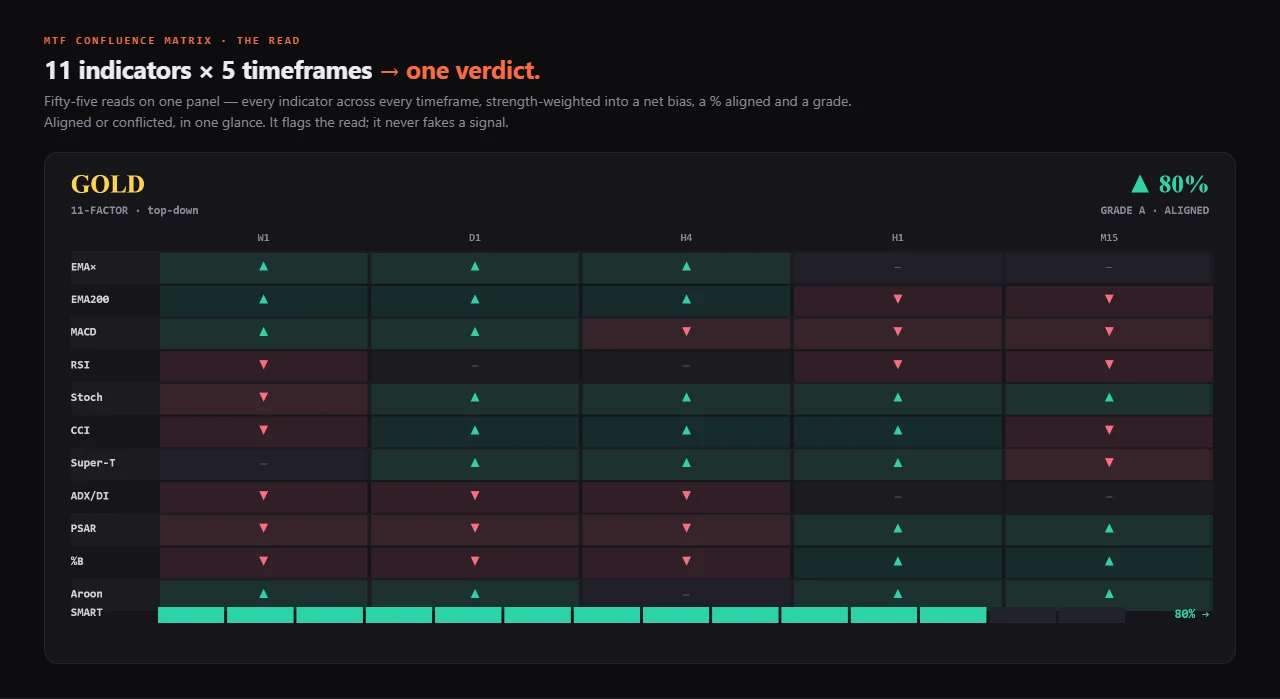
55 reads11 indicators × 5 timeframes → one verdict
One glancethe whole top-down read, no tab-flipping
% alignedstrength-weighted, with a grade A+/A/B
Go / no-goit flags alignment and conflict — never a fake signal
the call an arrow can't make

A single arrow says up or down. It can't tell you the timeframes disagree. This one says align — or stand aside.

When every timeframe leans the same way, you trade with conviction; when they fight, it says so instead of faking a signal. That go / no-go, in one glance, is the edge — not another arrow to second-guess.

See alignment vs conflict
what it does — and why it matters

Top-down confluence at a glance.

Stop flipping through five timeframes and a watchlist to read the trend. The Matrix aligns your whole stack in one panel — and it's engineered to never blow TradingView's request limit.

net bias

Conviction, weighted.

Net bias, “% aligned” and a weighted conviction read — top-down confluence without the tab-flipping.

it just loads

Never crashes the limit.

Trims to your plan and stays under TradingView's request cap — the failure mode that kills most MTF tools, engineered out.

your chart

On-chart, your way.

An optional preset — Off / Markers only / Ribbon + markers — keeps the chart as clean as you want it.

11 indicators × 5 timeframes · confirmation, not a signal

The whole market's bias — in one glance.

Stop flipping M15 → H1 → H4 → D1 → W1 and second-guessing yourself. The Matrix reads eleven indicators across every timeframe at once and collapses it into one line you can act on — a bias, a strength-weighted alignment %, and a grade — then says it back in plain English. Three modes: your timeframes, your watchlist, or both. Confirmation, never a prediction.

01

See it work

One engine, three views — your timeframes, your watchlist, or both — each read back in plain English.

One engine — three views

Switch the lens without leaving the chart. A · MTF reads one symbol across every timeframe (the main view). B · Scanner ranks a whole watchlist by bias. C · Hybrid shows symbols × timeframes in one grid. The narrative adapts to each — “timeframes” or “symbols” — and always names the honest call.
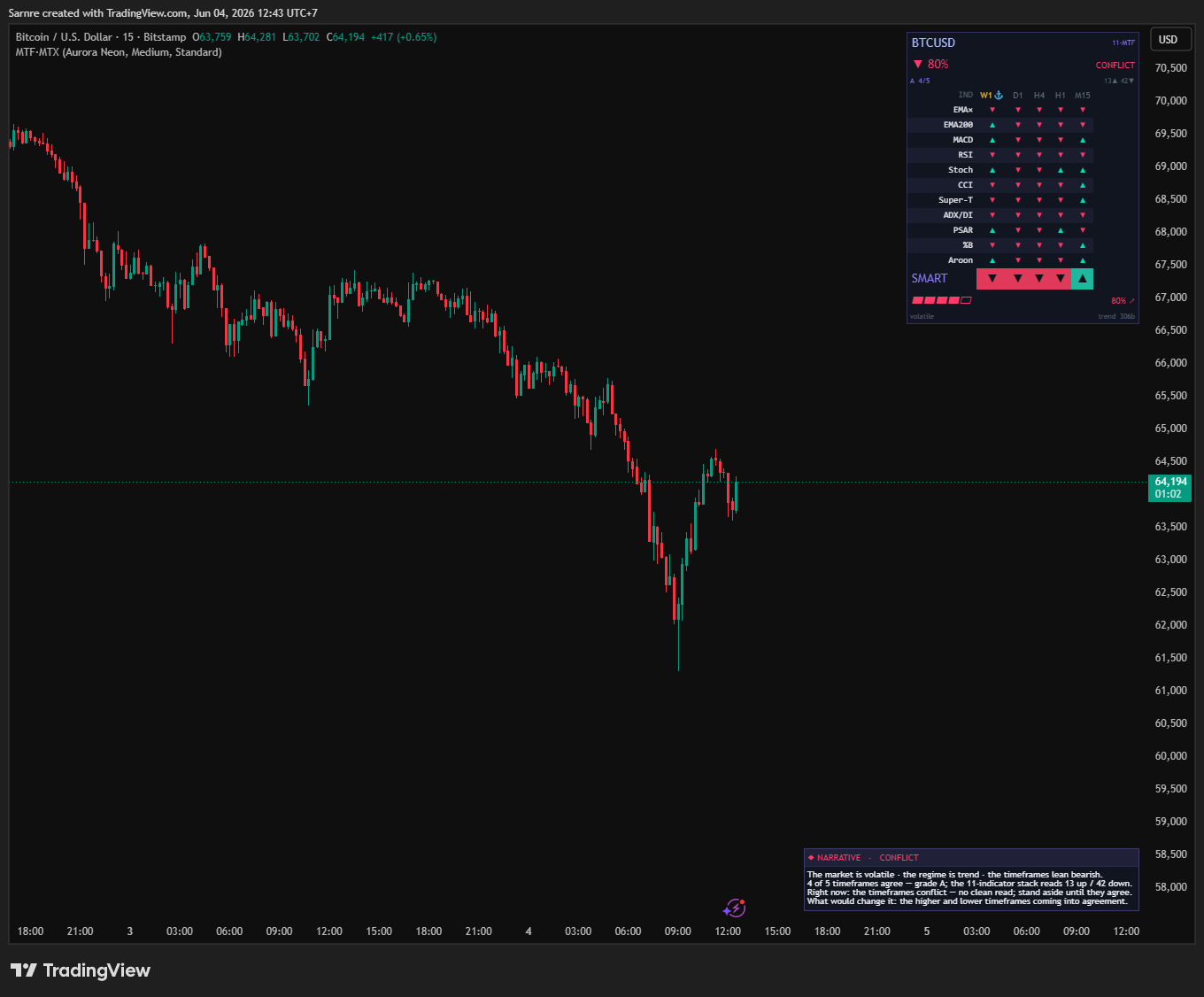
MTF Confluence Matrix in MTF mode on BTCUSD — 11 indicators across 5 timeframes, the SMART consensus band, an 80% confluence with a CONFLICT verdict and the narrative
MTF mode — 11 indicators × 5 timeframes on one symbol, the SMART consensus and the confluence %, with a narrative that even flags a CONFLICT and says stand aside · context, not a signal
Confluence grid — 11 indicators across 5 timeframes with a grade
The whole matrix at a glance — 11 indicators × 5 timeframes, green aligned / red conflict, strength-weighted into a net bias, a % aligned and a grade. It flags the read; it never fakes a signal.

How you'd actually trade with it

It's confirmation, not a signal — so here's the honest workflow, from open to decision:
  • 1 · Open it on your symbolMTF mode reads all five timeframes at once — no flipping M15 → H1 → H4 → D1 → W1 by hand.
  • 2 · Read the one-line verdict“▼ 80% · Grade A · ALIGNED” means the higher timeframes lean short and agree — and the Co-Pilot says it in a sentence.
  • 3 · Aligned → act with it · Conflict → stand asideIf it agrees with your idea, drop to your execution timeframe and look for an entry in that direction. If it reads CONFLICT, there's no clean edge — wait.
  • 4 · Trading a list? Let Scanner pickScanner ranks your whole watchlist by bias, so you spend attention only on the symbols that are actually aligned.

What every part means

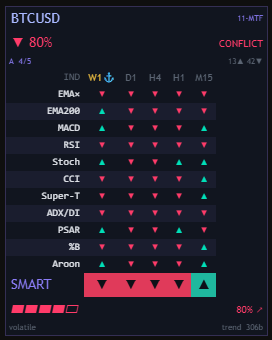
  • ▼ % · GRADE · ALIGNED / CONFLICTThe headline: how many indicator-×-timeframe cells agree, a grade, and whether it's aligned or in conflict. You see the conviction behind the read — never a mystery arrow.
  • The 11 × 5 gridEvery cell is one indicator's read on one timeframe (▲ up / ▼ down). A green column means that timeframe's stack agrees; a lone red in a sea of green is an early divergence most traders miss.
  • The SMART rowThe weighted consensus per timeframe — the one verdict after all eleven have voted, with higher timeframes and strong trends weighted more than flat ones.
  • The context lineLive regime (volatile / trending), trend age and session — so you always read the bias in the right context.
MTF Confluence Matrix close-up — all 11 indicators voting per timeframe, the SMART consensus band and the confluence gauge
The matrix, up close — all 11 indicators voting per timeframe, the SMART consensus band and the confluence gauge. Nothing inferred; you see exactly why.

Scan a whole watchlist — ranked by bias

Scanner mode drops the per-timeframe grid and ranks your whole watchlist by bias, strongest on top. The same engine now reads symbols instead of timeframes — and the Co-Pilot says it in a sentence: “the symbols lean bearish — 80% aligned (context, not a signal).”
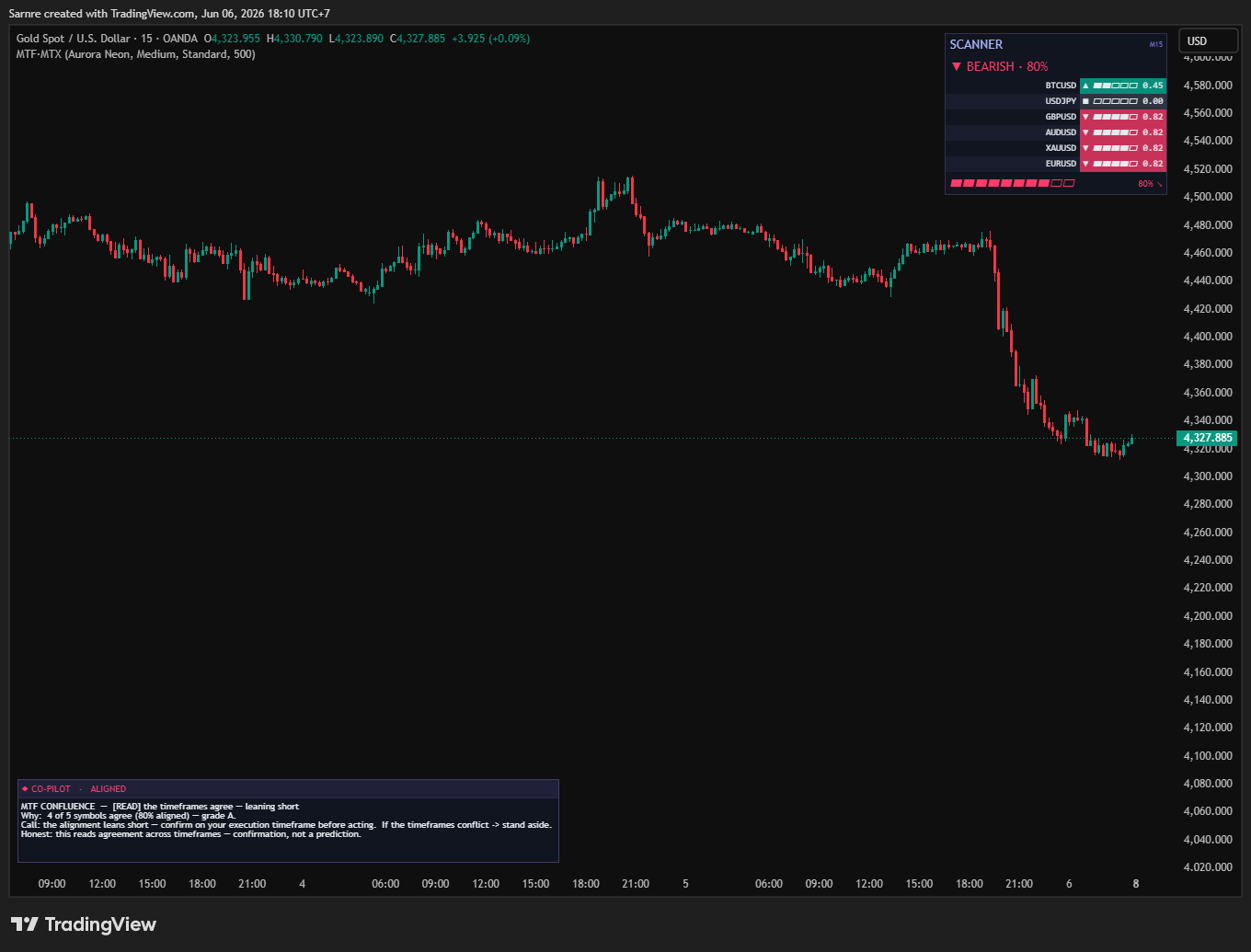
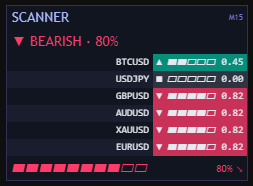
MTF Confluence Matrix in Scanner mode on Gold — a watchlist ranked by bias, BEARISH 80%, with the Co-Pilot narrative
Scanner mode — your whole watchlist ranked by bias, strongest on top · BEARISH 80% · context, not a signal
MTF Scanner panel close-up — each symbol scored and ranked by bias
The Scanner read, up close — each symbol scored and ranked

Or every symbol × every timeframe

Hybrid is the richest view — a grid of every symbol across every timeframe, each with its own confluence column. A light in-context engine resolves each cell to one bias, so it runs the full default (6 symbols × 5 timeframes) comfortably — still legible, and distilled into one honest read.
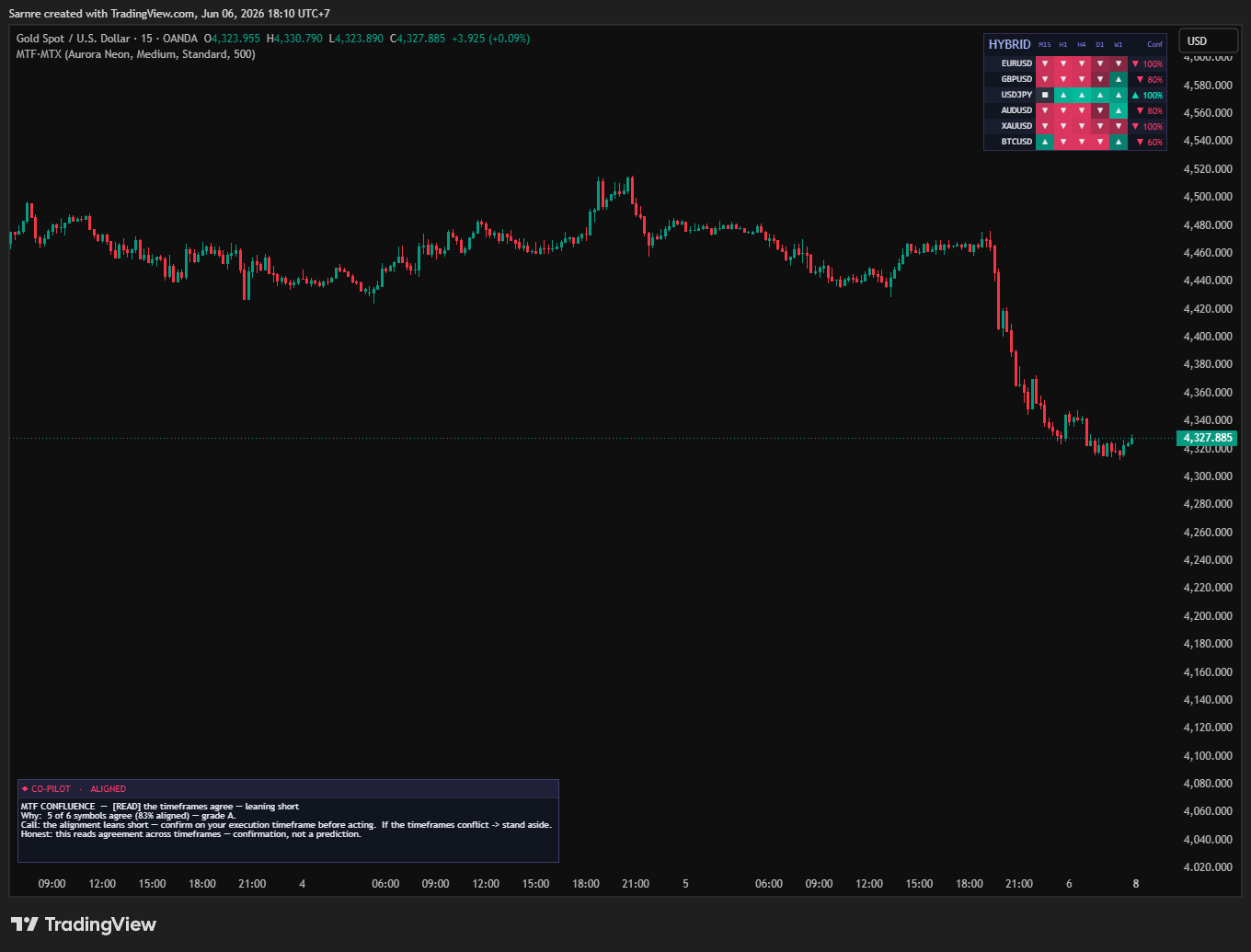
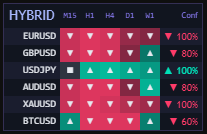
MTF Confluence Matrix in Hybrid mode on Gold — a grid of six symbols across five timeframes with a confluence column each, and the Co-Pilot narrative
Hybrid mode — every symbol × every timeframe, each with its own confluence column · 5 of 6 aligned · grade A · context, not a signal
MTF Hybrid grid close-up — symbols by timeframes, each with a confluence percentage
The Hybrid grid, up close — symbols × timeframes, each with its own confluence %

No black box — it reads the matrix back

A Co-Pilot panel translates the whole matrix into honest sentences — the regime, how many timeframes (or symbols) agree, the call, and what would change it. It even says “no clean read — stand aside” when they disagree. Display only, never a buy/sell signal.

MTF Co-Pilot narrative panel — the timeframes agree, leaning short, grade A+, confirmation not a prediction
The Co-Pilot — “5 of 7 timeframes agree (100% aligned) — grade A+ … confirmation, not a prediction”

Three modes, one dropdown

Switch MTF / Scanner / Hybrid from one dropdown. The tooltip is honest about the cost — Hybrid is the heaviest, and if you push too many symbols on a basic plan it trims and warns you instead of erroring.
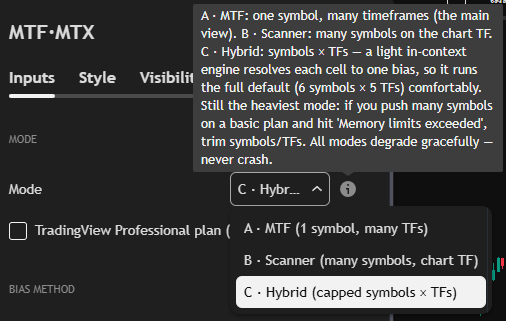
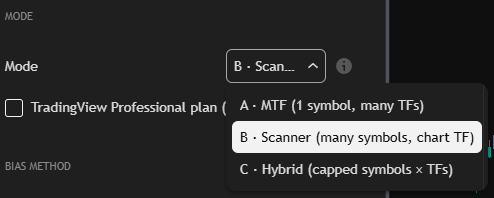
MTF mode picker with the honest tooltip explaining MTF, Scanner and Hybrid and the memory-limit behaviour
Three modes — MTF, Scanner, Hybrid — each explained in-app
MTF mode dropdown switching to Scanner mode
Switch in one dropdown — it trims to your plan, never errors
Seen all three modes? Own the Matrix — $29, refundable for 7 days
02

Own it & extend it forever

Not a rented black box — the full Pine v6 source on a base that already solves the request-limit trap, plus an AI kit.

You don't just get an indicator. You get the lab.

  • Full Pine v6 sourceThe whole confluence engine — yours to own, read, re-weight and extend. Never frozen.
  • AGENTS.md + a Pine v6 skillA drop-in AI-agent kit so Claude, Cursor, ChatGPT or Gemini can add a timeframe, an indicator or re-weight the consensus correctly.
  • The request-budget engineThe hard part is already solved — one budgeted request per symbol-timeframe, trimmed to your plan. You build on a base that doesn't crash.
  • PROMPTS.md + docsReady prompts and the design doc, so even a non-coder can extend it with AI on day one.

What “extend it” looks like — you ask, your AI ships

Drop the kit into any AI and these are day-one edits — the indicator set, the consensus weights and the request-budget model are all documented.

  • “Add the 4-hour to my matrix.”Your agent adds the timeframe to the grid and the consensus — it knows the request-budget model, so it stays under the limit.
  • “Weight the daily twice as heavily.”A one-line change to the SMART consensus weights — the model is documented and readable.
  • “Show the ribbon only on the active symbol.”A safe display tweak — it knows the on-chart preset hooks.
03

Get it & trust it

Exactly what each read is and isn't, what you need to run it, instant delivery and a 7-day net.

What it is — and what it isn't

Most confluence tools paint one tidy arrow and hide the disagreement. We lay it all out.

The read-outWhat it really isThe honest caveat
The cells (▲ / ▼)each of 11 indicators' read on each timeframeconfirmed-bar reads — not a forecast
% aligned + gradehow many cells agree, strength-weighteda confluence measure — not a probability of profit
The SMART consensusthe weighted vote per timeframedecision support, not a signal — it can read CONFLICT
The Co-Pilot narrativethe matrix translated into plain Englishit translates the read — never an entry or exit
Scanner / Hybrid scoreseach symbol's bias across the setcontext, not a prediction — confirm on your own timeframe
It's a bias / confluence visualizer — it shows where the timeframes and symbols lean and how much they agree. It never claims to know what price will do next. Confirmation, not a prediction — that's the whole point.

What you need to run it — the honest checklist

It's a Pine v6 indicator on a TradingView chart. Here's what works on a free account, and where a bigger plan only buys you more at once.

You want to…TradingView plan
Run MTF mode (1 symbol × many timeframes) + the narrativeAny plan — including free
Run Scanner / Hybrid across a watchlistAny plan — it trims to your plan's request budget
Push many symbols × timeframes at once without trimmingA higher TradingView plan = more requests (their limit, not ours)
No subscription to us — you own the full Pine v6 source outright. The only thing a bigger TradingView plan buys you is more symbols/timeframes at once; on a free plan it simply trims and tells you, never errors.

The moment you pay — and the 7-day safety net

No waiting on a human, no “invite pending.” Checkout is instant, and the refund rule is written plainly so there's no surprise after.

  • Instant accessPay by card, Google Pay or PromptPay and the success page hands you the download right away — the full Pine v6 source plus the AI-agent kit, in one ZIP. A copy of the link is emailed too.
  • Yours foreverIt's source code, not a rental — no expiry, no seat check, no phone-home. Keep it, fork it, extend it for as long as you like.
  • Free updates — for lifeEvery future version of the Matrix is yours at no extra cost. Buy once; when the engine improves or a Pine v6 change lands, email support@pulltrade.app and we send the latest. Not abandonware, not a resubscribe.
  • 7-day refund — before you downloadChanged your mind and haven't downloaded yet? Full refund within 7 days, no questions. Once you download the source the window closes — code can't be “returned,” and that one rule is what keeps the price this low.
  • Broken file? Refundable any timeIf the ZIP is ever corrupt or missing files, we fix it free or refund it — even past 7 days. You paid for a working file; if it isn't, that's on us.

Don't take our word for it — check it yourself

We're a new release, so instead of a wall of five-star quotes you can't verify, here's what you can confirm before you pay a cent:

How to trust it before you buy

When real buyers leave reviews, they'll appear here with a handle and a date — never invented, and never before they exist.

  • Read the sourceThe full Pine v6 is in the box — the 11 indicators, the consensus weights, the request-budget engine, all auditable. Nothing obfuscated, nothing invite-only.
  • It lays all 55 reads bareAgreement and conflict, every cell shown. The verdict is fully auditable; nothing hides behind one arrow.
  • It admits conflictWhen the timeframes disagree it says “no clean read — stand aside,” and publishes no win-rate. A tool that flags its own conflict isn't the one hiding something.
  • Bar-replay itEvery cell commits on the confirmed higher-timeframe bar (lookahead off). Replay it candle by candle and watch the reads hold — disclosed, not a repaint.
  • A real refund + a real human7 days before download, broken files anytime, and support@pulltrade.app reaches a person.

Why it's worth every cent

Add it up. Most multi-timeframe tools make you flip five tabs and paint one arrow that hides the disagreement. The Matrix runs 11 indicators across every timeframe and your whole watchlist, collapses it into one honest verdict, reads it back in plain English, and admits conflict instead of faking certainty — then hands you the full source plus the AI kit to extend it. One price. Yours forever, every update free.

04

Honest FAQ

The things you actually worry about — answered straight, no spin.

Will it lag or crash my chart?No — it makes one budgeted data request per symbol-timeframe (never multiplied by the indicators) and stays inside TradingView's request limits. Push too many and it trims and warns instead of erroring — the exact failure mode that breaks most multi-symbol tools, engineered out.
Does it repaint?No. Every cell commits on the confirmed higher-timeframe bar (lookahead_off) — bar-replay it candle by candle and verify it yourself.
Is it a black box?The opposite. All 55 reads are laid out — agreement and conflict — and the Co-Pilot translates the verdict into plain English. Nothing hides behind one arrow.
Only one symbol at a time?No — Scanner mode ranks a whole watchlist by bias, and Hybrid mode does symbols × timeframes. Watch the market, not one chart.
What's the win rate?None claimed — and you should distrust anyone who publishes one. It's a bias / confluence visualizer, not a signal service: it shows agreement across timeframes; the trade stays yours.
Locked or frozen after I buy?Never. You own the full Pine v6 source — add an indicator or a timeframe, re-weight the consensus, restyle it, or extend it with any AI. It grows with you.
honest by design — what it is not

A confluence dashboard — decision support, not a signal or a win-rate. Bias reads are derived from your chosen inputs, not a prediction.

ready when you are

Own every line — and extend it forever.

The full source, the AI-agent kit and free updates for life — yours the moment you pay.

$29$199Save $170 · 85% off

Early-access launch price · full refund within 7 days · own the source forever

★ Complete bundle · own the whole line

Eleven tools.
One honest line.

The entire ProEA Lab Pine line in one pack — five indicators and six skills & kits, every Pine v6 source and every AI-extend kit. Build a system, validate it, render it, risk-gate it, then audit it — honestly, end to end.

Advanced AIO v2Advanced Volume ProfileSMC AI-Scored ToolkitMTF Confluence MatrixProp Firm Challenge ToolkitPine Strategy FoundationPine Quant StudioPine Chart StudioPine Dashboard StudioPine NarrativeReality Check
$46$469
11 products · $469 bought separatelySave $423 vs buying singlyStripe checkout · 7-day refund before download · own the source

Educational decision-support tools — not financial advice, not a signal service. No win-rate, profit, or accuracy is claimed or implied. Entry / SL / TP levels and zone scores are reference values derived from market geometry, not predictions. SMC concepts are public methodologies, implemented originally. Trading involves risk; forward-test on a demo and manage your own risk. © 2026 ProEA Lab.

Complete BundleAll 11 Pine v6 tools + full source
MTF Confluence Matrix — Pine v6 indicator · ProEA Lab · ProEA