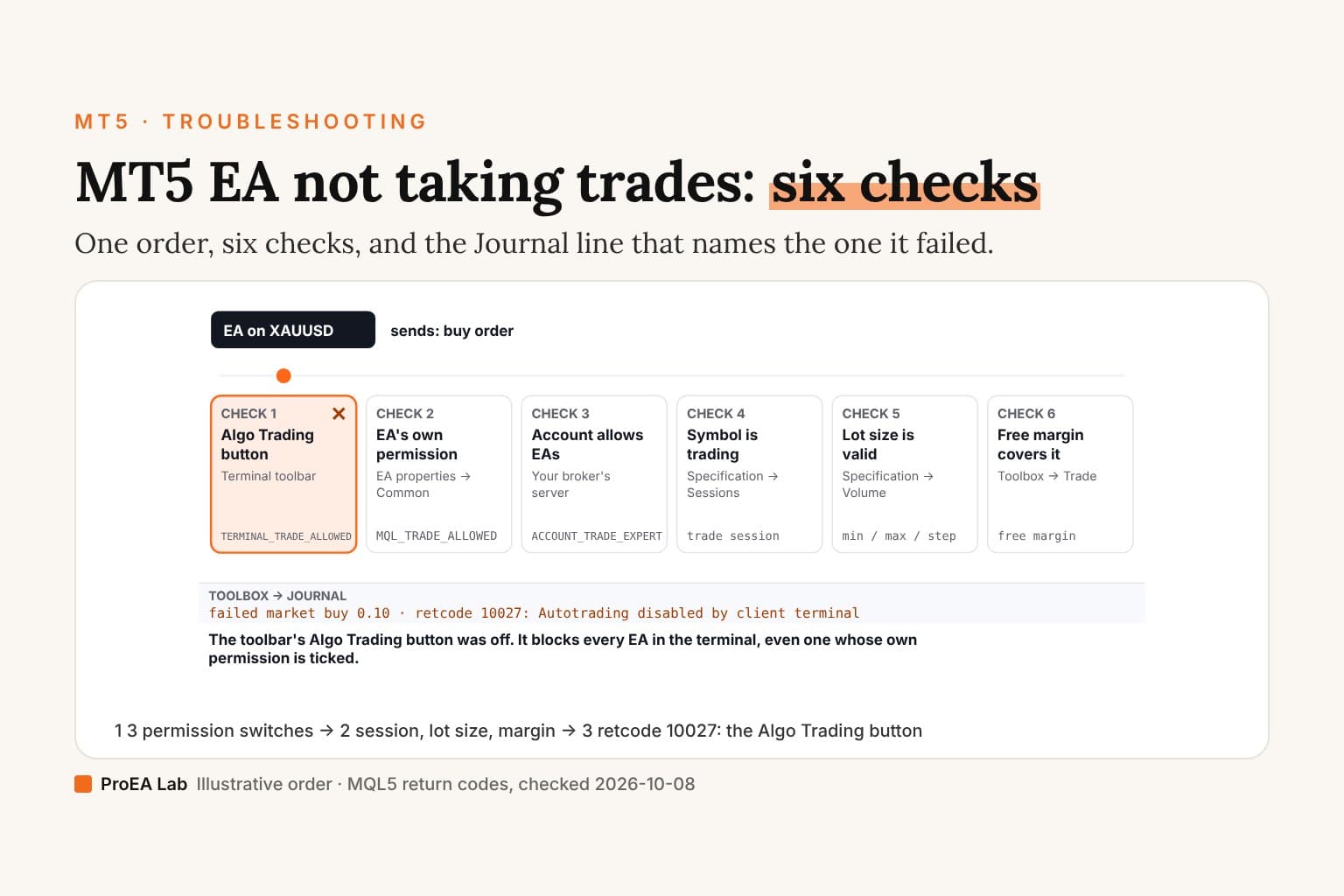
A simulated, illustrative order: the symbol, lots and log layout are examples, not a recorded session. The codes and their wording are MQL5's.
Read as text
- The EA's entry rule fires: it sends a buy order (0.10 lots).
- It passes 0 of 6 checks, then stops at "Algo Trading button".
- failed market buy 0.10 · retcode 10027: Autotrading disabled by client terminal. The toolbar's Algo Trading button was off. It blocks every EA in the terminal, even one whose own permission is ticked.
How this window was chosen: The checks in order: the toolbar's Algo Trading button (TERMINAL_TRADE_ALLOWED), the EA's own permission (MQL_TRADE_ALLOWED), the account's permission for EAs (ACCOUNT_TRADE_EXPERT), then the symbol's session, lot size and free margin. Return codes and their wording from MQL5's trade server return codes, checked 2026-10-08: 10009 Request completed; 10014 Invalid volume in the request; 10018 Market is closed; 10019 There is not enough money to complete the request; 10026 Autotrading disabled by server; 10027 Autotrading disabled by client terminal.
Read the Journal first
Two logs matter, both in the Toolbox: Experts holds messages from running EAs and indicators, while Journal records platform and trade operations (MetaQuotes logging guide). Look in both; the visible tabs contain recent entries, and Open accesses saved logs for earlier dates. A missing line is not proof that the entry condition failed. The codes below are from MQL5's trade server return codes, checked 2026-10-08.
With source access, record initialization and tick processing, the entry decision, and any local permission or preflight exit. For a request, inspect the function's return value and the result fields: OrderCheck can stop the path before OrderSend, and OrderSend requires checking result.retcode; a true return does not by itself prove a fill. Capture GetLastError() when diagnosing a failed call. Without source access, ask the developer for these diagnostics rather than inferring them from silence. Logging and request-result guidance checked 2026-10-10.
| Code | MQL5's wording | Where to fix it |
|---|---|---|
| 10027 | Autotrading disabled by client terminal | Toolbar → Algo Trading button |
| 10026 | Autotrading disabled by server | Your broker: the account doesn't allow EAs |
| 10017 | Trade is disabled | Specification → trade mode for the symbol |
| 10018 | Market is closed | Specification → sessions; wait for the open |
| 10014 | Invalid volume in the request | The EA's lot input vs the symbol's min, max and step |
| 10016 | Invalid stops in the request | Stop-loss or take-profit, for example too close to price |
| 10019 | There is not enough money to complete the request | Lower the lot or risk input |
Use itCopy the exact Journal line, with its time and symbol, before you change anything.
Watch outChanging three settings at once tells you nothing about which one was wrong.
The three permission switches
All three must be on (MQL5 trade permission, checked 2026-10-08):
- The Algo Trading button on the toolbar (
TERMINAL_TRADE_ALLOWED). Off, it blocks every EA in the terminal (MetaQuotes). - The EA's own permission: the EA's properties → Common → Allow Algo Trading, called Allow Auto Trading in older builds (
MQL_TRADE_ALLOWED). - The account: the broker can disable EAs (
ACCOUNT_TRADE_EXPERT), and an investor (read-only) login can't trade at all (ACCOUNT_TRADE_ALLOWED).
Tools → Options → Expert Advisors can switch automated trading off on its own when you change account, profile, or a chart's symbol or period (MetaQuotes settings). If an EA stops after you switched something, look there.
The three checks the server makes
Permissions passed, the order still has to fit the symbol. In Market Watch, right-click it → Specification: the sessions, the minimum, maximum and step for lots, and the margin rules are your broker's (MetaQuotes). A lot of 0.005 on a symbol whose minimum is 0.01 returns 10014; an order on Saturday returns 10018.
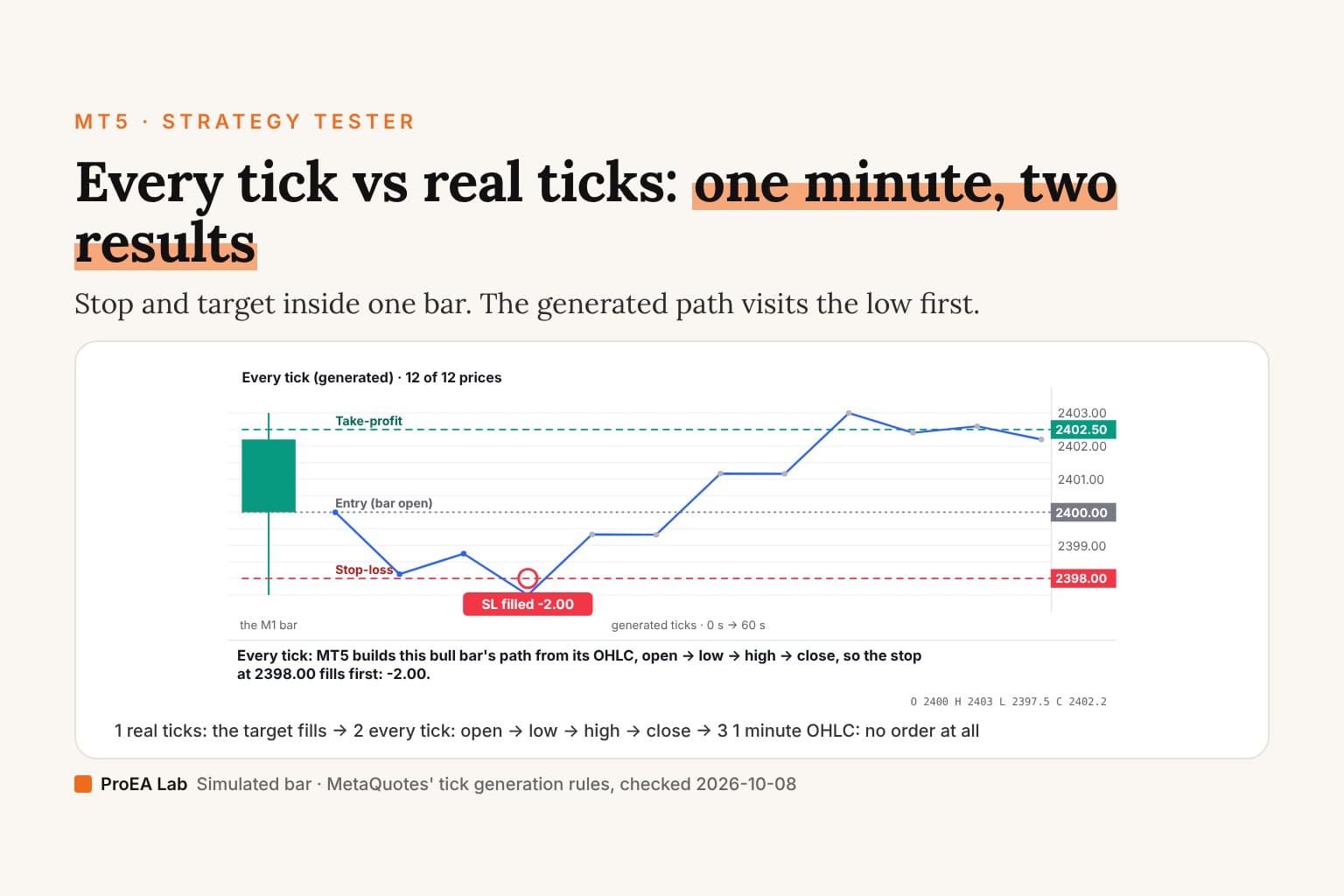
Keep the exact message and request result. A code narrows the next check; a silent log leaves the cause unresolved.If the install itself is in doubt, start from installing an EA on MT5. To see whether the entry rule fires at all, replay the period in the Strategy Tester.
Use this animation on your site.
Frequently asked questions
Why is my EA not taking trades in MT5?
Check Toolbox → Experts and Journal for initialization, runtime and trade-request messages. No trades can mean no entry signal, a local permission or preflight failure, or a rejected request. If a request result is available, 10027 means client-terminal automated trading is disabled, 10018 the market is closed, 10014 the volume is invalid, and 10019 there isn't enough margin.
What does error 10027 mean in MT5?
TRADE_RETCODE_CLIENT_DISABLES_AT, "Autotrading disabled by client terminal" in MQL5's list. Turn on the Algo Trading button on the toolbar. It blocks every EA in the terminal, even one whose own permission is ticked.
My EA has the Allow Algo Trading box ticked. Why won't it trade?
That box is one of three permissions. The toolbar's Algo Trading button must be on too, and the account must allow EAs (ACCOUNT_TRADE_EXPERT). An investor (read-only) login can't trade at all.
Why does my EA trade on demo but not on live?
The two accounts can have different symbol names, sessions, minimum lots and margin. Compare Market Watch → Specification for the symbol on both, and read the live Journal for the return code.
The Journal is empty. What does that mean?
An empty Journal alone does not prove that no order was attempted or that the entry rule failed. Check Experts too, then open the saved logs for the correct date and terminal. Confirm initialization, incoming ticks, symbol, timeframe and inputs. If you have source access, log the entry and preflight decisions and the request result; otherwise ask the EA developer for that diagnostic evidence.
Does MT5 stop my EA when I switch accounts?
It can. Tools → Options → Expert Advisors has "Disable automated trading when switching accounts", and the same for profiles and for changing a chart's symbol or period. With them ticked, re-enable Algo Trading after the switch.