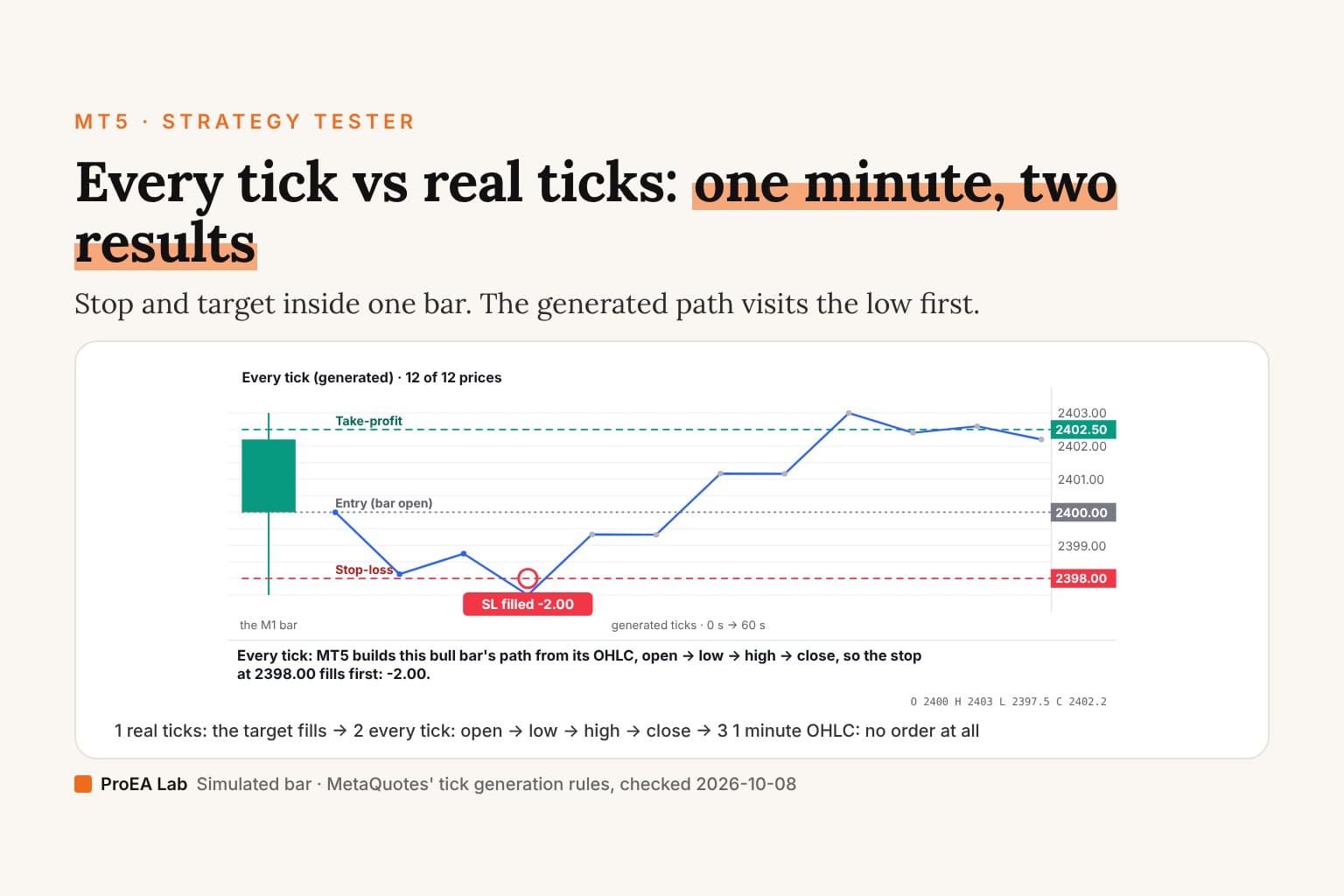
Illustrative: the bar's prices, the trade and the 'real' tick path are simulated, not a recorded gold minute. The generated path is a sketch of MetaQuotes' published rule.
Read as text
- A long trade is bought at 2400.00, the bar's open, with a stop-loss at 2398.00 and a take-profit at 2402.50. The minute's range, 2397.50 to 2403.00, covers both.
- Every tick (generated): 12 prices inside the minute.
- Every tick: MT5 builds this bull bar's path from its OHLC, open → low → high → close, so the stop at 2398.00 fills first: -2.00.
How this window was chosen: Every tick follows MetaQuotes' 3-5-3 reference points for a bull bar (open, two points toward the low, the low, the range in thirds, the high, two points toward the close, the close); 1 minute OHLC generates only the bar's four prices; real ticks are the broker's recorded ticks. From the MT5 help on tick generation, checked 2026-10-08.
The four modes, from MetaQuotes' help
All from MT5 help: tick generation, checked 2026-10-08.
| Mode | What the EA receives | Spread inside a minute |
|---|---|---|
| Every tick based on real ticks | The broker's recorded ticks | Can change, as recorded |
| Every tick | A generated path: up to 11 reference points per minute bar, split opening shadow / range / closing shadow (3-5-3 when there are 11) | Fixed for the minute |
| 1 minute OHLC | Four prices per minute: open, high, low, close | Fixed for the minute |
| Open prices only | One call per bar of the test timeframe, at its open | n/a |
Two details matter more than they look. A minute with no recorded ticks is filled with generated ones, even in real-ticks mode. And ticks recorded without a matching minute bar are ignored.
Why the generated path can stop you out
For a rising bar the generated reference points run open, two steps down, the low, up through the range to the high, two steps down, the close. A long trade whose stop sits near the low and whose target sits near the high is stopped out first in Every tick, whatever the market actually did in that minute.
Use itRun your final test in real ticks, then once in Every tick. If the two differ a lot, your exits live inside one minute.
Watch outA result that only holds in one mode is the mode's result, not your strategy's.
Which mode to use
- Exits inside a minute's range (scalping, tight stops): real ticks, and check the report's history quality.
- Decisions on bar closes, exits wider than a minute's range: 1 minute OHLC is a fast first pass. Confirm in real ticks.
- Optimisation sweeps: a coarse mode to shortlist, real ticks to decide.
The settings around the mode, delay and the forward period, are in how to backtest an EA in MT5. Why even a real-ticks backtest won't match live is in EA backtest vs live results, and the step after a clean one is walk-forward testing.
Use this animation on your site.
Frequently asked questions
What is the difference between Every tick and Every tick based on real ticks?
Real ticks replays the ticks your broker recorded, with a spread that can change inside a minute. Every tick generates up to 11 reference prices per minute bar from its OHLC, with that minute's spread fixed, per MetaQuotes' tick-generation help.
Which MT5 modelling mode is most accurate?
Every tick based on real ticks, which MetaQuotes calls as close to real conditions as possible. Where a minute has no tick data the tester falls back to generated ticks for it, so check the history's coverage.
Why do my results change between modelling modes?
If a stop and a target, or an entry and a stop, are both inside one minute, which one the tester hits first depends on the path it feeds the EA. A generated bull bar visits its low before its high; recorded ticks may not.
Is 1 minute OHLC good enough?
For rules that act on bar closes and keep exits wider than a minute's range, often yes, and it's much faster. It has only four prices a minute, so any rule that needs the order of prices inside a minute is guessed.
What does Open prices only do?
It calls the EA only at each bar's open on the test timeframe. MetaQuotes warns that stops and pending orders may fill at prices other than the ones set, especially on higher timeframes.