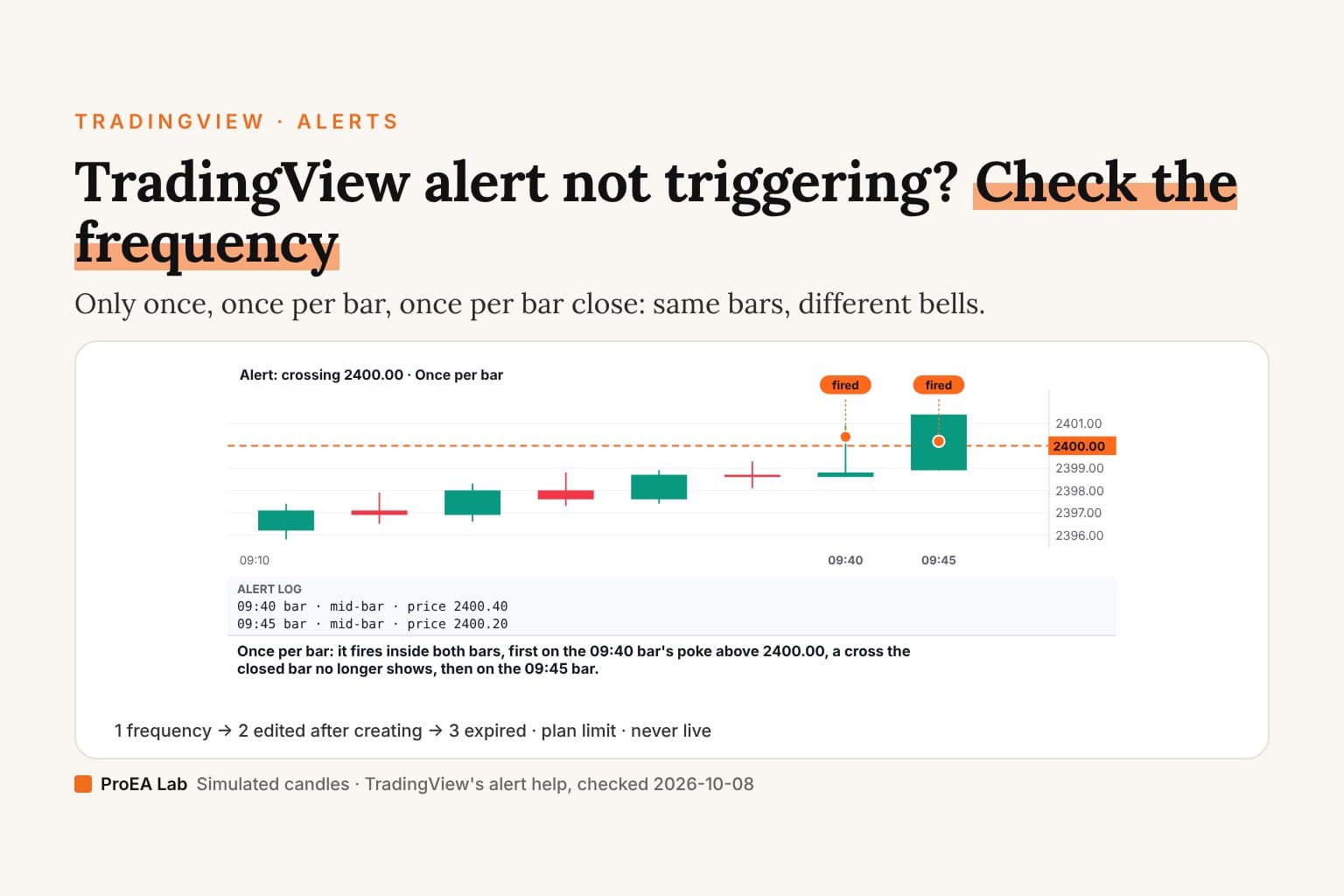
Simulated 5-minute candles and an illustrative level, not market data.
Read as text
- The alert: price crosses above 2400.00, set to "Once per bar". Six bars closed below it.
- The 09:40 bar trades up to 2400.90 and closes at 2398.80, back below. The 09:45 bar crosses again and closes at 2401.40.
- Once per bar: it fires inside both bars, first on the 09:40 bar's poke above 2400.00, a cross the closed bar no longer shows, then on the 09:45 bar.
How this window was chosen: Only once fires the first time the condition is met; Once per bar fires at most once per bar, as soon as it is met; Once per bar close needs the bar to close with it met. Alerts only trigger on the live bar. From TradingView's alert frequency help and the Pine Script alerts page, checked 2026-10-08.
1. The frequency
TradingView's alert frequency help, checked 2026-10-08:
| Frequency | Fires | Watch for |
|---|---|---|
| Only once | The first time the condition is met | Then it stops; the next signal gets nothing |
| Once per bar | At most once per bar, as soon as it's met | Mid-bar signals that vanish by the close |
| Once per bar close | Only when the bar closes with it met | Up to one bar later than the cross |
Pine's alerts page says the same for script alerts and recommends Once per bar close to avoid alerts on values that change before the close.
2. You edited the script after creating the alert
"TradingView saves a mirror image of the script and its inputs" when you create an alert, so later changes to the script or its inputs don't reach it (Pine alerts, checked 2026-10-08). Delete the alert and create it again after every change. This catches people who add a script from source, fix it, and keep the old alert.
Use itRecreate the alert every time you save a new version of the script.
Watch outAn alert made yesterday runs yesterday's code.
3. It expired
Alerts have an expiry. A standard alert lasts at most two months; Premium and Ultimate can set alerts that don't expire (TradingView alerts help, checked 2026-10-08).
4. Your plan's limit is full
Active alerts per plan, from the pricing page, checked 2026-10-08:
| Plan | Price alerts | Technical alerts |
|---|---|---|
| Basic | 3 | none listed |
| Essential | 20 | 20 |
| Plus | 100 | 100 |
| Premium | 400 | 400 |
| Ultimate | 1,000 | 1,000 |
5. The condition was never met on a live bar
Alerts only trigger on the live bar (Pine alerts). A signal you see on historical bars, or one that repaints, may never have been true in real time.
An alert that fired once and stopped, or never fired on yesterday's bars, is working as set.Use this animation on your site.
Frequently asked questions
Why is my TradingView alert not triggering?
Check five things in order: the frequency (Only once stops after the first firing; Once per bar close waits for the close), whether you edited the script or its inputs after creating the alert, whether the alert expired, whether your plan's alert limit is full, and whether the condition was met on a live bar at all.
What is the difference between Once per bar and Once per bar close?
Once per bar fires the first time the condition is met in a bar, even mid-bar. Once per bar close fires only if the condition is still met when the bar closes. The first is faster; the second won't fire on a cross that disappears before the close.
I changed my indicator's settings. Why does the alert still use the old ones?
TradingView saves a copy of the script and its inputs when you create the alert. Later changes don't reach it, per the Pine Script alerts page. Delete the alert and create it again.
Why did my alert fire but the chart shows no signal?
It fired mid-bar on a value that changed before the bar closed. Use Once per bar close if you only want signals the closed chart will still show.
How many alerts can I have on TradingView?
On the pricing page, checked 2026-10-08, active price alerts are 3 on Basic, 20 on Essential, 100 on Plus, 400 on Premium and 1,000 on Ultimate, with the same numbers for technical alerts on the paid plans.
Do TradingView alerts expire?
Yes. TradingView's help says a standard alert can last at most two months; Premium and Ultimate can set alerts with no expiry.