To convert Pine Script to MQL5, you rewrite the script for a different execution model, then check the rewrite bar by bar against the original on the same symbol and timeframe. A converter can help with the first half. Nothing does the second half for you. Pine hands you closed-bar history and rolls back changes made on an unfinished bar. MQL5 calls your code when an event arrives and keeps every change you make. Most porting bugs come from that difference, and from the clock, not from the syntax.
The Pine quoted here is real, from our Opening Range Desk 2.0.0 and Drift Desk 1.5.0 (v6 source, both in Pine Pro Library). The MQL5 is a sketch we wrote for this post. Our MT5 EA ships as MQL5 source too (the file list is public).
Three checks catch most ports that disagree with the original:
- The clock. Pine names its time zone; MQL5 bars carry broker server time, and a fixed offset is wrong for part of the year.
- The bar. A Pine rule decides once per closed bar; an EA's
OnTickruns on every tick. Gate on a new bar and read shift 1. - The future. A Pine
request.securitywithlookahead_onand no[1]sees the finished day on history. No MQL5 port can copy that.
How does Pine run a script differently from MQL5?
Pine runs the whole script once per bar, oldest first. On the live bar it reruns on every price update and rolls its state back each time, committing only the bar's final tick (execution model, checked 2026-10-08). So barstate.isconfirmed gives one decision per bar, var survives from bar to bar but not across an open bar's ticks, and varip escapes the rollback.
MQL5 has no bar loop. It calls OnInit() once at load, OnTick() on each tick in an EA, OnCalculate() in an indicator (with prev_calculated, so it computes only new bars) and OnTimer() on a timer. Nothing rolls back: a counter Pine increments once per bar counts ticks in MQL5 unless you gate it.
Indexing is the second trap. Pine's close[1] and MQL5's iClose, CopyRates and CopyBuffer all count back from the forming bar at position 0, but CopyBuffer (checked 2026-10-08) stores the oldest value first. Call ArraySetAsSeries(buf, true) so buf[0] is the newest, as in Pine.
Which Pine calls map to which MQL5 calls?
Built-in indicators change the most. In Pine, ta.ema(close, 21) is a function you call on every bar. In MQL5 you create a handle once in OnInit(), then copy values out of it with CopyBuffer().
| Pine v6 | MQL5 | Watch for |
|---|---|---|
ta.sma(close, 20), ta.ema(close, 20) | iMA(_Symbol, _Period, 20, 0, MODE_SMA, PRICE_CLOSE) (or MODE_EMA) in OnInit, then CopyBuffer | create the handle once; the first EMA values can differ |
ta.atr(14) | iATR(_Symbol, _Period, 14) | smoothing can differ (below) |
request.security(…, "D", x[1], lookahead = barmerge.lookahead_on) | a handle on PERIOD_D1, read at shift 1 | next section |
var float level = na | a global, or a static local | nothing rolls back |
varip int ticks = 0 | a plain global | MQL5's default |
barstate.isconfirmed | a new-bar check, then read shift 1 | you act on the next bar's first tick |
runtime.error() on barstate.isfirst | return INIT_PARAMETERS_INCORRECT; from OnInit | — |
strategy.entry("L", strategy.long) | trade.Buy(lots, _Symbol, 0.0, sl, tp) with CTrade | lots, not contracts |
strategy.exit("X", "L", stop = s, limit = t) | SL and TP on the position; trade.PositionModify to move them | the broker's minimum stop distance |
plot() | an indicator buffer: SetIndexBuffer, #property indicator_buffers and indicator_plots | an EA can't plot; draw objects, or create an indicator with iCustom and show it with ChartIndicatorAdd |
box.new, label.new, line.new | ObjectCreate with OBJ_RECTANGLE, OBJ_TEXT, OBJ_TREND | delete what you create |
alert(), alertcondition() | Alert(), SendNotification(), SendMail(), WebRequest() | WebRequest works from EAs and scripts, not indicators or the Strategy Tester, and only to URLs allowed in the terminal's options |
ATR differs by design. Pine's ta.atr smooths true range with an RMA, Wilder's average; Opening Range Desk's rules file says so: "ATR(14) of the chart (RMA of the true range)". The ATR source MetaQuotes ships with the terminal (MQL5\Indicators\Examples\ATR.mq5) uses a rolling simple mean. Same length, different numbers, so a stop at 1.5 × ATR lands somewhere else. If the rule needs the exact value, compute the RMA yourself.
Size and positions. Pine's qty is contracts, shares or units; MT5 trades lots. A Pine strategy holds one net position, so an opposite entry reverses it. On an MT5 hedging account, a sell beside an open buy opens a second position; on a netting account it nets against the first.
How do I convert request.security without repainting?
Port the confirmed pattern. Ours:
// opening-range-desk.pine: yesterday's daily ATR
float ordDAtr = request.security(syminfo.tickerid, "D", f_ordDailyAtr()[1], lookahead = barmerge.lookahead_on)
The [1] inside the request, paired with lookahead_on, asks for the last completed daily bar: the same value on history and live. Keep lookahead_on and drop the [1], and each intraday bar on history sees the finished day it belongs to. Our repaint audit shows how to catch it.
MQL5 has no lookahead switch. A handle such as iATR(_Symbol, PERIOD_D1, 14) gives the bars that exist at that moment: shift 0 is the day still forming, shift 1 the last closed day. The confirmed pattern ports to shift 1; a script that leaked the future can't be reproduced at all. If your MT5 port looks worse than the TradingView backtest, check the Pine request before you blame the port.
Also test CopyBuffer's return (it can be -1 while higher-timeframe history loads), and remember that an MT5 D1 bar runs midnight to midnight on the server clock, not on the feed's session, so "yesterday's ATR" can come from different bars.
How do Pine sessions and time zones translate to MT5?
This is the bug that survives a careful port. Pine lets a script name its clock:
string ordRangeSess = input.session("0930-0945", "Opening-range window", …)
string ordTz = input.string("America/New_York", "Timezone (IANA)", …)
bool ordInRange = not na(time(timeframe.period, ordRangeSess, ordTz))
time() returns na when the bar isn't in the session, read in the zone you pass, and an IANA name handles New York's daylight saving for you. MQL5 has no time-zone database. Bar times are broker server time, and the server's offset from UTC is the broker's choice. TimeGMT() won't rescue a backtest: MetaQuotes documents (checked 2026-10-08) that in the Strategy Tester it always equals the simulated server time, so TimeGMT() - TimeTradeServer() is zero in every backtest.
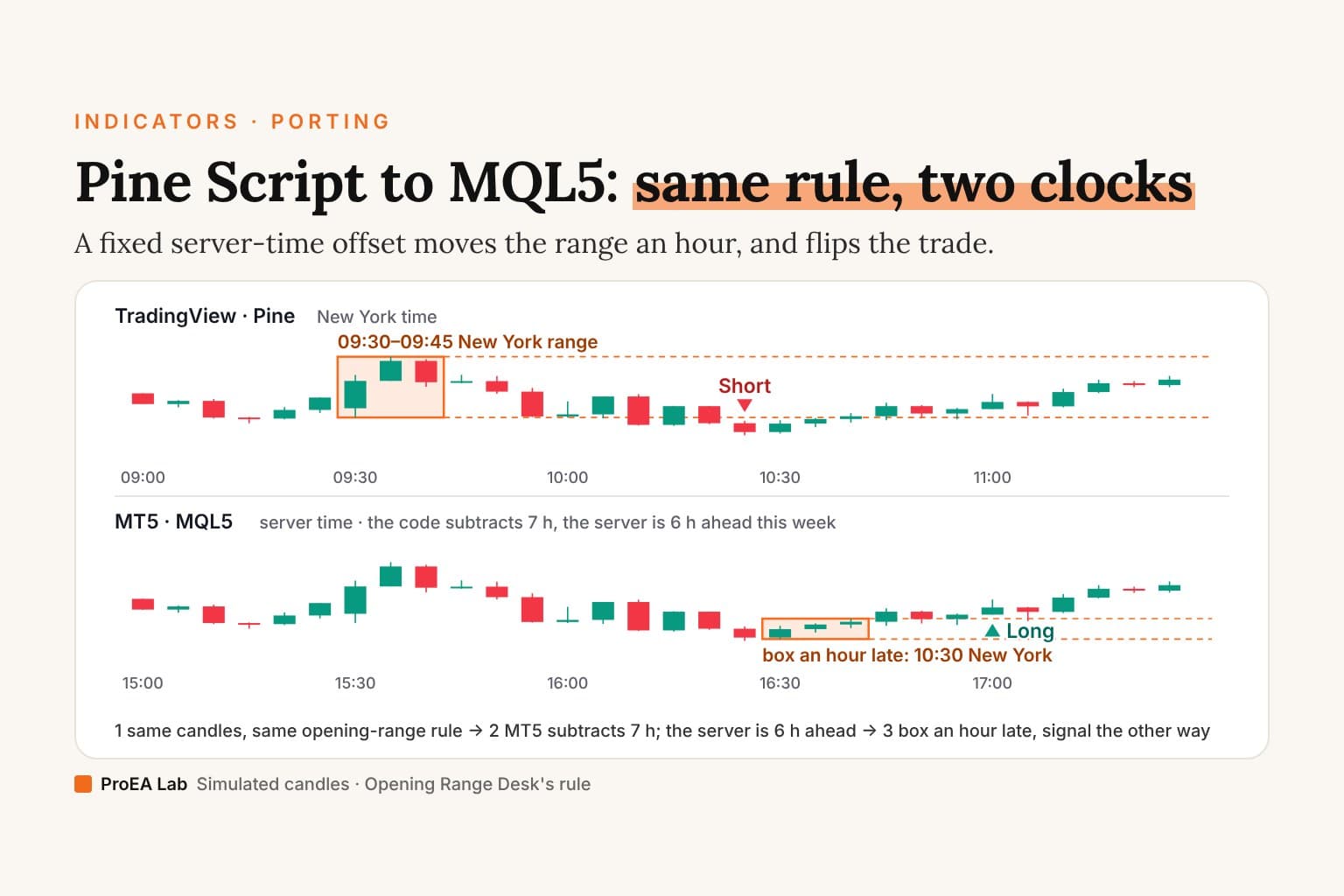
The MQL5 sketch further down subtracts a fixed 7 hours (InpNyOffset = -420). On a server that changes clocks on Europe's dates, that's right most of the year and an hour off when New York and Europe are on different clocks. The film runs Opening Range Desk's own rule on both panes, on the same simulated candles.
Simulated 5-minute candles, not market data: the same candles on both panes, so only the clock differs. The server is an example on Europe's daylight-saving dates (New York + 7 h most of the year, + 6 h in the gap weeks); the sketch assumes 7 (InpNyOffset = -420).
Read as text
- Pine names its clock (America/New_York). The MT5 sketch gets server time and subtracts 7 hours.
- Pine's range: the 09:30–09:45 New York candles. The sketch reads them as 08:30 and waits.
- Pine: two closes below the range, short at the 10:25 close.
- The sketch's range: it reads server 16:30 as 09:30, but this week the server is 6 hours ahead, so its box sits on 10:30 New York.
- MT5: two closes above that box, long at 11:00 New York. The other way.
- Same rule, same candles, two answers. The clock moved the box.
- Measured for this week: the server is New York + 6 h. InpNyOffset = -360 moves the box to 09:30 New York.
- One clock: both panes draw the same range and the same short at 10:25.
How this window was chosen: The Opening Range Desk page's simulated SIM INDEX market (seed 1), read by the desk's engine at its defaults: the range is the high and low of the 09:30–09:45 New York candles, and the first two consecutive closes beyond one edge give the day's one signal. The day shown is the first simulated session after the 20-session warm-up on which both clocks give a signal before 11:30 New York and the two signals go opposite ways. A wrong offset doesn't always flip the trade; this day is chosen because it does.
In the gap week the sketch reads 16:30 server as 09:30 New York, so it builds its range from the 10:30 candles and, on this simulated day, goes long where Pine went short. Switch to Any other week and the same day agrees on both panes. That is why the bug hides: most weeks of testing pass.
What to do:
- Measure your server's offset from New York for a winter week and a summer week. Compare the terminal's server time with the New York clock on our forex market hours page, or find where a known 09:30 cash open falls in your bar history.
- If the server changes clocks on New York's dates, the offset is one constant. If not, it moves by an hour for part of the year, and your code needs that rule.
- Test the gap weeks. In 2026 they run from 8 to 29 March and from 25 October to 1 November.
What does a real conversion look like?
Take one rule from Opening Range Desk: build the 09:30–09:45 New York range, then enter after two consecutive closes beyond an edge, the default confirmation. The Pine, trimmed to that rule:
// opening-range-desk.pine v2.0.0, trimmed: "…" marks cut code
bool ordClosed = barstate.isconfirmed
bool ordRangeStart = ordInRange and not ordInRange[1] and bar_index > 0

if ordClosed and ordAvailable and not na(ordAtr)
    if ordRangeStart
        ordDay := ORDDay.new(dayNo = ordDay.dayNo + 1, orH = high, orL = low, …)
    else if ordInRange and ordDay.dayNo > 0 and not ordDay.set
        ordDay.orH := math.max(ordDay.orH, high)
        ordDay.orL := math.min(ordDay.orL, low)
    …
        bool upRaw = close > upper
        ordDay.cntUp := upRaw ? ordDay.cntUp + 1 : 0
    …
        bool brkUp = close > upLvl and ordDay.cntUp >= ordConfirm and strongUp
Three things here have no direct MQL5 equivalent: the named-zone session test, ordInRange[1] (history on any series) and the ordClosed gate. Here is the same rule in MQL5. It's an illustrative sketch. We wrote it to compile, but it hasn't been through MetaEditor or the Strategy Tester for this post. Compile it and test it before it goes near an account.
// ORB close-through · MQL5 SKETCH, not compiled or tested for this post
#include <Trade\Trade.mqh>

input int    InpRangeStart = 570;   // 09:30 New York, minutes after midnight
input int    InpRangeEnd   = 585;   // 09:45
input int    InpTradeEnd   = 955;   // 15:55, end of the entry window
input int    InpNyOffset   = -420;  // NY minus server time, minutes: EXAMPLE, measure yours
input int    InpConfirm    = 2;     // closes beyond the edge before entry
input double InpBufferAtr  = 0.0;   // breakout buffer, x ATR(14)
input double InpLots       = 0.10;

CTrade   trade;
int      atrHandle = INVALID_HANDLE;
datetime lastBar   = 0;

// Day state: globals persist like Pine's var, but nothing rolls them back
double orH = 0.0, orL = 0.0;
bool   building = false, rangeSet = false;
int    cntUp = 0, cntDn = 0;

int OnInit()
{
   if(InpConfirm < 1) return INIT_PARAMETERS_INCORRECT;
   atrHandle = iATR(_Symbol, _Period, 14);           // once, not on every tick
   if(atrHandle == INVALID_HANDLE) return INIT_FAILED;
   trade.SetExpertMagicNumber(93045);
   return INIT_SUCCEEDED;
}

void OnDeinit(const int reason) { IndicatorRelease(atrHandle); }

int NyMinute(datetime serverTime)
{
   MqlDateTime t;
   TimeToStruct(serverTime + InpNyOffset * 60, t);   // fixed offset: wrong if DST dates differ
   return t.hour * 60 + t.min;
}

void OnTick()
{
   datetime bar0 = iTime(_Symbol, _Period, 0);
   if(bar0 == lastBar) return;                       // once per bar, on its first tick

   double atr[];
   ArraySetAsSeries(atr, true);
   if(CopyBuffer(atrHandle, 0, 1, 1, atr) != 1) return;   // not ready: retry next tick
   lastBar = bar0;

   // Shift 1 = the bar that just closed (Pine: barstate.isconfirmed)
   double h = iHigh(_Symbol, _Period, 1);
   double l = iLow(_Symbol, _Period, 1);
   double c = iClose(_Symbol, _Period, 1);
   int    m = NyMinute(iTime(_Symbol, _Period, 1));

   bool inRange = (m >= InpRangeStart && m < InpRangeEnd);
   if(inRange && !building)  { orH = h; orL = l; building = true; rangeSet = false; cntUp = 0; cntDn = 0; }
   else if(inRange)          { orH = MathMax(orH, h); orL = MathMin(orL, l); }
   else if(building)         { building = false; rangeSet = true; }   // first bar after the window
   if(!rangeSet) return;

   cntUp = (c > orH + InpBufferAtr * atr[0]) ? cntUp + 1 : 0;
   cntDn = (c < orL - InpBufferAtr * atr[0]) ? cntDn + 1 : 0;

   bool entryOpen = (m >= InpRangeEnd && m < InpTradeEnd);
   if(!entryOpen || PositionSelect(_Symbol)) return;  // real code: filter positions by magic
   // Buy/Sell returning true only means the request passed its checks; the retcode says whether it filled
   if(cntUp >= InpConfirm)      { if(trade.Buy(InpLots, _Symbol, 0.0, orL, 0.0, "ORB long")   && trade.ResultRetcode() == TRADE_RETCODE_DONE) rangeSet = false; }
   else if(cntDn >= InpConfirm) { if(trade.Sell(InpLots, _Symbol, 0.0, orH, 0.0, "ORB short") && trade.ResultRetcode() == TRADE_RETCODE_DONE) rangeSet = false; }
}
The new-bar check plus shift 1 stands in for barstate.isconfirmed, the building flag for ordInRange[1], and the offset arithmetic for the IANA zone. Clearing rangeSet after a fill gives the desk's one trade per day.
The sketch leaves out the desk's exits, filters, retest and fade entries and range-size gate, and it builds a partial range if started mid-window, which version 2.0 refuses to do. One difference stays on purpose: the Pine desk fills at the confirming close (its Strategy Lab sets process_orders_on_close = true). An EA can't know which tick is a bar's last, so the sketch acts on the next bar's first tick, and a buy fills at the Ask.
How do I check that the MT5 version matches the Pine version?
If the original is still on v5, migrate it to v6 first. Then:
- Same market, same timeframe, ideally your broker's own feed on TradingView.
- Log every event on both sides. Opening Range Desk already sends RANGE_SET, ORB_LONG, ORB_SHORT, TP1 and EXIT as JSON alerts;
Print()the same events in MQL5, with the bar time in New York time. - Compare the range high and low day by day before the signals. If those differ, it's the data or the clock, not your logic.
- Compare ATR on a few bars and decide which one the rule uses.
- Find the first signal that differs and explain it before you tune anything.
- Then run the Strategy Tester on real ticks where they exist, with the broker's spread, commission and a non-zero delay (each setting explained), and forward on demo for a few weeks.
Why do TradingView and MT5 results still differ?
A correct port still won't print the same equity curve:
| Cause | TradingView (Pine) | MT5 (MQL5) |
|---|---|---|
| Price data | the feed TradingView shows for that symbol | your broker's quotes; forex bars are normally built from Bid |
| Session clock | the zone the script names; daily bars follow the feed's session | broker server time, D1 bars included |
| Fills inside a historical bar | the broker emulator assumes a path from open, high, low and close | ticks, real or generated, by modelling mode |
| Fill after a signal | next bar's open by default; the signal bar's close with process_orders_on_close | the next tick after the order is sent |
| Spread | absent unless you model it with slippage or commission | paid on every fill; a buy fills at Ask |
| ATR | RMA of true range | MetaQuotes' ATR source: simple mean of true range |
| Positions | one net position per strategy | hedging or netting, by account |
Our Strategy Lab's source says it too: TradingView's emulator "decides the order of a bar's high and low its own way and adds slippage, so its fills can differ". A gap can run either way and doesn't prove either version broken. Backtest versus live results covers how to explain one, and the spread post why the Ask side matters on short-term rules.
Can AI convert Pine Script to MQL5 for you?
It can draft one, and it maps syntax well: ta.ema to iMA, strategy.entry to CTrade. It can't see your broker's server clock, whether the account hedges or nets, or which ATR the rule was tuned on. Check a draft for the bugs above first: handles created in OnTick, rules reading shift 0, counters that run per tick, session times compared in server time, arrays read backwards, and an opposite entry that opens a second position on a hedging account.
Give the model the Pine source and the written rules. Opening Range Desk's download has both, plus docs/engine-contract.md and an independent JavaScript reference engine, tests/reference/engine.mjs, to check a port against. The model can draft; you have to verify. The vibe-coded bot audit covers what goes wrong when nobody does.
Where does ProEA fit?
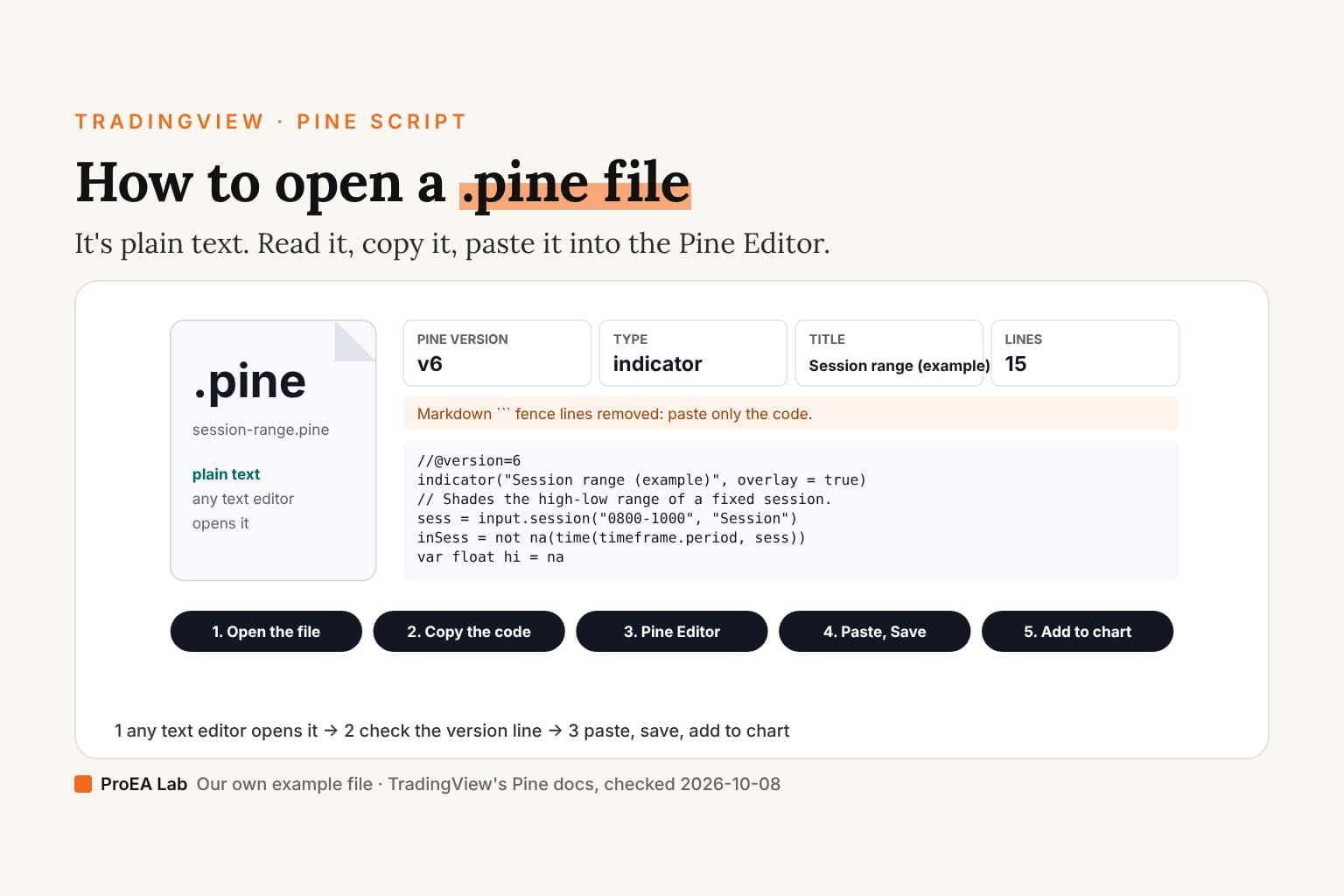
We write both languages and ship both as source, but we don't sell a conversion service. Our Pine v6 tools come as readable .pine files, and Opening Range Desk comes in Pine Pro Library with its rules and tests written down. New to either side? See adding Pine Script to TradingView and installing an EA on MT5.
Use this animation on your site.
Frequently asked questions
Can you convert Pine Script to MQL5 automatically?
A converter can help with the rewrite, but nothing checks it bar by bar against the original for you. Pine hands you closed-bar history and rolls back changes made on an unfinished bar; MQL5 calls your code when an event arrives and keeps every change, and most porting bugs come from that difference, not from the syntax.
What is the MQL5 equivalent of ta.ema or ta.sma?
An iMA handle with MODE_EMA or MODE_SMA and PRICE_CLOSE, created once in OnInit, then read with CopyBuffer. The first EMA values can differ.
Why is ATR different in TradingView and MT5?
Pine's ta.atr smooths true range with an RMA, Wilder's average, while the ATR source MetaQuotes ships with the terminal uses a rolling simple mean. Same length, different numbers: if the rule needs the exact value, compute the RMA yourself.
How do I convert request.security without repainting?
Port the confirmed pattern, a [1] inside the request paired with lookahead_on, to shift 1 on an MQL5 handle such as iATR(_Symbol, PERIOD_D1, 14): shift 0 is the day still forming, shift 1 the last closed day. A Pine script that leaked the future can't be reproduced at all.
What is the MQL5 equivalent of barstate.isconfirmed?
A new-bar check, then reading shift 1, the bar that just closed. You act on the next bar's first tick, because an EA can't know which tick is a bar's last.
How do Pine session times translate to MT5?
MQL5 has no time-zone database: bar times are broker server time, and in the Strategy Tester TimeGMT() always equals the simulated server time. Measure your server's offset from New York for a winter week and a summer week, then test March and late October into early November, when New York and Europe are on different clocks.
Can AI convert Pine Script to MQL5?
It can draft one, and the draft is often a useful start, but it can't see your broker's server clock, whether the account hedges or nets, or which ATR the rule was tuned on. The model can draft; you have to verify.
Why do TradingView and MT5 results still differ after a correct port?
The price data, the session clock, fills inside a historical bar, the fill after a signal, the spread, ATR and position handling all differ. A gap can run either way, and it doesn't prove either version is broken.