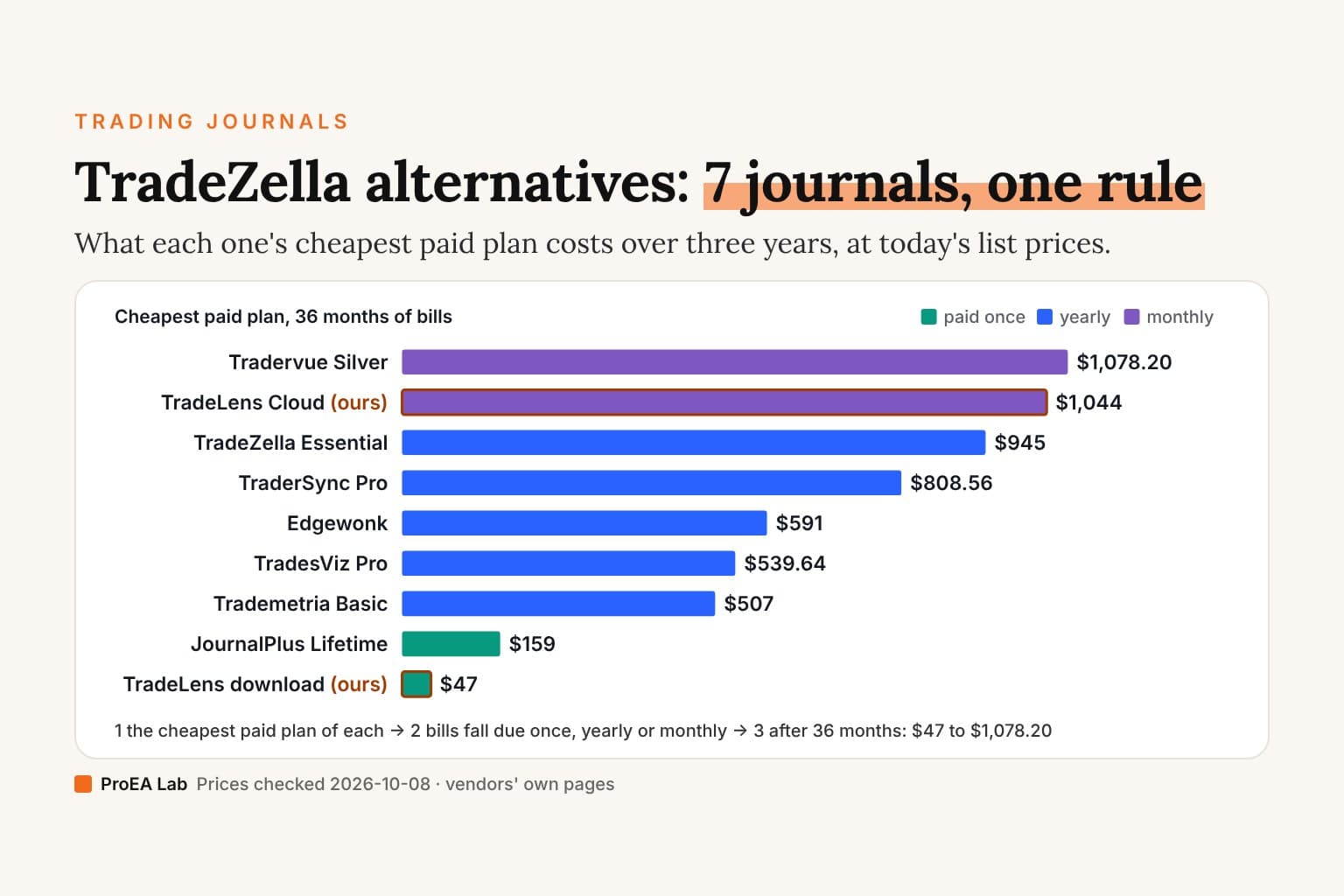
"One referral pays you for 12+ months, with potential for lifetime commissions."
That line isn't from a TradeZella review. It comes from TradeZella's partner page: the recruiting pitch aimed at people who write TradeZella reviews.
Commissions start at 20% and, in their words, "scale up to 30% as you grow." They recur monthly for every subscriber you send. The program is public, and it openly courts "Bloggers and newsletter writers in the trading space."
We should know. We sell a competing journal, which makes us the other kind of biased reviewer. We earn money when you don't subscribe to TradeZella.
So here's the deal, same as always: every claim below is sourced to TradeZella's own pages, quoted so you can check them. Where they're genuinely better — and in places they are — this review says so plainly.The sixty-second version
TradeZella is a polished cloud trading journal with real depth. Broker auto-sync reaches 500+ platforms; tick-level trade replay, backtesting, an AI assistant, and a 20,000-member community fill out the suite. Since 14 July 2026 it costs $35, $59 or $99 a month ($315, $531 or $891 billed annually).
Now for the facts ranking reviews tend to leave out. The AI is credit-metered per month, the two official pages disagree about limited Trade Replay on the $35 plan, we found no free trial, and its Terms of Service say every payment is final and non-refundable. Meanwhile, a public partner program courts reviewers with 20–30% recurring commissions.
| What the top reviews say | What TradeZella's own pages say |
|---|---|
| "Best trading journal" | A public partner program offers reviewers 20–30% recurring commission (their partner page) |
| "From $29/month" | That was the price before 14 July 2026. Now $35, $59 or $99/mo, or $315, $531 or $891/yr. Essential replay access conflicts between the pricing page and pricing help article; both put unlimited replay on Pro and Ultra. |
| "AI-powered journaling" | Zella AI is metered: 500 credits/mo on Essential, 1,500 on Pro, 3,000 on Ultra |
| "Cancel anytime" | True; cancelling stops the next renewal. Their Terms add: "All payments made are final and non-refundable" |
| "Is it worth it?" (referral link) | Depends which product you're buying: the suite or the exit ramp. Different traders need different ones |
What does TradeZella actually cost?
Three paid plans since 14 July 2026: Essential $35/month, Pro $59/month and Ultra $99/month. Pay annually and they drop to $26, $44 and $74 a month, billed $315, $531 and $891 a year.
Those numbers match TradeZella's pricing page and its help-center pricing article, both checked on 3 October 2026. Subscribers from before 14 July keep their old price while they stay on the same plan; switching plan or billing cycle moves them to the new prices.
Per the pricing page, Essential connects 1 account and includes 500 AI credits a month and manual backtesting of 10 strategies. It does not include the Zella agents or automated backtesting. Pro, at $24 more a month, connects 50 accounts and adds unlimited Trade Replay, 1,500 AI credits, the agents and 10 automated backtest runs a month. Ultra adds unlimited accounts, 3,000 credits, 100 automated runs and priority support.
Replay needs a closer check. On 5 October 2026, the pricing page excluded Trade Replay from Essential, while the pricing help article listed 10 replays a month for that plan. Both listed unlimited replay for Pro and Ultra. The help article also reserved the 1-second replay chart and replay AI insights for those higher plans. We cannot resolve that disagreement from the public pages; confirm Essential's current allowance with TradeZella before paying for that feature.
My judgment, plainly labeled: if unlimited replay is why you're buying, price the product at $531 a year, then decide. Essential may be enough for a narrower journaling workflow.
Is there a TradeZella free trial or refund policy?
We found no trial, and the refund answer is no. TradeZella's Terms of Service, section 22: "TradeZella has a no refund policy after sign-up. All payments made are final and non-refundable."
A correction belongs here. In July this review said we found no published refund policy, after checking the pricing page, the help-center pricing article, the cancellation article, the Billing help collection and the homepage. We had missed the Terms page, which loads inside TradeZella's web app. On 3 October 2026 none of those other pages mentioned a refund or a trial. The Terms do, and they say no.
The cancellation article says "your subscription will remain active until the end of your current billing cycle and will not renew automatically." Cancelling stops the next charge. Your paid period simply runs out. Section 22 also puts the burden on you: "It is the customers responsibility to confirm the cancellation."
One independent reviewer at stockbrokers.com reports that TradeZella "told me they do offer refunds if someone requests one within 14 days of signing up" and adds that the policy "isn't apparent on their website." The page still said so on 3 October 2026. If you're counting on a refund like that, get it from support in writing before you pay, because the Terms say the opposite.
Refunds do appear in TradeZella's partner terms. Its partner page says: "If a referred customer cancels or receives a refund, commissions for that customer stop." The affiliate accounting allows for refunds that the customer-facing Terms rule out.
Plan around the written rule: payments are final. A refund that support might grant is not a term you can count on.Our bias should cost us something, too. TradeLens publishes its terms: $47 one-time with a 7-day refund window before you download the source, or $29/month Cloud with a 7-day money-back window on the first month, in writing, on the pricing page.
What is Zella AI, and what do the credits mean?
Zella AI is the platform's built-in assistant. Its product page gives it one job description: "It tags every trade. builds every plan. reviews every session. works 24/7. So you don't have to." In practice, it auto-tags trades by setup and emotion, drafts session notes, checks your stated rules, flags revenge-trade patterns, and answers questions in chat.
The same page says it "was trained on your trade history, your broker, and your setups", meaning it grounds answers in your own data. TradeZella's homepage separately advertises "Trained on 20.2B trades"; that aggregate marketing figure comes from another page, so we keep the two claims separate.
The daily-use constraint is simple: 500 AI credits a month on Essential, 1,500 on Pro and 3,000 on Ultra. Every plan includes the assistant, and every plan meters it. Per the pricing page, "Each action spends credits, and your balance resets at the start of every billing month." On Essential, the agents that auto-tag and review each trade aren't included.
That monthly meter has a nasty failure mode for a journaling tool. In my view, the weeks you most need to interrogate your trading are the weeks you ask the most questions. The ceiling rations exactly the behavior the product exists to encourage.
TradeLens handles this differently, not better in every way. The $47 TradeLens download ships with a free offline local model, or you bring your own Claude/GPT/Gemini key and pay the model provider directly. TradeLens Cloud's managed coach uses a daily question limit instead of a monthly credit meter, so its ceiling resets every morning and can't strand you mid-month.
Does the MT4/MT5 auto-sync actually work?
By their documentation, yes. This part isn't close. TradeZella is ahead: its broker-support page lists both MT4 and MT5 with Auto Sync and File Upload, and the sync uses "your investor password. This is a read-only password that is separate from your main trading password."
Once connected, it "re-syncs automatically on an ongoing basis." A separate official post adds that it "supports same-day trades! You can sync your Forex trades, including open trades, with no delay."
Our version falls short. TradeLens Cloud's MT4/MT5 auto-sync covers closed trades only, while the $47 download has no live broker connection at all; you import MT4/MT5 reports or CSV manually. If you're buying the sight of open positions flowing into your journal in real time, TradeZella does it and we don't.
The wider reach is real: "TradeZella connects with 500+ brokers and trading platforms including NinjaTrader, MetaTrader, Interactive Brokers, Charles Schwab, Tradovate, and more," spanning stocks, options, futures, and crypto. TradeLens speaks MT4, MT5, and CSV. That's the whole list.
When is TradeZella the right choice?
Four honest cases. If two or more fit, subscribe with our blessing.
You trade more than forex/CFDs. If stocks, options, and futures must sit beside your FX book, their 500+ broker reach is the product. We don't compete there and don't intend to.
You want the replay-and-backtest sandbox. Tick-level trade replay (on Pro and Ultra) and backtesting against 11+ years of historical data make a genuine practice environment. TradeLens reviews trades you already took; it has no market simulator of any kind.
You want people around the tool. Their community page states "20K+ Active Members And Growing" and "10+ Events Scheduled Weekly," alongside the Zella University course library. A one-product shop like ours has no equivalent. You cannot fake community.
You'd rather rent everything than own anything. One login, no files, no setup; updates simply appear. The convenience is real, but so is the exit: cancel, and per their own cancellation article the access simply runs out. Nothing stays behind on your machine.
Why does every TradeZella review sound the same?
Open three reviews ranking above this page. Notice the shape: similar pricing paragraphs, similar mild cons, then a verdict landing somewhere near worth it. Now come back for the part none printed.
TradeZella's partner program is public. Commissions start at 20% and "scale up to 30% as you grow," recurring monthly, with higher tiers earning "30% Commission for 12 months + 10% Lifetime Commission." Referrals ride a 60-day cookie.
Volume earns tier status: 1 referred customer for Bronze, 10 for Silver, 100 for Gold, 400 for Top.
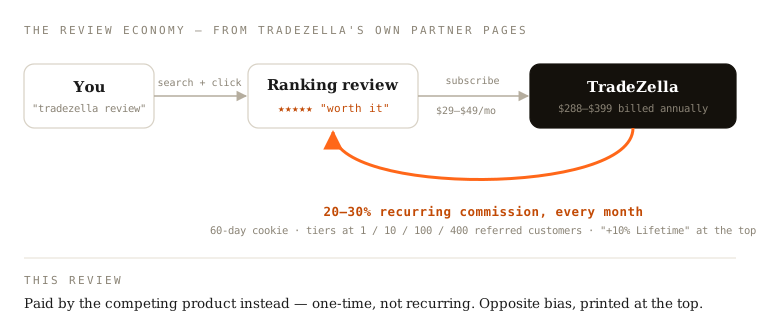
Precision matters here. We have not audited which reviews carry partner links, and we don't claim they all do. The narrower claim is verifiable: the incentive exists, it recurs, it compounds with volume, and TradeZella aims it squarely at "Bloggers and newsletter writers in the trading space." Not one review we read disclosed its size beside the verdict.
Our incentive runs the opposite direction, and you've known about it since the first paragraph. Two biased reviews can disagree about the truth; only one told you the price of its opinion.
Where we sit
The bias, fully priced: we sell TradeLens, a journal for MT4/MT5 traders that costs $47 one-time, includes the full source code, keeps your data in one local SQLite file that never leaves your machine, and uses 92 tested calculations to hunt where your trading leaks money. Or go hosted: TradeLens Cloud at $29/month with read-only MT4/MT5 auto-sync and a managed AI coach, cancel anytime.
Say the honest part louder: our Cloud tier costs close to what their entry plan costs, $29 a month against $35. For a hosted journal with auto-sync, a $6 gap isn't the decision. Ours refunds a first month within 7 days, syncs less (closed trades only), and sits beside a $47 exit ramp you can take whenever the subscription stops earning its keep. Their $35 plan sits below a deeper suite you'll grow into by paying $24 more.
Now the gaps, before you discover them later: no trade replay, no backtesting sandbox, no community, no course library, no stocks or options. The long ownership argument is in the one-time-purchase case. The row-by-row comparison, with every cell sourced the way this review is, lives at the side-by-side page. If Tradervue is also on your list, that comparison is built the same way.
Disclosure
Every TradeZella claim above comes from their official pages: the help-center pricing article, the pricing page, the broker-support page, two official MT4/MT5 blog posts, the cancellation article, the Billing help index, the Zella AI page, the community page, and the partner-program pages. We first fetched them between 2026-07-09 and 2026-07-11. On 3 October 2026 we re-checked the prices, plans, AI credits, Trade Replay access, refund and cancellation terms, and partner terms against the pricing page, the help-center pricing and billing articles, the cancellation article, the Terms of Service and the partner page; the MT4/MT5 sync, Zella AI and community quotes are from the July check. The one third-party source, the stockbrokers.com refund report, is labeled as such. Prices and terms drift; if anything above has, email support@pulltrade.app and we'll correct it.
Replay access and prices were checked again on 5 October 2026. That check found the Essential replay disagreement described above; it did not repeat the other feature or policy checks.
The conflict of interest, one last time: we sell the competing product. Discount our praise and criticism by the same number.
The three-tab test
Before this or any journal subscription, open three tabs and spend ten minutes. Tab one: the pricing article. Find your real tier, then multiply by twelve.
Tab two: the Terms of Service. Scroll to section 22 for the refund rule, then read the cancellation article for what happens to paid time. Tab three: the partner page. See what the reviews that sent you here stand to earn.
Then decide. If the $59 plan still makes sense after those three tabs, it probably makes sense, and no competitor's blog post should talk you out of it.
A review you can check beats a review you have to trust — including this one. That's why the links are there.