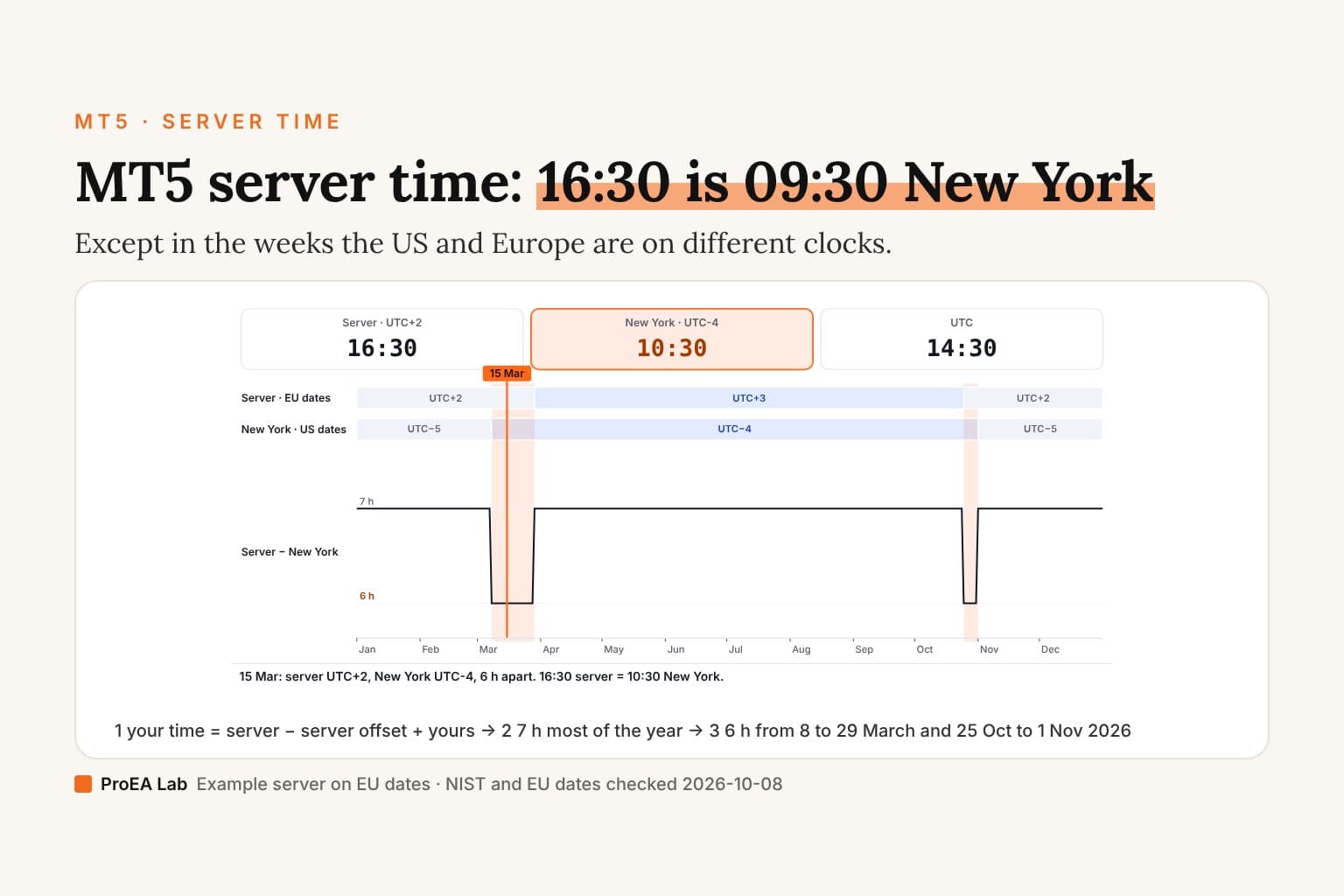
A simulated example server: many MT5 servers run UTC+2 in winter and UTC+3 in summer, but yours may not. Check it against the time in Market Watch. Clock-change dates for 2026, checked 2026-10-08.
Read as text
- 15 Jan: server UTC+2, New York UTC-5, 7 h apart. 16:30 server = 09:30 New York. On Bangkok time: 21:30.
- 15 Mar: server UTC+2, New York UTC-4, 6 h apart. 16:30 server = 10:30 New York. On Bangkok time: 21:30.
- 15 Jun: server UTC+3, New York UTC-4, 7 h apart. 16:30 server = 09:30 New York. On Bangkok time: 20:30.
- 28 Oct: server UTC+2, New York UTC-4, 6 h apart. 16:30 server = 10:30 New York. On Bangkok time: 21:30.
- 1 Dec: server UTC+2, New York UTC-5, 7 h apart. 16:30 server = 09:30 New York. On Bangkok time: 21:30.
How this window was chosen: 2026's clock changes: the US from the second Sunday of March to the first Sunday of November (NIST), the EU from the last Sunday of March to the last Sunday of October (Directive 2000/84/EC), checked 2026-10-08. The example server follows the EU dates at UTC+2 / UTC+3; the stops are one day in each stretch of the year.
Where does MT5 show server time?
In Market Watch. MetaQuotes' help says its time is "the last quote arrival time. Specified according to the time zone of the broker's trading server" (Market Watch help, checked 2026-10-08). The times in the History tab, and in any report you export from it, are on the same clock.
How to find your server's offset
- While the market is open, read the time in Market Watch.
- Look up UTC now and subtract. Round to the hour: that's your server's offset (UTC+2, UTC+3, or something else).
- Do it again after the next clock change. If the offset moved, your server changes clocks, and you need to know on which dates.
Use itWrite the offset next to the date you measured it, once in January and once in July.
Watch outOne reading in summer will be an hour wrong all winter.
Converting a trade time
Your time = server time − server offset + your offset.
| Server time | Server offset | UTC | Bangkok (UTC+7) | New York |
|---|---|---|---|---|
| 16:30, 15 January | UTC+2 | 14:30 | 21:30 | 09:30 (UTC−5) |
| 16:30, 15 March | UTC+2 | 14:30 | 21:30 | 10:30 (UTC−4) |
| 16:30, 15 June | UTC+3 | 13:30 | 20:30 | 09:30 (UTC−4) |
The example server keeps the EU's dates. Thailand doesn't change clocks, so a Bangkok trader sees the server move by an hour twice a year instead.
The two weeks the gap is 6 hours
The US changes clocks on the second Sunday of March and the first Sunday of November (NIST). The EU changes on the last Sunday of March and the last Sunday of October (Directive 2000/84/EC). Both checked 2026-10-08.
| Year | New York ahead, server not | Server back, New York not |
|---|---|---|
| 2026 | 8 – 29 March | 25 October – 1 November |
| 2027 | 14 – 28 March | 31 October – 7 November |
In those weeks a server on EU dates is New York + 6 hours. A session filter, an EA or a journal that subtracts a fixed 7 hours puts the New York open an hour late. Our Pine Script to MQL5 film shows one rule trading the other way because of it.
A fixed offset is right most of the year. Test it in March and late October.For EA and indicator code
MQL5 has no time-zone database. TimeCurrent() is the last known server time. TimeTradeServer() and TimeGMT() are calculated in the terminal from your computer's clock settings (TimeTradeServer, TimeGMT, checked 2026-10-08), so a wrong clock on the PC or VPS gives a wrong GMT. Measure the server's offset for the dates you trade, and store it as a setting you can check.
Use this animation on your site.
Frequently asked questions
What time zone is MT5 server time?
Whatever your broker set. Many MT5 servers run UTC+2 in winter and UTC+3 in summer, which keeps them 7 hours ahead of New York most of the year, but that is a convention, not a rule. Compare the time in Market Watch with UTC to see yours.
How do I find my MT5 server's time offset?
Open Market Watch: its time is the last quote's time on the broker server's clock, per MetaQuotes' help. Subtract UTC now (while quotes are arriving) and round to the hour. Do it once in winter and once in summer, because many servers change clocks.
How do I convert MT5 trade times to my local time?
Your time = server time − server's UTC offset + your UTC offset. With a UTC+2 server, a trade at 16:30 server time is 14:30 UTC, 21:30 in Bangkok and 09:30 in New York in winter.
Why is MT5 one hour off from New York in March and late October?
The US and the EU change clocks on different Sundays. In 2026 New York moved on 8 March and Europe on 29 March, then Europe moved back on 25 October and New York on 1 November. A server on EU dates is 6 hours ahead of New York in those weeks, not 7.
Does MT5 use my computer's time?
Trade, quote and history times are the server's. Two MQL5 functions use your computer: TimeTradeServer() and TimeGMT() are calculated in the terminal from your computer's clock settings, per the MQL5 reference.