Short answer: for a free, full SMC suite, Smart Money Concepts by LuxAlgo is the most-boosted and has the most alerts here (16 conditions), but it counts a break of structure on the live price, so create its alerts with "Once per bar close". If you want zones that only change when a bar closes, Order Blocks by Flux Charts draws on the close, with no alerts. At default settings, none of the six reads future data on history.
Most "best SMC indicator" lists name tools.
This one reads them.
ProEA Lab makes SMC Basics and the SMC AI-Scored Toolkit. Both are in the table, labelled "ours", and one of them didn't come out clean. We fixed it in v1.4.1 on 2026-10-03; the finding stays below.
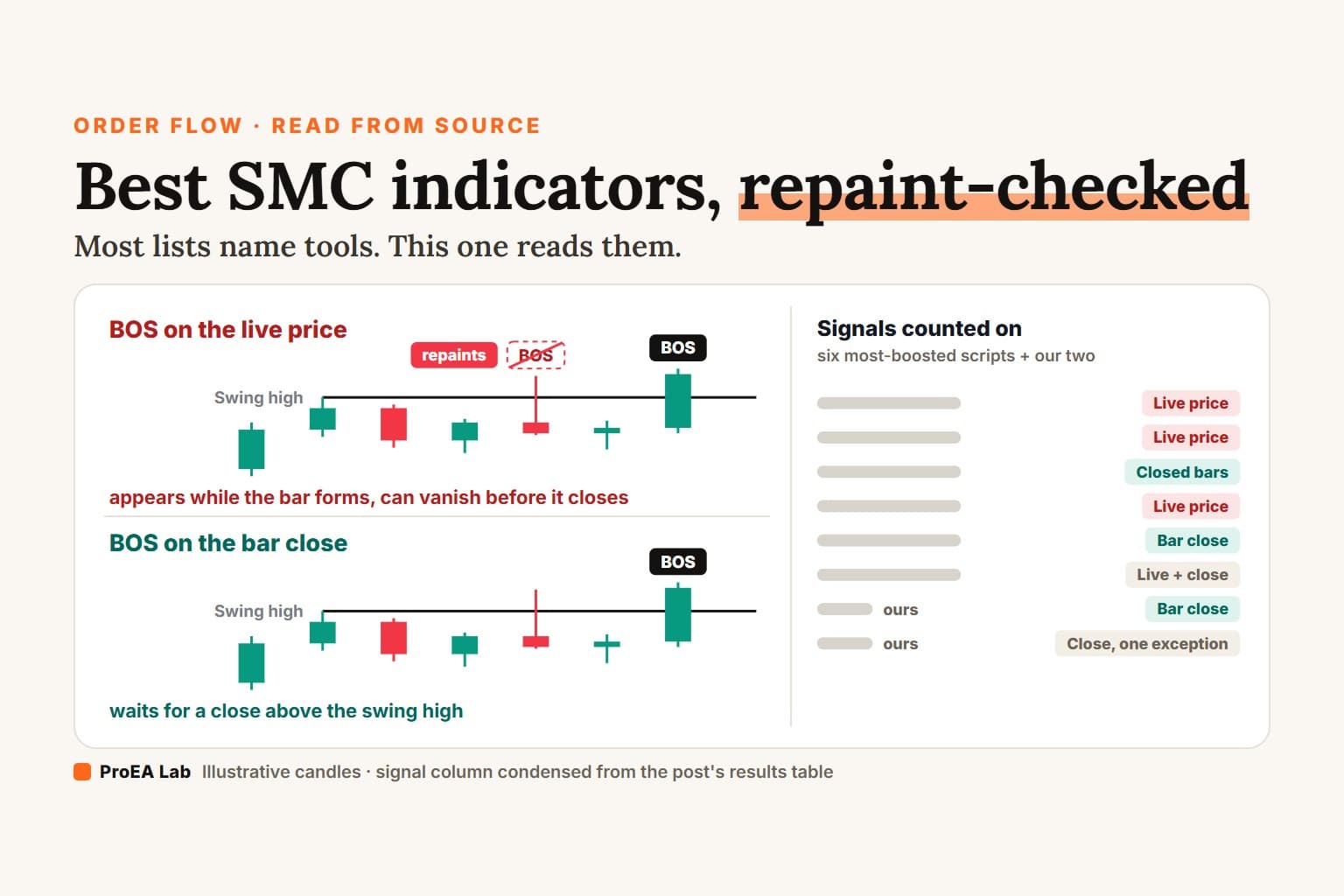
Simulated 15-minute candles, not market data. Both lanes confirm the swing high 5 bars late; the only difference is when a break counts. The dashed circle is our annotation, not indicator output.
Read as text
- Swing: the high at 11:30 is only confirmed 5 bars later, at 12:45, so both lanes draw its label 5 bars in the past. That delay is normal when it is stated.
- Live poke: during the 15:45 bar the live price trades above the swing high. The live-price lane prints a break of structure at once; the bar-close lane waits.
- Gone: the 15:45 bar closes back below the high. The live-price lane's break of structure disappears; the bar-close lane never drew one.
- Close above: the 17:15 bar closes above the high. Both lanes now show the break of structure, and it stays.
- Reload: after the script reloads, the live-price lane's history only shows the break that closed. The one you watched appear at the live price is not there. The bar-close lane is unchanged.
What does "repainting" mean for an SMC indicator?
TradingView defines repainting as "script behavior causing historical vs realtime calculations or plots to behave differently" (Pine docs, checked 2026-10-03). For SMC tools it shows up in three ways, and only the first one is a real problem.
- Future data on history. The chart shows a signal using a value that wasn't final yet. TradingView files this under "unacceptable".
- Signals on the live price. A BOS or zone appears while the bar is still forming and can vanish before it closes (the film's top lane). History never shows the ones that vanished.
- Drawn in the past. A swing needs bars on its right, so its label lands N bars back. That's normal, as long as you know N.
Then there's a fourth thing traders call repainting: deleting broken zones. Scroll back and you see only the zones that survived.
The results
| Script · boosts | Signals counted on | Drawn in the past | Broken zones | Alerts | Price |
|---|---|---|---|---|---|
| Smart Money Concepts · LuxAlgo · 170,868 | Live price | Swing labels 50 bars back (default) | Deleted on a wick through | 16 conditions | Free, open source |
| Market Structure Break & OB · EmreKb · 62,625 | Live price (zigzag) | MSB label between earlier pivots | Removes its oldest box | 1 condition + 4 "price in zone" | Free, open source |
| Order Block Finder · wugamlo · 40,109 | Closed bars only | Marker 6 bars back | Never deleted | 2 conditions | Free, open source |
| Order Block Detector · LuxAlgo · 39,629 | Live price and volume | 5 bars back (volume pivot) | Deleted; shows the last 3 per side | 4 conditions | Free, open source |
| Order Blocks · Flux Charts · 25,579 | Drawn on bar close | Zone placed back at its candle | Become breakers, then deleted | None | Free, open source |
| Price Action SMC · BigBeluga · 25,500 | Live price for BOS and CHoCH; bar close for zone breaks | Pivots 5 bars back | Deleted on a close through (default) | None | Free, open source |
| SMC Basics (ours) | Bar close | Swings 10 bars back | Deleted (ghost option) | None | Paid, in Pine Pro Library with full source |
| SMC AI-Scored Toolkit (ours) | Bar close (one score factor fixed in v1.4.1, below) | Pivots 5 and 15 bars back | Removed, counted in its Resolved % | 5 types, on bar close | $39 one-time, full source |
Which one should you use?
Pick by the column that matters to you, not by the boost count.- Full suite with alerts: LuxAlgo Smart Money Concepts. Structure, internal structure, order blocks, FVGs, equal highs and lows, premium and discount zones, and the most alerts here. Its BOS and CHoCH come from
ta.crossover(close, level)with no bar-close check (lines 568 and 593), so a break can show mid-bar and vanish. Swing labels sit 50 bars back by default (line 95). One setting to leave alone: set its FVG timeframe above the chart's and the request mixes the higher-timeframe bar's current high and low with lookahead on (line 635), so gaps on history can use values that weren't final yet. - Only changes on a closed bar: Flux Charts Order Blocks. Everything it draws is rendered inside
if barstate.isconfirmed(line 460). It has no alerts, and it only scans the last 1,750 bars. - Nothing ever deleted: wugamlo's Order Block Finder. It looks only at closed bars and prints each block 6 bars back with a negative offset (line 71), so failed blocks stay on the chart. It's also the oldest here: Pine v4, last published 2020-11-03.
- Volume-based blocks: LuxAlgo Order Block Detector. Blocks come from a 5-bar volume pivot (line 156), and the box set is redrawn on the last bar with only the newest 3 unbroken blocks per side.
- Market structure breaks with breaker blocks and mitigation blocks: EmreKb. Note one behaviour: when a zone breaks, the code removes the first box in its list,
box.delete(array.shift(box_arr))(line 86), which isn't always the box that broke. - Big feature set, close-based zone breaks: BigBeluga. Zones are checked for a break only on a closed bar (line 518), while BOS and CHoCH use the live close.
Best SMC indicator for beginners
Start with one that only changes on a closed bar, so the history you study looks the way it did live. In this table that's Flux Charts Order Blocks, or our SMC Basics (in Pine Pro Library). Scrolling back then shows what the tool drew live, apart from the bars a swing needs on its right.
- Flux Charts Order Blocks renders everything it draws inside a bar-close gate. It has no alerts and scans only the last 1,750 bars.
- SMC Basics (ours, in Pine Pro Library) commits swings, order blocks, gaps and their mitigation on bar close, and keeps only 3 zones per side. It has no alerts and no BOS or CHoCH labels, so you mark structure yourself.
- wugamlo's Order Block Finder reads closed bars only and never deletes a failed block, so the misses stay on the chart to learn from. It's also the oldest here: Pine v4, last published 2020-11-03.
LuxAlgo's suite does the most, but its BOS and CHoCH come from the live price. While you're still learning what a break is, a label that appears mid-bar and vanishes teaches the wrong lesson, and history never shows the ones that vanished. If you start there anyway, create its alerts with "Once per bar close" and keep its FVG timeframe at the default, not above the chart's.
Whichever you pick, learn the rule behind each drawing before you trust it: BOS vs CHoCH for structure, and the fair value gap for the gaps these tools box.
Our two, measured the same way
SMC Basics (ours) commits everything on bar close (line 174 in version 1.1.0): swings, order blocks, gaps and their mitigation. LuxAlgo's suite beats it on coverage: Basics has no alerts, no BOS or CHoCH labels, and keeps only 3 zones per side.
SMC AI-Scored Toolkit ($39) draws zone geometry, labels and all five alert types on bar close. But we found one live-versus-history difference while writing this page. Up to v1.4.0, one of its five score factors, the higher-timeframe alignment (4H by default), read the still-forming 4-hour bar in real time, through request.security with lookahead off and no [1] offset (line 328). After a reload it read the last closed 4-hour bar instead. So a zone born live could carry a slightly different score once you reloaded, even though its box didn't move.
TradingView's documented fix is the [1] offset with lookahead on (Pine docs, checked 2026-10-03). Fixed in v1.4.1 (2026-10-03): the factor now uses that offset, so it reads the last closed 4-hour bar both live and after a reload. The trade-off is up to one 4-hour bar of lag, and scores can differ slightly from v1.4.0.
Check any SMC indicator in three minutes
If the source is open, search it for four things.
barstate.isconfirmed   no gate = signals can flicker on the live bar
lookahead_on           safe only with a [1] offset on the value
offset = -             how many bars back it draws
pivothigh / pivotlow   the right-side length = the delay
Closed source? Watch one live bar, screenshot the signal, wait for the close, then change any input and change it back. That reload recalculates history. If the signal is gone, the tool counts the live price. The full method is in how to tell if an indicator repaints.
What each concept these tools draw means, one written rule each: smart money concepts.
Can you use these SMC indicators on MT5?
Not as published. All eight scripts in the table, ours included, are Pine Script, which runs only on TradingView; MetaTrader 5 runs MQL5. To use one on MT5, someone has to rewrite it in MQL5, and that rewrite is a new program. Every finding in the table describes the Pine code, not a port of it.
So check an MT5 version the same way, in MQL5's terms:
- Live bar or closed bar? MQL5 counts bars back from the present, and shift 0 is the bar still forming. A rule that reads shift 0 is the MT5 version of a signal on the live price; shift 1 is the last closed bar.
- Higher timeframe? Reading a higher-timeframe value at shift 1 gets the last closed bar, the same fix our toolkit got in v1.4.1. Shift 0 is that timeframe's bar still forming.
- Broken zones? Deleted, kept, or the wrong one removed: a port can differ from its original here too.
Then compare the port bar by bar with the Pine original on the same symbol and timeframe. Broker prices, server time and the ATR formula can still make the two disagree. Our Pine Script to MQL5 guide works through a port and that check. Before you port someone else's script, or share your port, read the licence in its source.
Disclosure
ProEA Lab makes SMC Basics and the SMC AI-Scored Toolkit. Boost counts, sources and version dates were fetched from TradingView on 2026-10-03; scripts get updated, so check the version date before you rely on a line number. The third-party findings describe what each script's code does, not how well it trades.
Found something we got wrong? Email support@pulltrade.app and we'll correct it.
Use this animation on your site.
Frequently asked questions
What is the best SMC indicator on TradingView?
For a free, full suite, Smart Money Concepts by LuxAlgo: the most-boosted script in our table, with the most alerts (16 conditions). It counts a break of structure on the live price, so create its alerts with Once per bar close. For zones that only change when a bar closes, Order Blocks by Flux Charts draws on the close, with no alerts.
Does LuxAlgo Smart Money Concepts repaint?
Its BOS and CHoCH are counted on the live price with no bar-close check, so a break can show mid-bar and vanish before the close. At default settings it does not read future data on history, but set its FVG timeframe above the chart's and gaps on history can use values that were not final yet.
Is there a free SMC indicator that doesn't repaint?
In our code read, Order Blocks by Flux Charts draws everything on bar close and wugamlo's Order Block Finder reads closed bars only. Our SMC Basics, which is not free (it comes in Pine Pro Library), commits swings, order blocks, gaps and their mitigation on bar close. All three still draw some things in the past, because a swing or block needs bars on its right.
What is the best SMC indicator for beginners?
One that only changes on a closed bar, so the history you study looks the way it did live: Flux Charts Order Blocks, or our SMC Basics (in Pine Pro Library), which keeps 3 zones per side and has no alerts and no BOS or CHoCH labels.
Can you use these SMC indicators on MT5?
Not as published. All eight are Pine Script, which runs only on TradingView; MetaTrader 5 runs MQL5. A port to MQL5 is a new program, so check it the same way: does it decide on the bar still forming (shift 0) or the last closed one (shift 1)?
How do you check if an SMC indicator repaints?
If the source is open, search it for barstate.isconfirmed, lookahead_on, negative offsets and pivot lengths. If it is closed, screenshot a signal on a live bar, wait for the close, then change any input and change it back; if the signal is gone after that reload, the tool counts the live price.
Did ProEA's own SMC indicators pass the repaint check?
SMC Basics commits everything on bar close. The SMC AI-Scored Toolkit draws zones, labels and alerts on bar close, but up to v1.4.0 one score factor read the still-forming 4-hour bar live, so a score could differ after a reload. v1.4.1, released 2026-10-03, reads the last closed 4-hour bar.