
Strategy twin
drift-desk-strategy.pine
The same rules as a strategy, with costs, for TradingView's Strategy Tester.
It flips on a confirmed close through its trail, then sets the stop, the checkpoint and the target at once.
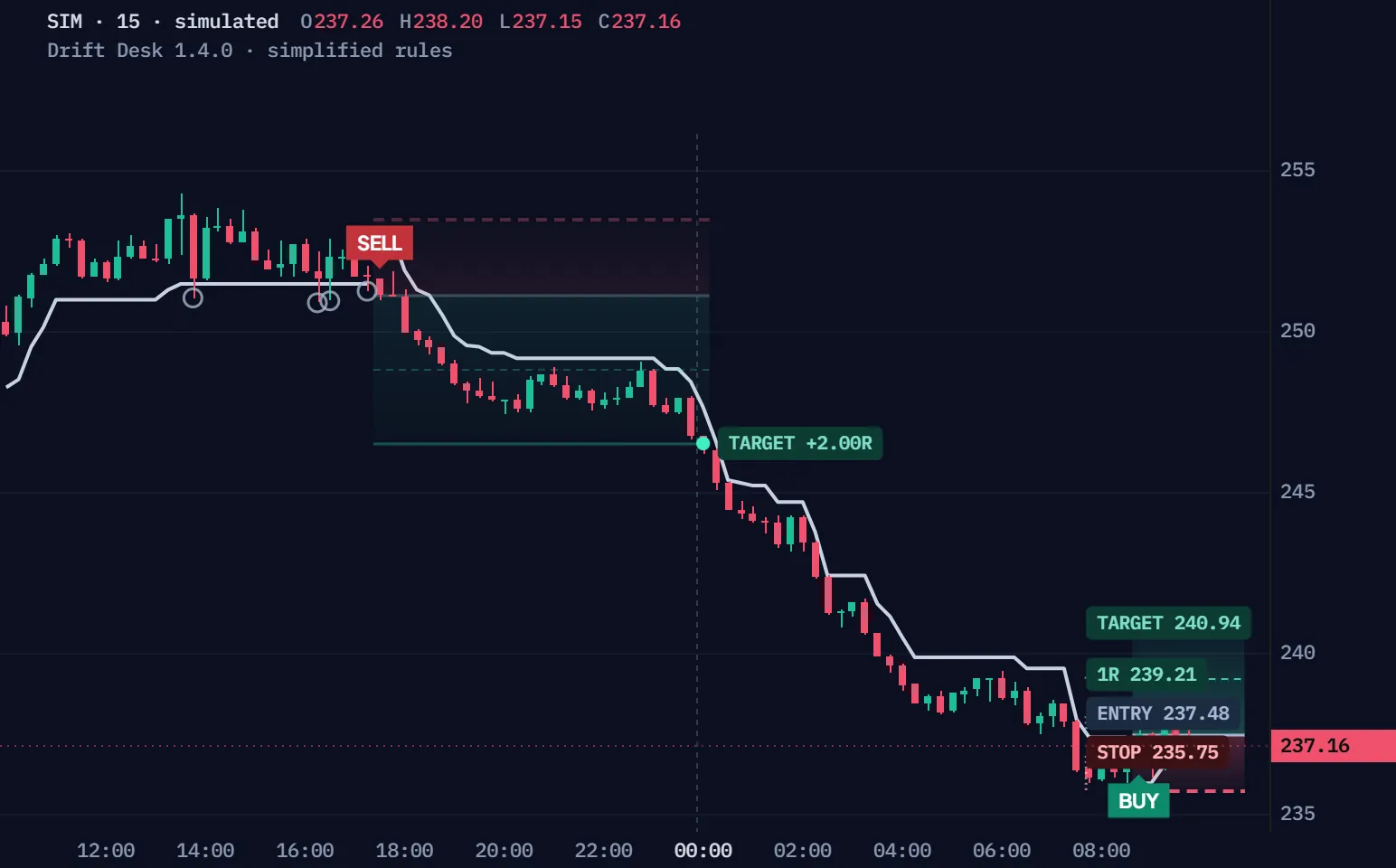
Window 1 · first to reach 1R
Simulated 15-minute bars, not a real market, run through Drift Desk's rules, simplified for the browser. Quiet bars run as a time-lapse; the bars that matter slow down. Window 1 is the first simulated window whose trade reaches its 1R checkpoint, so every step shows; Another window plays the next simulated windows with a trade that closes inside the window, whatever the result; every window starts with no plan open.
| Time | Event | Prices |
|---|---|---|
| 13:45 | Wick through the trail · no flip | Wick 251.04 |
| 16:15 | Wick through the trail · no flip | Wick 250.89 |
| 16:30 | Wick through the trail · no flip | Wick 250.95 |
| 17:15 | Wick through the trail · no flip | Wick 251.25 |
| 17:30 | SELL · flip down | Entry 251.16 · stop 253.48 · 1R 248.84 · target 246.52 |
| 19:00 | 1R · checkpoint, nothing changes | 1R 248.84 |
| 00:00 | TARGET +2.00R | Exit 246.52 |
| 08:45 | BUY · flip up | Entry 237.48 · stop 235.75 · 1R 239.21 · target 240.94 |
Full Pine v6 source in Pine Pro Library. It draws on your chart; you place the trades.
The trail only flips on a closed candle beyond its band; wicks through it change nothing.
A close above 127.45: long at 127.63, the plan set at once.
Five optional gates, all off by default.
Simulated 15-minute bars, simplified rules; shorts mirror longs. The window is the first simulated one with two wicks through the trail before the close that flips it.
Each band sits two ATR from a centre that leans with buying and selling pressure.
A band only moves toward price while price stays on its side.
A confirmed close beyond the last opposite band flips the trail.
EMA 100, efficiency, eight timeframes, New York hours and the hourly EMA can each block a flip.
Turn a gate on and drag the close: a flip the gate refuses is gone, not saved for later.
The next close clears the EMA 100: still no entry. A refused flip is never queued.
As shipped, any confirmed flip with a valid plan enters.
A gate that fails on the flip's bar refuses that flip.
A later bar that passes the gate does not bring it back.
A flip while a plan is open, or on its exit bar, is ignored the same way.
Every entry arrives with a stop that never moves, a 1R checkpoint, and a 2R target, closed within 120 bars.
Straight to the target: Drift Desk keeps the whole move, +2.00R. Premium, same path: half at 1R, the rest at the target if its trail holds → +1.50R.
Drawn paths, not trades, through simplified rules, before fees; the Premium line uses Premium's.
The lowest low of the ten bars before entry, less 0.25 ATR (the highest high for a short).
The desk marks it and changes nothing: no partial, no stop move.
A bar that touches the stop and the target counts as the stop.
Then the plan closes at the close; a gap through the stop exits at the open.
Two files, the complete v1.5.0, ready for TradingView's Pine Editor.
On a phone? Send this page to your desktop.
GitHub holds an earlier release (v1.3.0) of the indicator.
1.5.0 · Every market: plans on indices, futures, CFDs and feeds without volume, on any timeframe.
New in 1.4.0: a Direction setting — Both (unchanged) or Long only. Long only refuses each short flip on its own flip bar and never queues it. The trail, its flips and the long-plan rules stay the same. Test both on your own market.
Updating a saved copy? Add 1.5.0 as a new script, or recheck its research, broker and display settings after pasting: those saved values shift.
//@version=6// …// Shared technical candidates; independent paper and broker acceptance/outcomes.// Price/volume context is not order flow, probability, or proof of a trading edge.// Keep extra historical-tick and order-fill recalculation disabled; overrides are outside the confirmed-close model.indicator("Drift Desk · Open Source", "Drift Desk", overlay = true, behind_chart = false, max_boxes_count = 120, max_lines_count = 250, max_labels_count = 200, max_bars_back = 3000)const bool IS_STRATEGY = falseconst string DRIFT_VERSION = "1.5.0" // DRIFT DESK · original pressure / ratchet engine. No private indicator code.const string NY_TZ = "America/New_York"const string G_PRESSURE = "01 · Pressure & trail"const string G_GATES = "02 · Optional entry gates"const string G_RISK = "03 · Fixed paper plan" int pressureFastLen = input.int(8, "Pressure EMA · fast", minval = 2, maxval = 100, group = G_PRESSURE, display = display.none)int pressureSlowLen = input.int(21, "Pressure EMA · slow", minval = 3, maxval = 200, group = G_PRESSURE, display = display.none)int normalizationLen = input.int(50, "Pressure deviation window", minval = 10, maxval = 300, group = G_PRESSURE, display = display.none)int volumeLen = input.int(20, "Relative volume / valid-bar window", minval = 2, maxval = 200, group = G_PRESSURE, tooltip = "New entries require this many consecutive positive-volume candles. Missing or recovering volume uses neutral price-only context until the complete window is valid.", display = display.none)float volumeCap = input.float(3, "Relative volume cap", minval = 1, maxval = 10, step = 0.25, group = G_PRESSURE, display = display.none)float projection = input.float(0.5, "ATR pressure projection", minval = 0, maxval = 2, step = 0.1, group = G_PRESSURE, display = display.none)int atrLen = input.int(14, "ATR period", minval = 2, maxval = 100, group = G_PRESSURE, display = display.none)float bandMult = input.float(2, "Trail ATR multiplier", minval = 0.5, maxval = 8, step = 0.25, group = G_PRESSURE, display = display.none) bool emaGate = input.bool(false, "Require EMA alignment", group = G_GATES, display = display.none)int emaLen = input.int(100, "Trend EMA length", minval = 5, maxval = 500, group = G_GATES, display = display.none)bool efficiencyGate = input.bool(false, "Require price-path efficiency", group = G_GATES, display = display.none)int efficiencyLen = input.int(20, "Efficiency window", minval = 2, maxval = 200, group = G_GATES, display = display.none)float efficiencyMin = input.float(0.2, "Minimum efficiency · 0 to 1", minval = 0, maxval = 1, step = 0.05, group = G_GATES, active = efficiencyGate, display = display.none)bool mtfGate = input.bool(false, "Require eligible timeframe agreement", group = G_GATES, display = display.none)float mtfRequired = input.float(0.625, "Minimum same-direction fraction", minval = 0.5, maxval = 1, step = 0.025, group = G_GATES, tooltip = "Lower or unavailable frames are excluded. Neutral eligible frames stay in the denominator. This count is not a probability.", active = mtfGate, display = display.none)bool sessionGate = input.bool(false, "Require New York entry session", group = G_GATES, display = display.none)
No coding needed.
drift-desk-strategy.pine
The same rules as a strategy, with costs, for TradingView's Strategy Tester.
In Pine Pro Library: read it, change it, keep it.
The indicator draws; the strategy twin runs the same rules in the Strategy Tester.
Crypto, forex, indices or stocks, on the timeframe you trade.
Alerts on each flip, entry and exit, in the desk's own words.
The page, the films and the manual are open to everyone. The code, the indicator and its strategy twin, is in Pine Pro Library: $49 once for every desk and every update, or as part of the Complete Suite. Sign in to copy or download.
No edge is proven. It applies one fixed rule and draws a plan; you decide.
Nothing. Blocked flips are not queued, so a gate that passes later cannot create an entry.
We, ProEA Lab, build Drift Desk and Drift Desk Premium. The code is AI-assisted. Charts on this page show simulated bars and simplified rules, not broker fills. Trading involves risk.
Drift Desk Premium · $49 once
Get itEvery rule, setting and check, one topic at a time.
Illustrated example · the trail never moves the plan’s stop
Drift Desk is a TradingView trend indicator in Pine Pro Library that combines candle pressure, relative volume and an ATR-based trail. A confirmed trail flip becomes an entry candidate only when required checks and risk rules pass. Its dashboard separates current trend context from a fixed paper plan, with a separate strategy script for testing.
No. Its pressure read combines candle position, body and relative volume; it is not bid-and-ask order flow. Missing or nonpositive volume blocks new plans until the required positive-volume history recovers, while price context and existing-plan management can continue. On a feed that has never carried volume, the default Every market setting runs the checks price-only instead. Understand pressure and volume limits
The trail describes current context; an accepted plan keeps its original entry, stop and target references. A later opposite flip does not close that plan. Its own stop, target or expiry rules determine when it ends. Compare trend context and fixed plans
No. MONITOR ONLY identifies an older active reference, not permission to enter late. NEW ON LAST CLOSE marks a newly accepted plan. Read the plan age, distance and original risk alongside the current checks before interpreting the display. Decode the plan status
If an enabled filter blocks a flip, that flip is not queued. A later bar passing the filter cannot create an entry without a new confirmed flip. The new flip must pass the enabled checks and risk rules on its closing bar. Version 1.3.1 puts this existing rule in the desk and default Brief explanation.
New in 1.4.0: a Direction setting — Both (unchanged) or Long only. Long only refuses each short flip on its own flip bar and never queues it. The trail, its flips and the long-plan rules stay the same. Test both on your own market.
1.5.0 · Every market: plans on indices, futures, CFDs and feeds without volume, on any timeframe. When the planned cash risk buys less than one quantity step, the plan keeps the exact size instead of being refused; a feed that has carried no volume runs its checks price-only. Off is the 1.4.0 rule. A coverage change, not a performance claim.
Drift Desk grew from a community request for an understandable trend tool. It explains what changed, which checks matter and where an accepted plan ends. Start with one candle.
The candle opened at 40 and finished at 60, nearer its high than its low. Its close and rising body contribute positive pressure.
Move a candle’s close to see how its pressure changes. Then compare a wick touch with a confirmed close through the trail.
Drag the blue close, move the slider or press Play.
This score feeds the pressure history. Positive pressure alone does not mean the trail flips.
Close location (2 × close − high − low) ÷ range
Signed body (close − open) ÷ range
Pressure (0.6 × close location + 0.4 × signed body) × volume weight
The example’s preceding nineteen volume observations are 100 each. The current volume is 100; its twenty-bar mean is 100. Dividing the current volume by that mean, then capping it at 3, gives weight 1.00. Candle volume is not bid/ask order flow.
The close-location and signed-body terms are clamped to −1 through +1; a zero-range candle contributes zero. Complete historical warmup is still required. Missing history is not a measured zero.
Pressure history → drift. Subtract the slow pressure EMA from the fast one: default lengths 21 and 8. Divide that spread by its fifty-bar standard deviation and clamp to −3 through +3. Zero variance gives zero; the history must first be ready.
Drift → projected center. Start at the candle’s high, low and close average. Add drift × ATR × projection. Defaults: ATR 14, projection 0.5. Raw bands sit an ATR distance times the multiplier around that center; default multiplier 2.
Raw bands → ratcheting trail. While the previous close stays at or below the previous upper band, take the lower of the new raw upper and the previous upper. It cannot rise in that condition. The lower band mirrors this with a maximum when the previous close is at or above it. Equality retains the ratchet.
Confirmed close → raw flip. A downtrend flips up only above its previous upper band; an uptrend flips down only below its previous lower. A wick, equality or a forming bar is insufficient. Initialization sets direction without a flip event.
The sketch supplies earlier raw-band candidates to show this ratchet. It does not compute a historical drift from the single displayed pressure candle. A raw flip is not an accepted paper plan or a broker fill.
Schematic candles and supplied trail history · illustrative units · no market feed
A candle’s close, body and relative volume contribute to pressure. The history of that pressure shifts an ATR channel. The trail ratchets with it; a flip requires a confirmed close strictly through the previous opposite band.
Missing open, high, low or close, reversed extremes, or an open/close outside the high–low range pauses calculation on a confirmed bar before technical or ledger state uses it. No plan outcome is inferred from that malformed bar. Coherent zero, negative and flat prices are valid OHLC. This is separate from a recoverable volume gap.
History and ATR must be ready. Missing or zero volume blocks new plans until the full valid-volume window recovers: 20 consecutive positive-volume bars by default. With Every market on (the 1.5.0 default), a feed that has carried no volume on any closed bar runs its checks price-only instead of waiting. During recovery, neutral weight 1 gives price-only context. It is not evidence of participation. Existing plans keep their normal stop, target and timeout processing.
These unedited v1.3.1 captures show ETHUSDT 15m in Full and Compact modes. Both use Brief Co-Pilot, leave the five optional checks off and show no active paper plan. The Compact view hides optional explanation rows while keeping RULE visible. Version 1.4.0 draws the same desk with the default Direction setting; only the version label differs. Version 1.5.0 keeps the rule these captures show on a feed with volume, like this one; they were not retaken for it.
ETHUSDT · 15m · v1.3.1 · Full desk, Medium, Brief · all checks optional
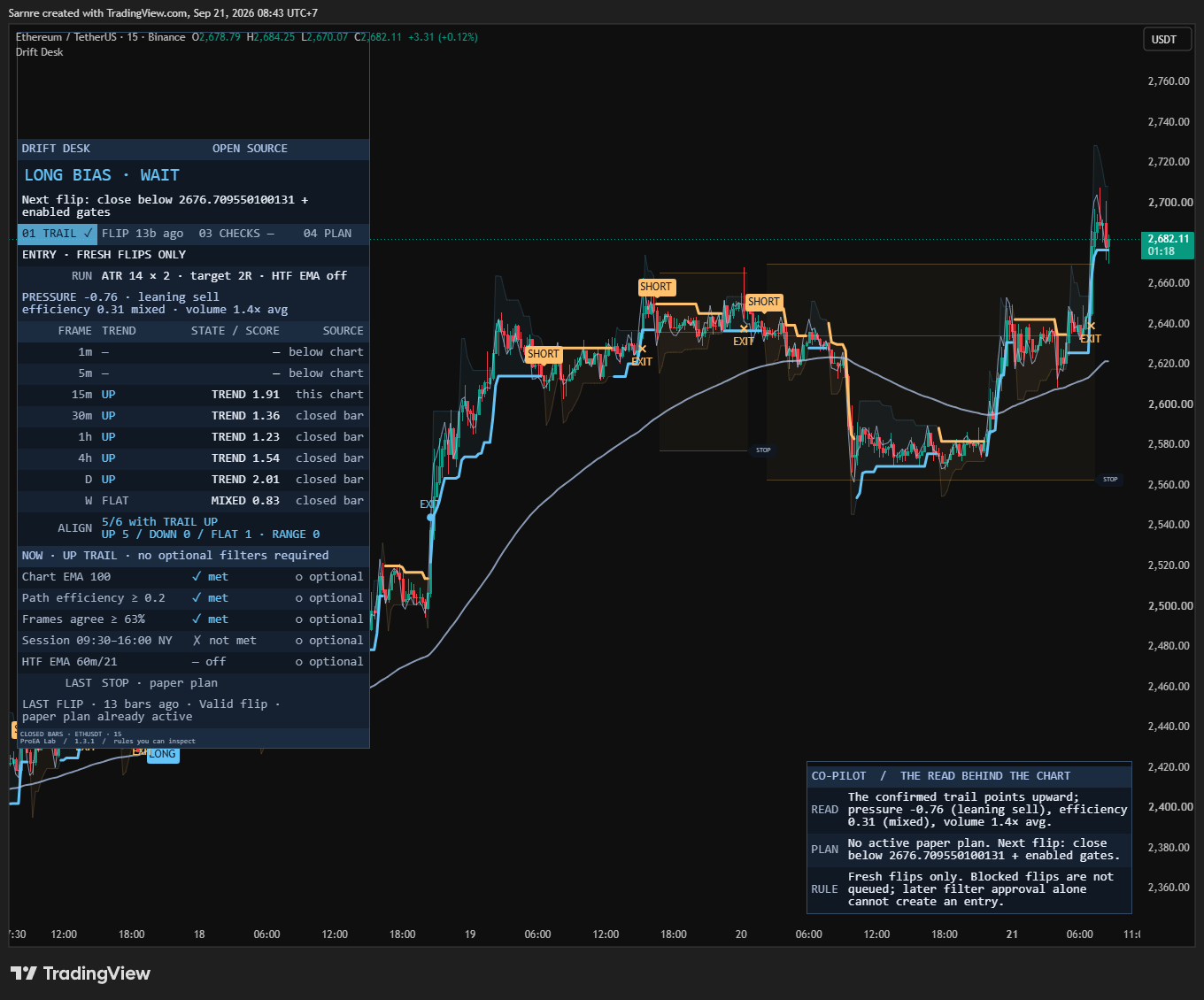
The ENTRY row makes the existing policy visible: a fresh confirmed flip must pass the enabled checks and risk rules on that closing bar. If an enabled HTF EMA check blocks it, that check passing later without another flip cannot create an entry. This market capture shows the policy label, not the synthetic regression sequence.
Open the original chart full size ↗Copy → Pine Editor → Save → Add to chart. The code is in Pine Pro Library.
Pressure trail, context matrix, five checks, fixed plans, research lab, Co-Pilot and alerts.
The same technical candidates, passed to TradingView’s broker model with costs.
It ships with percentage commission per fill, one tick of slippage and full margin. Adapt the strategy() header to your market. Keep close processing enabled and extra tick/fill recalculation disabled. A simulated close fill does not promise an external order the same price.
Both files are in Pine Pro Library. Save the script before changing symbols. Updating a saved copy? Add 1.5.0 as a new script, or recheck its research, broker and display settings after pasting: those saved values shift. New to Pine? Follow the TradingView installation walkthrough.
Full source in Pine Pro Library · Licence · exact v1.5.0 release files
A public GitHub repository holds an earlier v1.3.0 release of the indicator, with its source hash, formulas, limits and a reproducible observation checklist. The files above are v1.5.0.
Open the question you are working on. All original rules, experiments and settings remain here.
Follow one confirmed flip into a plan. Then move a later close: the original-risk distance changes, while the saved entry and plan stay fixed.
F0 closes at 104, strictly above the preceding active band at 100. That confirms an UP flip. A touch or the first trend initialization would not be a flip.
Check this very close. The flip alone is not an entry.
The example assumes warmup, a full positive-volume window and a valid risk plan. Those are mandatory even when every optional check is off. Matrix neutral rows count; lower or unavailable rows do not. A required HTF EMA must use a strictly longer timeframe and a completed source bar.
Later mode shows four closed bars after entry. Its prior lower band is fixed at 108; equality keeps the UP trail, a strict close below flips it DOWN. The proposed new upper band is 114. These band inputs are supplied for teaching; the pressure explorer explains the preceding calculation. The slider range keeps this example short of stop and final target.
NEW ON LAST CLOSE means age zero. MONITOR ONLY describes an earlier accepted plan. Original-R displacement uses the plan’s direction and initial risk, even when today’s trail points the other way. Current checks describe the current direction; they cannot replace the saved entry checks. In-chart PLAN tags use a readable display lane, so their horizontal position is not entry time.
Here the prior structure low is 97 and the ATR buffer is 1, giving a stop at 96. Entry 104 makes the initial risk distance 8. Cash risk 100, point value 1 and quantity step 1 give a rounded-down size of 12. Actual sizing uses the symbol point value and Auto or Manual quantity increment, without account-currency conversion.
Entry stays at the confirmed close; the stop and target levels round outward to the symbol tick. Size must be positive and price distances valid. An optional maximum-stop limit can also reject a candidate.
The paper ledger evaluates outcomes only after the entry bar. Opening stop gaps come first, then known opening final-target prints; an otherwise unresolved intrabar stop/target collision is stop-first and marked ambiguous. An opening print beyond 1R can record that checkpoint before a later stop touch. The checkpoint never edits the stop or quantity.
If neither stop nor final target resolves it, the default timeout is 120 completed bars and closes at that bar’s close. It is not a wall-clock promise. No replacement paper plan opens on a resolution bar. The strategy companion uses the same candidates with its own broker acceptance and fill rules.
Illustrated prices · saved flip comparison · no trade outcome shown
The moving trail is not the plan’s stop. Entry, stop, checkpoint, target and size freeze at acceptance. The 1R checkpoint only records a touch; it does not take a partial exit or move the stop.
The default stop uses the prior 10 completed bars’ extreme plus a 0.25 ATR buffer, rounded away from entry. Size is cash risk divided by stop distance and point value, rounded down to the quantity increment. Cash risk uses symbol currency without account FX conversion. A zero size, invalid distance or a distance exceeding the enabled stop limit blocks the plan.
Paper outcomes start after the entry bar. An opening stop gap exits at the open; an opening target gap is credited at the target. If a bar touches both stop and target with unknown ordering, the paper model uses the stop and marks the ambiguity. A known opening print beyond 1R can still record the checkpoint before a later stop touch.
The default timeout is 120 closed bars after entry, resolved at the close if neither stop nor target has resolved it. The clock counts observed bars, not a promise of elapsed minutes. No replacement paper plan starts on the resolution bar.
Change the chart timeframe and watch which rows can count. The source label tells you why a reading is included or left out.
Lower timeframes and missing readings do not count. A neutral reading counts in the total, but agrees with neither side.
These are illustrative row readings. Changing the chart here demonstrates eligibility; it does not recalculate market data.
Each row compares EMA 20 with EMA 50 and the slow EMA’s slope over 3 bars. Its RANGE / MIXED / TREND word describes a thresholded strength score. This is EMA context, not eight copies of the pressure engine and not a probability.
Higher rows use completed source bars. Daily and weekly rows match local data only on the corresponding calendar chart; a same-duration alias uses a completed source packet and says “closed alias”. The optional agreement check compares the candidate’s side with the eligible total; its default required fraction is 0.625.
The optional confirmed HTF EMA is another reference, separate from this matrix and the chart EMA. Its default is the completed hourly EMA 21, switched off. When required, the reference must be strictly above your chart timeframe; a missing reference blocks new plans.
The lab compares fixed settings on one window, freezes its choice and observes a later window. Your operating setup stays yours.
Each row: multipliers 1.5 · 2 · 2.5 · 3
The lab observes the declared training window. Every cell uses one ATR period and one multiplier, with the same required checks and a separate cost model.
Process illustration only. No measured rankings or selected parameter are shown.
Declare the training start, split and validation end before examining the later window. Load pre-start warmup and any required higher-frame context. The baseline minimum is 20 resolved training plans. A selected cell can still have a negative training score; selection does not establish an edge.
Normal outcomes settle first at the first observed confirmed close at or beyond a date boundary, then surviving plans close there. No validation entry occurs on the split bar. Costs, ambiguous bars and boundary exits remain in the research record. The cost score does not simulate executable fills.
The operating inputs never adopt the leader. Changing inputs or repeatedly inspecting the later window reruns the experiment; fixed dates alone do not keep it independent.
The indicator’s own plan ledger. It excludes costs and uses stated rules for gaps and ambiguous candles.
A separate experiment with a standardized cost score. It compares training and validation without changing operating inputs.
TradingView’s broker model, with its own fills, exposure and cost settings. Its ledger is independent.
Version 1.3.0 makes the age of a plan explicit. A fresh acceptance says NEW ON LAST CLOSE; an older active plan says MONITOR ONLY.
| ROW | WHAT IT TELLS YOU |
|---|---|
| State & ribbon | TRAIL → FLIP → CHECKS → PLAN tells you where the process stands. WARMING UP, ATR DATA WAIT, VOLUME WAIT or HTF DATA WAIT explain why a new plan cannot start. |
| ENTRY / RULE | Fresh flips only. A blocked flip is not queued. Later filter approval without a new confirmed flip cannot create an entry. ENTRY appears in Full and Compact; RULE stays visible in every enabled Co-Pilot depth, including Brief. With Direction set to Long only, ENTRY reads FRESH LONG FLIPS ONLY and RULE adds that short flips are refused and never queued. |
| RUN | The operating ATR, multiplier, target and HTF setting. These remain your inputs; they never become the research lab’s choice. |
| PRESSURE | Drift in words: flat, leaning or strong. Path efficiency reads choppy, mixed or clean. Relative volume adds participation context. |
| FRAME / SOURCE / ALIGN | Eight EMA-context rows, their strength labels and their source. ALIGN counts eligible rows agreeing with the current trail. |
| CHECKS | Five checks, required first: met, not met, no data or off. The count describes the current trail direction, not the frozen entry snapshot. |
| PLAN / AGE / CLOSED PRICE | NEW ON LAST CLOSE marks acceptance at the latest completed bar. MONITOR ONLY marks an older plan. Levels and size stay fixed; age, remaining bars and signed distance in original R describe that reference. |
| LAST / LAST FLIP | The last resolution and the latest confirmed flip with its date, age and rejection reason. A past rejection is a historical fact, not today’s blocker. |
| Co-Pilot | Brief is the default: READ names current context; PLAN distinguishes a new acceptance from an older reference. Standard and Detailed add evidence, including the saved AT ENTRY checks. |
Current checks can change while a plan is open. AT ENTRY preserves what was true when that plan was accepted. Original-R distance uses the plan’s saved direction and initial risk, before costs; it is not a closed trade result or a late-entry instruction. Moving the cursor over an older candle does not turn the latest-state desk into a historical dashboard.
ATR 14, multiplier 2, target 2R. Pressure uses fast EMA 8, slow EMA 21, a 50-bar deviation window, a 20-bar relative-volume window capped at 3, and ATR projection 0.5. These are shipped defaults, not selected settings.
All five default off. Chart EMA uses length 100. Path efficiency uses 20 bars and a minimum of 0.2. Frame agreement uses a minimum fraction of 0.625. The New York session is 09:30–16:00, judged by the chart bar’s opening timestamp; that gate rejects daily or higher charts. The confirmed HTF EMA defaults to 60 minutes, length 21.
Required EMA checks need a strict close on the candidate’s side; equality does not pass. A required HTF reference must be longer than the chart and ready. Turning a check off does not bypass common warmup or the risk rules.
Cash risk defaults to 100 in symbol currency. Auto quantity step uses TradingView’s minimum contract metadata, falling back to 1; Manual uses your increment. With Every market on, a plan whose cash risk buys less than one step keeps the exact size; off, it is refused. Set structure length, ATR stop buffer, final target, optional maximum-stop limit and bar timeout for your experiment. The estimate does not check a broker’s account-specific restrictions.
The factory desk is Full, Medium and Top Left; Co-Pilot is Brief. In-chart PLAN tags are the default, with connectors to their true prices. Their horizontal position is a readable display lane, not the original entry time. Projected tags remain optional. Adjust the transparent Top Left header clearance, text size and Full/Compact density to fit your chart.
Theme, chart view, channel, EMA, candle tint, markers, completed-plan history and paper record have separate display controls. No display setting changes acceptance. Tag spacing is a placement aid, not a guarantee for every scale, session gap or viewport.
Set training start, split and validation end, minimum resolved training plans and lab costs before reading the later window. The twelve ATR/multiplier cells stay fixed. An incomplete window or no eligible cell remains a valid no-selection result.
Exact input names and factory defaults from the current source. The explanations above show how they fit together. A disabled option may require its parent switch.
821502030.5142false100false200.2false0.625false0930-1600false6021Both100Auto1100.2520120truetruefalse01 Jan 2026 00:00 +000001 Jun 2026 00:00 +000001 Sep 2026 00:00 +0000200.041AccessibleFullCompanion: MinimalFullCompanion: OffTop LeftMediumtruetruefalsetruetruefalse212Top LeftIn chart12BriefCompanion: OffBottom RightMediumtruetruetrue01 Jan 2024 00:00 +000001 Jan 2030 00:00 +0000trueAn accepted plan, after checks and risk validity.
A raw direction change; it may still be rejected.
The checkpoint was recorded; the stop stays fixed.
The paper plan finished under the ledger’s rules.
Long and short are separate conditions: five named conditions in total. Create one “Any alert() function call” alert for structured accepted-plan events. The JSON includes an event ID, symbol, timeframe, close time, direction, fixed levels, size estimate, drift, relative volume, context counts and acceptance reason.
Everything fires once per bar close. The companion emits a broker-submission event, explicitly not a confirmed fill. These are event payloads, not a broker connection. Version 1.3 preserves tiny valid numbers with scientific-capable JSON formatting and keeps unavailable numbers null. The schema and IDs stay unchanged; they do not fully identify the saved settings. Recreate alerts after source or setting changes and retain configuration identity separately. Live notification delivery was not established by the release checks.
The release includes source, compiler, malformed-data, numeric-output and selected desktop chart checks. These verify implementation within their stated scope. Earlier market observations retain their original source, costs and inspected samples; the paper, research and broker records remain separate.
The documented trading-validity verdict remains inconclusive. Inspectable rules and a readable panel do not establish a trading edge.
The detailed lab-notes article is not published yet. Get the companion and examine your chart ↑
Trail flips and acceptance commit on confirmed closes; higher-timeframe readings use completed source bars. Accepted levels stay fixed. A forming candle is provisional, and changing inputs or loaded history recalculates the study. Confirmation adds delay; it is not advance knowledge.
No. Blocked flips are not queued. Without a fresh confirmed flip there is no new entry, even if the enabled HTF EMA check later passes. Both scripts use this candidate rule. The strategy also applies its own position and date checks and broker fill model, so shared candidates do not imply identical trades. Delayed entries would require a separate rule.
No. Long only refuses each short flip on its own flip bar, so a refused short never opens a plan. A later long flip that an open short would have blocked can then be accepted. Test both settings on your own market.
The trail reads current context. The plan keeps the levels and reason frozen at its entry. Only its stop, target or expiry resolves it; a later trail flip alone does not.
No. The 1R line only records a checkpoint. It does not reduce size, take a partial or move the stop.
Standard time-based candles on a feed with usable volume. Five- and fifteen-minute charts leave several higher rows eligible. The matrix excludes lower rows. Missing volume blocks new plans while the desk explains the wait.
No. It identifies an earlier accepted plan. Its age and closed-price distance explain where price is relative to the saved entry, using the original risk. The current trail and checks do not authorize a late entry.
No. Drift Desk is an independent implementation with a published formula. The private script was not accessed.
A community request became a complete tool with inspectable rules. This page, its films and this manual are open to everyone; the indicator and companion are in Pine Pro Library, $49 once for every desk and every update, or as part of the Complete Suite. Sign in to copy or download. The framework behind tools like this is available on the lab hub.
What shipped and what changed in Drift Desk, newest first. Ask for the next change below; what gets built lands here with a date, and on the lab queue on the front page.
Every market: indices, futures, CFDs, no-volume feeds v1.5.0 Updated Drift Desk
A new Every market setting, on by default: indices, futures, CFDs and feeds without volume get plans, on any timeframe.
Direction setting: Both or Long only v1.4.0 Updated Drift Desk
A new Direction setting. Both, the default, keeps the 1.3.1 rule; Long only refuses short flips.
Historical v1.3.1 entry-rule visibility Lab note Drift Desk
The desk now spells out the existing entry rule: blocked flips are not queued for later approval.
Historical v1.3.0 plan monitoring Lab note Drift Desk
The desk distinguishes a new accepted entry from an older plan, with clearer labels, age and fixed references.
Drift Desk v1.2.0 Shipped
Reads candle pressure and trend before planning an entry.
A small friction or a big idea. Tell us what would make this tool work better for you.
Requests for a new tool go on the same queue: see what is asked for and what is being built.
PINE PRO LIBRARY · CONFIRMED-CLOSE RULES · CONTEXT, NOT A SIGNAL SERVICE