Drift Desk · Pine v6 · 1.1.0

Drift Desk Premium

  1. 01Reads the bigger trend
  2. 02Waits for the pullback
  3. 03Sizes it, fees in R
  4. 04Banks half. Trails the rest.
Get it $49

One payment, yours to keep. Also inside the $97 Complete Suite. Built on Drift Desk's engine; no promised results.

Premium is a toolset: its signals are not proven to earn more. Test them on your own market.

0.00R

waiting for a plan

Simulated window 1 of 8

A simulated 15-minute market, not market data: Drift Desk Premium's rules, simplified, run in your browser on seeded bars, with the with-trend filter set to Filter entries, 2 of 3 (the desk's default is Show only). R is the simulated plan's; a closed plan's R is after the desk's fee estimate. This window is the first simulated window whose plan waits for its pullback and reaches 1R, so every step shows; Another window plays the next seed, whatever it shows.

Read as text
Every step of this simulated window in order, on its simulated clock, with the alert text the desk sends at that close.
Simulated timeWhat happenedPricesAlert text
Day 1 07:45Down flip refused: 1 of 3 bigger timeframes agree, 2 neededclose 278.75Drift Desk Premium: the confirmed trail flipped on SIM 15; checks may still refuse a plan
Day 1 13:00Up flip refused: 1 of 3 bigger timeframes agree, 2 neededclose 273.37Drift Desk Premium: the confirmed trail flipped on SIM 15; checks may still refuse a plan
Day 1 13:30Down flip · 2 of 3 bigger timeframes agree · waiting for the pullback, up to 10 barszone 271.60 – 272.09Drift Desk Premium: the confirmed trail flipped on SIM 15; checks may still refuse a plan Drift Desk Premium: a valid flip is waiting for its pullback on SIM 15
Day 1 13:45Price touches the pullback zone——
Day 1 14:15Short entry on the retest closeentry 271.14 · stop 274.51 · 1R 267.77 · target 264.40Drift Desk Premium: a short plan entered at the close on SIM 15
Day 1 14:15Size 29 units at 1% of 10,000 · fees and slippage 0.08R——
Day 1 17:001R · half booked267.77Drift Desk Premium: a partial exit on SIM 15
Day 1 17:00Stop to break-even271.14Drift Desk Premium: the stop moved (break-even or trail) on SIM 15
Day 1 17:00Stop follows the Drift trail269.31—
Day 1 17:15Stop follows the Drift trail269.30Drift Desk Premium: the stop moved (break-even or trail) on SIM 15
Day 1 18:15Stop follows the Drift trail269.01Drift Desk Premium: the stop moved (break-even or trail) on SIM 15
Day 1 19:15Stop follows the Drift trail268.29Drift Desk Premium: the stop moved (break-even or trail) on SIM 15
Day 1 21:45Stop follows the Drift trail268.24Drift Desk Premium: the stop moved (break-even or trail) on SIM 15
Day 1 23:30Exit · TRAIL STOP · +0.85R after fees (simulated)268.24Drift Desk Premium: the plan closed on SIM 15; paper result on the desk

New in 1.1.0

Every market. Every timeframe.

  • 01 · Markets

    Indices, futures and CFDs get plans.

    Daily and weekly charts included. A NASDAQ 100 daily stop is several hundred points wide; 1.0.0 refused those plans, 1.1.0 sizes them from your account and risk.

  • 02 · Volume

    Feeds without volume work.

    Some feeds carry no volume on TradingView, among them Cboe Europe 50 and the TVC feeds of the FTSE 100, Nikkei 225, Hang Seng and US oil on the daily chart. Their checks now run price-only, and the desk says so.

  • 03 · FIX line

    The desk tells you what limits a plan.

    A FIX line names the one setting that changes it; a MARKET row shows how the desk reads the instrument.

  • 04 · Lot step

    Size that fits your broker.

    Below one lot step the plan still stands, with the exact size your risk buys; lot-step presets 0.1, 0.01 and 0.001.

  • 05 · Flip distance

    Know before a flip.

    The desk shows how far the flip level is, in ATR and in %, and a Near a flip alert fires on the first close within half an ATR.

  • 06 · Scanner

    Scanner lists.

    Indices + commodities, Forex + gold, Crypto majors, US large caps, sorted by fresh flips, then by the markets closest to a flip.

Already a member? Download 1.1.0 from your account and paste it into a new indicator.

02 The bigger trend

Three timeframes. One glance.

The Drift trail on the next two timeframes up and the daily, each read from its last closed bar. Watch it on the desk, or let it filter your flips.

2/3must agree, to filter
01 · Timeframes

Next, next again, daily

On a 15-minute chart: 1 hour, 4 hours and 1 day, picked for you. Or set each one yourself.

02 · Closed bars

Never changes after

Each direction comes from that timeframe's last closed bar, so a row never changes inside a higher-timeframe bar.

03 · Your call

Show, filter or off

Show only is the default: you see it and decide. Filter entries refuses a flip unless enough agree, 2 of 3 by default.

04 · Refused

Not queued

A flip the filter refuses is dropped, not saved for later. The film above runs with the filter on.

03 The pullback

Flip first. Then wait.

After a flip the plan waits up to ten bars for price to come back to the trail and close with the trend. No pullback, no entry.

10bars at most
01 · The wait

Up to 10 bars

Counted from the flip bar. A pullback on the last bar can still enter.

02 · The touch

Within 0.25 ATR

A long's low must reach the flip level plus a quarter of the ATR at the flip; a short's high, the level minus it.

03 · The entry

The close back

After the touch, a close back on the trend's side is the entry, and the stop is set again by the same structure rule.

04 · No entry

Expired or cancelled

No pullback in time: the plan expires. An opposite flip cancels it. Switched off, the entry is the flip's close, as on the library desk.

04 The scanner

20 symbols. One alert.

Your watchlist in one table: fresh flips at the top, pullbacks still pending marked, and one alert for every symbol.

5fresh now · of 20
01 · Coverage

Up to 20 symbols

Ten Binance pairs to start, every one editable, and ten blank slots for your own tickers.

02 · Order

Fresh flips first

A flip in the last 3 bars sorts to the top and reads NEW. A pullback still being waited for reads PENDING.

03 · One alert

Every symbol, one alert

A fresh flip sends its symbol, direction and timeframe. Create it once, with Any alert() function call.

04 · Checks

Three at a glance

Volume ready, the close on the trend's side of a 100 EMA, and path efficiency. Each row is that symbol's last closed bar.

05 The size

Your risk. Its size.

Set the account and the risk once. Each plan comes sized to the lot step, with the fees and slippage in R, before you click.

Example

100risk ÷3.7stop distance =27.03→ rounded down →27

account
10,000
risk
1% · 100
entry · stop
108.9 · 105.2
size
27
value
2,940.30
risk at this size
99.90
fees + slippage · 0.05%/side + 1 tick/side
8.34 · 0.08R

Example inputs at a point value of 1; the arithmetic is the desk's (size rounded down to the lot step, fees on both sides).

01 · The math

Size from your risk

Risk ÷ (stop distance × point value), rounded down to the lot step. 1% of a 10,000 account by default, or a fixed amount.

02 · Costs

Fees and slippage in R

Commission per side (0.05% by default) and slippage (1 tick per side), in money and in R, before you click.

03 · Lot step

Read from the symbol

Auto reads the symbol's minimum quantity and point value from TradingView. Your broker's can differ, so you can set them.

04 · Currency

Your account's

Chart currency, or USD, EUR, GBP, JPY, CHF, CAD or AUD at TradingView's daily rate, frozen when the plan is made.

06 The management

Set once. Then managed.

Half off and the stop to entry at 1R, then the stop follows the Drift trail and only ever tightens. Each part switches off.

01 · Break-even

At +1R

When a bar reaches 1R, the stop moves to the entry from the next bar. A bar that also reaches the stop counts as a stop.

02 · Partial

50% at 1R

Half the position closes at 1R. The rest runs to the 2R target, the stop or the trail.

03 · Trail

On the Drift trail

Once break-even or the partial happens, the stop follows the trail at each close and only ever tightens.

04 · Yours

Each part switches off

Set the plan rule to "Free 1.5.0", the option's name in the script, and every Premium plan feature is off: the library desk's plans.

07 Own it

All eleven. Once.

Eleven things we make, one payment, and nothing that renews.

Complete Suite

Everything on this list.No subscription.

One by one today$557.98Save 82%
$97, one payment, yours to keep.

$8.82 a product. $460.98 stays with you.

Secure checkout by Stripe

Renews never Full source Yours forever 7-day refund before download

What's insidePrice on its own
  1. Drift Desk Premiumthis deskThe bigger trend, the pullback, size first.$49.00
  2. Opening Range Desk ProOpening ranges graded A to C, markets in play first.$49.00
  3. Signal Desk PremiumA 20-market Radar, sized tickets, a daily lock.$49.00
  4. Breakaway Desk PremiumA Trend Radar for six crypto perpetuals on 4-hour candles.$49.00
  5. Gold Sweep Desk ProGold's session pools, the plan before the window.$49.00
  6. Pine Complete Bundle11 Pine v6 tools, every source included.$46.00
  7. Pine Evolution LabA local strategy factory that kills weak ideas.$79.00
  8. MTR FullSystemEAA complete MT5 EA: all 21 source files.$49.00
  9. TradeLensA self-hosted journal whose AI coach prices your leaks.$47.00
  10. The WatchA self-hosted paper-trading board.$59.00
  11. AI Starter PacksPrompt Vault, Fixer, Builder Lite, Chart Reader.$32.98
All eleven, one by one$557.98
The math, to scale
One by one$557.98
The Suite$97.00

Just this desk, Drift Desk Premium

$49onceThe Suite is $48 more and adds the other ten.

Academy Premium, with hosted tools

$49/ monthA membership. Cancel anytime.

Each price on its own is that product's one-time price today: the Pine Complete Bundle at its current $46.00, the AI packs as the Starter Stack plus Chart Reader. The tools draw levels and conditions; you place the trades. Trading involves risk.

08 Answers

Straight answers.

Will Premium make more money than Drift Desk?

We don't claim that. Premium does the work around the same trail: the bigger trend, the wait, the size, the fees and the management, shown before you click. Our research is public: read our test report.

Does it place orders?

No. The scripts draw the plan, manage it on the chart and send alerts; you place the orders.

Does it repaint?

No. Decisions wait for the bar to close, and each higher timeframe is read from its last closed bar.

Which TradingView plan do I need?

Any plan runs the scripts. Free and Basic allow two indicators per chart: the desk and the scanner fit together; for the Strategy Lab, remove one of them or use a second chart tab.

Does it work on weekly bars?

Yes. Drift Desk Premium works on any timeframe, from minutes to weekly. On a weekly chart the bigger-trend rows use the 1-month, 3-month and 12-month trails automatically.

Does it work on indices, oil and CFDs?

Yes, since 1.1.0. Feeds without volume run price-only; the desk's MARKET row tells you which one you are on.

What does it look like on TradingView?

Unedited crops from Drift Desk Premium 1.0.0 on TradingView, 25 Sep 2026: the desk's plan rows and the scanner's rows.

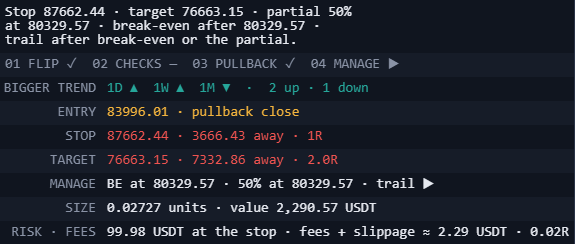
The Drift Desk Premium dashboard's plan rows: the plan's stop, target and partial, the four steps, the bigger trend on 1D, 1W and 1M, entry at the pullback close, stop, target, management, size and fees in R.
Real capture · the desk's plan rows · BINANCE:BTCUSDT 4h, TradingView, 25 Sep 2026 (cropped)
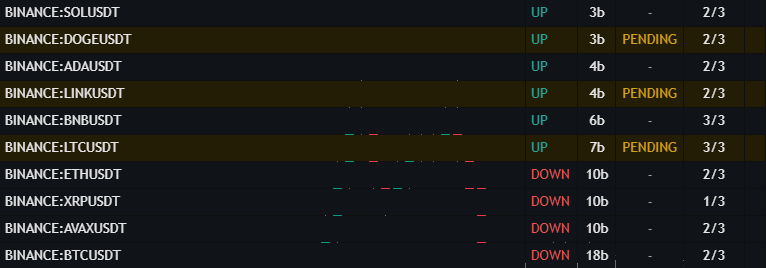
The Drift Desk Premium scanner's rows: ten Binance symbols, each with its trail state, bars since the flip, a pending pullback and its checks.
Real capture · the scanner's rows · on a BINANCE:BTCUSDT 4h chart, TradingView, 25 Sep 2026 (cropped)
What's in the download?
  • Drift Desk Premium: The Drift Desk engine, unchanged, with the Premium plan layer and dashboard on top.
  • Strategy Lab: The same entries and management with commission and slippage, in TradingView's Strategy Tester.
  • Watchlist scanner: Up to 20 symbols in one table, fresh flips first, and one alert for all of them.
  • Drift Desk 1.5.0: A reference copy of the library desk's indicator and its Strategy Lab (their MIT release), byte for byte as released.
  • AI Builder Kit: Open the folder in Claude Code, Codex, Cursor or Windsurf and ask in plain words: the agent knows the scripts, their rules and how to check a change.
  • Desk Builder Kit: The skill and templates we build every Desk with, to build your own Desk-style indicators with your AI agent.
  • Quick start: On your chart in five minutes.
What does Premium add to the library desk?

Drift Desk 1.5.0 in Pine Pro Library stays complete; Premium adds to it and takes nothing away.

Library deskPremium
The trail, its flips and the checks✓✓, the same engine
EntryAt the flip's closeAt the flip's close, or on the pullback
Bigger trend—1H, 4H and 1D on the desk; filter optional
SizeFrom a planned cash riskFrom your account and risk, to the lot step, in your currency
Costs on the desk—Fees and slippage in money and in R
ManagementA fixed stop and a 2R targetBreak-even, a partial and the trailing stop, each optional
Many symbolsOne chartA 20-symbol scanner with one alert
Your own Desks—The AI Builder Kit and the Desk Builder Kit

See Drift Desk in Pine Pro Library

Can I change how it looks?

Yes. The dashboard comes Compact or Full, in Dark, Light or Accessible colours, with a clean chart mode.

Does Premium include Pine Pro Library?

No. Premium runs on its own, with Drift Desk's engine inside. Pine Pro Library ($49 once: every library desk with its source and updates) is sold separately and does not include Premium; the Complete Suite includes both.

I have Academy Premium or the Complete Suite.

Both include Drift Desk Premium at no extra cost.

We, ProEA Lab, build Drift Desk and Drift Desk Premium. The code is AI-assisted. The film and the boards on this page run the desk's rules, simplified, on simulated markets, not market data; the two captures in the answers are real. None of it is a result or advice. Trading involves risk.