
Strategy Lab · optional
camarilla-desk-strategy.pine
A separate emulator for TradingView's Strategy Tester, with its own fills, sizing and costs; a chart reference is not its fill.
At the open it draws the Camarilla map from the previous session, checks which of twelve named plays can arm, and follows each from its setup to a target, a stop or the bell.
Session 1 · a play reaches ACTIVE
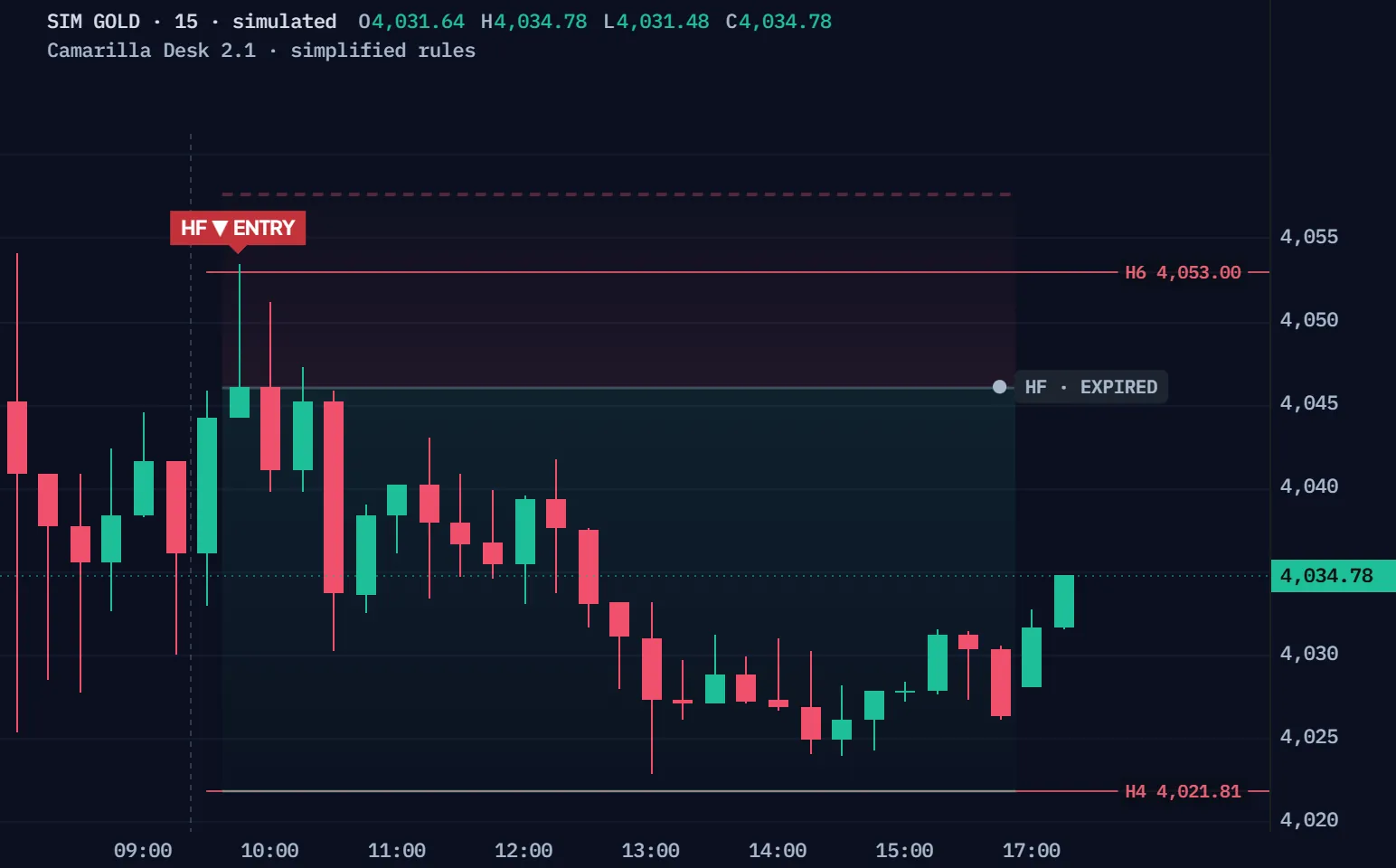
Simulated 15-minute gold bars, not a real market, run through Camarilla Desk's default rules, simplified for the browser: the map from the previous 09:30–16:00 New York session (the script reads it from one-minute bars), a daily ATR(14) from simulated daily bars, and twelve plays inside that window. The chart draws the script's Map: the session's seven levels, yesterday's before 09:30, and the tracked plan; its TRIGGER highlight and the H2/L2 band are left out. Session 1 is the first simulated session where a play reaches ACTIVE; Another session plays the next simulated sessions where a play arms, in order, whatever it does next.
| Time | Event | Prices |
|---|---|---|
| 09:15 | Window opens under the previous session's map | Close 4036.09 |
| 09:30 | Map set · RTH · HIGHER · WIDE | L3 3966.08 · PC 3984.66 · H3 4003.24 |
| 09:45 | HF SHORT · ARMED · Actual bar range touched the reference level | close < 4052.9952796614 |
| 09:45 | HF ▼ ENTRY · ACTIVE · H6 outer touch + recovery; close 4046.05 < H6 4052.9952796614 | Entry 4046.05 · stop 4057.65 · target 4021.82 |
| 15:45 | HF · EXPIRED · Decision session ended · no fill inferred | Entry 4046.05 · no fill inferred |
Full Pine v6 source in Pine Pro Library. It draws on your chart; you place the trades.
A play is a candidate from the open, arms on its setup, turns ACTIVE on a confirming close, and ends at its target, its stop or the bell.
HE · EXPIRED: Decision session ended · no fill inferred.
The same simulated 15-minute gold, simplified rules, one play with today's map. It is the first play in the replay's windows, in order, that is a candidate, arms, confirms and ends on four different closes, so each phase holds on screen. The state words and reasons are the script's own.
The opening inside the play's range, the context and the width, all at 09:30.
A touch and a close back (A, F), a closed break then a retest (B), an opening between the fourth and sixth levels (C, D), a close beyond then a failure (E).
The confirming close is the entry reference; the stop and target freeze with it, at 1R or more.
Each play arms once a session, whatever it does next; the last bar can end a plan but never start one.
The 09:30 opening, the context and the width decide which of the twelve plays can arm today.
A drawn example, not the simulation: only the opening, the context and the width change. Each verdict is the desk's own prerequisite rule.
Higher when the map's close sits more than two percent of the ATR above the close before it; H plays need Higher, L plays Lower.
Against the session before: A and E need Wide or Similar, B, C and D Narrow or Similar, F any.
Each play has its own range for the opening, edges included; outside it, the play waits for the next map.
A change within two percent of the ATR is Neutral; by default no play runs then.
A later bar settles an ACTIVE plan at its target or its stop; the session's last bar ends it with no fill.
A later bar reaches the target, and the plan ends there. HA ✓ TARGET: Reference destination touched on a later bar, +1.36R.
A drawn example, not the simulation: the film's run holds no open past the stop and no bar touching both. R is a reference distance, not a fill.
An A long's stop sits one tick under the lower of L4 and its setup's low; each family has its own.
An A long aims at H3, a B, C or D long at H6; both round to the tick, and the plan stands only at 1R or more.
An open past a level settles first; a bar touching both counts the stop.
At the session's end an ACTIVE plan is EXPIRED; no fill is inferred.
Two files, the complete v2.1.0, ready for TradingView's Pine Editor.
On a phone? Send this page to your desktop.
//@version=6// …// CARD: market/timeframe — standard time-based intraday bars, 1m through 1h.// CARD: idea — confirmed play states, frozen prior-source map and reference plans.// ACTIVE denotes an observed hypothesis, not a filled order or a validated edge.// See docs/engine-contract.md for exact rules and docs/build-report.md for evidence. indicator("Camarilla Desk · Open Source", "Cam Desk", overlay = true, behind_chart = false, max_lines_count = 220, max_labels_count = 160, max_boxes_count = 50, max_bars_back = 3000)const string CAM_VERSION = "2.1.0"const bool CAM_IS_LAB = false // PUBLIC LITE BASELINE PREREQUISITES · original closed-bar execution · no Premium parity.string CAM_FORMULA = "expanded6-v1"string camSourceGroup = "Source and decision clock"string sourceMode = input.string("Market default", "Pivot source", options = ["Market default", "Auto RTH/ETH", "RTH", "ETH", "Exchange daily", "Selected session"], group = camSourceGroup, display = display.none, tooltip = "Market default explicitly chooses RTH for non-crypto and Exchange daily for crypto. RTH/ETH require complete observed one-minute windows. Optional Auto RTH/ETH requires complete pre/postmarket coverage and freezes at the opening; it never silently falls back. Exchange daily remains a provider-defined daily/settlement source, never cash RTH.")string decisionMode = input.string("Auto", "Decision window", options = ["Auto", "US cash", "Exchange day", "Custom"], group = camSourceGroup, display = display.none, tooltip = "Auto uses Exchange day for crypto and US cash 09:30–16:00 New York for other assets. Set Custom for another exchange or a futures cash window.")string customSession = input.session("0930-1600", "Custom decision interval", group = camSourceGroup, active = decisionMode == "Custom", display = display.none)string customTimezone = input.string("America/New_York", "Custom IANA time zone", group = camSourceGroup, active = decisionMode == "Custom", display = display.none, tooltip = "Use an IANA region such as America/New_York. True overnight intervals use the ending trading weekday. Equal start/end is 24 hours and uses the starting calendar weekday.")bool customWeekdays = input.bool(true, "Custom weekdays only", group = camSourceGroup, active = decisionMode == "Custom", display = display.none)string regularSession = input.session("0930-1600", "RTH source interval", group = camSourceGroup, display = display.none)string regularTimezone = input.string("America/New_York", "RTH source IANA zone", group = camSourceGroup, display = display.none, tooltip = "Cash-session definition, including futures emulation. It is independent from the exchange's definition of regular trading.")string extendedClock = input.string("Auto", "ETH source clock", options = ["Auto", "Custom"], group = camSourceGroup, display = display.none, tooltip = "Auto: US equities 04:00–20:00 New York, futures 18:00–17:00 New York, crypto exchange day. Other venues require a Custom source clock.")string extendedSession = input.session("1800-1700", "Custom ETH interval", group = camSourceGroup, active = extendedClock == "Custom", display = display.none)string extendedTimezone = input.string("America/New_York", "Custom ETH IANA zone", group = camSourceGroup, active = extendedClock == "Custom", display = display.none)string closeMode = input.string("Match source", "Pivot close selection", options = ["Match source", "RTH", "ETH", "Exchange daily"], group = camSourceGroup, display = display.none)float switchingTolerance = input.float(2, "Auto excursion · % selected ATR", minval = 0, maxval = 100, step = 0.1, group = camSourceGroup, active = sourceMode == "Auto RTH/ETH", display = display.none)string camPrerequisiteGroup = "Public Lite baseline · confirmed prerequisites"float rangeThresholdPct = input.float(2, "Neutral close change · % selected ATR", minval = 0, maxval = 100, step = 0.1, group = camPrerequisiteGroup, display = display.none)float widthThresholdPct = input.float(2, "Similar width tolerance · %", minval = 0, maxval = 99, step = 0.1, group = camPrerequisiteGroup, display = display.none)bool allowNeutral = input.bool(false, "Allow both directions in Neutral", group = camPrerequisiteGroup, display = display.none)bool smaGate = input.bool(false, "Original SMA close confirmation", group = camPrerequisiteGroup, display = display.none, tooltip = "Optional original filter: confirmed long closes above the chart SMA, short below. This does not reproduce an undisclosed Premium SMA trigger.")int smaLength = input.int(20, "Chart SMA length", minval = 2, maxval = 300, group = camPrerequisiteGroup, active = smaGate, display = display.none)
No coding needed.
camarilla-desk-strategy.pine
A separate emulator for TradingView's Strategy Tester, with its own fills, sizing and costs; a chart reference is not its fill.
The full source: read it, change it, keep it.
The indicator draws; the Strategy Lab emulates fills and costs on a second chart.
Crypto maps from the daily bar; other markets from 09:30–16:00 New York.
A play activated and an episode ended, plus one JSON envelope for the events you select.
The page, the films and the manual are open to everyone. The code, both files, is in Pine Pro Library: $49 once for every desk and every update, or included in the Complete Suite. Sign in to copy or download.
No measured edge. Its checks cover how the program behaves, not trading results, and ACTIVE is a reference, not an order. What it can and cannot tell you says where it stops.
Its plan failed on the confirming close: under 1R after rounding, a target on the wrong side, or risk under one tick. The episode is spent; it does not chase another close.
No Camarilla features. It holds the other things we make, for one payment, Pine Pro Library among them, so this desk's code comes with it.
We, ProEA Lab, build Camarilla Desk. The films run its rules, simplified, on simulated candles, not market data; R is a reference distance, not a fill. Not financial advice.
Complete Suite · $97 · one payment
The Suite adds no Camarilla features; it includes Pine Pro Library.
Every rule, setting and check, one topic at a time.
Read the pivot map and session context. Follow each confirmed episode with its original entry, stop and target.
Seven visible levels · fourteen named plays · full source in Pine Pro Library
Camarilla Desk is a TradingView indicator in Pine Pro Library that builds a frozen session map from completed price data and tracks fourteen play hypotheses. It separates the source used for levels from the session clock used for decisions. Qualifying episodes receive fixed entry, stop and target references; these observations are not confirmed order fills.
The default map shows H6, H4, H3, previous close, L3, L4 and L6. Levels come from the selected completed source and freeze at the decision opening; they are Camarilla references, not floor pivots or CPR. See the map formulas
The map needs complete source coverage, a valid ATR basis and a known decision opening. Missing boundaries, stale sources or incomplete sessions can block interpretation. Check the resolved source and clock before treating a waiting row as a setup. Check source and session coverage
No. H names the Higher context, while SIDE identifies the direction of the hypothesis. Some Higher plays point short. Read the opening gate, approach region and confirmation rule together; the context label alone does not define an entry. Read the common play questions
Camarilla starts with earlier prices and calculates places to watch. This desk explains how price behaves at those places, then checks whether a named play qualifies. First, see where the lines come from.
The map comes from an earlier trading period. Here, its candles establish a high and low. While that period is still open, its final close is not known.
Change the close and wick. See the rule respond while the Camarilla map stays still.
Illustrated prices · four closed candles · fixed scale while you drag.
Opening, source and ATR edits restart this hypothetical replay. The earlier range is centred on its close. Source completeness and the ATR scalar are supplied assumptions: this lesson does not reconstruct a full session feed, ATR seed or missing-session recovery.
ATR Market default: observed RTH for futures unless the decision clock is Exchange day; Provider daily otherwise. This completed ATR(14) is supplied, not calculated or matched to Premium.
Candidate passes context, width and inclusive opening gates without a bad-OPEN latch. Approaching adds the strict price region. Neither is ACTIVE. Similar includes the two-percent width tolerance; ATR zero is unavailable. This lesson fixes structural risk, SMA off and one episode per session.
Explore HA/HB/HE here; all fourteen rules appear below. Recovery accepts either candle-body direction. Stops round outward and targets toward entry. Outcomes begin after activation, with opening gaps then stop-first touches. No broker fill is simulated.
Illustrative inputs · changing a slider recalculates this example · no market feed
Read each opening gate, setup, confirming close and ending.
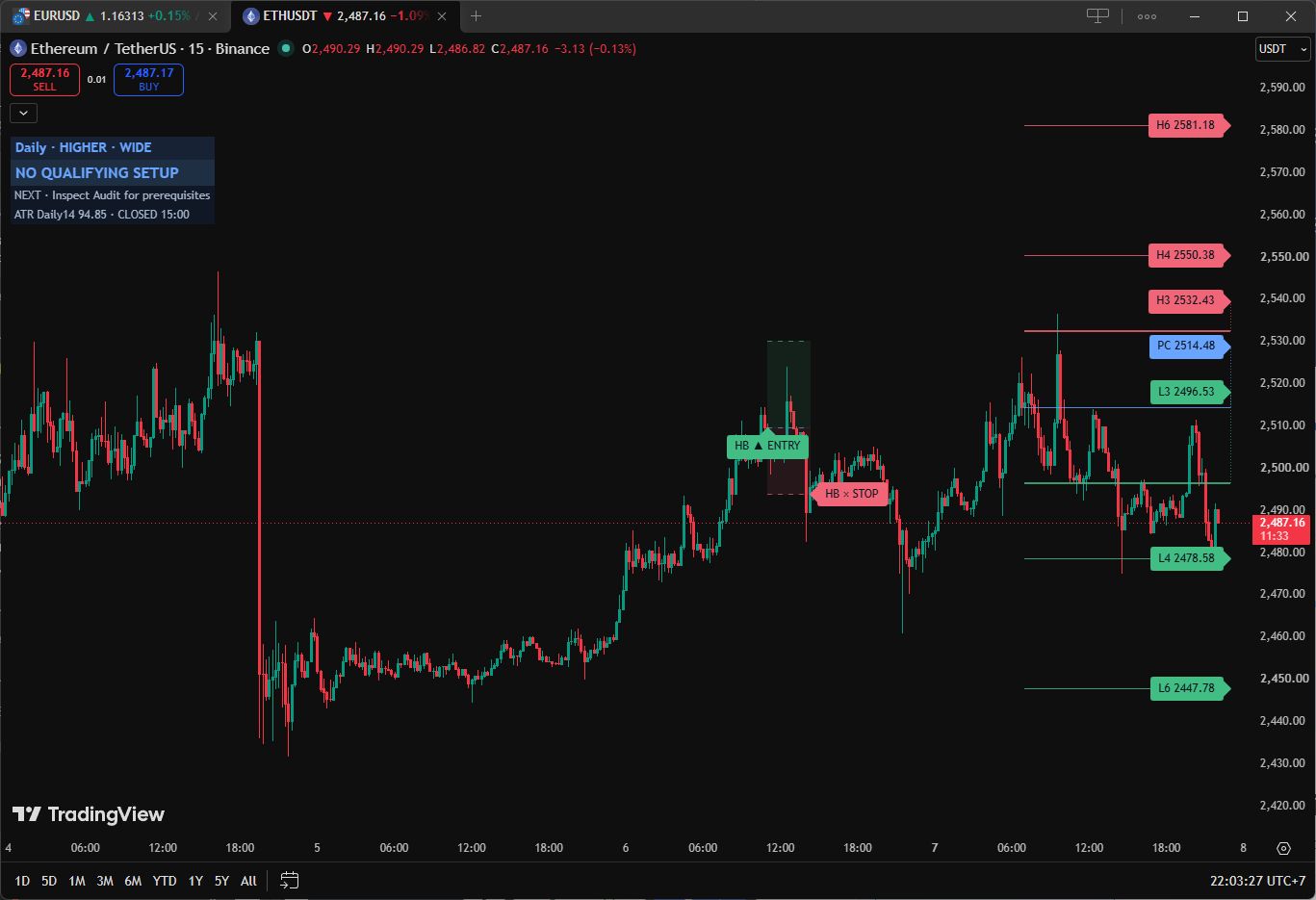
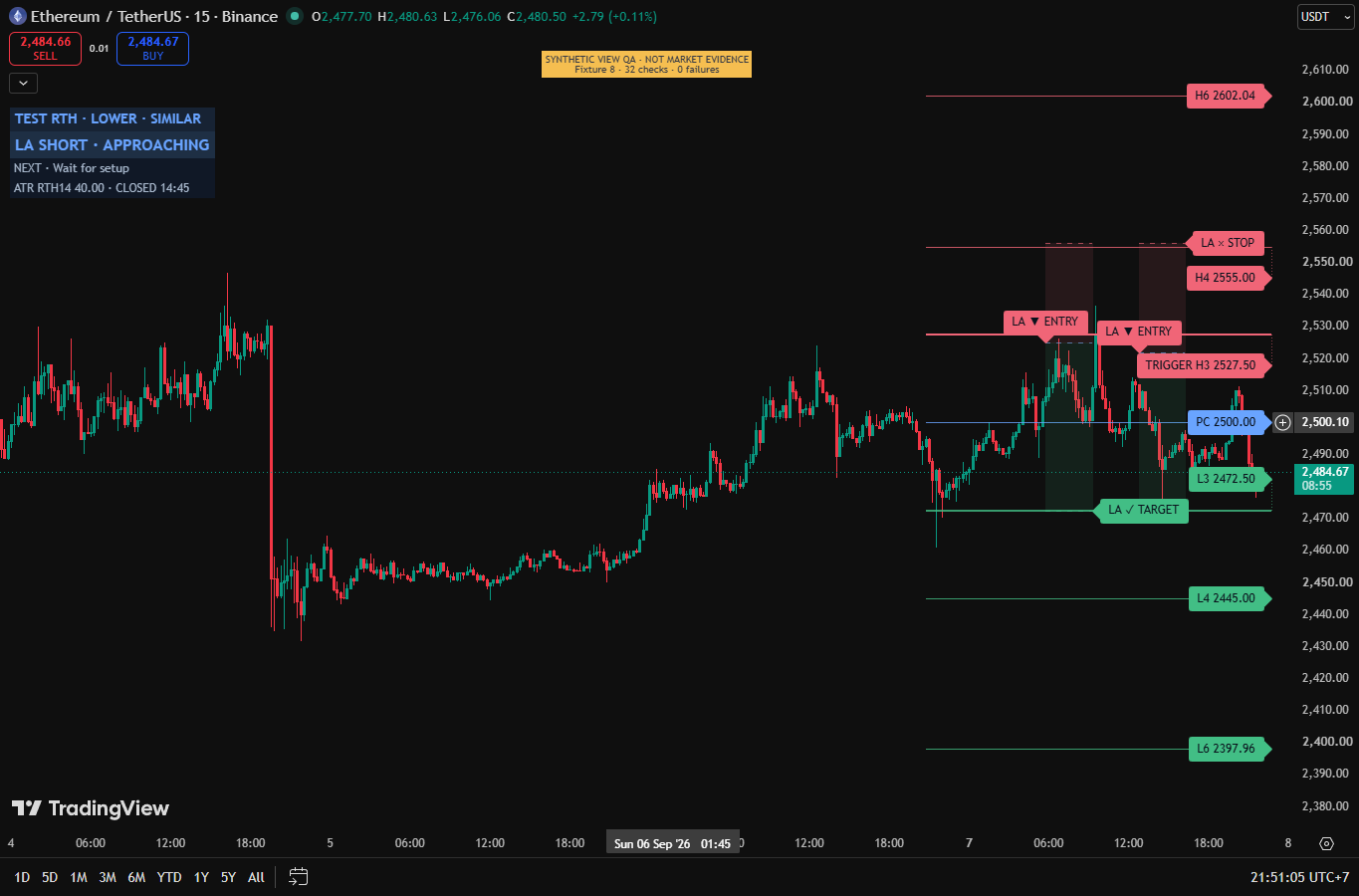
Default Top Left Ribbon: source, range, width. Trading Dark keeps seven levels visible. Open HUD or Inspector for detail.
Read all three before following a play. SOURCE and ATR basis remain separately inspectable.
Entry arrows, shaded reference regions and named outcomes identify the episode. Ended geometry stops at its recorded end, not a new entry.
Inspect any code’s prerequisites and NEXT. Manual selection cannot switch the tracked plan. Candidate, approach, armed and active remain distinct.
The detailed HUD dates the committed close and map. Display changes cannot change qualification or reference prices.
Complete sources in Pine Pro Library; sign in to copy or download. Use the installation walkthrough. Save each source separately.
Seven-level map, context ribbon, explicit ATR basis and frozen reference episodes.
v2.1.0 · SHA256 93e60db80ed8a14c475e5812404a0f50016edae741d122202b33db86b620664b
Optional broker emulator: independent fills, occupancy, sizing and costs; no claimed edge.
v2.1.0 · SHA256 16d881cad4a2acb7ab67a286c1b9b5e19e9d678f974afe1cb72c014a1f694e5f
Source identity manifest · Licence. Save the two scripts separately; adding the indicator does not run the Lab.
Strategy Lab separately emulates selected activations, occupancy, next-available fills, frozen brackets, sizing and costs. A HUD reference is not its fill. Verify settings and source-ready dates first.
Read each opening gate, setup, confirming close and ending.
Open the question you are working on. All original rules, experiments and settings remain here.
Map, opening and completed ATR freeze for the decision session.
H6, H4, H3, PC, L3, L4 and L6 have solid lines and right-side price tags. PC is the selected prior close. H/L also means R/S; H2/L2 are not floor-pivot CPR.
Higher means selected close exceeds its predecessor by more than two percent of frozen ATR. Lower mirrors it. Equality is Neutral; Neutral defaults off.
Compare H3−L3 widths. Ratios 0.98–1.02 are Similar, inclusive. A/E require Wide or Similar; B/C/D Narrow or Similar; F/G any valid width. Band overlap is separate context.
D = H − L; PC = selected C. H2/L2 = C ± 1.1D/6; H3/L3 = C ± 1.1D/4; H4/L4 = C ± 1.1D/2; H6 = (H/L)C; L6 = 2C − H6. H5 = H4 + 1.168(H4 − H3), with L5 mirrored, is audit-only.
Original sources must be positive and coherent; an independent close may lie outside chosen H/L. A needs valid inner geometry; other families also require outer levels.
Crypto uses completed Exchange daily data. Non-crypto uses configured RTH, initially 09:30–16:00 New York. A futures provider daily bar is never relabelled cash RTH.
Crypto follows Exchange day. Others use US cash. RTH/ETH intervals, custom sessions and IANA timezones are explicit; configure other exchanges deliberately.
H/L and close can use separate source pairs. ATR has its own basis and timestamp, independent of pivot selection.
OPEN UNKNOWN means wait. One-minute opening and chart boundary coverage must be known; loading mid-session cannot certify missing bad-OPEN history.
ATR Market default selects observed RTH-session ATR(14) for futures unless the decision clock is Exchange day; Provider daily ATR(14) otherwise. Explicit selections override. RTH true ranges use complete sessions, not chart candles.
Fourteen complete observed RTH sessions seed the mean true range, then Wilder smoothing updates it. An observed incomplete or malformed session resets the chain; entirely absent dates are skipped. Missing, nonpositive or more than seven elapsed days old means ATR WAIT without fallback. Basis, value, accepted timestamp, chain start and sample count freeze at decision opening. This aggregation is not verified Premium private-formula parity.
Auto requires complete aligned pre/postmarket windows, coherent source pairs and ATR. Excursion strictly beyond the ATR tolerance chooses ETH; equality chooses RTH. Missing coverage blocks it. There is no silent fallback.
Market default needs no extended-hours data. Auto freezes at decision opening.
RTH/ETH/Selected session require observed one-minute boundaries, continuous coverage and valid OHLC. The 100,000 minutes requested cover about 69 continuous crypto days; visible chart history can extend farther.
Source pairs must be ordered, completed by decision opening and at most seven elapsed days old. Incomplete windows occupy the slot; absent windows are not classified as holidays. Coarse charts can use a known minute opening after an observed straddled boundary; missing chart coverage blocks.
Malformed OHLC clears previous-close knowledge; clock expiry continues. Overnight weekdays follow the ending date, full local days the starting date. Repeated/skipped DST endpoints remain unverified.
H/L names structure, not direction. O is frozen opening; C is latest committed close. Opening intervals include equality. Approach intervals are strict. A/E accept Wide or Similar, B/C/D Narrow or Similar, F/G any valid width.
| PLAY / CONTEXT / SIDE | OPENING GATE | APPROACH REGION | ORIGINAL SETUP → CONFIRMATION | STRUCTURAL DESTINATION |
|---|---|---|---|---|
| HA · L3 bounceHigher · long | L2 ≤ O ≤ H2 | L4 < C < PC | Touch L3; close above. | H3 |
| LA · H3 fadeLower · short | L2 ≤ O ≤ H2 | PC < C < H4 | Touch H3; close below. | L3 |
| HB · H4 break + retestHigher · long | L2 ≤ O ≤ H3 | H3 < C < H6 | Closed break above H4; later containing retest and close above. | H6 |
| LB · L4 break + retestLower · short | L3 ≤ O ≤ H2 | L6 < C < L3 | Closed break below L4; later containing retest and close below. | L6 |
| HC · H4 continuationHigher · long | H4 ≤ O ≤ H6 | C > H3 | Approach arms; touch H4 and close above. | H6 |
| LC · L4 continuationLower · short | L6 ≤ O ≤ L4 | C < L3 | Approach arms; touch L4 and close below. | L6 |
| HD · L4 counterHigher · short | L6 ≤ O ≤ L4 | C < L3 | Approach arms; touch L4 and close below. | L6 |
| LD · H4 counterLower · long | H4 ≤ O ≤ H6 | C > H3 | Approach arms; touch H4 and close above. | H6 |
| HE · H4 failureHigher · short | L2 ≤ O ≤ H3 | H3 < C < H6 | Close above H4 arms; later close below confirms failure. | L4 |
| LE · L4 failureLower · long | L3 ≤ O ≤ H2 | L6 < C < L3 | Close below L4 arms; later close above confirms failure. | H4 |
| HF · H6 rejectionHigher · short | H4 ≤ O ≤ H6 | C > H4 | Touch H6; close below. | Wide: H4; otherwise PC |
| LF · L6 rejectionLower · long | L6 ≤ O ≤ L4 | C < L4 | Touch L6; close above. | Wide: L4; otherwise PC |
| HG · L6 rejectionHigher · long · optional | L6 ≤ O ≤ PC | C < L4 | Touch L6; close above. G defaults off. | Wide: L4; otherwise PC |
| LG · H6 rejectionLower · short · optional | PC ≤ O ≤ H6 | C > H4 | Touch H6; close below. G defaults off. | Wide: H4; otherwise PC |
A touch means low ≤ tier ≤ high. A wrong-side gap is not a touch. Previous contained close starts at the known opening. B requires a strict closed crossing, with previous equality allowed.
Check every valid contained candle OPEN, not wick. Strictly outside these limits blocks the code until a new session: HA [L4,H2]; LA [L2,H4]; HB/HE [L2,H6]; LB/LE [L6,H2]; HC/LD/HF [H3,U]; LC/HD/LF [D,L3]; HG [D,PC]; LG [PC,U]. U = H6 + 0.5(H6−H4), D = L6 − 0.5(L4−L6). Equality does not block.
A blocked pending setup invalidates. ACTIVE retains its ending rules; recovery cannot clear the block.
A/F/G can touch and recover on the setup candle. Wrong-side touches need a later recovery from the previous wrong-side close. C/D can arm and confirm on a containing approach candle. B/E need a later bar. Confirmation still needs approach region, optional SMA alignment and acceptable geometry.
Flags describe prerequisites, not ranking. Multiple hypotheses, including opposite directions, may coexist.
Cancellation precedes confirmation. Pending A long cancels at close ≤ L4; short at ≥ H4. B/C/D long at ≤ H3; short at ≥ L3. E long at ≤ L6; short at ≥ H6. F/G have no additional pivot cancellation. A bad OPEN invalidates pending setups.
Setup confirmation is allowed through age twelve; age thirteen expires first. Price outcomes precede active expiry at age 120 and known session end. Final session close cannot start ACTIVE. Rollover expires an unfinished episode without inventing a fill.
Factory: one episode per code per session, consumed when armed, including failures. Optional rearming requires cooldown, remaining budget and valid unblocked prerequisites. Cooldown three permits reset at end-bar plus three, never on the ending bar. Rearming cannot clear a bad-OPEN latch.
ENTRY REF is the confirming close; direction, stop, target, time, source and settings freeze with it. R measures distances, not fills or returns.
A stop is beyond the farther of fourth tier and armed extreme. B/C/D use H3 for longs or L3 for shorts. E extends beyond outer tier and armed extreme. F/G extend beyond both armed extreme and one-quarter of fourth-to-third spacing outside the sixth tier.
The outward buffer defaults to one tick. Long stops round down, short stops up; targets round toward the activation close. Entry retains sub-tick precision. Prices must be positive, direction correct, risk at least one tick and ratio at least 1R after rounding.
Stop and target can independently use configurable multiples of frozen ATR. Optional maximum target distance rejects geometry without moving its destination. The lesson uses structural defaults; SMA and ATR alternatives are not simulated.
No activation-bar outcome. Later stop gaps use observed open; target gaps use fixed target. Otherwise stop touch precedes target touch. If both touch, ambiguity is marked instead of inferring an intrabar path.
Invalid or uncontained OHLC cannot settle price outcomes; clock expiry continues. Ended snapshots retain references and end time as LAST REFERENCE. Current distance uses last closed price; it does not move the plan.
Market default source and ATR basis; Auto clock; matching close. Display: Ribbon, Top Left, Trading Dark, seven levels with right tags; 12% header clearance. Range threshold and Similar tolerance both two percent. A–F on, G off, Neutral off. Structural stop and target, one-tick buffer, minimum 1R, setup twelve, active 120, SMA off, rearming off, one episode.
Exact input names and factory defaults from the current source. The explanations above show how they fit together. A disabled option may require its parent switch.
Market defaultAuto0930-1600America/New_Yorktrue0930-1600America/New_YorkAuto1800-1700America/New_YorkMatch source2Market default22falsefalse20truetruetruetruetruetruefalse121201.01Structural0.25Structural0.50false31truetruefalseRibbonOffTrading DarkMapMediumAutofalseTop LeftBottom Left12truefalsetrue212Righttrue14All · fixed code orderBoth0.590001 Jan 2020 00:00 +000001 Jan 2099 00:00 +0000trueTwo alert conditions cover activation and episode ending. One “Any alert() function call” alert aggregates selected same-bar events into JSON. Armed events default off.
In TradingView’s alert dialog the two conditions are named “Camarilla play activated” and “Camarilla episode ended”. The envelope from “Any alert() function call” opens with {"schema":"camarilla-desk.v2","product_version":"2.1.0","rule_version":"lite2-prerequisites.original2.1-execution", …} and lists each event’s code, direction, time and fixed references.
The envelope includes settings, symbol, timeframe, source/session and frozen ATR provenance, with no confirmed fill. Recreate alerts after code, input, symbol or timeframe changes. Indicator: named condition or “Any alert() function call”. Strategy Lab: alert() calls for structural JSON; order fills are a separate broker event stream. No alerts are created here.
Map and plan freeze at decision opening and activation respectively. Forming bars do not commit changes. Input/history changes recalculate; display changes only presentation.
H names Higher context; SIDE names direction. HE/HF are short hypotheses, while HD is opposed continuation.
Wrong-side destination, unusable risk or insufficient rounded ratio rejects confirmation and consumes the episode. It does not chase another close.
What shipped and what changed in Camarilla Desk, newest first. Ask for the next change below; what gets built lands here with a date, and on the lab queue on the front page.
Seven levels, clearer prerequisites and ATR v2.1.0 Updated Camarilla Desk
The map, ATR basis, fourteen play rules and separate Strategy Lab now match the current release.
Camarilla Desk v2.1.0 Shipped
Builds a session map, then checks a potential trade.
A small friction or a big idea. Tell us what would make this tool work better for you.
Requests for a new tool go on the same queue: see what is asked for and what is being built.
FULL PINE V6 SOURCE · CLOSED-BAR RULES · REFERENCE LEVELS