
Strategy Lab · optional
supply-demand-desk-strategy.pine
The same rules as broker orders for TradingView's Strategy Tester, filled at the next open, with its own sizing and costs.
It marks where a strong move began, waits for a pullback and a raid back into that zone, and makes a paper reference with a fixed stop and a 4R target.
Reference 1 · the run's first
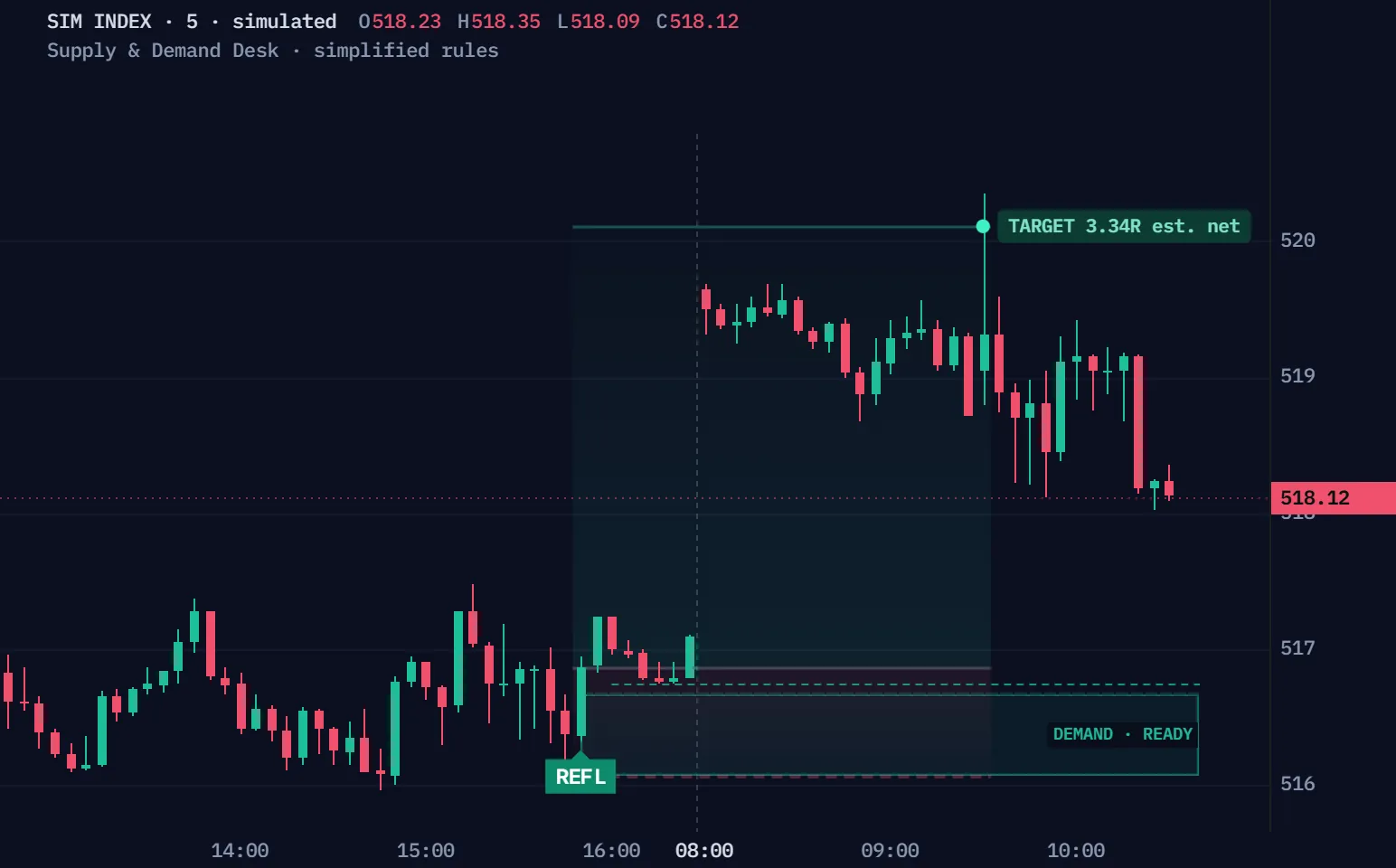
Simulated five-minute index bars, not a real market, run through Supply & Demand Desk's default rules, simplified for the browser. The chart draws what the script's Clean view draws at each close (its four newest live zones, their stage and their front line) and its paper reference (the entry at the signal close, the stop a tick past the raid, a 4R target, 48 bars at most). R is after the script's own cost estimate: commission on both prices and a tick of slippage each way. Reference 1 is the first simulated paper reference of the run; Another reference plays the next references in order, each after the window before it ends, whatever they do.
| Time | Event | Prices |
|---|---|---|
| 14:05 | Window opens | Close 516.41 |
| 14:50 | A demand zone departs (the one this window follows) | Zone 515.96–516.27 |
| 15:00 | The pullback begins | Front 516.62 |
| 15:10 | READY · the origin breaks | Front 516.29 |
| 15:45 | A raid into the zone · wait for a bullish close | Low 516.07 |
| 15:50 | REF L · 516.87 | Stop 516.06 · 4R target 520.11 |
| 09:30 | TARGET · 3.34R est. net | Exit 520.11 |
Full Pine v6 source in Pine Pro Library. Five-minute charts; it draws on your chart, and you place the trades.
A zone starts at its base, and the script waits for a pullback, a close past its origin, then a raid back into it and a close outside.
The bullish close makes the paper reference: REF L at 516.87, stop 516.06, target 520.11.
The same simulated five-minute index, simplified rules: the replay's window 1, up close. The stage words are the script's own.
An opposite-colour candle, then a close past it; the zone runs from the wicks to the base's edge.
The move away reaches 0.8 ATR past the zone's edge before the pullback begins.
Two pullback bars, a close past the origin, and the pullback's low in the half of the move nearer the zone.
A wick past the pullback's low into the zone, then a close outside it within three bars.
Move the pullback's low, and the script's own rule says whether the zone turns READY.
A drawn zone, not the simulation: the page's lesson candles, ATR 10. The verdict is the engine's own.
Half of the move from 104.00 to 118.00: a low above 111.00 stops too far from the zone.
A pullback that reaches the zone before READY ends it.
The close past the origin must come after two pullback bars.
A pullback still waiting more than 20 bars after it began expires.
The script prices every ending after its own cost estimate, and on a five-minute stop that estimate is large.
Reference 1 reached its 4R target: +4.00R before costs, +3.34R est. net.
The run's first reference to end each way. Before costs is the move in R; est. net is the script's own formula, commission on both prices and a tick of slippage each way.
Four times the risk from the entry, rounded away from it to the tick.
One tick beyond the deepest wick of the raid; an open past it fills at the open.
A reference still open after 48 bars ends at that bar's close.
Commission on both prices and a tick of slippage each way, set in its inputs.
Two files, the complete scripts, ready for TradingView's Pine Editor.
On a phone? Send this page to your desktop.
//@version=6// …// Not Mangoe's official script or private-method parity. See docs/engine-contract.md.// Signal-close paper references differ from next-open Strategy Lab fills.indicator("Supply & Demand Desk · Open Source", "SDD", overlay = true, behind_chart = false, max_boxes_count = 40, max_lines_count = 100, max_labels_count = 100, max_bars_back = 2000)const string SDD_VERSION = "1.0.0"const bool SD_IS_LAB = false // Original closed-bar subset of a public discretionary method. Read docs/engine-contract.md.string sdG = "01 · Setup rules"float sdImpulse = input.float(0.8, "Minimum departure · ATR", minval = 0.1, maxval = 5, step = 0.1, group = sdG, tooltip = "Original strength threshold, measured from proximal edge to departure extreme. Birth ATR is frozen.", display = display.none)int sdRetrMin = input.int(2, "Minimum retracement bars", minval = 2, maxval = 8, group = sdG, tooltip = "Observed retracement bars before the breakout bar; colors may mix.", display = display.none)float sdNear = input.float(0.5, "Front liquidity · maximum setup fraction", minval = 0.1, maxval = 1, step = 0.05, group = sdG, tooltip = "Demand: (front low − proximal) / (originating high − proximal). Supply mirrors. Our explicit near-half formalization.", display = display.none)bool sdAccuracy = input.bool(false, "FX accuracy drawing", group = sdG, tooltip = "Optional public FX drawing variant. Excludes a protruding proximal base wick. Default full-wick drawing applies to all symbols; no automatic asset classification.", display = display.none)int sdRetrWait = input.int(20, "Retracement deadline · bars", minval = 3, maxval = 60, group = sdG, display = display.none)int sdZoneAge = input.int(120, "Zone lifetime · bars", minval = 10, maxval = 500, group = sdG, display = display.none)int sdVisitAge = input.int(3, "Entry visit deadline · bars", minval = 0, maxval = 12, group = sdG, tooltip = "Age0 is first touch. Default ages0..3 can confirm; age4 expires. Opposing-color wick rejection may wait for a later directional close.", display = display.none)bool sdTrendGate = input.bool(false, "Require chart-local HH/HL or LH/LL", group = sdG, tooltip = "Optional original gate: last two confirmed two-left/two-right swing highs and lows. No HTF request. Neutral or incomplete structure blocks when enabled.", display = display.none)string sdP = "02 · Paper reference"float sdStopPad = input.float(0, "Stop pad · ATR (minimum one tick)", minval = 0, maxval = 1, step = 0.05, group = sdP, display = display.none)float sdReward = input.float(4, "Target · R", minval = 1, maxval = 10, step = 0.5, group = sdP, tooltip = "4R follows the public 2026 five-minute course. Changing this is your variant. Rounded actual R may be slightly greater.", display = display.none)int sdHold = input.int(48, "Maximum paper hold · bars", minval = 1, maxval = 288, group = sdP, tooltip = "Ordinary stop/target checks first, then close at the observed candle close. Broker Lab uses its own next-open market exit.", display = display.none)float sdCash = input.float(100, "Cash risk budget · symbol currency", minval = 0.01, group = sdP, display = display.none)float sdCap = input.float(90000, "Notional cap · symbol currency", minval = 1, group = sdP, display = display.none)float sdFee = input.float(0.05, "Estimated commission · % per side", minval = 0, maxval = 2, step = 0.01, group = sdP, display = display.none)int sdSlip = input.int(1, "Estimated slippage · ticks per side", minval = 0, maxval = 20, group = sdP, display = display.none)bool sdJson = input.bool(true, "JSON alert events", group = "03 · Alerts", tooltip = "Create one alert using Any alert() function call. Reference events are not broker fills. Strategy Lab can emit these paper-reference events independently from its order-fill alerts.", display = display.none) // === TYPES AND PURE HELPERS ===type SdConfig float impulse = 0.8 int retrMin = 2
No coding needed.
supply-demand-desk-strategy.pine
The same rules as broker orders for TradingView's Strategy Tester, filled at the next open, with its own sizing and costs.
The full source, to read, change and keep; owners sign in to copy.
The indicator draws and plans; the Strategy Lab sends its orders to the Strategy Tester.
Standard five-minute candles; the films here use a simulated index.
A paper reference, its end, and each zone condition; a reference and its end also send a JSON message.
The page, its films and the manual are open to everyone. The code, both scripts in full Pine v6 source, is in Pine Pro Library: $49 once for every desk and every update, or included in the Complete Suite. Sign in to copy or download.
No. It is the script's reference at the signal close, and it places no order. The Strategy Lab sends broker orders, filled at the next open.
R here is after the script's own cost estimate: commission on both prices and a tick of slippage each way. On a short five-minute stop that estimate can be larger than the stop itself.
No. It is our original automation of a public five-minute course's rules, with thresholds we chose; it is not an official script.
No measured edge. The release's checks are software checks, not results; What the release has established keeps them and their limits.
Everything we make, for one payment, Pine Pro Library included. It adds no Supply & Demand Desk features; this desk's code comes with it.
We, ProEA Lab, build Supply & Demand Desk. The films run its rules, simplified, on simulated candles, not market data. Not financial advice.
Complete Suite · $97 · one payment
The Suite adds no Supply & Demand Desk features; it includes Pine Pro Library, so this desk's code comes with it.
Every rule, setting and check, one topic at a time.
Supply & Demand Desk v1.0 · original rules
See where a strong move began, follow price back to that area, then check whether an entry is ready.
Standard five-minute candles. Reference plans are not orders.
Supply & Demand Desk is a TradingView indicator in Pine Pro Library that follows a price zone from its formation to a return and qualifying entry. Designed for standard five-minute candles, it checks departure, pullback, liquidity and rejection before fixing a paper entry, stop and target. A separate strategy script supports broker-emulator testing.
A zone begins with a directional departure, then needs enough movement, a qualifying pullback and a later closing break. A newly drawn area is not ready for entry; a premature touch or expired setup can invalidate it. Read the zone-formation rules
No. The visit must pass front liquidity, intersect the ready zone and produce a qualifying close. Risk geometry, an existing paper plan, conflicting conditions or the optional trend gate can still block an entry. Follow the entry sequence
No. The indicator records a plan from the confirming close, while Strategy Lab uses broker-emulator orders, sizing and trading costs. Fill timing and independent position rules can differ, so compare the two models before interpreting results. Compare the two execution models
When price moves sharply away, mark its starting area. The tool watches a later return and checks a sequence before proposing an entry.
The thick body joins the opening and closing prices. The thin wick reaches the high and low. This red candle closed lower than it opened.
Fictional prices, standard five-minute candles, supplied ATR(14) value 10 and tick 0.25. Default full-wick zones and strength filter; optional trend filter off. The move reaches 14 above the zone before pulling back, exceeding the required 8. This shows one zone, not a complete market calculation. No orders, costs or outcome are simulated here.
The area gives you somewhere to watch. The entry checks tell you when the tool is ready; the stop defines where the plan fails. A target is a planned distance, not a promised result. Section 01 connects these parts.
This original automation subset draws on Mangoe’s public five-minute Liquidity Supply & Demand course. It is not his official indicator. The numerical thresholds, equality rules and accounting policies in the full rules are our explicit choices.
Supply mirrors demand. The zones and “liquidity” levels come from candle prices; they do not reveal resting orders or prove why traders bought or sold.
Follow the fictional candles into the area. Compare a waiting candle, an accepted entry and a losing outcome.
Fictional five-minute candles. The scale stays fixed as you edit the close. A historical base anchor does not mean the zone was known before its departure close.
Wait for the first departure close beyond the base high.
The teaching model supplies ATR(14) value 10 and tick 0.25; trend filtering is off. It computes the shown sequence, excluding the breakout from the two earlier retracement bars. It does not reconstruct market data, size a position, include costs, or emulate broker fills.
Read these three parts in this order.
The rectangle marks an earlier move’s starting area. A ready zone is worth watching; a visit means price has returned. Neither is an entry by itself.
The dashboard says which check is missing. A condition alone is not an accepted entry: another plan or a conflicting setup can still block it.
Read all three together when a plan is accepted. The default target is four times the initial entry-to-stop distance: 4R. An ended plan is history, not a current position.
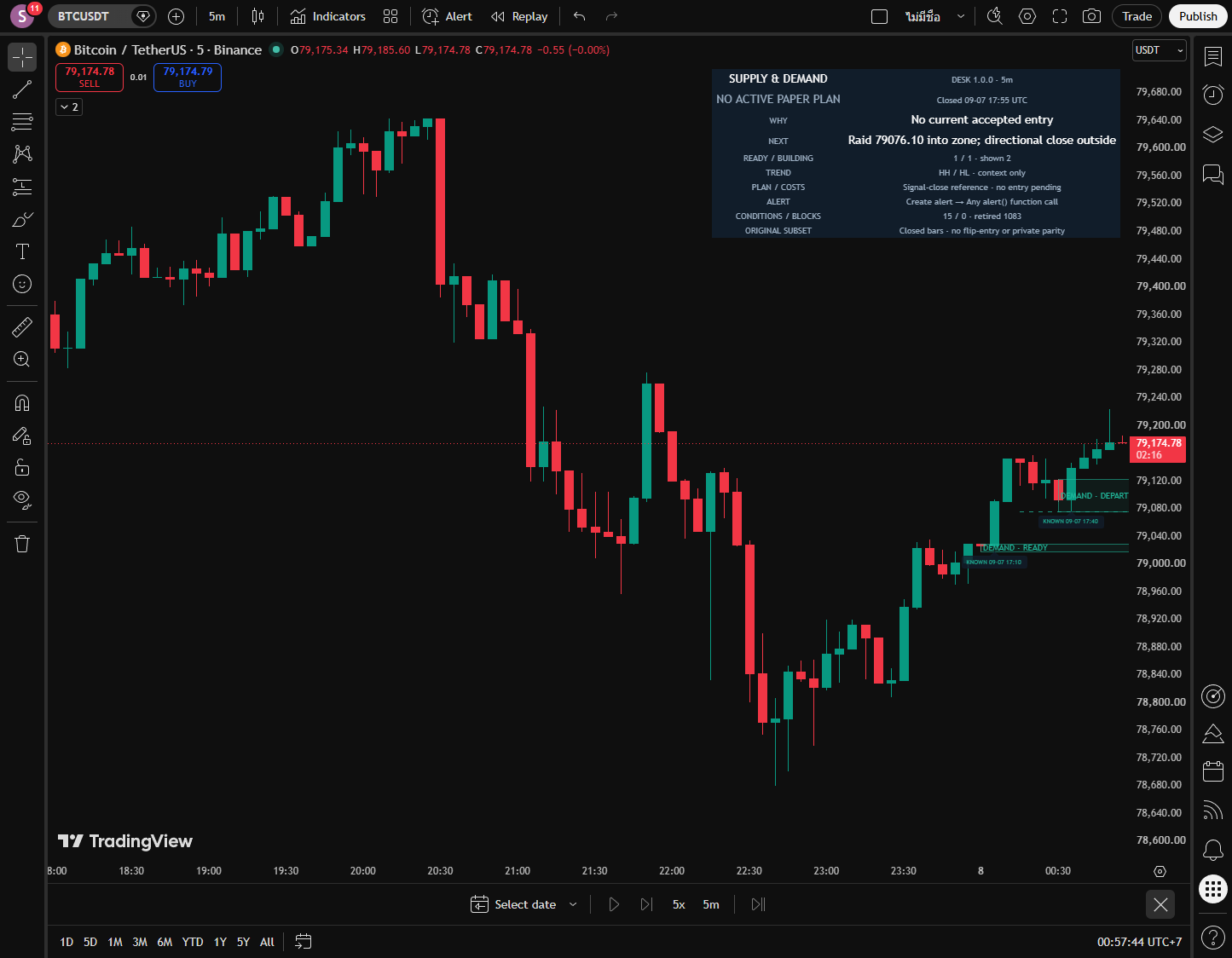
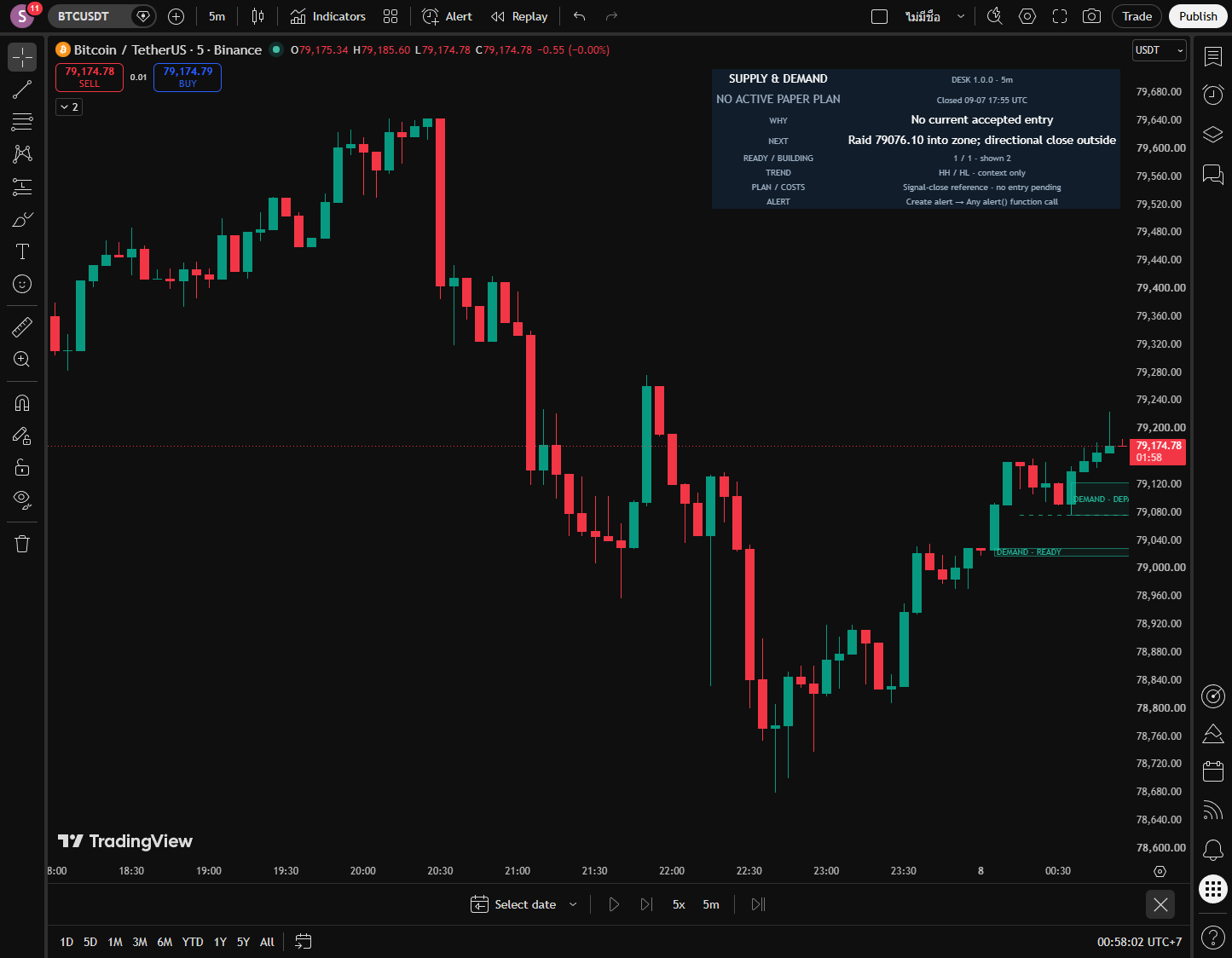
Both charts are unmodified TradingView captures of this release. Source and image identities.
Complete Pine v6 source, in Pine Pro Library.
Use a standard five-minute chart with enough history for ATR14.
Replace the editor contents with the full indicator source. Save it and choose Add to chart. Save the separate Lab as a different script for broker testing.
If it says “ATR14 history unavailable” or “Waiting for ATR history”, load more chart history. Keep defaults initially, then test one change at a time.
Explains zones, confirmed conditions and frozen reference plans.
Copy the code as it is. No coding needed.
Tests independent orders, fills, sizing and declared costs.
Copy the code as it is. No coding needed.
Release identity and file hashes · Licence
Pine Editor installation walkthroughOpen the detail you need.
A directional departure after an opposite candle creates the zone at its first close. Default bounds use the base's full range, extended only by a lower departure wick for demand or a higher one for supply. The edge facing the departed price is proximal; the far edge is distal. At the first pullback candle, the move must have reached at least 0.8 ATR beyond proximal, using ATR frozen at the zone's birth.
Its pre-retracement extreme becomes a fixed break level. At least two retracement bars must finish before a later strict close breaks that level. The breakout candle cannot count as the second retracement. Front liquidity must remain outside the zone and in the nearer half of the departure.
These thresholds and the optional FX wick adjustment are original formalizations. Five-minute standard candles are required; other chart types do not produce valid conditions.
After readiness, price must pass front liquidity and actually intersect the zone. Demand then needs a bullish close strictly above proximal; supply needs a bearish close strictly below. An opposite-color rejecting candle can wait, but a close on the adverse edge invalidates first.
The deepest wick is tracked from first visit through confirmation. Visit age zero through three is allowed; age four expires. A zone has one condition, even if plan admission is blocked. There is no automatic re-entry.
In the lesson, entry 108 minus stop 101.75 gives initial risk 6.25, called 1R. Four times that distance is 25, so the 4R target is 133. This is distance before costs, not a chance of winning.
Entry is the confirming close reference. Stop sits beyond the deepest visit wick by at least one tick; optional ATR padding increases that distance. Stop and target round outward to the instrument's tick grid. Default target is four initial risk distances away.
A reference plan cannot exit on its entry candle. On later bars, an open already beyond a reference uses that open. Otherwise touching both stop and target records an ambiguous STOP. A 48-bar hold deadline checks ordinary outcomes before a close-based time exit. No trailing, breakeven move or partial profit is assumed.
Projected net-at-target includes estimated costs. Nonpositive projection does not automatically block admission in this version. It is a scenario calculation, not an expectation or probability.
Only one paper plan is active. The optional chart-local trend filter runs first: long needs HH+HL, short LH+LL, from two-left/two-right confirmed swings. It defaults off; neutral or unavailable structure blocks when enabled. Opposite trend-eligible conditions then conflict before geometry selection. Same-side conditions choose the smallest valid risk distance, then the oldest zone.
Bad metadata, zero rounded quantity or unusable risk also blocks admission. A plan that exits on this bar cannot be replaced on the same bar. No condition is recycled after it is consumed.
A zone touched after departure but before readiness is invalidated. Total age 120 is allowed; age 121 expires. Retracement age 20 is allowed; age 21 expires before a breakout, measured from the first retracement bar. Malformed observed OHLC clears pending setups and ends an active reference as unpriced DATA GAP.
Ages count observed bars. Missing timestamps do not create invented candles. The desk retains at most 32 zones: it removes the oldest ended zone first, or the oldest live zone if none has ended. It keeps six ended paper plans. Inputs and loaded history can change a recalculated result; display controls do not change the engine.
All 21 indicator inputs are also in the Lab, with the same defaults. The Lab adds two sizing inputs. The TradingView names below help you find each setting.
These rules use completed, standard five-minute candles. ATR describes recent price movement; the departure test freezes its value when the zone is born.
Paper sizing uses the symbol’s currency and rounds quantity down. These estimates describe the indicator’s reference plan; the Lab owns separate broker sizing and costs.
Creating or changing an input does not create an alert. Reference messages and Lab order-fill messages are different streams.
The Lab keeps the shared paper inputs, then adds these two broker sizing controls. It converts account-currency amounts to the symbol’s currency before rounding quantity.
Display controls do not change the engine. The desk can remain visible when Chart view is Off.
These are the shipped broker-test defaults, separate from script Inputs. Saved Properties can override them. Changing paper fee, slippage or sizing inputs does not replace the Lab settings below.
The Lab submits its bracket with the signal and normally fills at the next available open. It owns its position and deadline independently of paper outcomes. A partial margin exit keeps the remaining position's bracket.
Defaults include 100,000 initial capital, fixed risk 100, 90-percent equity notional cap, 0.05-percent commission per side and one tick of slippage. Actual broker fills, currency conversion, gaps and costs can differ from chart references. Configure Properties for the instrument and inspect complete outcomes.
Choose Paper entry reference when you want an accepted entry, rather than Zone condition confirmed for every qualifying condition. Paper reference ended is the separate final-outcome condition. Any alert() function call provides the structured lifecycle message. Recreate alerts after source, symbol, timeframe or input changes.
Indicator reference alerts are not broker fills. Lab order-fill notifications are a different stream. This page creates no alert and proves no notification delivery.
The interactive lesson explains a stated hypothesis using fictional candles. It does not measure a trading edge. The download record pins the exact source and actual chart images. Compilation, synthetic cases, real chart checks and broker reconciliation are distinct software checks; none establishes an economic advantage.
The untouched MNQ Strategy Lab sample in the release checks lost money after declared costs. That sample does not establish future performance; it is a reason to inspect losing trades as well as the entry logic. No private indicator parity, success probability or automatic profitability is claimed.
What shipped and what changed in Supply & Demand Desk, newest first. Ask for the next change below; what gets built lands here with a date, and on the lab queue on the front page.
Supply & Demand Desk v1.0.0 Shipped
Checks a return to a price area before planning entry.
A small friction or a big idea. Tell us what would make this tool work better for you.
Requests for a new tool go on the same queue: see what is asked for and what is being built.
Explore the other library desks · Compare Sweep Desk's inversion-close model