
Strategy Lab · optional
sweep-desk-strategy.pine
The same rules as orders for TradingView's Strategy Tester, with commission and slippage on from the first bar.
It marks prior highs and lows as pools, waits for a liquidity sweep and a gap that inverts, and draws a plan only if a 60-minute gap was just touched for the first time.
Day 1 · the first after the warm-up to reach TP1
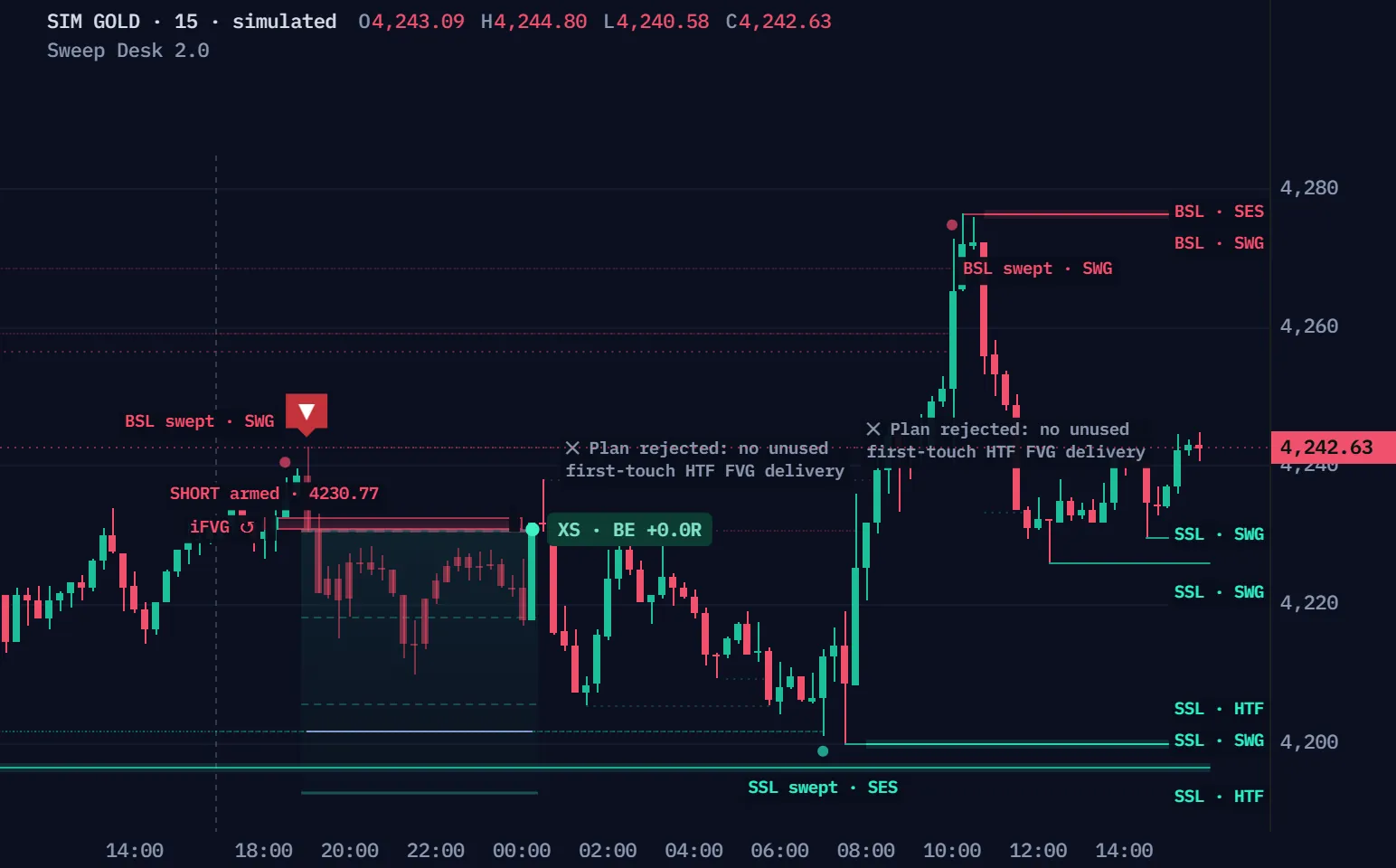
Simulated fifteen-minute gold candles from our seeded market model, not a real market, read by Sweep Desk 2.0.0's own rules, checked bar by bar against TradingView. The model plants stop runs at untouched swings; some reverse. R is as the script counts it: paper, before costs. Day 1 is the first simulated day after the warm-up whose plan reaches TP1; Another day plays the next simulated days with a plan, in order, whatever they did; each plays one New York day, then runs on until that day's plans have ended.
| Time | Event | Prices |
|---|---|---|
| 13:30 | ✕ no shift in time | Close 4229.82 |
| 17:00 | The trading day opens | 17 BSL · 8 SSL resting |
| 18:45 | BSL swept · SWG | Pool 4237.93 · high 4238.39 · close 4235.45 |
| 19:15 | iFVG inverted: a close through an opposing gap | Close 4230.77 |
| 19:15 | SHORT armed · 4230.77, filled at the close | Stop 4243.38 · TP1 4218.16 · TP2 4205.55 · TP3 4192.94 |
| 20:00 | TP1 reached: the stop moves to entry | TP1 4218.16 · stop 4230.77 |
| 00:30 | XS · BE +0.0R | Exit 4230.77 |
| 07:15 | SSL swept · SES | Pool 4201.70 · low 4200.84 · close 4212.39 |
| 08:00 | iFVG inverted: a close through an opposing gap | Close 4225.27 |
| 08:00 | ✕ Plan rejected: no unused first-touch HTF FVG delivery | Close 4225.27 |
| 10:15 | BSL swept · SWG | Pool 4268.64 · high 4272.66 · close 4265.25 |
| 11:30 | iFVG inverted: a close through an opposing gap | Close 4248.63 |
| 11:30 | ✕ Plan rejected: no unused first-touch HTF FVG delivery | Close 4248.63 |
Full Pine v6 source in Pine Pro Library. Every step commits on the closed candle.
By default a confirmed sweep becomes a plan only after a first touch of a completed 60-minute gap in the last 6 bars, a gate the chart never draws.
20:45: a close through the gap 3991.71–3993.39, 3.1 ATR from the extreme, confirms it. The script sets entry 3996.80 and stop 3978.04, then prints “Plan rejected: no unused first-touch HTF FVG delivery”: the first touch was 21 bars back.
The same simulated market and rules: the first simulated day after the warm-up where the 60-minute gate refused a confirmed sweep. Dashed grey is ours, not the script's: the 60-minute gaps, their first touch, the gate's 6 bars and the refused plan (TP2 4034.32, TP3 4053.08 above the chart). Let through, it would have ended XL · TP3 +3.0R at 02:00; the gate refuses such plans too; the day was picked by rule.
Wicks through a resting pool that closed back inside.
A close through an opposing gap, a full ATR away.
No first touch of a 60-minute gap in the last 6 bars.
The ones that passed the gate.
The script's own count at its defaults on a real chart: OANDA:XAUUSD 15m, the 6,101 candles from 30 June to 1 October 2026.
Shape a raid of a swing low and what follows; the script's own engine names the outcome.
The 09:30 candle at the low
What follows
A 60-minute gap under the low
Drawn candles, not the simulation: one drawn day, read by the desk's own engine at the script's defaults. Ours, not the script's: the dashed grey (an unarmed gap, the 60-minute gap, a refused plan's levels), the names, the LOW line and each “our label”.
A wick through a pool, then a close back inside.
A close through an opposing gap within 12 candles.
A first touch of a 60-minute gap, or no plan.
A close more than 1 ATR back through the pool cancels it.
TP1 moves the stop to entry, TP2 to TP1; a plan ends at TP3, at its stop, or after 200 bars.
TP1 and TP2 moved the stop up; TP3 closed the plan.
Three plans from the simulated run: the first simulated plan after the warm-up to end TP3, the first to end BE, the first to end TRAIL. R is paper, before costs. A plan stopped before TP1 ends SL at −1.0R; the replay above plays those days too.
The sweep's extreme plus 0.10 ATR.
From the next bar; nothing is closed.
From the next bar; the dashboard writes TRAIL.
Still open, it closes at that candle's close.
Two files, the complete scripts, ready for TradingView's Pine Editor.
On a phone? Send this page to your desktop.
// ═══════════════════════════════════════════════════════════════════════════════// SWEEP DESK — Liquidity · Shift · FVG · Pine Script v6 · v2.0.0// The liquidity-sweep model made mechanical and honest, with closed-bar structural references and explicit paper execution assumptions.//// THE SEQUENCE (every step commits on the CLOSED bar):// 1 · POOLS resting liquidity = confirmed swing highs/lows, equal highs/lows, killzone-session// highs/lows, previous day / week highs/lows. Each pool is resting until it is swept.// 2 · SWEEP a bar wicks THROUGH a pool by ≥ X ATR and CLOSES back inside → the pool is raided.// 3 · CONFIRM within N bars, either (a) iFVG — a bar CLOSES THROUGH an opposing imbalance printed near the// raid, so that gap INVERTS and becomes the entry zone (an original, explicitly defined inversion model), or (b) MSS — a// close beyond the last opposing short-term swing with displacement (leg from the extreme ≥ k ATR).// 4 · ZONE iFVG: the inverted gap · MSS: the 3-candle imbalance printed inside the shift leg.// 5 · ENTRY confirmation close (v2 default); optional later close inside or resting edge / midpoint limit.// 6 · STOP the sweep extreme ± a buffer — the structural invalidation, not a guess.// 7 · TARGET frozen 1R / 2R / 3R milestones; optional nearest qualifying fresh opposing pool; explicit TP3 fallback.//// WHY IT EXISTS "Finding the liquidity is easy; the entries and exits are where the gold is." This// build answers that with a state machine you can read on the dashboard, stop-first// accounting, and a track record that counts every setup it ever armed.// STATUS v2.0.0 · reliability revision · verification scope in docs/build-report.md · paper// ledger has NO costs · the Strategy Lab measures independent broker fills with costs · not a validated edge.//// …// ═══════════════════════════════════════════════════════════════════════════════//@version=6indicator("Sweep Desk — Liquidity · Shift · FVG", "SweepDesk", overlay = true, behind_chart = false, max_bars_back = 3000, max_lines_count = 250, max_labels_count = 200, max_boxes_count = 120) // ─────────────────────────────────────────────────────────────────── INPUTS · liquidity poolsgP = "Liquidity pools"inPivLen = input.int(5, "Swing pivot length", minval = 2, maxval = 30, group = gP, tooltip = "Bars on each side that confirm a swing high / low. A swing becomes a resting pool N bars after it forms — no repainting, some lag.", display = display.none)inEqTol = input.float(0.15, "Equal highs / lows tolerance (× ATR)", minval = 0.0, maxval = 1.0, step = 0.05, group = gP,
No coding needed.
sweep-desk-strategy.pine
The same rules as orders for TradingView's Strategy Tester, with commission and slippage on from the first bar.
The indicator plans; the Strategy Lab tests the same rules.
Every step commits when its candle closes.
Armed to exit, in JSON or text; never an order.
If you trade gold, Pro is our sweep desk built for it alone: each side's trigger drawn before London and New York, and half off at 1R.
No subscription / Full source / 7-day refund before download
Pro is a set of tools for reading and planning gold's day. It does not trade for you and it does not promise results.
The page, the films and the manual are open to everyone. Both scripts, the indicator and its Strategy Lab, are in Pine Pro Library: $49 once for every desk and every update, or included in the Complete Suite. Sign in to copy or download.
No. The parity test shows this page plays the script's own rules exactly, checked bar by bar against TradingView; it says nothing about results, and the script's header says so too: not a validated edge. What we measured is in the manual.
By default a confirmed sweep becomes a plan only after a first touch of a completed 60-minute gap in the last 6 bars. The setting Require first-touch HTF FVG delivery turns that gate off; this page plays the defaults.
No. The indicator draws plans and says why; it places no orders, and its paper record has no costs. The optional Strategy Lab sends the same rules to TradingView's Strategy Tester, costs included.
Any market on standard intraday candles shorter than 60 minutes, since the gate reads 60-minute gaps. The replay shows gold on 15 minutes, in New York time.
A separate desk built for gold alone: both sides' triggers before London and New York, seven context checks, SMT with silver, half off at 1R, a day guard, the eight-market Radar and full-plan alerts. Sweep Desk stays complete on its own, in Pine Pro Library.
We, ProEA Lab, build Sweep Desk. The films run its rules on simulated candles, not market data. Not financial advice.
Gold Sweep Desk Pro · $49 · one payment
See Gold Sweep Desk Pro →Pro is a set of tools for reading and planning gold's day. It does not trade for you and it does not promise results.
The earlier page, whole: read your chart, install it, and every rule one question at a time.
Sweep Desk v2 · Pine Pro Library
Follow the sweep and qualifying inversion close. Read the accepted entry, structural stop and selected target.
Draws on your price chart. The indicator does not place orders.
Prior highs and lows worth watching.
Price crosses, returns, then confirms a shift.
An entry zone, invalidation and target levels.
Sweep Desk is a liquidity sweep indicator for TradingView in Pine Pro Library. It follows a price sweep through a reference level, then checks for a qualifying gap inversion or structure shift. Its dashboard explains the waiting state and accepted reference plan, including the structural stop and target. A separate Strategy Lab script tests execution assumptions.
No. A qualifying sweep starts a sequence; confirmation, context and entry checks must also pass. The default confirmation is a close through an opposing fair value gap. A reference level being crossed alone does not accept a plan. Read the sweep-to-entry sequence
The default setup requires completed higher-timeframe gap context and an eligible first touch. Its sixty-minute source must exceed the chart timeframe. Check the New setups data row and Co-Pilot for the prerequisite that is still missing. Read the dashboard prerequisites
Not in the default Confirmation close mode, which accepts a qualifying confirmation close. Optional modes wait for a later close inside the zone or an edge or midpoint limit. Their arming candle cannot satisfy the later-entry requirement. Compare the entry modes
Built from a trader’s question: how do marked levels become entry and exit rules?
Inspired by iFVG Ultimate+ by TakingProphets / DodgysDD. These are original public-concept rules; private grades, LRL weights and discretionary refinements are not reproduced.
The tool marks 64 from earlier price history. It is a level to watch, not proof of orders waiting there.
Fictional prices and supplied history. Defaults also require a first touch of a fresh area from a higher timeframe. See the extra lesson below.
Repeatable rules define qualification, entry and exit. Results depend on price, size and costs. A valid entry can lose.
Compare the default confirmation-close entry with an optional return inside.
The reference at 64 comes from earlier history. Only one new candle is shown so far.
Entry methods only. The required higher-timeframe check is switched off here; explore it below.
Fictional prices; previously confirmed low 64 and high 160; ATR 10. Single-gap long-side inversion; Confirmation close or the labelled Close inside alternative. HTF delivery, SMT, momentum, vote minimum, volume and time gates are disabled to isolate entry timing. These six candles do not calculate earlier pools or ATR. The simulator below recalculates ATR from longer fictional history.
A completed bullish one-hour gap, 80–90, is supplied. Wait for the first later five-minute candle close.
Supplied history, aligned time boundaries and any accepted-setup event. Only first-touch context is simulated; other entry checks remain separate.
No. It compares the first and third wicks. The middle candle can trade through the strip. It does not record missing transactions.
Read state → zone → plan.
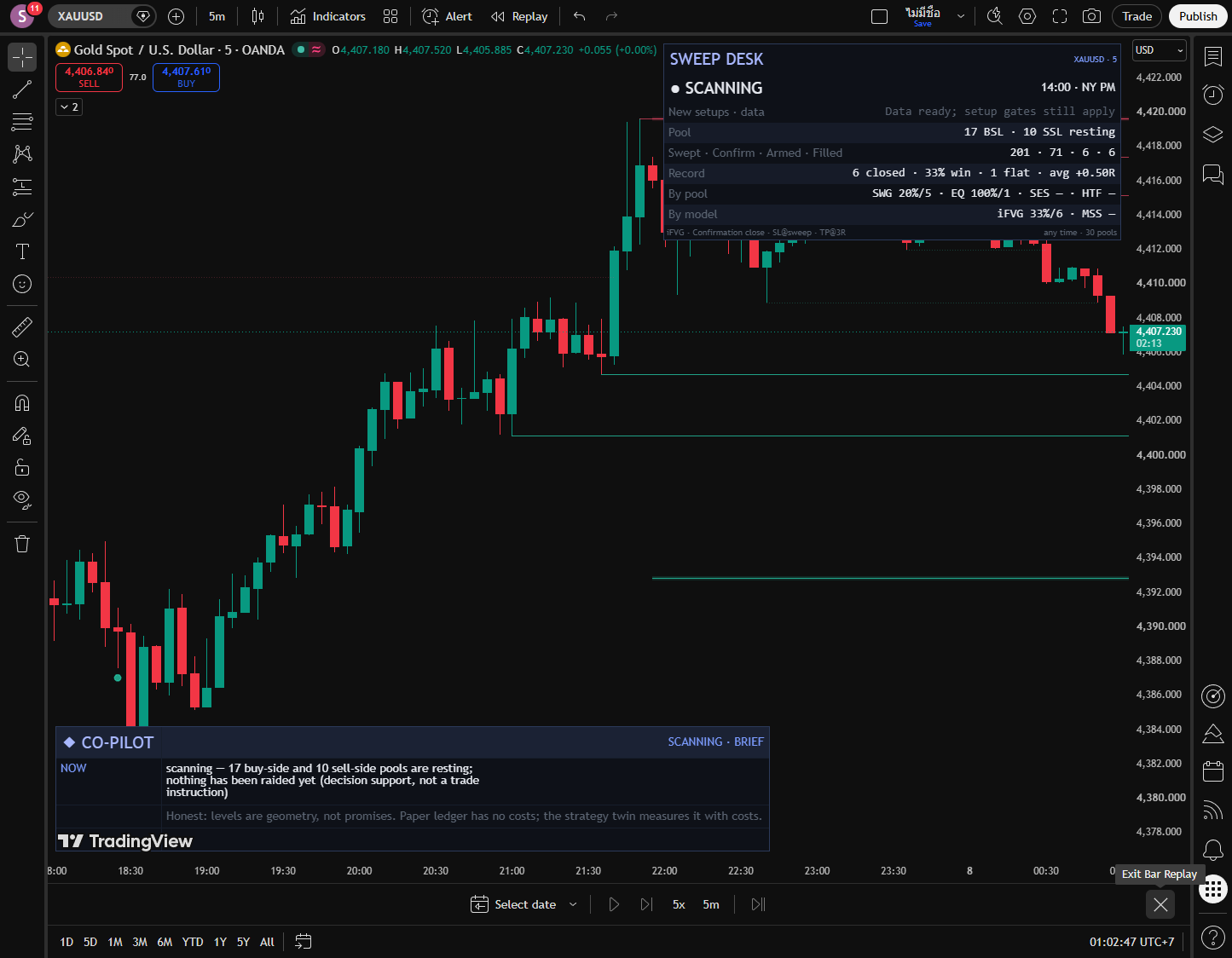
SCANNING watches levels. SWEPT waits for confirmation. ARMED waits for entry. FILLED tracks the paper trade.
Confirmation identifies this fixed area. Default entry uses that confirming close; return modes explicitly wait.
Read entry, stop and selected final target together. The stop can move after milestones.
Edit the sweep, confirmation, later close and entry mode. This long-side example calculates ATR from fictional history, with supplied levels and context gates off.
Compare the default confirmation-close entry with an optional return inside.
Closed candles. The last is a later observation.
Raid: wick-through ≥ 0.05 ATR, close strictly above pool. Inversion: close strictly above gap, push ≥ one ATR. Later fills include both edges.
Confirmation: twelve bars allowed. Close-entry outcomes begin on later bars. Close inside is an alternative, with thirty armed bars and fill checked before expiry. Its entry recalculates risk from that acceptance close; accepted geometry stays fixed.
Open plan: entry 94.00, stop 54.00, targets 134.00 / 174.00 / 214.00. Opposing liquidity: none qualifies.
Illustrative inputs · changing a slider recalculates this example · no market feed
Both complete Pine v6 scripts are in Pine Pro Library.
Create a new indicator on your chart.
Copy below and replace the sample code.
Save it. Keep defaults and choose an HTF FVG source above your chart.
Levels, entry plans, dashboard, Co-Pilot and alerts.
Copy the code as it is. No coding needed.
Measure the rules with costs on a second chart.
Copy the code as it is. No coding needed.
Release identity and file hashes · Licence
Wait for completed history and unused first-touch context. The default 60-minute source must exceed your chart. Check New setups · data and Co-Pilot. A sweep alone cannot enter; data warnings do not replace an existing plan’s state.
Full rules and settings, when you need them.
This long setup mirrors for shorts above a high. Defaults: Confirmation close and Single gaps. Close inside and limit entries are alternatives.
Swings: highs/lows confirmed five candles later by default. Equal levels: nearby highs/lows merged within an ATR tolerance. Sessions: extremes available after a session ends. Higher-timeframe swings and previous day/week levels add context.
“Liquidity pool” is the tool’s name for these price-derived references; it does not observe waiting orders. “Strong” means equal, session, higher-timeframe or day/week by type. It does not establish a better outcome.
Any wick strictly beyond a pool consumes it, even without enough depth or a close back inside. Touching exactly does not. Entry filters cannot make consumed liquidity fresh again. Age and budget prune swing-type pools; the drawing-distance setting only hides distant lines.
iFVG, the default: after a sweep, a new close through an opposing gap’s far edge can prepare that gap as the zone. In our long example, exactly 90 fails; above 90 can qualify. The gap must also meet age, location and movement checks.
The gap condition confirms. At 96, the newest individual gap needs a strict close above 94. Equality does not confirm.
Original Series rule: same-direction gaps formed on consecutive chart bars, combined before inversion. This isolated illustration supplies valid gap sizes and shows only the inversion check; sweep, displacement, confluences and plan geometry remain separate requirements.
Default HTF prerequisite: a completed 60-minute FVG must receive its first valid touch. It grants six observed chart bars of directional context, ages zero through five, and cannot refresh on repeated touches. An accepted setup consumes it; a pending return retains its frozen context.
Optional SMT compares synchronized prior closed bars and needs a meaningful manually chosen pair. Momentum, a minimum observation count and confirmation-close macro windows are separate checks. Our definitions are explicit; more checks do not prove better results.
MSS, the alternative: price closes beyond the opposing short-term swing captured at the sweep, with enough movement. A qualifying gap in that shift leg becomes the zone. SHIFTED means it is still searching; ARMED means the zone is ready. Nearest picks its newest gap; Deepest picks its oldest.
Either accepts either route, with iFVG first if both qualify together. Confirmation allows twelve candles after the sweep; the next candle is too late. MSS allows eight extra candles after a shift to find the gap.
Default sweep distance is at least 0.05 ATR and the close must return strictly across the level. Confirmation needs at least 1 ATR of movement; gap width at least 0.1 ATR. ATR measures recent price movement including gaps; its length is fixed at fourteen.
Confirmation close, the default: the qualifying inversion or MSS-zone acceptance close is the entry reference. Its earlier wick cannot also exit that plan.
Close inside, the alternative: a later candle closes within either edge, including exactly on an edge. Its actual close becomes entry. The confirmation candle cannot fill too.
FVG edge / CE midpoint: use a paper limit at the zone’s near edge or center. Contact can fill without a close inside. These are alternative entry rules.
The zone is fixed after arming. Close-inside entry recalculates stop and targets using the actual fill close and current ATR. The pending sweep extreme can extend before confirmation.
Recorded reasons include no confirmation in time, no rejection, invalidation, a close through the wrong side of an inverted zone, price reaching the first target unfilled, or expiry.
A prepared setup has thirty candles to fill. Close inside first checks the frozen pending stop: a close beyond it cancels before entry and cannot move the stop to manufacture a fill. Otherwise, a qualifying fill wins over missed-target and expiry checks, including on the final allowed candle. Once expired, a later return cannot revive it.
Pro labels recorded cancellations. A fresh qualifying sweep can also replace an unarmed idea without a cancellation tag. Armed and filled setups are protected from replacement.
1R is initial entry-to-stop distance. Default stop: sweep extreme plus 0.1 ATR buffer. Zone far edge is an alternative. Auto can choose a nearer anchor when the sweep is too far; its 2.5 ATR cap does not constrain the default Sweep extreme setting.
Targets default to 1R, 2R and 3R. TP1 optionally moves stop to entry; TP2 always moves it to TP1. Neither takes partial profit. Protective stop changes apply from the next bar, after the current bar is checked against its existing stop. Breakeven names an entry-price reference; costs can still leave a loss. This tool has no continuous ATR trail.
Liquidity selects the nearest qualifying fresh opposing pool, skipping closer pools below the minimum distance: 2R by default, checked after rounding toward entry. Clustered quality requires at least two confirmed merged swing observations. Choose Liquidity or TP3 as final; Liquidity falls back to TP3 when none qualifies. The selected final target freezes at acceptance; later pool changes cannot move it.
Close entries have no entry-bar outcomes. On later bars, a stop-gap open is the exit reference; a favorable gap beyond the target uses the fixed target. Ordinary both-touch bars resolve stop-first and disclose ambiguity. Unknown intrabar limit fills never invent a same-bar target success. These paper assumptions are separate from broker fills. Default timeout is two hundred candles.
State shows the stage and timers; Pool / Confirm / Zone identify the setup. Entry / Stop / R ladder / Liquidity describe its plan. Record / By pool / By model summarize closed paper outcomes without costs.
These counters exclude sweeps blocked by enabled filters and new sweeps while armed or filled. Sweep quality is descriptive; it gates nothing.
Co-Pilot explains NOW, WHY and PLAN from the same engine. Pro adds pool, sweep, structure, zone and cancellation labels; Full adds session shading. It does not draw every stored gap.
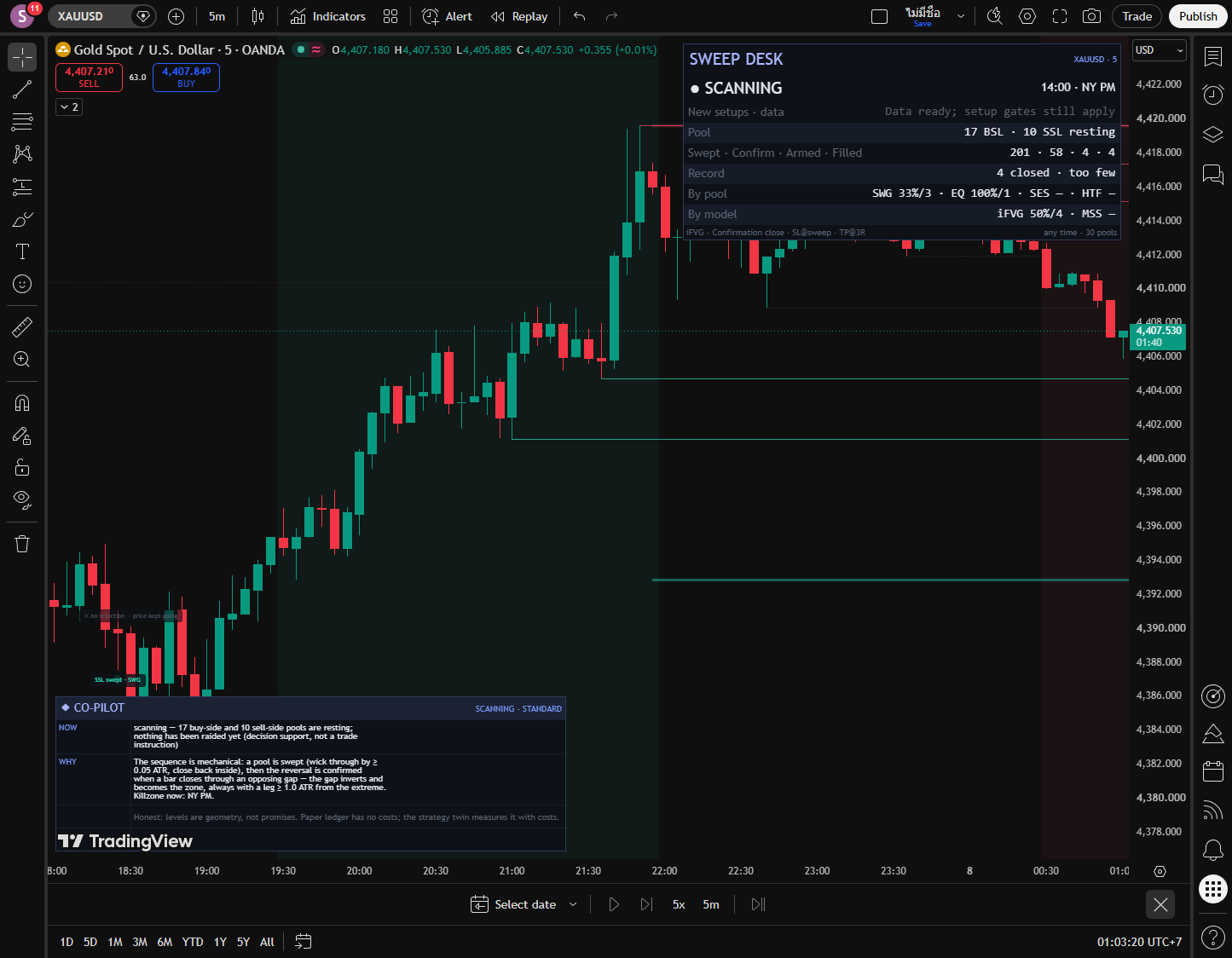
Four display defaults differ, labelled Indicator and Lab. The Lab has its own broker dashboard; other defaults are shared.
Confirmed highs/lows provide the references. Pool age and budget affect available levels; drawing distance only changes visibility.
A wick must pass a level and close back across it. Optional checks select which sweeps can start an idea.
Choose gap inversion, structure shift or Either. Nearest/Deepest selects the newest/oldest qualifying MSS gap; it does not change iFVG selection.
Choose the entry rule, stop anchor and final target. R means the initial entry-to-stop distance. Milestones move the stop without taking partial profits.
These supply session highs/lows and the optional sweep-time check. They do not force trades to close.
Choose Minimal, Clean, Pro or Full; Aurora Neon, Royal Gold or Colorblind-safe. Appearance does not change entry rules.
Show and arrange the current setup, counters and paper record.
Brief shows NOW; Standard adds WHY and PLAN; Detailed adds the record. Off hides the explanation.
Choose structured JSON or readable text for dynamic messages.
Series combines adjacent gap births before inversion. Clustered target quality requires at least two confirmed merged swings; Any fresh pool also permits single observations. These are original definitions of public concepts.
The default requires one unused HTF first-touch context. Each other enabled gate must pass even when minimum votes is zero. Votes are observations, not a probability or private grade.
When required, volume must be positive with a positive twenty-bar mean. Zero or unavailable volume does not pass. The separate observation count is descriptive, not a private grade or probability.
The indicator has twelve named conditions: long/short armed, long/short filled, TP1, TP2, final target, stopped, cancelled, liquidity swept, FVG inverted and higher-timeframe pool swept. Final target covers TP3 or liquidity.
Any alert() function call sends only ARMED, FILLED, TP1, TP2, EXIT and CANCEL. It does not send separate sweep or inversion payloads. Use Once Per Bar Close.
Both scripts send JSON or readable text. The sweep-desk.v2 schema combines same-bar paper events with entry, initial/current stop, target, times and observed exit. These are not broker fills. The twin submits its bracket with entry and owns its position and deadline; a paper EXIT does not close it. Default Confirmation close uses on-close processing with declared slippage. Recreate alerts after source or setting changes.
Lab defaults: USD 100,000 capital, cash risk 100, maximum notional 90 percent of equity, commission 0.02 percent per order and five ticks of slippage. Fixed units is an alternative. The broker emulator can differ from the indicator’s cost-free reference ledger. Review Properties and quantity increment for the instrument.
Use the current Lab and its complete trade list. The older Strategy Tester picture belongs to the historical v1 article and is not a result for this release.
The current v2 MNQ Strategy Lab sample lost money after costs. That small observation does not establish an edge.
The linked gold and bitcoin measurements belong to the historical v1 engine. Its close-inside baseline is not evidence for current defaults; v2 revises entry timing and broker ownership.
Keep historical findings and current validation separate. Software checks verify behavior, not economic edge.
Read the lab notesSignals commit on closed candles. A live candle can change before its close. Different history, feeds, timeframes or inputs can recalculate results. Pivots appear after confirmation; session pools after their session ends. Higher-timeframe context uses its last closed candle.
The engine sees prices, not news, resting orders or execution. Its paper record excludes costs. It does not predict prices. Trading risk is yours; this is research tooling, not financial advice.
What shipped and what changed in Sweep Desk, newest first. Ask for the next change below; what gets built lands here with a date, and on the lab queue on the front page.
The confirming close starts the plan v2.0.0 Updated Sweep Desk
Default inversion-close entries, explicit context checks and an independent broker lifecycle replace the earlier execution model.
Sweep Desk v1.1.0 Shipped
Mapped a sweep, confirmation and return entry to stop and target references.
Entries and exits around the sweep Request Sweep Desk
The ask Sweep Desk was built from. Shipped as v1.1.0 with the inversion-gap confirmation, the stop at the sweep extreme and both targets drawn.
“Finding the liquidity is easy. Getting the actual entries and exits right is where the gold is.”
Measured on two markets before it shipped Lab note Sweep Desk
Run with costs on across two markets. Only the inversion-gap confirmation held on both; the notes name where it barely paid.
A small friction or a big idea. Tell us what would make this tool work better for you.
Requests for a new tool go on the same queue: see what is asked for and what is being built.