
Strategy twin · optional
ifvg-desk-strategy.pine
The same engine as broker orders for TradingView's Strategy Tester on a second chart, with commission and slippage set in the file.
It marks each three-candle gap, flips it when a later close runs through it, and plans one trade inside 09:30–11:00 New York with a fixed stop and a 1R target.
Trade 1 · each step shows
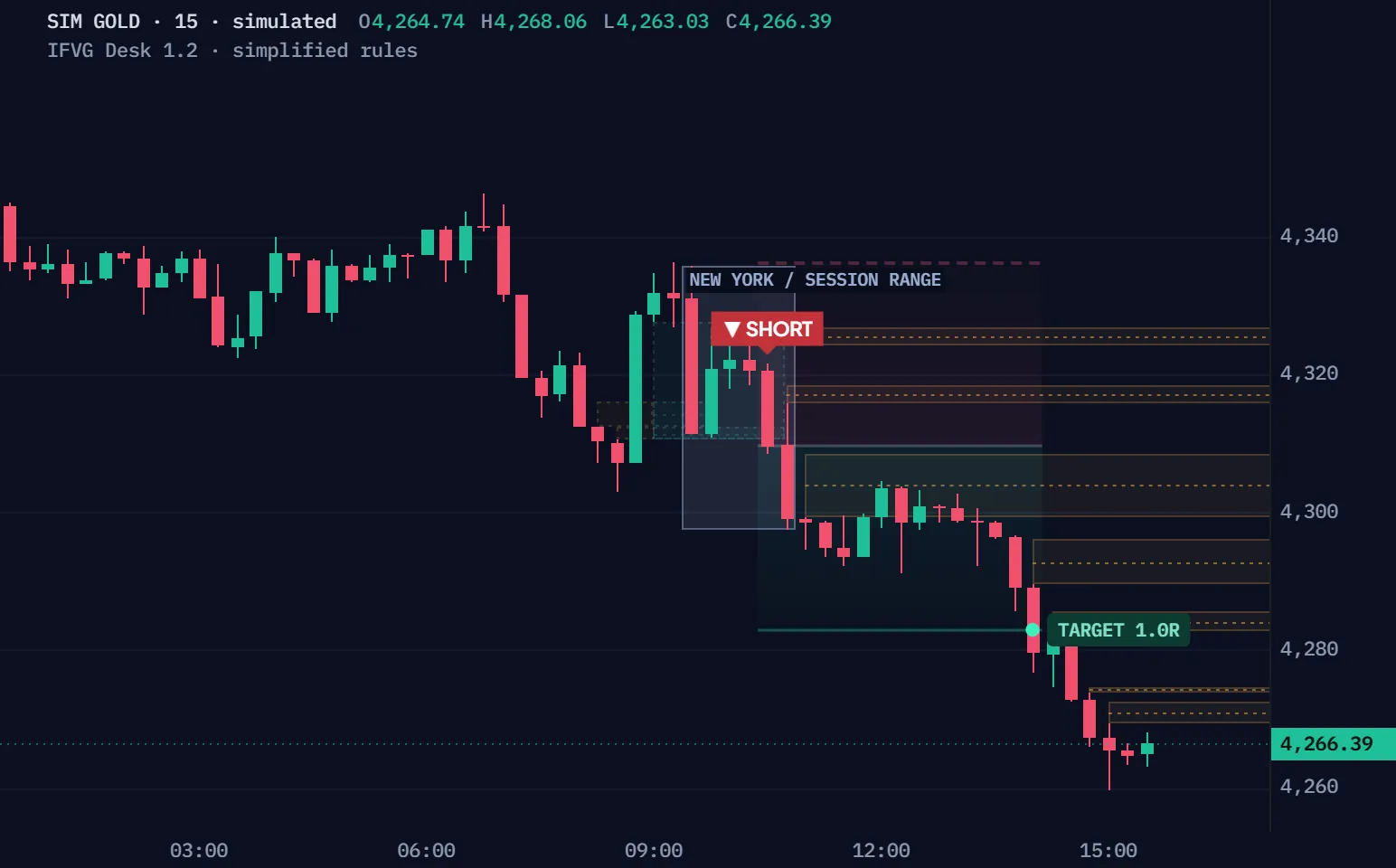
Simulated 15-minute gold bars, not a real market, run through IFVG Desk's default rules, simplified for the browser (the script suggests 1- to 5-minute charts and runs on these unchanged). The chart draws what the script draws at each close: its newest ten zones within 8 ATR, at most three of them ended. The higher-frame lanes, the optional checks (off by default), the 09:30 open and the previous day's high and low live in the script, not the film. Quiet bars run as a time-lapse; the trade slows down. Trade 1 is the first simulated trade whose gap forms after the film starts, so each step shows; Another trade plays the next simulated trades in order, whatever they do. R is before costs.
| Time | Event | Prices |
|---|---|---|
| 02:30 | Window opens | Close 4332.71 |
| 02:45 | ⚡ Bullish IFVG confirmed · not entered: Outside NY entry session | Gap 4335.73–4336.07 · close 4336.87 |
| 03:15 | ⚡ Bearish IFVG confirmed · not entered: Outside NY entry session | Gap 4325.49–4326.31 · close 4324.04 |
| 03:45 | ⚡ Bullish IFVG confirmed · not entered: Outside NY entry session | Gap 4328.79–4331.20 · close 4331.96 |
| 04:30 | ⚡ Bearish IFVG confirmed · not entered: Outside NY entry session | Gap 4332.05–4334.06 · close 4328.82 |
| 07:15 | ⚡ Bearish IFVG confirmed · not entered: Outside NY entry session | Gap 4321.87–4322.83 · close 4319.60 |
| 07:15 | ⚡ Bearish IFVG confirmed · not entered: Outside NY entry session | Gap 4328.79–4330.41 · close 4319.60 |
| 08:45 | ⚡ Bullish IFVG confirmed · not entered: Outside NY entry session | Gap 4312.29–4315.99 · close 4328.76 |
| 08:45 | ⚡ Bullish IFVG confirmed · not entered: Outside NY entry session | Gap 4310.58–4312.29 · close 4328.76 |
| 09:00 | ⚡ Bullish IFVG confirmed · not entered: Outside NY entry session | Gap 4320.60–4330.48 · close 4331.80 |
| 09:00 | Bullish gap forms (the one this window trades) | Gap 4310.58–4327.49 |
| 10:30 | ⚡ Bearish IFVG confirmed | Gap 4310.58–4327.49 · close 4309.65 |
| 10:30 | ▼ SHORT · 4309.65 | Stop 4336.39 · target 4282.91 |
| 14:00 | ✓ TARGET · 1R | Exit 4282.91 |
Full Pine v6 source in Pine Pro Library. It draws on your chart; you place the trades.
A later close through a gap's far edge flips it into an IFVG pointing the other way, and a close back through its other edge ends it.
A close above 4330.41, its other edge: the bearish IFVG is invalid, and its life is over.
The same simulated 15-minute gold, simplified rules, one gap drawn alone. It is the first gap in the replay's windows, in order, that forms on screen, stays fresh 4 bars or more, flips, and is invalidated 4 bars or more after its flip, so each phase holds on screen. The phase words are the script's own.
The third candle's low clears the first candle's high by at least 0.05 ATR; a bearish gap is the mirror.
A later close strictly beyond the far edge. A wick, or a close exactly on the edge, is not a flip.
An armed IFVG ends on a close strictly beyond its other edge; a close on it keeps it.
A zone still waiting after 180 bars expires; the chart keeps its newest 40.
Only a close through the far edge flips a gap, however far the wick goes.
A drawn example, the same bars each time: only the last close moves. The verdict is the desk's own rule.
A close below a bullish gap's low flips it; one tick below is enough.
A close exactly on the low does not flip it.
The flip is recorded at the confirming close, never backdated.
Inside 09:30–11:00 New York, that close is the entry.
The stop sits one tick past the prior ten bars' swing, the target 1R away, and five rules end the plan.
The bar reaches the target, and the plan closes there. TARGET 1.0R.
A drawn example, not the simulation: the film's run holds no gap stop and no ambiguous bar. R is before costs. One resolved plan per New York day; after it, the desk reads DAY DONE until the next day.
The lowest low of the prior ten bars minus one tick, for a long, rounded away from the entry.
One risk from the entry, rounded away from it.
Whole units within 100 in the symbol's currency; no size, no plan.
An open past a level fills first; a bar touching both counts the stop.
Two files, the complete v1.2.0, ready for TradingView's Pine Editor.
On a phone? Send this page to your desktop.
//@version=6// Web revision display-fix.1: restore precise inversion-close and positive-close wording; no engine changes.// …// Built from Pine Builder skeleton architecture. See docs/build-card.md.// Signals are close-confirmed. Paper R excludes costs; broker simulation differs.indicator("IFVG Desk · Open Source", "IFVG Desk", overlay = true, behind_chart = false, max_boxes_count = 160, max_lines_count = 350, max_labels_count = 200, max_bars_back = 3000)const bool IS_STRATEGY = false // Original, mechanical interpretation of publicly described IFVG concepts.// CLOSED-BAR SPINE: every lifecycle, signal, and paper mutation is confirmed-only.const string NY_TZ = "America/New_York"const string G_ENGINE = "01 · Gap engine"const string G_CONTEXT = "02 · Higher-timeframe context"const string G_CHECKS = "03 · Confluence gates"const string G_RISK = "04 · Risk & paper record"const string AUDIT_VERSION = "1.2.0"const string G_AUDIT = "06 · Setup audit trail" string entryMode = input.string("Inversion close", "Entry trigger", options = ["Inversion close", "Retest rejection"], group = G_ENGINE, tooltip = "Inversion: later close through opposite gap edge. Retest: a subsequent overlapping candle rejects beyond the IFVG edge in the trade direction. Failed gates do not create retroactive entries.", display = display.none)int atrLen = input.int(14, "ATR length", minval = 2, group = G_ENGINE, display = display.none)float minGapAtr = input.float(0.05, "Minimum gap / ATR", minval = 0, maxval = 3, step = 0.05, group = G_ENGINE, display = display.none)float birthBodyAtr = input.float(0, "Middle candle body / ATR", minval = 0, maxval = 5, step = 0.1, group = G_ENGINE, tooltip = "Zero disables the gap-birth displacement filter. Uses the middle candle's confirmed ATR.", display = display.none)int maxZoneAge = input.int(180, "Maximum zone age · chart bars", minval = 5, maxval = 2000, group = G_ENGINE, display = display.none)int zoneCap = input.int(40, "Retained chart zones", minval = 5, maxval = 80, group = G_ENGINE, display = display.none) string tfInputA = input.string("Auto", "Lane A timeframe", options = ["Auto", "1", "3", "5", "15", "30", "60", "120", "240", "D", "W"], group = G_CONTEXT, display = display.none)string tfInputB = input.string("Auto", "Lane B timeframe", options = ["Auto", "1", "3", "5", "15", "30", "60", "120", "240", "D", "W"], group = G_CONTEXT, display = display.none)string tfInputC = input.string("Auto", "Lane C timeframe", options = ["Auto", "1", "3", "5", "15", "30", "60", "120", "240", "D", "W"], group = G_CONTEXT, tooltip = "Auto resolves to 5/15/30 on 1m and 3m; 15/30/60 on 5m. All three lanes must be strictly increasing and higher than chart, including disabled lanes.", display = display.none)bool laneOnA = input.bool(true, "Enable lane A", group = G_CONTEXT, display = display.none)bool laneOnB = input.bool(true, "Enable lane B", group = G_CONTEXT, display = display.none)bool laneOnC = input.bool(true, "Enable lane C", group = G_CONTEXT, display = display.none)int htfMaxAge = input.int(80, "Context age · source bars", minval = 3, maxval = 500, group = G_CONTEXT, display = display.none)
No coding needed.
ifvg-desk-strategy.pine
The same engine as broker orders for TradingView's Strategy Tester on a second chart, with commission and slippage set in the file.
The full source: read it, change it, keep it.
The indicator draws; the strategy twin sends the same signals to the Strategy Tester.
Standard time-based intraday candles; the films here use simulated 15-minute gold.
Long, short, new gap, inversion, invalidation, expiry and paper resolution.
The page, the films and the manual are open to everyone. The code, both files, is in Pine Pro Library: $49 once for every desk and every update, or included in the Complete Suite. Sign in to copy or download.
No measured edge. The v1.2 checks cover how the program behaves, not trading results, and earlier tests on other charts disagreed. The v1.2 checks and limits say what was checked.
With the default trigger, only the flip's own close can enter, inside 09:30–11:00 New York, one resolved plan a day. WHY names the check that failed.
No IFVG features. It holds the other things we make, for one payment, Pine Pro Library among them, so this desk's code comes with it.
We, ProEA Lab, build IFVG Desk. The films run its rules, simplified, on simulated candles, not market data; R is before costs. Not financial advice.
Complete Suite · $97 · one payment
The Suite adds no IFVG features; it includes Pine Pro Library.
Every rule, setting and check, one topic at a time.
IFVG Desk v1.2.0
See each gap flip, entry check and trade plan.
TradingView indicator + test strategy · Pine Pro Library
IFVG Desk v1.2 is a TradingView indicator for inversion fair value gaps, in Pine Pro Library. It checks an entry at a confirmed candle close, then keeps fixed paper-plan levels. A separate event history saves original decision reasons under each Setup ID. Recording starts on; the history panel starts hidden. Its bounded paper-engine journal is rebuilt on recalculation and is separate from broker fills.
No. An armed gap still needs the selected entry trigger, enabled context checks, usable data and valid risk geometry. The daily allowance also applies. In inversion-close mode, a failed flip-bar entry is not queued for a later candle. Read why an inversion may wait
The six checks cover higher-timeframe gap overlap, a recent sweep, SMT comparison, previous-day direction, entry displacement and the New York session. Only the session gate is required by default; enabled checks need valid data before an entry qualifies. Explore the six context checks
Enable Show setup history and filter with the full Setup ID from a row tooltip. Eight events appear per page. Recording defaults to 300 events across all setups, up to 500; filtering does not reserve storage. Older decisions may be removed. Recalculation rebuilds the journal; Pine Logs export requires an editable personal copy. Read the history and export limits
Mark a three-candle gap, then watch for a closing break.
Its thin wick reaches 106. The thick body joins the open and close. We need two more candles before a gap can exist.
Fictional candles and supplied earlier history. Retest mode shows the flip separately from entry.
It makes entry, blockers and exits testable. Clear rules alone do not establish an advantage after costs.
Reveal candle four, then compare the choices.
Reveal candle three. The first and third candles must leave a strict space between their wicks; the middle candle may trade through it.
A flip, an accepted plan and a trade result are different events.
Thirty earlier fictional candles warm up ATR 14 and the prior ten-bar stop. They recalculate with revealed prices. All shown bars are closed and inside one New York entry session; there is no earlier plan. The three supplied context gaps remain fixed: bearish 5m at 102–105, bullish 15m at 110–114 and bullish 30m at 118–122. Previous-day direction is bullish; synchronized SMT is unavailable.
Tick 0.25, cash risk 100 in symbol currency, point value 1, quantity step 1, one-tick stop buffer and 1R target are illustrative inputs. Only the session check is required, except the blocked case also requires higher-frame overlap. No future bars, account conversion, fees or broker fills are inferred.
Read state → reason → plan. ARMED means an inverted gap; entry still needs its checks.
Follow each Setup ID to its entry or skip reason. History guide ↓
Earlier v1.1.1 capture · Gold · 5m · 15 / 30 / 60m lanes · Aurora · Compact dashboard
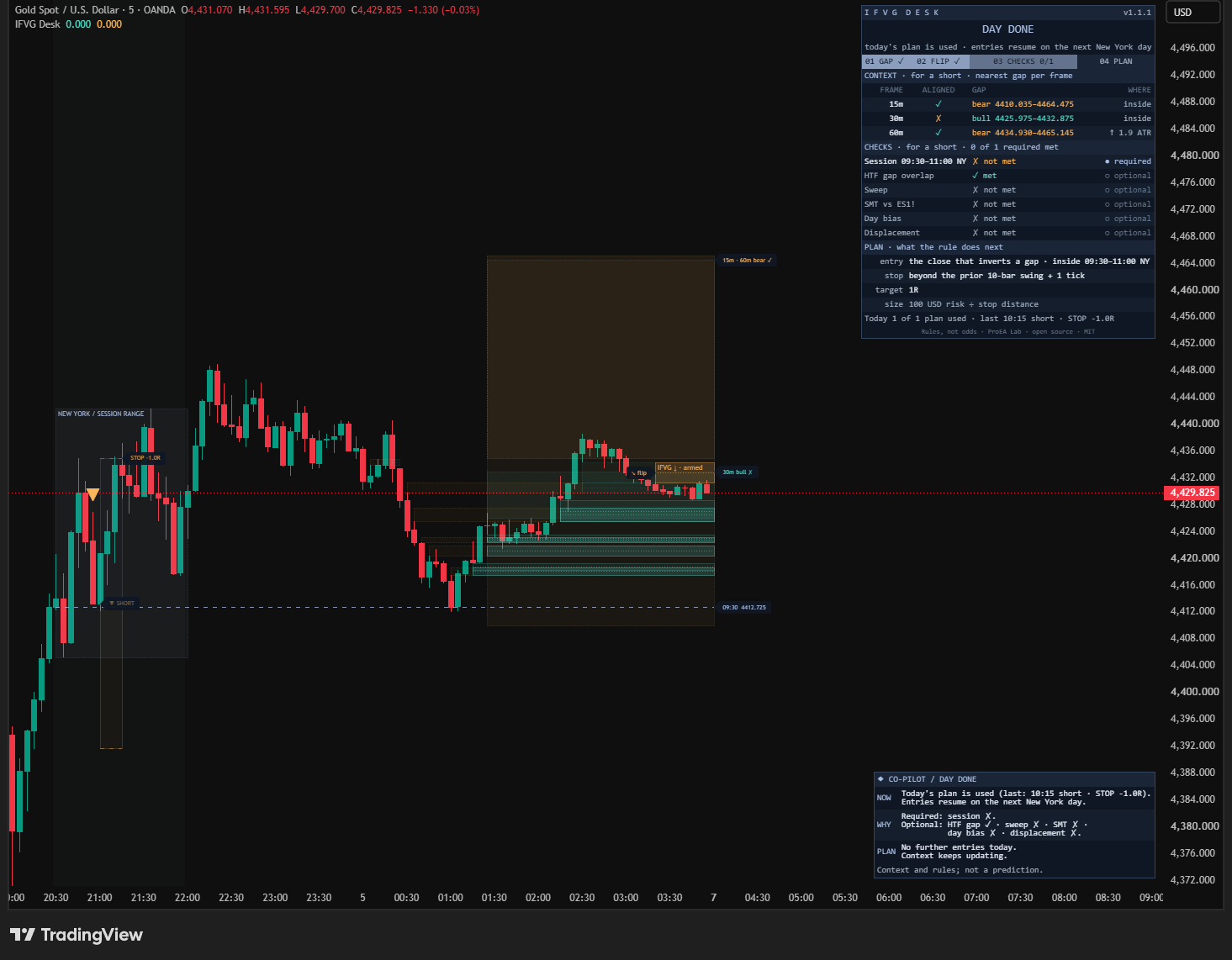
Read DAY DONE and its reason first. The session check is required; the other checks are optional. An armed zone can remain on the chart after the daily plan allowance is used. The merged lane tag separates aligned bearish context from the opposing bullish lane.
Open the original capture ↗Drag the last candle’s close across the blue edge. A wick is insufficient. The closed price decides whether the bearish gap becomes a bullish IFVG.
Only the flip-test candle is edited. The later return is not shown yet.
The session check is required and met. Other untouched gates are off. Current context overlap is not met; entry displacement is met against 0.5 × ATR 6.69. Making an unmet check required blocks the trigger.
Supplied context: 5m bearish 102–105; 15m bullish 110–114; 30m bullish 118–122. The gate searches every aligned gap. It does not merely read the nearest displayed lane. These ranges are not recalculated from the small chart.
Retest requires a later overlapping bar and a strict close above both the upper edge and its own open. A failed retest may qualify on a later bar while still armed. Inversion-close mode cannot accept a previously blocked flip later. Invalid, used and expired zones never reopen.
Tick 0.25, prior ten-bar swing plus one tick, target 1R, cash risk 100, point value 1 and quantity step 1 are illustrative sizing inputs. Entry-bar extremes never resolve a new plan. No commissions, broker fills or future bars are simulated.
Illustrative inputs · changing a slider recalculates this example · no market feed
Pine Pro Library owners: sign in to copy.
Use standard intraday candles. Start with 1m and Auto context lanes.
Replace the sample code, save and add to chart.
The entry session defaults to 09:30–11:00 New York.
Copy the code as it is. No coding needed.
Use a separate chart, match engine settings and adapt costs to your instrument.
Copy the code as it is. No coding needed.
v1.2.0 source · display-fix.1 · Licence
Replace the whole script, check saved inputs and recreate alerts. Recording starts on; Show setup history and Pine Logs export start off. The added setup_id connects accepted-entry alerts to history. Audit controls do not change entry selection or the paper rule. The web revision restores precise inversion-close wording and labels positive paper closes correctly. Its three display lines differ from the original v1.2.0 package; the rules remain unchanged. Original producer package.
The signal engine is shared. Factory broker costs are 2.25 cash per contract/unit and one tick of slippage, with margin set to five percent. Adapt costs, margin, point value and quantity step to the instrument. Stop and target are submitted with entry; broker fills and the cost-free paper ledger can differ.
Every rule and setting.
The third candle closes with its low strictly above the high two bars earlier, or the bearish mirror. Minimum size and the optional middle-candle body filter decide whether the gap is retained.
A strict close through the far edge inverts the gap: bearish becomes bullish, or bullish becomes bearish. A wick or equality does not flip it. CE is the midpoint, not a separate entry trigger.
Inversion-close mode evaluates that flip bar only. Retest mode waits for a later overlapping candle that closes beyond the trade-side edge with a directional body. Every required check and the risk plan must pass there.
An armed zone invalidates on a strict close through its opposite boundary. Equality survives. Fresh and armed zones expire when age exceeds the maximum; expiry is checked first. A zone flips once. Used, invalid and expired zones remain terminal.
Entry is the accepted close. The stop uses the prior rolling swing, excluding that entry bar, plus a tick buffer. Stop and target round outward to exchange ticks. Size rounds down from cash risk divided by stop distance and point value; missing history, wrong-side or sub-tick risk and zero size reject the plan.
Paper outcomes start on the next bar. Opening stop gaps exit at the open; favorable target gaps use the target. Otherwise a candle touching both levels resolves stop-first. Timeout and optional session exit follow price checks. One plan is active at a time; no new plan opens on its resolution bar. The daily cap counts resolved plans on their New York exit date.
When several zones qualify, the latest inversion wins; equal flip times choose the newest birth. The retention cap removes the oldest zone regardless of its state.
Six factors stay visible. A required factor can block entry; an optional factor cannot. A count of matching checks is not a probability.
On 1m or 3m charts, Auto uses 5 / 15 / 30m; on 5m, it uses 15 / 30 / 60m. All three must satisfy chart < A < B < C, even if a lane is disabled. A required context gate needs at least one enabled lane.
Each lane receives completed source candles, keeps valid gaps and shows the nearest one to the closed price. Equal-distance ties choose the latest gap. Its ALIGNED mark compares its direction with the analysed side; WHERE shows inside or distance in ATR. The entry check searches all aligned gaps, so another gap may qualify even when the nearest row is opposite.
Context gaps expire by source-bar age or a strict far-edge close. Their values arrive after confirmation, with deliberate delay. Current factor rows describe the latest closed candle, not a frozen explanation of an older entry.
WAIT has no armed zone. ARMED waits for a qualifying trigger. PLAN ACTIVE manages fixed levels. DAY DONE resumes entries on the next New York day.
The reason names the blocker or active levels. GAP → FLIP → CHECKS → PLAN lights the actual progress. Required checks appear first, with met, not met or no data.
Entry, stop, target, distances and size describe the accepted plan. When idle, the rows explain the rule. Today counts resolved plans; Full rows add the paper record and six-event tape.
NOW gives the state and reason. WHY names required and optional checks. PLAN says if → then with levels. Detailed adds boundaries; Brief keeps the immediate read.
ATR 14, minimum gap 0.05 ATR, middle-candle displacement off. Chart zones age out after 180 bars, with 40 retained. Context age is 80 source bars. Adjust lane timeframes and switches separately from the entry gates.
Optional gates are HTF overlap, sweep, SMT, day bias and entry displacement. SMT defaults to ES, Direct, with a ten-bar reference. Select a valid synchronized comparator. Cash risk defaults to 100 in symbol currency, quantity step 1, timeout 120 bars; session exit is off. Sizing does not convert account currency or enforce your broker’s restrictions.
Full, Focus and Minimal change visibility, not retained-zone selection. Theme, dashboard, Co-Pilot and zone controls remain separate. The indicator starts Medium, Compact, Top Right, with Standard Co-Pilot Bottom Right; the companion starts Minimal with both panels off. Allow right margin for projected tags.
V1.1 display fixes retained the unchanged v1.0.1 engine. V1.2 adds frozen decision snapshots and optional history/export. Record setup history is on; Show setup history is off. Its panel displays eight events per page and starts Bottom Left, moving around occupied visible panels.
All sixty-three inputs appear below in source order. Defaults are for the indicator; companion differences are shown separately.
Birth uses the outer candles and optional size/body filters. Each zone flips once; the oldest retained zone is removed when capacity is exceeded.
Auto builds three increasing frames above your chart. Even disabled lanes must have valid frame ordering. Each lane keeps at most twelve gaps.
Every factor is observed. Only checks marked required can block entry. The session is the only required check by default.
Stops exclude the entry candle. Sizing uses symbol currency and point value, with no account-currency conversion. Broker restrictions may differ.
The dynamic message describes an accepted paper plan. It is separate from the indicator’s named lifecycle conditions.
Confirmed events keep their reasons within a run; recalculation rebuilds them. Capacity is 50–500 events across all setups. Filtering neither reserves storage nor changes recording or entry selection. Use the full ID. Export needs recording On and an editable personal copy; it writes to Pine Logs only.
Display controls do not change the entry rule. Visibility limits hide drawings while retained zones remain in the engine.
Brief gives the immediate read; Standard explains checks and plan; Detailed adds limits. A shared dashboard corner moves this panel to the opposite lower corner.
The panel starts hidden, independently of recording and the dashboard. Eight events per page, newest first; excessive page numbers clamp. Occupied panel positions move automatically. Rows use New York time; JSON timestamps are UTC.
Each recorded gap gets one Setup ID. Its saved events explain what happened at the close when each event occurred. Later checklist changes do not rewrite those reasons within the same calculation.
ONE GAP · SAME SETUP ID
Save its original edges and birth time.
Save the close that crossed its far edge.
Read why the trigger was accepted or skipped.
A zone can end, or an accepted paper plan can resolve.
Possible stages, not a promised path or four separate candles. A gap can expire before it flips. Retest mode also records an eligible overlap that fails its rejection close; ordinary waiting and non-overlap bars add no rows.
300 events across all setups are retained by default, adjustable from 50 to 500. This is separate from the zone limit. Check the removed-record count: an older birth or decision may be gone even when you filter its ID.

These are paper events, with costs excluded. A resolution event’s detail retains the original accepted plan; candidate_plan is a fresh hypothetical plan for that event bar. Broker fills and Strategy Properties remain separate.
Seven named indicator conditions: long plan, short plan, new gap, inversion, invalidation, expiry and paper resolution. Only accepted-plan events mean the required checks and risk rules passed.
In TradingView’s alert dialog they are named IFVG Desk · Long, IFVG Desk · Short, IFVG Desk · Inversion, IFVG Desk · New gap, IFVG Desk · IFVG invalidated, IFVG Desk · Zone expired and IFVG Desk · Paper resolved.
“Any alert() function call” sends one structured accepted-entry event at the confirmed close. It includes setup_id for matching the audit, source zone, the existing entry-event id, direction, levels, size, factor states and enabled gates. The audit has a separate event_id. It describes a paper plan, not a broker connection. Strategy users can use alert() or broker order-fill alerts; indicator alertconditions are separate. Recreate alerts after changing inputs.
The producer reports 88 local tests, nine native Pine probe checks and compilation of both scripts plus the probe without errors or warnings. These establish bounded program behavior; they do not establish a trading advantage.
Before/after observers matched on the same 5,888 historical bars in both entry modes. The real history panel and exported JSON were checked. This is a finite regression sample, not proof across every feed, input or recalculation. These are supplied evidence; the nine runtime checks were not rerun here. Both web files were freshly compiled after the display correction: zero errors or warnings.
The companion’s broker test was not repeated for v1.2. Earlier cross-chart findings remain historical; ETF charts disagreed and paper/broker records were not reconciled trade by trade. The paper ledger excludes costs and resolves unknown stop/target order stop-first.
Gap birth, inversion, entry and lifecycle updates commit on closed candles. Higher-timeframe context uses completed source bars. The flip is recorded at its confirming close, never backdated.
ARMED is a zone state. The entry mode, enabled gates, available data, daily allowance and risk validity still decide. Inversion-close mode does not queue a failed flip for later.
Standard time-based intraday candles, with all context frames strictly increasing above the chart. The tool refuses non-standard charts and invalid frame ordering with an explanatory error.
The comparator must have matching timestamps and complete prior-bar references. A valid but unavailable feed is different from an invalid symbol. A required SMT check blocks while synchronized data is missing.
No. Each zone inverts once. Invalid, expired and used zones are terminal; a new gap must start a new lifecycle.
What shipped and what changed in IFVG Desk, newest first. Ask for the next change below; what gets built lands here with a date, and on the lab queue on the front page.
Trace a setup’s original decisions v1.2.0 Updated IFVG Desk
Saved reasons by setup ID, with optional history and Pine Logs.
Historical v1.1.2 armed-state and record wording Lab note IFVG Desk
Earlier display corrections remain in v1.2.
IFVG Desk v1.1.1 Shipped
Shows when a gap flips direction, which checks are required, and when a plan can start.
A small friction or a big idea. Tell us what would make this tool work better for you.
Requests for a new tool go on the same queue: see what is asked for and what is being built.