Opening Range Desk · Pine v6 · 2.2.0

Opening Range Desk Pro

Know which opening range is worth your attention before it breaks.

  1. 01Key levels with room
  2. 02Setup grade A · B · C
  3. 03The whole plan in every alert
  4. 04Half off at TP1
Get it $49

USD 49 one-time · not a subscription · included in Academy Premium and the Complete Suite · Pine v6 · personal-use licence

Pro is a set of tools for reading and planning the open. It does not trade for you and it does not promise results; every statistic it shows is your own chart's history.

0.00R

waiting for an entry

Session 1 of 8

The same simulated sessions with Pro on the chart: key levels, today's grade, a graded entry, the alerts it sends and half off at TP1. Switch to Library desk to see the same candles with the library desk's indicator. The candles are simulated, not market data; the rules, grades and wording are the indicator's own, with a risk of 250 per trade. Session 1 is the first simulated session whose trade reaches TP1; the next sessions follow in order, whatever they did.

Read as text
02 The grade

Every setup, graded.

Three conditions, counted the moment the range is set. All three is an A, two is a B, one or none is a C.

A·B·Cthree checks, one letter
The grade · SIM INDEX · 5range 09:30–09:45
  • In playvolume 2.2× its 20-session average
  • Sizewide range · 70th pct
  • Earlythe break at 10:10 · by 11:00 counts

grade B 2/3this short · 10:10

A grade counts conditions; it is not a promise.

Simulated session 1 of 8
01 · On the chart

At every entry

The grade sits on the chart at every entry.

02 · In the panel

From the range

In the panel from the moment the range is set.

03 · In the alerts

B or better

In every alert. Choose "grade B or better" and only the setups you want reach you.

04 · Report card

Your chart, by grade

Your report card shows how each grade has done on your own chart, so you learn which setups suit your market.

03 Key levels

Key levels with room.

Yesterday's high, low and close, the overnight range and last week's high and low, and the distance to the next one in R.

7key levels, in R from the range
Key levels · SIM INDEX · 5room in R

▲ Long above 539.51ON HIGH at 0.1R

▼ Short below 536.75Y LOW at 0.2R

A level more than four range heights away sits at the top or the bottom, its price marked with an arrow.
Simulated session 1 of 8
01 · Yesterday

High, low and close

Yesterday's high, low and close.

02 · Overnight

The overnight range

The overnight range.

03 · Last week

High and low

Last week's high and low.

04 · Room

The next one, in R

The distance to the next one in R.

04 At TP1

Bank half at TP1.

The library desk holds the whole position to the end, so a trade that reaches TP1 and comes back to the entry is recorded as breakeven. Pro takes half off at TP1 and moves the stop to the entry: the same trade ends with the half it banked.

The other side of the same choice: when a trade runs all the way to TP2, the half you banked is the half that did not run.

1/2off at TP1, the stop to the entry
One trade, two counts · SIM INDEX · 5R after the estimated cost
TP2TP1STOP at entry
  1. SHORT 10:10
  2. TP1 11:25 · half off
  3. BREAKEVEN 14:20

Library desk · the whole position−0.01R

Pro · half off at TP1+0.49R

Each simulated session's trade, counted both ways after the estimated cost: how the two ways of counting differ, not a forecast or a record.

Simulated session 1 of 8
After the entry, the trade…Library desk · the whole positionPro · half off at TP1
reaches TP1, then comes back to the entry0.0R+0.5R
reaches TP1, then is flat at the end at +1.4R+1.4R+1.2R
runs to TP2+2.0R+1.5R
stops out before TP1−1.0R−1.0R · nothing to bank yet
Arithmetic on one trade with TP1 at 1R and TP2 at 2R, before costs: how the two ways of counting differ, not a forecast or a record. Set the share from 0 (the library desk's rule: keep it all) to 90 %. The desk, its alerts, the report card, the Radar and the Strategy Lab all count the same share.
Switch the replay above between Library desk and Pro on session 1 to watch both.
05 The Radar

Your markets, in play first.

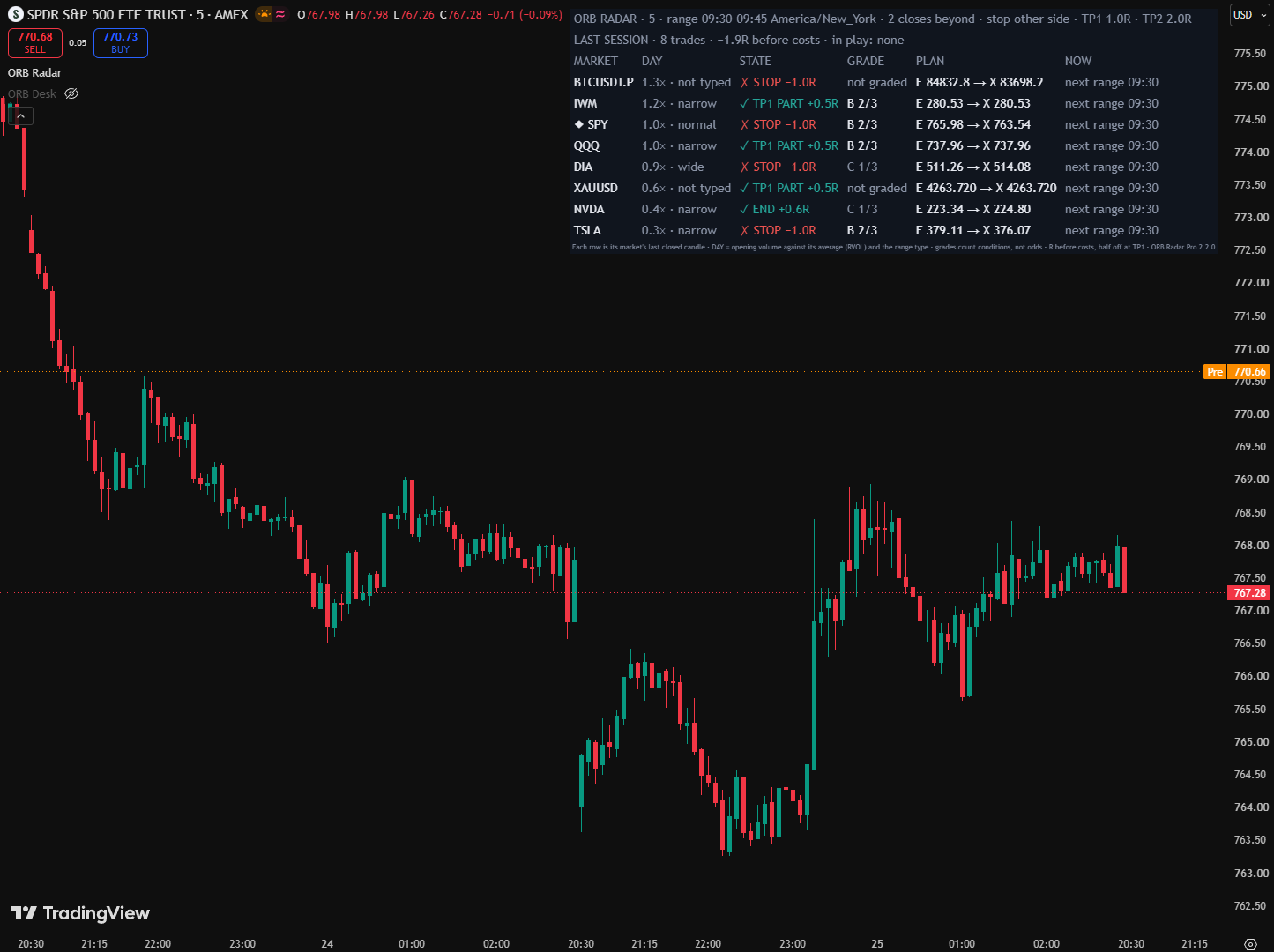
At 09:30 the move you wanted happens on the chart you were not watching. ORB Radar Pro runs the desk's rule on up to eight markets at once and lists them by how busy their open is, so the markets that are in play come first.

8markets, in play first
MarketDayStateGradePlanNow

Eight simulated markets on the Radar's own rows, one table per five-minute candle: at 09:45 the ranges set and the busiest opens move to the top. Simulated candles, not market data; R before costs, with half off at TP1, as the Radar shows it. A grade counts conditions; it is not a forecast. The first session shown is the first simulated one with a market in play; the next ones follow in order.

01 · Markets

Up to eight

ORB Radar Pro runs the desk's rule on up to eight markets at once.

02 · Each row

Grade, plan, next step

Each row shows the setup grade, the plan and the next step, and each market sends its own alerts.

03 · Daily guard

Stops at your loss

A daily guard pauses new-entry alerts once the day's closed trades reach the loss you set.

04 · No repaint

Closed candles only

Every row is its market's last closed candle, so nothing on it can be taken back by a candle that is still forming.

The real Radar on TradingView
ORB Radar Pro on TradingView: eight markets in one table, listed by how much volume their opening range had against its average, each with its range type, state, setup grade, plan and next step.
06 The alerts

The plan on your phone.

One alert on the indicator sends every event as it happens: the range; a heads-up on the first close beyond it; the entry, TP1 with what came off, and the exit.

Each message carries the whole plan: entry, stop, both targets, the size for the risk you set, the setup grade and the next key level. Choose "grade B or better" and only the setups you want reach you. The included relay posts each one to Discord or Telegram as one line, like the phone here: the replay's first session, in the relay's own words.

5events, one alert
Alerts · the relay's own wordssession 1
  1. RANGE_SETthe range, the day type, the opening volume and today's grade.
  2. BUILDINGthe close that would enter, the grade and the next key level.
  3. ORB_LONG / ORB_SHORTentry, stop, both targets, the size for your risk, the grade and the room to the next level.
  4. TP1what came off, what it banked, and the stop moved to the entry.
  5. EXIThow the trade ended and its R after the estimated cost, with any half banked at TP1 counted in.

The same entry as the indicator's full Text message:

Opening Range Desk Pro · SIM INDEX 5 · ORB_SHORT SHORT · entry 536.23 · SL 539.60 · TP 532.86 / 529.50 · grade B 2/3 · next W LOW 512.15 (7.2R) · size 74 for 250 risk · OR 536.75–539.51 · wide day · volume 2.2× · lean neutral · close-through

Simulated values, the indicator's and the relay's own wording. Alerts never place orders.

07 Own it

All eleven. Once.

Eleven things we make, one payment, and nothing that renews.

Complete Suite

Everything on this list.No subscription.

One by one today$557.98Save 82%
$97, one payment, yours to keep.

$8.82 a product. $460.98 stays with you.

Secure checkout by Stripe

Renews never Full source Yours forever 7-day refund before download

What's insidePrice on its own
  1. Opening Range Desk Prothis deskOpening ranges graded A to C, markets in play first.$49.00
  2. Drift Desk PremiumThe bigger trend, the pullback, size first.$49.00
  3. Signal Desk PremiumA 20-market Radar, sized tickets, a daily lock.$49.00
  4. Breakaway Desk PremiumA Trend Radar for six crypto perpetuals on 4-hour candles.$49.00
  5. Gold Sweep Desk ProGold's session pools, the plan before the window.$49.00
  6. Pine Complete Bundle11 Pine v6 tools, every source included.$46.00
  7. Pine Evolution LabA local strategy factory that kills weak ideas.$79.00
  8. MTR FullSystemEAA complete MT5 EA: all 21 source files.$49.00
  9. TradeLensA self-hosted journal whose AI coach prices your leaks.$47.00
  10. The WatchA self-hosted paper-trading board.$59.00
  11. AI Starter PacksPrompt Vault, Fixer, Builder Lite, Chart Reader.$32.98
All eleven, one by one$557.98
The math, to scale
One by one$557.98
The Suite$97.00

Just this desk, Opening Range Desk Pro

$49onceThe Suite is $48 more and adds the other ten.

Academy Premium, with hosted tools

$49/ monthA membership. Cancel anytime.

Each price on its own is that product's one-time price today: the Pine Complete Bundle at its current $46.00, the AI packs as the Starter Stack plus Chart Reader. The tools draw levels and conditions; you place the trades. Trading involves risk.

08 Answers

Straight answers.

Does it place trades?

No. It draws, grades, tabulates and alerts; the trading is yours.

Does an A setup always work?

No setup always works. The grade tells you which conditions are there, and your report card shows how each grade has done on your market.

Can I keep the whole position, like the library desk?

Yes: set "Take off at TP1" to 0. Any share from 10 to 90 % works too, and the desk, the alerts, the report card, the Radar and the Strategy Lab all count the one you set.

Does it repaint?

No. Every decision and alert reads closed candles, so what the chart shows at a close stays as it was.

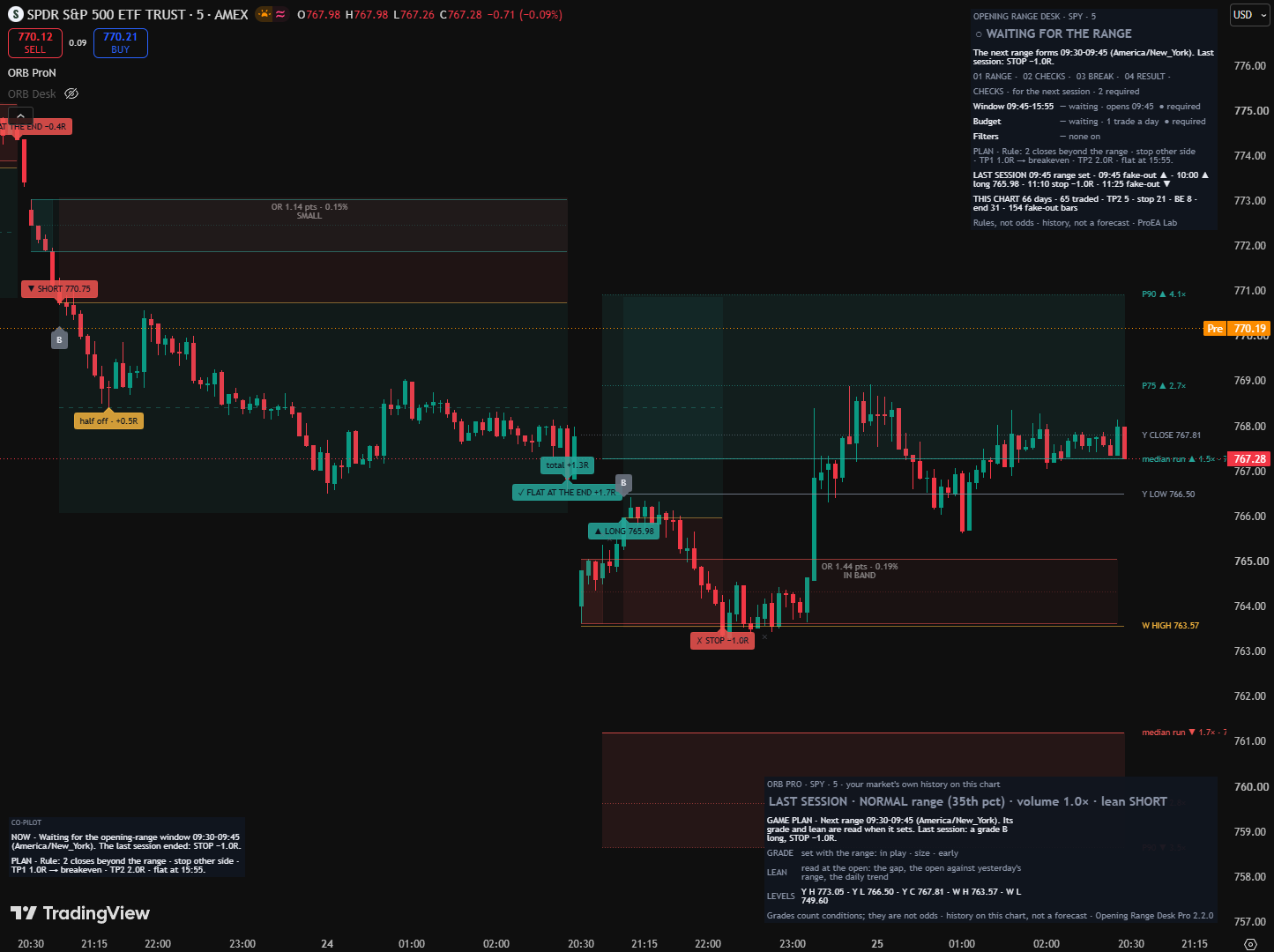
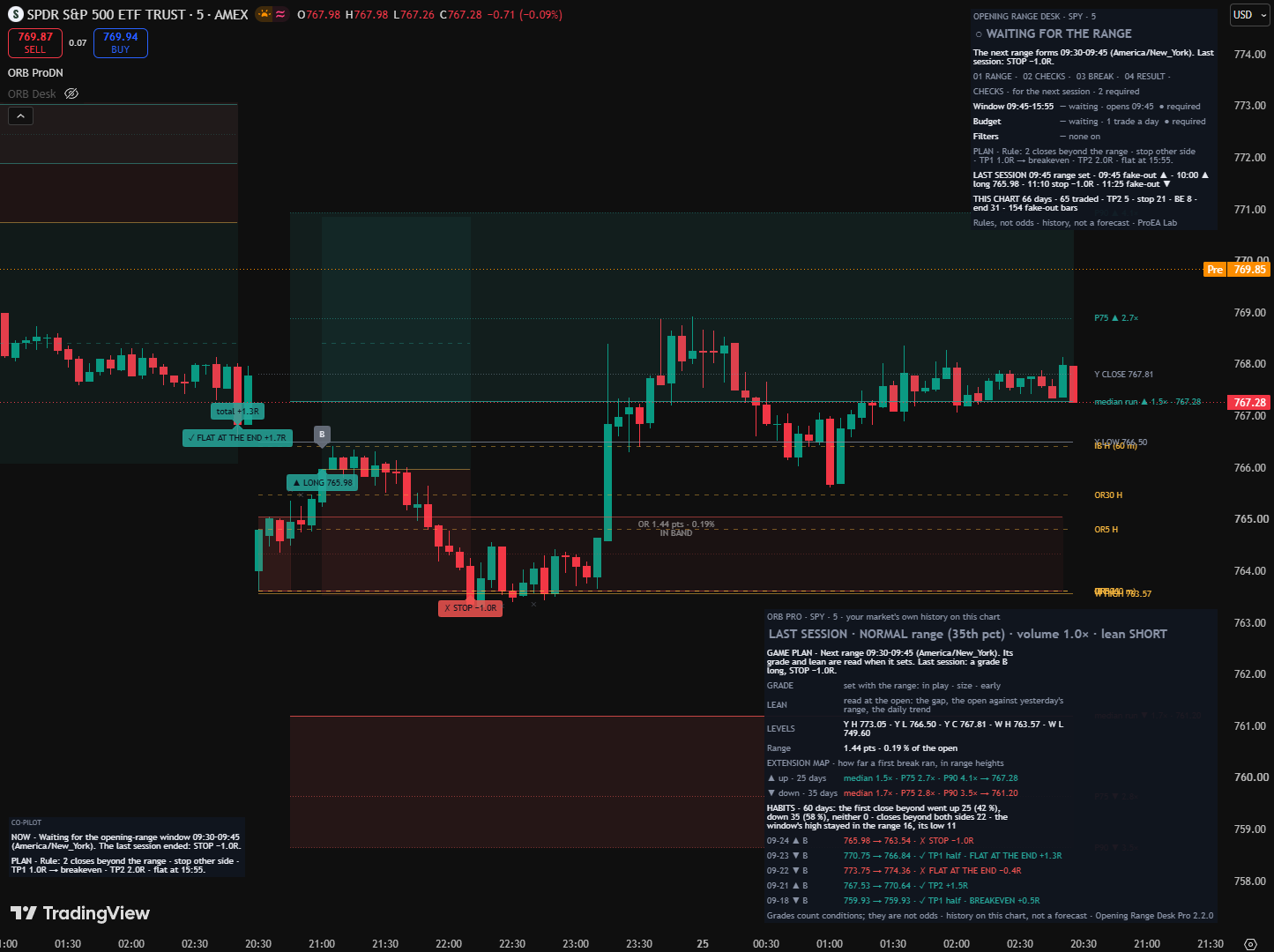
The desk on TradingView
Opening Range Desk Pro on a SPY five-minute chart: a grade B short takes half off at TP1, with the trade's total beside its exit, and a grade B long is stopped out; the Pro panel gives the game plan for the next range, the three grade checks and the key levels.
What you get.
  • Opening Range Desk Pro: the setup grade, in-play volume, the game plan, key levels with room, the day's lean, day types, the extension map, half off at TP1, the report card by grade, sizing and full-plan alerts. Opening Range Desk's engine is inside, unchanged.
  • ORB Radar Pro: eight markets in one table, in play first, with grades, a day total, a daily guard and an alert per market.
  • Pro Strategy Lab: a minimum grade, filters and the same share off at TP1, with the desk's result next to TradingView's fills.
  • Research Lab: verified data, written-first tests and a parity check with TradingView.
  • Alert relay: Discord and Telegram.
  • AI Builder Kit: agent brief, skill, recipes and a testing workflow.
The library desk or Pro.
FeatureLibrary deskPro
The range, two closes to enter, the plan and its result on the chart✓✓ the same engine, trade for trade
Setup grade A, B or C: in play, size, early—✓
Key levels, and the room to the next one in R—✓
The game plan in words, the day's lean, day types, the extension map—✓
A share off at TP1— holds it all✓ half by default, 0 to 90 %
The size for your risk; the open trade's R and cash—✓
Your record split by grade, from your own chart— one record for all trades✓
AlertsThe events, with entry, stop and targets✓ plus the heads-up, the size, the grade and the next level; a relay to Discord or Telegram
ORB Radar Pro: eight markets, in play first—✓
Strategy LabThe desk's rule, with your costs✓ grade and day filters, the same share at TP1
Research Lab and AI Builder Kit—✓
Price$49 library (all desks)USD 49 one-time

See Opening Range Desk in Pine Pro Library

The day in plain words.
Game plan
before the open, what to watch; once the range is set, today's grade and why, what a long and a short would run into, and the day's lean; in a trade, how far it is to the next level and to the target.
Key levels and room
yesterday's high, low and close, the overnight range and last week's high and low, and the distance to the next one in R.
The day's lean
the gap, where the day opened against yesterday's range, and the daily trend, read as one lean.
The extension map
how far first breaks have run on this market, drawn from today's range as a band.
Position
the size for your risk; in a trade, what is left after TP1, what the half banked, and the open R and cash.
The full Pro panel: the day's range type and volume, the game plan, today's grade, the next key level each way, the day's lean, the key levels, the extension map, the breakout habits and the last trades with their grades.
Test it on your market.
Pro Strategy Lab
take only A setups, or B and better. Trade only some day types, gaps or opens. It takes the same share off at TP1 as your desk. Its table puts the desk's result next to TradingView's own fills after your broker's costs, so you see what a choice really does on your market.
Research Lab
years of verified Binance data and a written-first way to test your own ideas, plus a trade-by-trade check of TradingView's log against the engine.
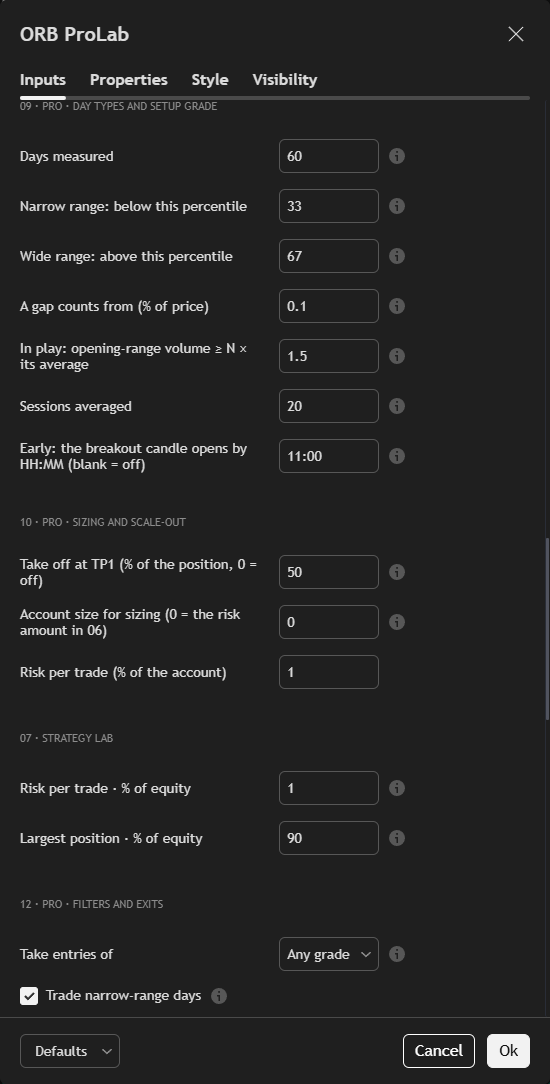
The Pro Strategy Lab's settings on TradingView: the setup grade's conditions, sizing, the share taken off at TP1, and the filters, with 'Take entries of' set to any grade, B or better, or A only.
Build on it with AI.

Open the folder in Claude Code, Codex, Cursor or Windsurf and ask in plain words: "move the table", "add a market", "only alert me on grade A". The kit tells the agent the rules, the invariants and how to check a change.

Which markets?

Any market whose session includes the range window, on candles that divide it (five minutes for the default 09:30–09:45 New York range). The Radar takes up to eight at once. The grade needs volume data.

Which TradingView plan?

A Basic plan allows two indicators per chart, enough for the Pro desk and the Radar. Webhook alerts to the relay need a paid TradingView plan.

Can I change it?

Yes. You get the readable source under a personal-use licence, with the kit that lets an AI agent change it safely. The desk's engine inside keeps its MIT notice.

We, ProEA Lab, build Opening Range Desk and Opening Range Desk Pro. The code is AI-assisted. The films on this page run the desk's rules on simulated candles, not market data; the captures are TradingView on real charts. None of it is a trading record or a forecast. Trading involves risk.