PDF guide · ProEA Lab
Pine Script v6 for Traders, the Cheat Sheet and Fix-It Manual
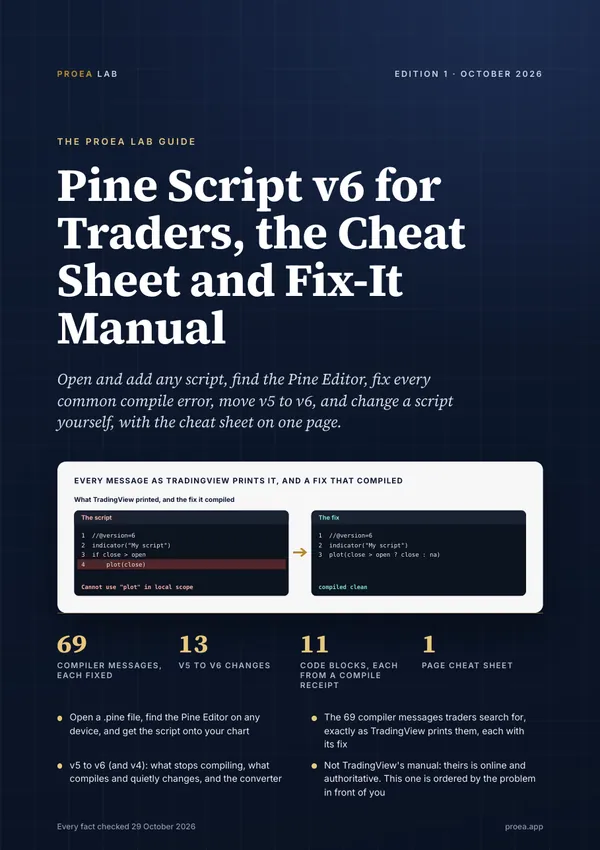
Open and add any script, find the Pine Editor, fix every common compile error, move v5 to v6, and change a script yourself, with the cheat sheet on one page.
69 compiler messages, each printed by TradingView's compiler for a real script on 23 Oct 2026, with a fix that compiled, and every code block in the book from a TradingView compile receipt.
33 pages · A4 PDF · edition 1.0.0
One payment, no subscription. Instant download. Refund within 7 days if you haven't downloaded it.
What's inside
- Open a .pine file on any device, find the Pine Editor, and get the script onto your chart
- 69 compiler messages traders search for, each exactly as TradingView's compiler printed it, with the fix that compiled
- v5 to v6 (and v4): seven changes that stop the compile and six that compile and change results
- The language on one page, then drawing, higher timeframes without repainting, alerts and JSON webhooks, and strategies with their costs
- Writing Pine with AI and checking what it wrote; porting Pine to MQL5 and Python
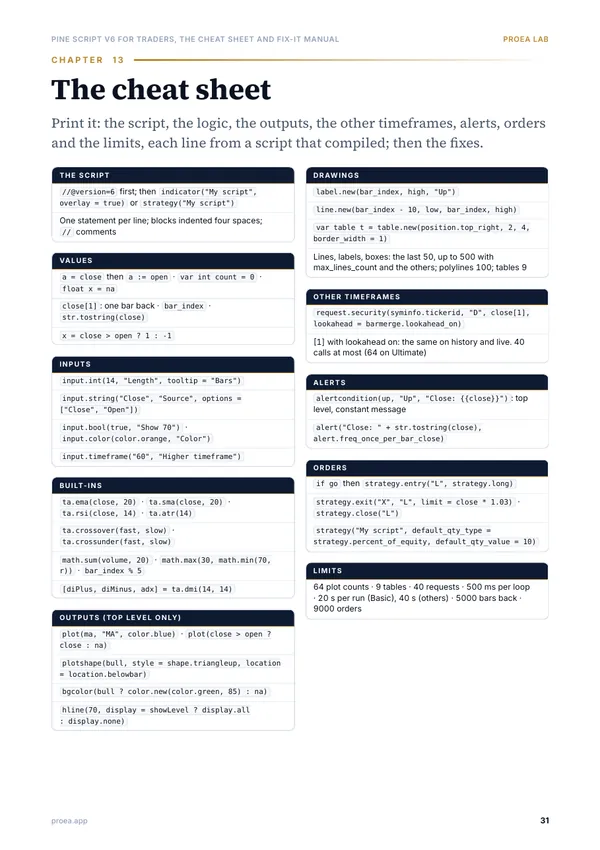
- A one-page cheat sheet, each line of code in it from a script that compiled on TradingView
Contents
- 01Open a .pine file and get it onto your chartA .pine file is text you paste, not a file you upload. What's in it, how to open it on any computer, and the five steps to a chart.
- 02Find the Pine Editor on desktop, web and phoneIt moved from the bottom of the chart to the right toolbar in 2025. Where it is on each screen, and the four reasons you can't see it.
- 03Paste, save and add to chart, and the limits that stop a pasteThe paste itself rarely fails. What stops a script is a plan limit, a phone, or one of TradingView's limits on what a script may do.
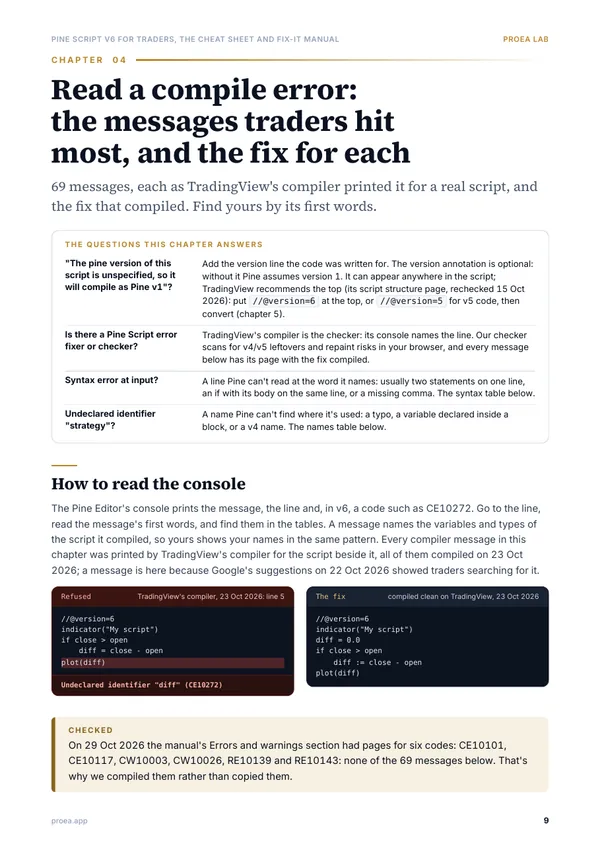
- 04Read a compile error: the messages traders hit most, and the fix for each69 messages, each as TradingView's compiler printed it for a real script, and the fix that compiled. Find yours by its first words.
- 05v5 to v6 (and v4): what breaks, and the fixSeven changes stop a script compiling and the editor points at them. Six compile cleanly and change what the script plots or trades.
- 06The language on one page: types, series, if, for, inputsHow a script runs, then every building block a trader edits, each in a line that compiled.
- 07Drawing: plots, lines, labels, boxes and tablesOutputs that exist on every bar, and drawings you create, move and delete. Which is which decides where the call may go and how many you get.
- 08Higher timeframes with request.security, without repaintingOne argument and one offset decide whether a daily level on an intraday chart existed when the bar printed it. The three settings, side by side.
- 09Alerts: alertcondition, alert() and the JSON messagePine code creates alert events; you create the alert. The three kinds, which plan holds how many, and a JSON message a webhook will accept.
- 10From indicator to strategy: entries, exits and quantityChange one word, add orders in if blocks, then set the costs before you read any number: a strategy reports exactly what its settings assume.
- 11Writing Pine with AI, and checking what it wroteA model drafts Pine fast and gets the version, the names and the scope wrong in ways the compiler names. The checks, in the order to run them.
- 12Pine to MQL5 and PythonPine commits once per bar on TradingView's servers. Anywhere else, you rebuild that loop, the clock and the fills, then check the port bar by bar.
- 13The cheat sheetPrint it: the script, the logic, the outputs, the other timeframes, alerts, orders and the limits, each line from a script that compiled; then the fixes.
A look at the pages
Who it's for
Get it if
- You trade on TradingView and paste, fix or change Pine scripts more than you write them
- You've hit a compile error, a script that stopped working in v6, or a level that moved after a reload
- You want the manual's answers in the order your problem arrives, with a cheat sheet to print
Skip it if
- You want a strategy that wins: the book prints its one strategy as a structure, not as one to trade
- You need the complete language reference: TradingView's manual is online and authoritative, and this book points to it
Answers
Is this TradingView's Pine Script manual as a PDF?
No. It's ProEA Lab's manual, ordered by the problem in front of you. TradingView's User Manual and Reference Manual are online and remain the authority, and the manual pages we read on 29 Oct 2026 offered no PDF. TradingView doesn't endorse this book.
Is the code checked?
Every line of Pine in it stands in a script that compiled on TradingView, and every error message is the one TradingView's compiler printed for the script beside it, with the date it compiled.
Does it overlap the TradingView Power-User Guide?
A little. That guide is the platform: plans, alerts, webhooks, screeners, Bar Replay and the strategy report's settings. This one is the language and its errors, and the two share one strategy template.
What do I get, and how?
One PDF, 33 pages, A4, readable on a phone, a tablet or paper. After payment the download is on the confirmation page and stays in your account, so you can download it again anytime.
Can I get a refund?
Yes, within 7 days if you haven't downloaded the PDF yet. Downloading it ends the refund, since the guide is then yours. A broken or incomplete file is refunded at any time.
Is it included in All-Access?
Yes. All-Access Monthly and Academy Premium members get every paid guide in their downloads, at no extra cost, from the day it opens.
Will it be updated?
When a fact in it changes (a price, a plan, a script), we correct it in a new edition. Your account always has the edition you bought.
Pine Script v6 for Traders, the Cheat Sheet and Fix-It Manual
Open and add any script, find the Pine Editor, fix every common compile error, move v5 to v6, and change a script yourself, with the cheat sheet on one page.
One payment, no subscription. Instant download. Refund within 7 days if you haven't downloaded it.
Education, not financial advice. Trading carries a risk of loss; past results, ours included, don't predict future ones. ProEA Lab isn't affiliated with the creators or products the guide names.