Take Profit Trader payout rules at a glance
Every PRO account size pays 80/20 from day one with no maximum. What changes with size is the buffer zone, the balance you must be above before anything can leave.
| PRO account | Drawdown, which is the buffer | Buffer zone | Minimum Account Balance at the start | The floor stops at |
|---|---|---|---|---|
| 25K | $1,500 | $26,500 | $23,500 | $25,000 |
| 50K | $2,000 | $52,000 | $48,000 | $50,000 |
| 75K | $2,500 | $77,500 | $72,500 | $75,000 |
| 100K | $3,000 | $103,000 | $97,000 | $100,000 |
| 150K | $4,500 | $154,500 | $145,500 | $150,000 |
Take Profit Trader's own comparison table shows "No max" under "Maximum withdrawal amount" for PRO and PRO+, and a buffer requirement for PRO only. PRO+ pays 90/10. The Test pays nothing; it's the evaluation.
Sources, checked 2026-10-22: PRO Account Profit Split & Withdrawal Rules, Rule 3: Do Not Hit End-Of-Day (EOD) Maximum Trailing Drawdown, PRO Account Rules, the comparison table on Take Profit Trader's home page.
When can you withdraw from a Take Profit Trader PRO account?
From your first day in PRO, and on any day after. Take Profit Trader's payout Q&A: "Payout eligibility is unchanged: still day-1 and daily in PRO." Its promo FAQs list the rest: "Zero minimum days of profit." "No funded consistency rule." "No waiting on payout windows." "No maximum withdrawal amount."
Three things have to be true when you ask:
- The balance is above the buffer zone. "However, you must build a buffer on the account first." On a 50K, a withdrawal on day one needs more than $2,000 of profit on day one.
- The dashboard shows it. The balance you withdraw from "is not updated real time. This is updated daily between 8PM - 9PM EST." The Q&A's example: "From profit at 3PM to funds in your wallet, same evening."
- You're flat. The account must have "no open positions or working orders" at the moment of the request, and "You cannot trade while the withdrawal is processing," which takes seconds on Tradovate.
The account also has to stay open and active. A PRO account is lost at the Minimum Account Balance or by holding a position into a limit-up or limit-down lock, and to keep it active "you must trade at least one day per calendar week," Sunday to Friday. A reset PRO account keeps the same payout rules, "while still being able to withdraw from day-one."
Sources, checked 2026-10-22: Speed of Payouts Update: Q&A, 50AND3 PROMO FAQS, PRO Account Profit Split & Withdrawal Rules, How to Withdraw from PRO Account to the Wallet, Keeping Track of Your Progress, PRO Account Rules, Resetting A PRO Account.
What is the buffer zone, and can you ever withdraw it?
The buffer is the drawdown, sitting on top of your starting balance. "The buffer is equal to the maximum drawdown amount on your account," and on a $50,000 account "you will need to reach a balance of $52,000 in order to start withdrawing at 80% of total profit." The home page's comparison table is plainer: "In order to withdraw from an active PRO account, you have to be above the buffer zone."
The number isn't arbitrary. In PRO the Minimum Account Balance trails your peak balance, open profit included, by the drawdown, and "The drawdown will never exceed your starting account balance." On a 50K it stops at $50,000 once your peak reaches $52,000, the buffer zone.
By the time a dollar is withdrawable, the PRO floor has already stopped at your starting balance, and withdrawing down to the buffer zone leaves the account its full drawdown as room.After the account closes. The payout article: "You can withdraw 50% of your Buffer Zone after your account is closed." On a 50K, half the $2,000 buffer is $1,000; Take Profit Trader doesn't say whether its 80/20 split applies on top. Archived copies of the same article, up to October 8, paid 50% within 60 trading days and 80% after; the version edited on October 9 has no such step. The home page's table says something else again, and the two are set side by side below. How the PRO floor trails open profit, with two animated sample weeks, is in our Take Profit Trader rules guide.
Sources, checked 2026-10-22: PRO Account Profit Split & Withdrawal Rules, PRO Account Rules, How to Keep Track Of Your Drawdown, the comparison table on Take Profit Trader's home page.
One invented 50K PRO account, from activation to its first withdrawal
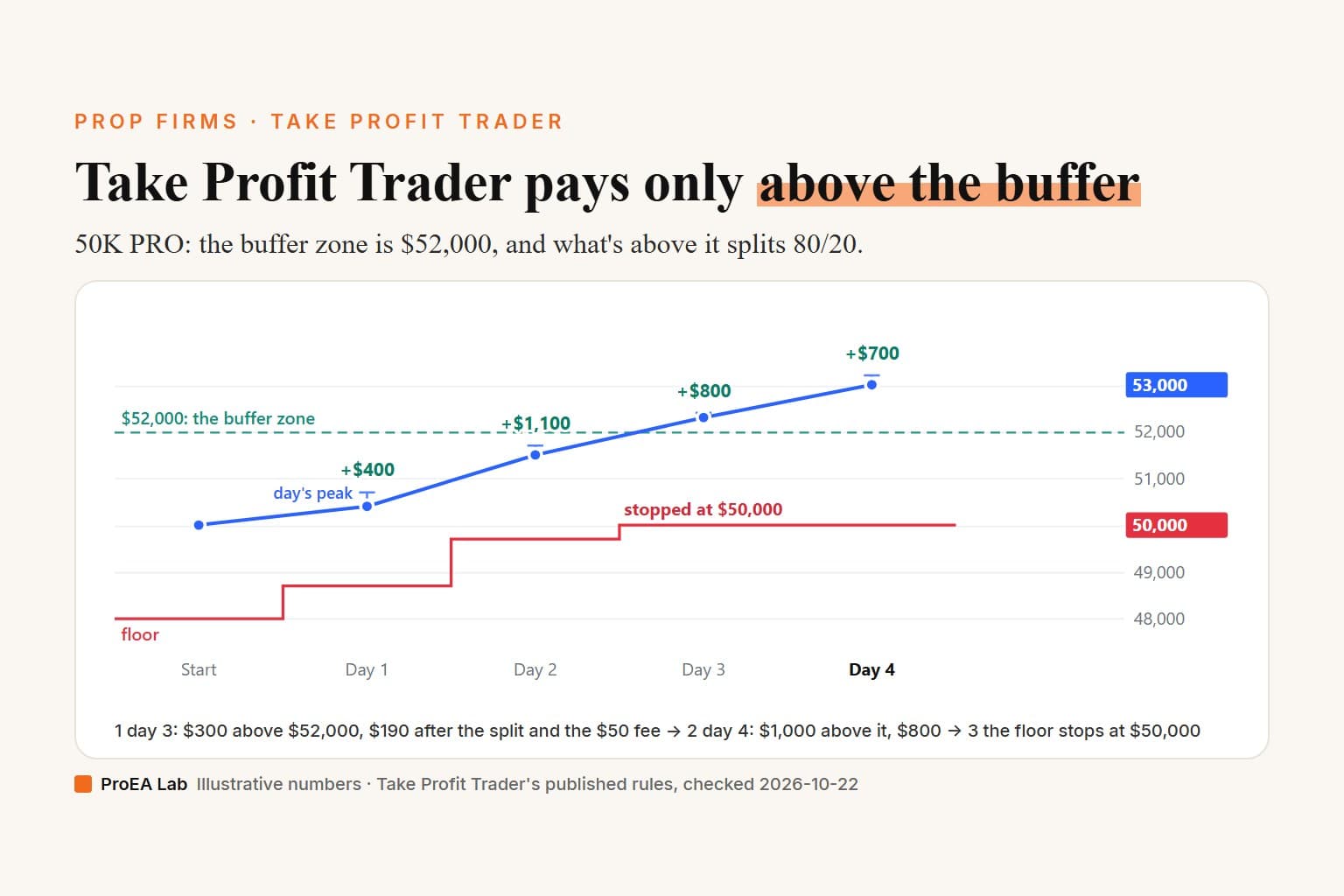
An invented 50K PRO account, activated after a passed Test for the "One Time $130 Fee" (waived with the NOFEE40 code its home page offered on 2026-10-22). It starts at $50,000 with the Minimum Account Balance at $48,000 and the buffer zone at $52,000. Each day's P&L is after commissions, which Take Profit Trader charges in PRO at $4.50 a round trip per contract and $1.50 for micros.
| Day | Day's peak, open profit included | Day P&L | Close | Highest balance so far | Minimum Account Balance after the day | Above the $52,000 buffer zone |
|---|---|---|---|---|---|---|
| Start | — | — | $50,000 | $50,000 | $48,000 | $0 |
| 1 | +$700 | +$400 | $50,400 | $50,700 | $48,700 | $0 |
| 2 | +$1,300 | +$1,100 | $51,500 | $51,700 | $49,700 | $0 |
| 3 | +$900 | +$800 | $52,300 | $52,400 | $50,000 (stopped) | $300 |
| 4 | +$900 | +$700 | $53,000 | $53,200 | $50,000 (stopped) | $1,000 |
Days 1 and 2 build the buffer and nothing can leave. Day 3's $52,400 peak stops the floor at $50,000, and its $52,300 close leaves $300 above the buffer zone that evening. Day 4 closes $1,000 above it.
What reaches your bank depends on how you take it:
| When you take it | Moved from the account | Take Profit Trader's 20% | Into your wallet | Fee on the wallet withdrawal | Reaches your bank |
|---|---|---|---|---|---|
| Day 3, straight out of the wallet | $300 | $60 | $240 | $50 | $190 |
| Day 3 to the wallet, day 4's $700 to the wallet, one wallet withdrawal | $1,000 | $200 | $800 | $0 | $800 |
| Day 4, all at once | $1,000 | $200 | $800 | $0 | $800 |
One thing the split route gives up: the 500 reward points for a first withdrawal of $1,000 or more need a single $1,000 move out of the PRO account, so only taking day 4's $1,000 at once earns them.
After either of the $1,000 routes the account holds $52,000 against a floor of $50,000: the full $2,000 of room it started with, and $0 above the buffer zone until it makes more. Take Profit Trader's pages don't say a withdrawal moves the Minimum Account Balance; this assumes it stays where it stopped. Any move from the account of $312.50 or less puts $250 or less in the wallet, so taking it straight out of the wallet costs the $50.
Run it on your own numbers: Take Profit Trader payout calculator, 50K PRO. It opens on day 3's $2,300 of closed profit and $2,400 intraday peak and shows $190 reaching your bank after the $50 fee; enter day 4's $3,000 and $3,200 and it shows $800.
Sources, checked 2026-10-22: PRO Account Profit Split & Withdrawal Rules, PRO Account Rules, Withdrawal Fees, Commissions on Test and PRO accounts, How to Withdraw from PRO Account to the Wallet, Take Profit Trader home page.
How much does Take Profit Trader keep, and what does a withdrawal cost?
The split. "In the PRO account, the profit split is 80/20, where the trader keeps 80% of the profits." It comes off when you move money to the wallet: the "commission is calculated and subtracted automatically, which is the 20% owed to Take Profit," and the form shows your 80% as "The amount you get." The home page's table: "In the PRO accounts you keep 80% of your profits above the buffer and 90% in PRO+ accounts."
The fee. "Take Profit Trader waives all fees on withdrawals from the wallet over $250." Below that: "If you request a withdrawal of $250 or less from your wallet, you will be charged a $50 withdrawal fee." It's charged on the wallet withdrawal, so at 80/20 you need to move more than $312.50 from the account to clear it in one go. PayPal may add its own: "additional fees might get applied to the withdrawals by PayPal."
What else the wallet does. "Any money available in your wallet can be used to purchase anything at TakeProfitTrader.com," such as a new Test or a reset, but only if it covers the whole price.
Taxes. Take Profit Trader is a US company, and "all PRO Accounts users and affiliates must complete and sign the required tax form before any withdrawal can be processed": a W-9 for US persons and companies, a W-8BEN otherwise, signed through ComplyExchange the first time you withdraw. A tax document follows after each calendar year.
Reward points. Your first withdrawal of $1,000 or more earns 500 points, and "The amount must be withdrawn in a single transaction from your PRO/PRO+ account": "smaller wallet withdrawals cannot be combined."
Sources, checked 2026-10-22: PRO Account Profit Split & Withdrawal Rules, How to Withdraw from PRO Account to the Wallet, Withdrawal Fees, Utilizing Your Wallet, Taxes on Withdrawals, Filling out tax forms, Point Values, the comparison table on Take Profit Trader's home page.
How does the money reach you, and how long does it take?
In two steps: from the trading account to your Take Profit Trader wallet, then from the wallet to you.
| Step | What happens | How long |
|---|---|---|
| Account to wallet, Tradovate PRO | automated check while you're flat; "Funds transferred successfully!" | "5-10 seconds" |
| Account to wallet, Rithmic PRO, PRO+, archived Tradovate PRO, cancelled or disabled PRO | reviewed by Take Profit Trader's team: "Your withdrawal process is in progress." | not published now; the old manual step "could take up to 12 business hours" |
| Wallet payout request | an admin approves it | "up to 12 business hours, however usually it is a lot faster" |
| To a US bank, through Plaid | usually real time | sometimes 1–2 business days |
| To PayPal or Wise | if you have no US bank account | "within 12 business hours" |
The automated step has "no manual review step and no pending window," and the Rithmic and PRO+ ones "remain manual for now." Archived accounts are Tradovate PRO accounts flagged "after three or more days of liquidation." The home page sums it up as paid "typically within one business day."
Methods. Plaid for US banks, PayPal, and Wise for international bank transfers. Plaid only connects a bank account in your own registered name: otherwise "Plaid will not allow the connection, and payouts to that bank account will not be processed." For PayPal and Wise, a name that doesn't match means "the payout will be delayed for review or denied." For an LLC, "you must use the Wise option," or the LLC's own PayPal.
Security. The MFA article lists "Withdrawals (confirming access to funds)" among the actions where it asks for your authenticator code, though it also calls setting MFA up optional.
Sources, checked 2026-10-22: Speed of Payouts Update: Q&A, How to Withdraw from PRO Account to the Wallet, How to Withdraw from the Wallet, Payout System, Connecting US Bank Accounts For Payouts, Multi-Factor Authentication (MFA) Overview & Usage, the FAQ on Take Profit Trader's home page.
What can stop or delay a payout?
- A denied request. The automated account-to-wallet step can refuse a request for four reasons only: not enough in the account, open positions or working orders, Tradovate maintenance, or a Tradovate API fault. "If a request is denied for any of these reasons, the issue can be resolved and the request resubmitted immediately."
- A name or tax-form mismatch. "Your payouts may be blocked if you submit incorrect information when signing the tax form."
- A policy breach. Take Profit Trader's Universal Trading Policies, which ban bots, counter positions and coordinated trading on every account: "Violation of any of these policies may result in profit forfeiture, account reset, account closure, or removal from the platform."
- A trading style Take Profit Trader won't fund. Its Sustainable Trading Policy singles out large positions at "fixed, predictable market moments like the open, key economic releases," where "TPT may part ways as funding partners without prior notice."
Sources, checked 2026-10-22: Speed of Payouts Update: Q&A, Filling out tax forms, TakeProfitTrader Universal Trading Policies (UTP), Sustainable Trading Policy.
PRO+ payouts: 90/10 and no buffer
PRO+ is the live account Take Profit Trader invites some PRO traders to. Its payout terms: "90/10 profit split, where the trader keeps 90% of the profits" and "No buffer zone requirement for withdrawal," with an end-of-day drawdown. It starts at a $0 balance with the floor at the PRO account's starting drawdown, −$2,000 for a 50K, trailing up to $0 and stopping there.
- Your PRO profit. When PRO+ is issued, "$5,000 in profit from the PRO account will be frozen and must remain in the account while the PRO+ is active." "Anything above this $5,000 can be withdrawn immediately according to the PRO Account Profit Split."
- If you lose the PRO+ account, your share of the frozen $5,000 and anything left in PRO+ can be withdrawn; a negative PRO+ balance comes out of the $5,000 first.
- PRO+ Development, the version with smaller limits: "Daily payouts with no withdrawal limits." Its 30-day cooldown counts net losses of Take Profit Trader's capital, credits back its 10% share of your payouts, and while it runs "the wallet stays fully withdrawable."
- Costs. PRO+ pays broker commission rates instead of $4.50 and $1.50.
Sources, checked 2026-10-22: Advantages of PRO+, PRO+ Account Upgrade Process – Overview and Guidelines, PRO+ Development Accounts, PRO+ Development: 30-Day Live-Capital Cooldown, Commissions for PRO+.
How other firms pay, rule by rule: Topstep payout rules, Apex payout rules, Lucid Trading payout rules.
Where Take Profit Trader's pages disagree
- Half the buffer, or all of it, after closing? The payout article: "You can withdraw 50% of your Buffer Zone after your account is closed." The comparison table on the home page: "Profits inside the buffer zone can be withdrawn from a disabled PRO account," with no percentage. The table's wording matches the article's archived version, up to October 8, when the share was 50% or 80% depending on the account's age.
- 80% of what? The payout article says that at $52,000 you "start withdrawing at 80% of total profit," which read alone could include the buffer. The home page's table says you keep "80% of your profits above the buffer," and the promo FAQs: "There are no withdrawal restrictions on your profits above the buffer." This post follows the table: the buffer stays in while the account is open.
- Is MFA needed to withdraw? The MFA article says "Setting up your MFA is completely optional" and lists "Withdrawals (confirming access to funds)" among the actions where MFA is required.
- Which step is reviewed by hand? The payout Q&A says the account-to-wallet step has "no manual review step," then that "The Profit Team manually reviews payout requests to the wallet for compliance purposes." How to Withdraw from the Wallet puts the admin approval on the request out of the wallet; we read the Q&A the same way.
- Withdrawing PRO money after the PRO+ upgrade. The upgrade article says "all future trading and withdrawals must be done on the PRO+ account only," and also that PRO profit above the frozen $5,000 "can be withdrawn immediately."
Not published
- A minimum withdrawal, beyond the $50 fee on $250 or less.
- How many withdrawal requests you can make in a day; the pages say "daily."
- What "50% of your Buffer Zone" means exactly: half the drawdown amount ($1,000 on a 50K, our reading) or half of what's left, whether the 80/20 split applies to it, and what it pays on an account liquidated at its Minimum Account Balance, where the buffer is already gone.
- Whether a withdrawal moves the Minimum Account Balance.
- How long the hand-reviewed account-to-wallet withdrawals take now (the old manual step "could take up to 12 business hours"), and what PayPal's fees are.
- Whether the 500 points for a $1,000 withdrawal count the amount before or after the 20%.
- What happens to the frozen $5,000 when a PRO account has less than $5,000 of profit at the PRO+ upgrade.
Where we sit
We don't run a prop firm, we're not affiliated with Take Profit Trader, and we earn nothing if you buy from Take Profit Trader. We sell the Prop Firm Challenge Toolkit, a TradingView indicator that turns rule numbers you type into dollar buffers on your chart. It fits only part of this rule: it can show the room to the PRO account's trailing floor, and the distance to the buffer zone if you type it as a target. It knows nothing about payouts. It has no Take Profit Trader preset, so use Custom. For a 50K PRO account:
| Toolkit setting (Custom) | 50K PRO account | From |
|---|---|---|
| Max loss % | 4 | $2,000 of $50,000 |
| Drawdown mode | Trailing Intraday | the floor trails your peak, open profit included |
| Trailing DD locks AT initial balance | On | the floor stops at $50,000 |
| Profit target % | 4 | the $52,000 buffer zone, as a distance to clear |
| Daily loss % | 0 | no daily loss limit in PRO |
| Consistency % (0=off) | 0 | no consistency rule in PRO |
| Min trading days | 0 | no minimum days |
Where it differs from Take Profit Trader, plainly. It doesn't read Take Profit Trader's dashboard: you type the balance in, and the high it trails is the balance you type. Take Profit Trader's floor follows your peak with open profit included, so on day 1 of the example, with $50,400 typed, the Toolkit puts the floor at $48,400 where Take Profit Trader's sits at $48,700, showing $300 more room than you have. Below an earlier high, it shows more room for the same reason. Its target is only a distance to $52,000: it doesn't know that's where withdrawals start, and a PASSED status there only means the balance you typed crossed it. It knows no split, no fee, no wallet and no news rule. Read the real floor off your platform (the "Dist Drawdown" column in Tradovate's Accounts widget, or "Auto Liquidate Threshold Value" in R|Trader Pro) and the withdrawable amount off the calculator.
Sources and their last edits
Each page was read on 2026-10-22. Dates are the help center's own last-edit stamps (UTC).
- PRO Account Profit Split & Withdrawal Rules: last edited 2026-10-09.
- PRO Account Rules: last edited 2026-09-22.
- Rule 3: Do Not Hit End-Of-Day (EOD) Maximum Trailing Drawdown: last edited 2025-11-13.
- How to Keep Track Of Your Drawdown: last edited 2025-11-13.
- Resetting A PRO Account: last edited 2026-09-16.
- Speed of Payouts Update: Q&A: last edited 2026-08-20.
- How to Withdraw from PRO Account to the Wallet: last edited 2026-07-20.
- Keeping Track of Your Progress: last edited 2026-07-20.
- How to Withdraw from the Wallet: last edited 2025-11-13.
- Withdrawal Fees: last edited 2025-12-28.
- Payout System: last edited 2025-12-28.
- Connecting US Bank Accounts For Payouts: last edited 2025-11-25.
- Utilizing Your Wallet: last edited 2025-12-23.
- Taxes on Withdrawals: last edited 2025-12-23.
- Filling out tax forms: last edited 2025-12-30.
- Multi-Factor Authentication (MFA) Overview & Usage: last edited 2026-05-27.
- Point Values: last edited 2026-07-07.
- Commissions on Test and PRO accounts: last edited 2026-08-08.
- 50AND3 PROMO FAQS: last edited 2026-08-25.
- TakeProfitTrader Universal Trading Policies (UTP): last edited 2026-03-06.
- Sustainable Trading Policy: last edited 2026-07-01.
- Advantages of PRO+: last edited 2026-03-16.
- PRO+ Account Upgrade Process – Overview and Guidelines: last edited 2026-06-19.
- PRO+ Development Accounts: last edited 2026-05-28.
- PRO+ Development: 30-Day Live-Capital Cooldown: last edited 2026-09-22.
- Commissions for PRO+: last edited 2026-09-25.
- Take Profit Trader's home page, its comparison table and FAQ: no edit date published.
Disclosure
The 50K PRO account above is invented and uses Take Profit Trader's published rules. Nothing here is advice or a forecast, and it doesn't say whether a Take Profit Trader account is worth buying. Your Take Profit Trader dashboard shows your real balance and what you can withdraw, not this page. If a rule here no longer matches Take Profit Trader's pages, email support@pulltrade.app and we'll correct it in public.
Frequently asked questions
What are Take Profit Trader's payout rules?
In a PRO account you can withdraw from day one and on any day after, with no minimum days, no consistency rule, no payout window and no maximum, but only the balance above the buffer zone: your starting balance plus the drawdown, $52,000 on a 50K. Take Profit Trader keeps 20%, and a wallet withdrawal of $250 or less costs $50. PRO+ accounts pay 90/10 with no buffer.
What is the Take Profit Trader buffer zone?
A PRO account's starting balance plus its maximum drawdown: $26,500, $52,000, $77,500, $103,000 or $154,500 on the 25K to 150K accounts. While the account is open you can only withdraw above it, and it's the same balance at which the trailing floor stops at your starting balance. After the account closes, Take Profit Trader's payout article says you can withdraw 50% of the buffer zone.
How much can I withdraw from a 50K Take Profit Trader account?
Everything above a $52,000 balance, less Take Profit Trader's 20%. At $53,000 that's $1,000 moved from the account and $800 in your wallet, while the $2,000 buffer stays in the open account. There's no maximum, and the balance that counts is the dashboard's, updated each evening between 8 and 9 PM Eastern.
Does Take Profit Trader have a payout cap or a withdrawal limit?
No maximum: its comparison table shows no max for PRO and PRO+, and its promo FAQs repeat that there's no maximum withdrawal amount. The limits are the buffer zone on a PRO account, being flat when you ask, and the $50 fee on a wallet withdrawal of $250 or less. Take Profit Trader doesn't publish a minimum withdrawal.
How long do Take Profit Trader payouts take?
Two steps. Moving profit from a Tradovate PRO account to your wallet takes 5 to 10 seconds; Rithmic PRO, PRO+ and a few archived accounts are still handled by hand. A payout out of the wallet is approved within up to 12 business hours, then Plaid to a US bank is usually real time, sometimes 1 to 2 business days, and PayPal or Wise take up to 12 business hours.
What payout methods does Take Profit Trader use?
Three: Plaid for US bank accounts, PayPal, and Wise for bank transfers anywhere else. The receiving account must be in the name registered with Take Profit Trader, payouts to an LLC go through Wise or the LLC's own PayPal, and you sign a W-9 or W-8BEN tax form before your first payout.
Does Take Profit Trader charge a withdrawal fee?
Only on small wallet withdrawals: $250 or less costs $50, deducted from the request, and anything over $250 is free. Take Profit Trader's pages list no fee for moving money from the PRO account to the wallet beyond its 20%, so small amounts can collect in the wallet first. PayPal may charge its own fees.