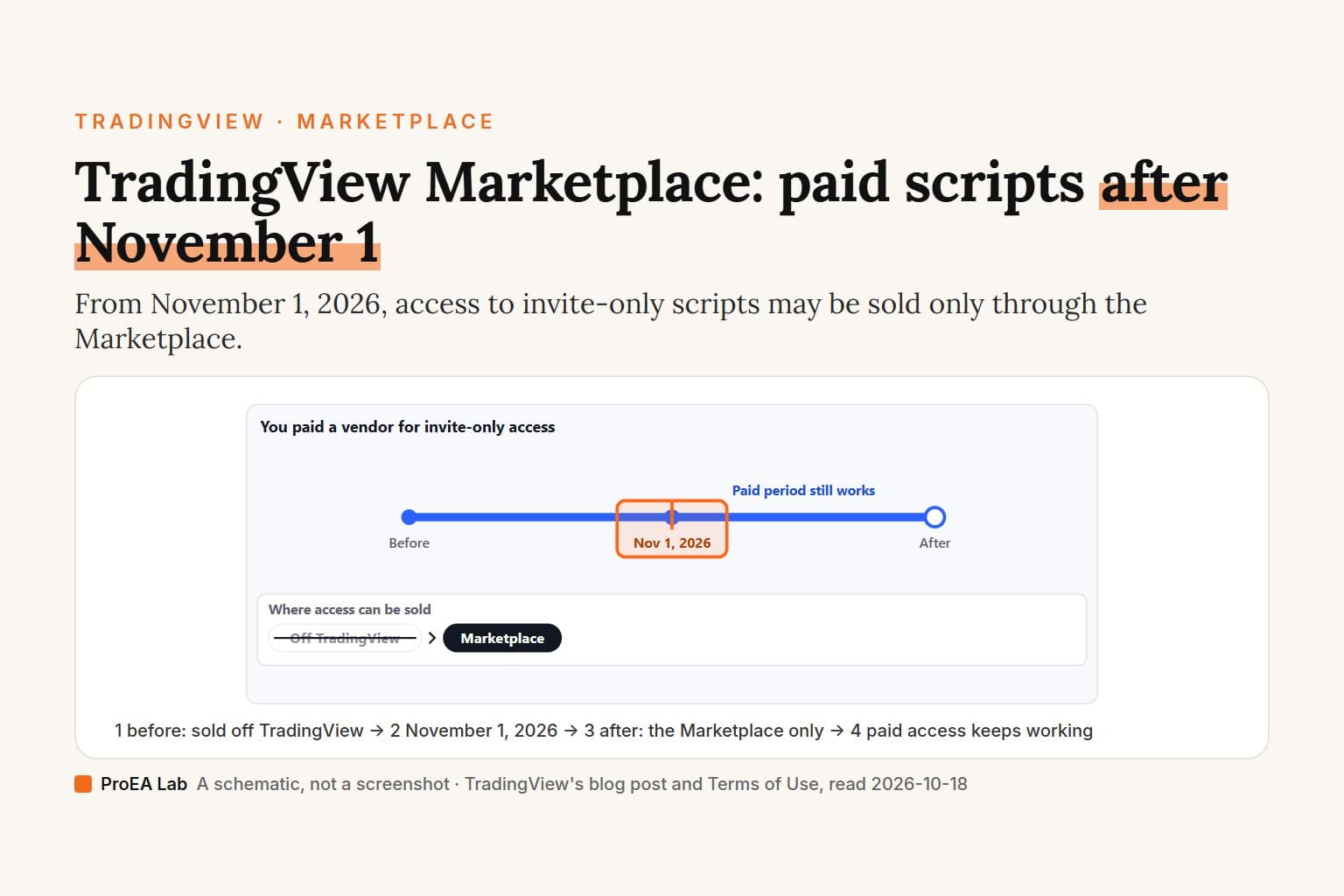
The TradingView Marketplace is where TradingView itself sells paid community scripts. Each listing is a Paid Space: one author's bundle of invite-only indicators and strategies, sold by monthly subscription, with TradingView taking the payment. From November 1, 2026, TradingView's Terms of Use allow selling access to invite-only scripts only there. Access people already paid for keeps working for the period they bought, lifetime included, TradingView says.
A disclosure first: we sell Pine Script indicators as source files from our own site, outside TradingView, so TradingView's rules on paid scripts are a subject we have a stake in. We read every TradingView page quoted here on 2026-10-18.
A simulated timeline, not a screenshot: no prices and no vendors. The cancel day in the Paid Space case is an example; you can cancel any day.
Read as text
- 1. Pay the vendor: off TradingView, before Nov 1.
- 2. The author adds you: in the script's Manage access.
- 3. Nov 1, 2026: selling off the Marketplace ends.
- 4. Your access keeps working: the period you paid, lifetime too.
- 5. Renewing it: only through the Marketplace.
- TradingView doesn't say what happens to it if a vendor's scripts are blocked.
How this window was chosen: From TradingView's blog post of September 30, 2026 (modified October 12), its Terms of Use sections 13 and 23, and its Paid Spaces terms, read on 2026-10-18. TradingView gives the date, not a time of day.
What is the TradingView Marketplace?
TradingView's own shop for paid indicators and strategies, made up of Paid Spaces. TradingView's Creator Program terms define a Paid Space as "a collection of invite-only indicators and strategies offered by an Author for a monthly fee". Its help article adds that "Each Paid Space belongs to a specific author" and that "All payments are handled securely by TradingView".
There are two ways in. On a chart, click Indicators on the top toolbar (or press /) and choose Marketplace under Community. On the website, tradingview.com/scripts/marketplace/ lists the same Paid Spaces under a page title that reads "Paid Spaces — Community-Crafted Indicators". In our signed-out look on 2026-10-18, each one showed a name, its author, a short description and a monthly price. We don't quote those prices: each author sets their own, per TradingView's guide to creating a Paid Space.
Not every author can sell there. Paid Spaces "are currently available only for selected authors who have passed a review conducted by our team", says the help article.
Marketplace, Store or Paid Spaces? The same thing under three names. The Indicators dialog calls it Marketplace. Its Personal → Purchased section, empty for us, still reads "No scripts here yet — discover the Store", with a Go to Store button. TradingView's Getting started with Supercharts lists "Store: Explore hand-picked, TradingView-approved authors from Paid Spaces." The "TradingView store" link in the site's footer is something else again: it sits under Merch and opens tradingviewstore.com, TradingView's "Official Merch Store", which sells mugs, caps and shirts.
What changes on November 1, 2026?
Selling access to an invite-only script stops being allowed anywhere but the Marketplace. TradingView's blog post of September 30, 2026, modified October 12: "selling access to an invite-only script, or providing that access as part of another paid product or service, will no longer be permitted starting November 1, 2026."
The rule itself is Section 23 of TradingView's Terms of Use, headed "Prohibition on commercial use of invite-only scripts". It opens: "Invite-only scripts published on TradingView may be used for non-commercial purposes only. Commercial use of any invite-only script is prohibited." It closes: "Scripts available for Commercial Use are only permitted to be distributed via the Marketplace. You can apply through the Creator Program."
Section 23 defines Commercial Use as any use where, "in connection with the invite-only script", any one of these applies:
- "a fee, subscription, donation, or other payment or benefit of monetary value (including tips, gifts, or cryptocurrency) is charged or requested for access to or use of the script;"
- "the script is published, distributed, or used as, or on behalf of, a company, partnership, trust, or other business or legal entity, or otherwise in the course of a trade or business (including as a sole proprietor), rather than purely in a personal, non-commercial capacity; or"
- "the script, its publication page or description, or a user's profile is used to advertise or direct users to a paid product or service, or otherwise to generate a commission, referral fee, or other benefit, including a paid signal service, paid community, paid course, or brokerage or exchange referral program."
It covers use "directly or indirectly", and it leaves the call to TradingView: "TradingView will decide, acting reasonably and based on the information available to it, whether a use constitutes Commercial Use." So we don't, and nothing on this page says whether a particular setup is inside the rule or outside it.
For vendors, the blog post sets a deadline: "If you want to continue selling scripts on TradingView, contact us at creators@tradingview.com before November 1, 2026." TradingView says it will then discuss "the details of your transition period, the steps required to move, and how to handle your existing customers". None of those details are public. Vendors who keep taking payments outside the Marketplace "without contacting us about joining the Marketplace will have their invite-only scripts blocked."
Section 23 also lists what TradingView may do if it finds Commercial Use or another breach of the section "following 1 November 2026": block or end the user's access "to TradingView and to all invite-only scripts published by or accessible to that user", remove their scripts, publications and profile content, or suspend or close the account.
Neither text gives a time of day or a time zone for November 1. TradingView gives the date only.
What happens to an invite-only script I already paid for?
TradingView says it keeps working for the period you paid for, lifetime access included. From the September 30 post: "Customers who paid for access to invite-only scripts before that date can keep using it for the period already purchased, including lifetime access."
Renewing is what changes. The next sentence: "After that, vendors may not take new payments outside the Marketplace to renew, extend, or maintain access to invite-only scripts." A monthly renewal paid on a vendor's own site after November 1 is the kind of payment that sentence names.
TradingView says a vendor who keeps taking payments outside the Marketplace without contacting it about joining will have their invite-only scripts blocked. It doesn't say what that does to access the vendor's customers already paid for. Nor do its pages say how a vendor's existing customers move into a Paid Space; that's left to each vendor's talks with TradingView. If you pay a vendor off TradingView, ask them before your next renewal whether they're moving to the Marketplace. For your own account, TradingView's support is the place to ask.
What does the rule not cover?
Section 23 names invite-only scripts. Its heading is "Prohibition on commercial use of invite-only scripts", and its definition of Commercial Use applies "in connection with the invite-only script". Its last sentence is worded more widely: "Scripts available for Commercial Use are only permitted to be distributed via the Marketplace." Section 23 doesn't mention open-source or protected scripts, or Pine code that isn't published on TradingView, and TradingView doesn't say whether that sentence reaches them.
Under TradingView's other rules, open-source and protected scripts are free to use anyway. Its Script Publishing Rules: "Open-source and protected scripts are, by definition, free." Its Vendor Requirements: "open-source and protected scripts are always free. You cannot restrict access to them or expect payment."
Free invite-only scripts for personal use are what the rule keeps. The blog post: "Authors can continue to use them for non-commercial purposes without any changes." Read that next to the definition above, though. A script published on behalf of a business, or one whose page, description or a user's profile is used to direct users to a paid course, a paid signal service or a brokerage or exchange referral program, is named in Section 23's definition of Commercial Use, and any one of its three parts is enough, whatever the access costs. That's TradingView's wording; whether it fits a given script is TradingView's decision.
How do you subscribe to a Paid Space?
On the web: open a Paid Space and click its Subscribe button. The Creator Program terms say "Subscribing to Paid Spaces is currently available only on the web version of TradingView" and "Free and paid TradingView users can subscribe", so the free Basic plan is enough.
On a computer
- Go to tradingview.com/scripts/marketplace/, or on a chart open Indicators (or press /) and choose Marketplace under Community.
- Open a Paid Space. On the website, its card's See all scripts link opened its page for us: a Paid Space label, the author, the scripts it includes, and a Subscribe button with the monthly price on it.
- Click Subscribe. Signed out, we got a Sign in box and stopped there.
- Once you've subscribed, "you get access to everything included in that author's bundle right on TradingView", per the help article.
We're on the free Basic plan and have bought nothing, so we haven't seen the checkout or where subscribed scripts show up afterwards. The dialog has a Purchased section under Personal; empty for us, it reads "Our trusted creators offer paid indicators and strategies — find the ones that work for you." TradingView's help doesn't say whether Paid Space scripts are listed there once you subscribe. For the rest of the dialog, our guide to TradingView indicators walks through it.
On a phone or tablet
TradingView's terms limit subscribing to "the web version", and its help gives no steps for the iOS or Android app. In an emulated iPhone browser, signed out, the same Paid Space page showed the same Subscribe button, and pressing it brought up the same Sign in box. We didn't test the apps, and we can't say whether a subscription goes through in a phone's browser.
How do Paid Space billing, cancellation and refunds work?
TradingView bills monthly; you can cancel any time in account settings and keep access to the end of the period; a refund has to be asked for within 7 calendar days after a payment. In TradingView's words:
- Billing: "Subscriptions are billed monthly, following the same rules as TradingView plan payments." "VAT or other applicable sales taxes are added where required by law." (Creator Program terms)
- Cancel: "Users may cancel at any time in account settings. Access remains active until the end of the billing period."
- Refund: "Paid Spaces subscriptions are eligible for a refund if requested within 7 calendar days after the payment is made." (Terms of Use, Section 13.) The same section says refunds are requested through TradingView's support team, and that "users who have filed a chargeback, dispute request, or claim are not eligible for a refund."
- Price changes: "If an Author changes the subscription price, the new price applies to existing Subscribers from their next billing cycle. Prices are not grandfathered for existing Subscribers."
- If a Paid Space is shut down: "Upon termination, active subscribers will retain access until their billing period ends, after which access will be automatically revoked."
- The author's own terms: subscribing means agreeing to TradingView's program terms "and, if applicable, to the Author's own terms published on their website". Where the two conflict, "these Program Terms prevail".
Here is how that compares with invite-only access bought straight from a vendor, which is the model the November rule ends for new payments:
| Invite-only access bought from a vendor | Paid Space in the Marketplace | |
|---|---|---|
| Who takes the payment | The vendor, off TradingView | TradingView |
| How you get access | The author adds you in Manage access | Automatically, when you subscribe |
| Billing, cancel, refund | Between you and the vendor | Monthly; account settings; 7 calendar days, via support |
| New payments from November 1, 2026 | Not permitted outside the Marketplace | The route TradingView allows |
The access row is from TradingView's Vendor Requirements: "When users subscribe to your Paid Space, they automatically receive access to all the scripts you included in that space. By contrast, for typical invite-only publications, you manually grant access to users who request it by using the "Manage access" dialog box." The vendor column's billing row follows TradingView's Pine docs, which call those transactions "strictly between users and vendors".
How do you sell indicators on TradingView?
Through TradingView's Creator Program: apply, pass a review, then sell one Paid Space by monthly subscription. TradingView's help article for authors sets two requirements: "An active Premium or Ultimate subscription" and "At least one invite-only indicator or strategy that is visible to everyone on TradingView and was published more than 3 months ago." You apply on the Creator Program page, and "there's no ETA for when your application will be reviewed."
Once approved, from the Creator Program terms and the setup guide:
- One Paid Space per author, "containing up to 50 scripts", and only "publicly available invite-only scripts".
- Your price: you set a monthly price when you create the Paid Space. To change it later, "contact us and we'll update it for you."
- The fee: "The platform fee is currently 0% per transaction." TradingView "may change the platform fee, but only with advance notice to Authors"; authors whose Paid Space was approved before April 1, 2026 keep 0% for as long as it stays active.
- Payouts: "once per month, subject to a settlement period of up to 30 days", in USD only, by PayPal, with a minimum withdrawal of USD 100.
- Taxes: TradingView "is the merchant of record for every Paid Space subscription, so we collect and remit any applicable sales taxes (such as VAT)". Income tax is yours. If your annual earnings reach USD 600, TradingView may ask for a Form W-9 (US residents) or W-8 (non-US residents).
- Your plan: Premium or Ultimate, kept "for as long as their Paid Space is active".
- Where: "Users from some regions — including, but not limited to, Iran, North Korea, and Russia — are not able to join the program due to legal restrictions."
Where do TradingView's own pages disagree?
On three points, as we read them on 2026-10-18. The help pages and the Terms carry no dates, so the September 30, 2026 blog post (modified October 12) is the newest dated statement among them.
- Who an invite-only sale involves. TradingView's Pine Script publishing docs still say: "TradingView does not benefit from script sales. Transactions concerning invite-only scripts are strictly between users and vendors; they do not involve TradingView." Its Vendor Requirements still describe vendors who "independently offer access to invite-only scripts" and let them mention "the price of your script" in the Author's instructions field. The September post says otherwise from November 1, 2026: "We're moving sales of access to scripts to our Marketplace", and Section 23 now permits distribution of scripts for Commercial Use "only" there.
- The name. Marketplace in the Indicators dialog and on the scripts page. Store in the Purchased section, the Supercharts guide and TradingView's November 2025 launch post, which says to "switch to the Store tab". Paid Spaces in the page title of the Marketplace page itself.
- How authors get in. The Creator Program terms say "Participation is by TradingView's invitation only." The Creator Program page, the help center and Section 23 all describe applying: "You can apply through the Creator Program."
What should you check before you pay for an invite-only script?
TradingView's own list, from its invite-only help page, which recommends "that you do your own research before using any invite-only scripts":
- Who is the author?
- How does the script manage risk and determine position sizes?
- Is there a track record of past trades on a real account?
- What markets is the system designed for?
- Does the script suggest using leverage?
- Was the script backtested?
- Does the author provide support?
- Can you contact other users of the script?
- Does the author offer a trial period?
Two questions of our own, from the rules above: is it a Paid Space, billed and refunded through TradingView, or a vendor's own checkout? And if it's the second, is the payment you're about to make one the vendor can still take after November 1, 2026? For judging the indicator itself, see how to judge a paid TradingView indicator.
Where we stand
On 2026-10-18 we read TradingView's blog, Terms of Use, Creator Program terms, help center and Pine docs, signed out in a fresh browser, and looked at the Indicators dialog, the Marketplace page and one Paid Space page, on a computer and in an emulated iPhone browser. Our TradingView account is on the free Basic plan. We didn't sign in, subscribe, ask for a refund, request invite-only access, test the iOS or Android apps, or apply to the Creator Program.
We sell Pine indicators as source code: each tool in our Pine v6 stack is a .pine file you paste into the Pine Editor and save, so it sits under My scripts like a script you wrote (how to add Pine Script to TradingView; how to open a .pine file). Section 23 doesn't mention scripts that aren't published on TradingView, and we don't read an answer into that silence, for our files or anyone else's.
This page isn't legal advice. For your own case, TradingView's terms and TradingView's support are the sources that count. We aren't affiliated with TradingView.
Use this animation on your site.
Frequently asked questions
What is the TradingView Marketplace?
TradingView's own store for paid community scripts. Each listing is a Paid Space: one author's bundle of invite-only indicators and strategies, sold by monthly subscription and billed by TradingView. On the chart it's the Marketplace section of the Indicators dialog; a few TradingView pages still call it the Store.
What changes on TradingView on November 1, 2026?
TradingView's blog says selling access to an invite-only script, or including that access in another paid product or service, is no longer permitted from that date except through its Marketplace. Its Terms of Use now say scripts available for Commercial Use may be distributed only via the Marketplace, and vendors who keep taking payments elsewhere without contacting TradingView will have their invite-only scripts blocked.
What happens to an invite-only script I already paid for?
TradingView says customers who paid before November 1, 2026 can keep using it for the period already purchased, including lifetime access. After that date, vendors may not take new payments outside the Marketplace to renew or extend it. TradingView doesn't say what happens to that access if a vendor's scripts are blocked.
Can I still use free invite-only scripts on TradingView?
TradingView's terms allow invite-only scripts for non-commercial purposes. Its definition of Commercial Use also covers scripts published on behalf of a business and scripts used to advertise a paid product or a referral program, so a script being free isn't the whole test. TradingView decides each case; we don't judge any one script.
How do I cancel a Paid Space subscription?
In your TradingView account settings, at any time. Access lasts until the end of the billing period you paid for. TradingView's Terms of Use make a Paid Spaces subscription eligible for a refund if you ask within 7 calendar days after the payment.
How do I sell indicators on TradingView?
Through the Creator Program. You need a Premium or Ultimate plan and at least one invite-only script that is visible to everyone and was published more than 3 months ago, then you apply and wait for a review. An approved author gets one Paid Space of up to 50 invite-only scripts, sets a monthly price and is paid monthly in USD via PayPal; the platform fee is currently 0%.
Can I subscribe to a Paid Space in the TradingView app?
TradingView's Paid Spaces terms say subscribing is currently available only on the web version of TradingView, and its help gives no app steps. In our signed-out check a Paid Space page in a phone's browser showed the same Subscribe button, but we didn't sign in or subscribe, so we can't say it works there.