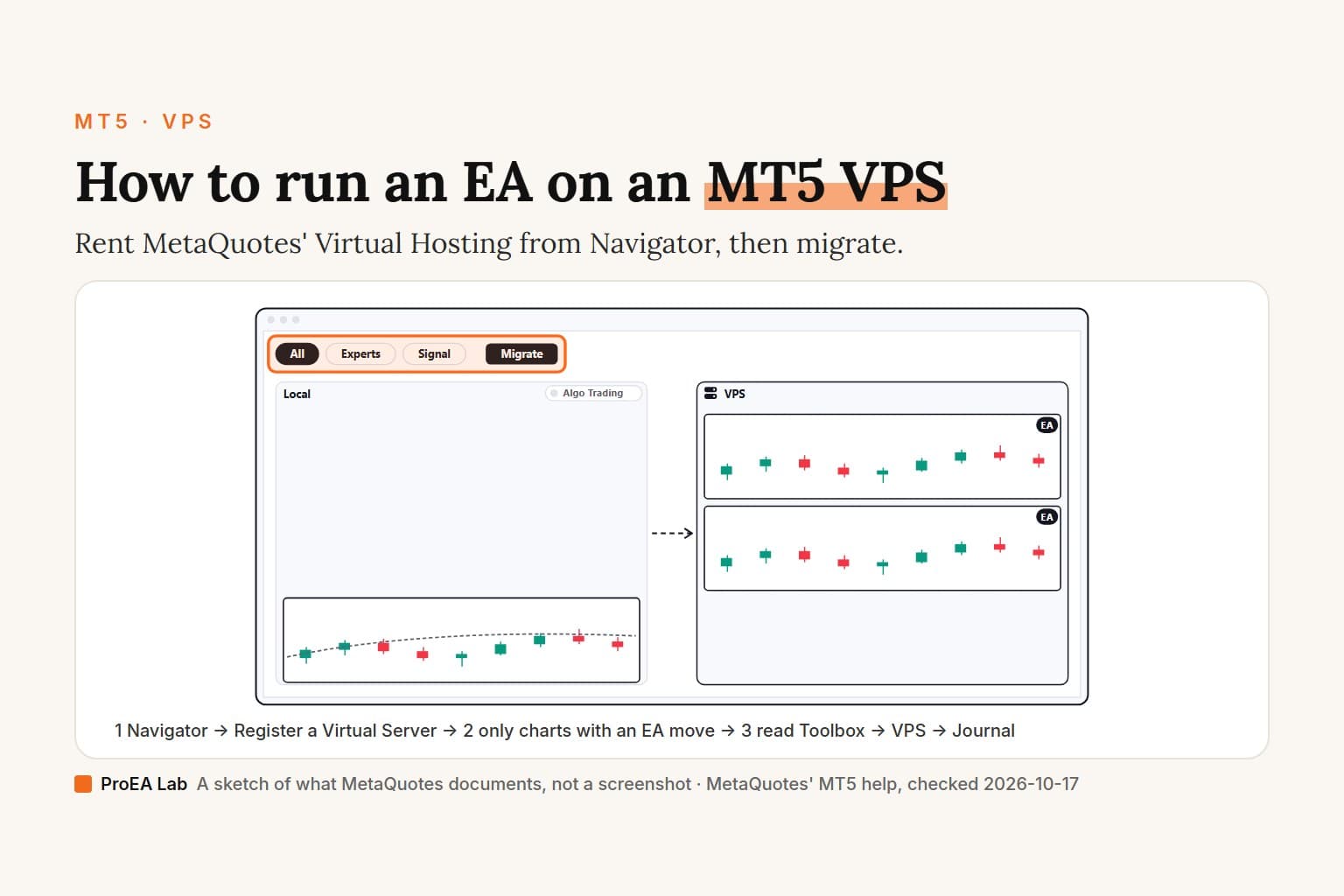
Where this comes from: we haven't rented MetaQuotes' Virtual Hosting, so nothing below is a screen we saw. Every step, limit and price is from MetaQuotes' own pages (its MT5 help, the MQL5 docs and the VPS pages on mql5.com), read on 2026-10-17. Where two of its pages disagree, we show both.
A simulated sketch of what MetaQuotes documents, not a screenshot: text is drawn as blank bars, pings and prices have no figures, and only the commands and panels this page names are labeled.
Read as text
- 1. Right-click your account: Navigator → Register a Virtual Server.
- 2. Check the server it picked: its ping against your terminal's.
- 3. Pick a plan and pay: 1, 3, 6 or 12 months, via MQL5.
- 4. Migrate: All, Experts or Signal: only charts with an EA move.
- 5. Read the hosting journal: Toolbox → VPS → Journal.
- Changed an EA or its inputs? Migrate again; nothing copies back from the server.
How this window was chosen: Places and command names from MetaQuotes' MetaTrader 5 help on Virtual Hosting (Register a Server, Migration, Working with the Virtual Platform) and the plan lengths on mql5.com/en/vps, checked 2026-10-17. We have not rented one; menus can differ slightly between builds.
What is an MT5 VPS, and do you need one?
It's a server that runs the terminal around the clock, close to your broker. MetaQuotes' Virtual Hosting help names three cases that need one: your own trading robot, an EA bought on the Market, and a Signal subscription. All of them, it says, "require constant connection to a trade server and uninterrupted power supply." A home PC that sleeps, restarts for updates or loses its connection stops the EA with it.
You can get that server two ways:
| MetaQuotes' Virtual Hosting | A Windows VPS from another company | |
|---|---|---|
| Where you rent it | Inside MT5, from Navigator | The provider's website |
| What runs there | A special MT5 with no user interface | Your own Windows and your own MT5 |
| How your EA gets there | Migration from your desktop terminal | You install it, as on any PC |
| DLL imports | Forbidden | Your choice |
| Server choice | Picked for you, closest to your broker | Whatever the provider offers |
| You look after | The subscription and each migration | Windows, restarts and the terminal |
MetaQuotes puts the difference in one line: "Unlike renting ordinary VDS or VPS from third-party companies, you are able to select the server that is the closest to your broker."
How do I rent MetaQuotes' VPS from MT5?
From Navigator, while you're logged in to the account the EA trades. The steps, from MetaQuotes' Register a Server help:
- Log in to the trading account in the desktop terminal. MetaQuotes' service rules say you can rent only through "the desktop version of MetaTrader client terminal installed on a PC", and only from 18 years old.
- Add your MQL5.community account under Tools → Options → Community. Payment runs through it, and the terminal prompts you if it's missing.
- In Navigator, right-click the account and choose Register a Virtual Server. The VPS section opens and "the system will automatically select the server that is closest to your broker."
- Pick a plan. Choose whether to turn on auto renewal (more on that below).
- Pay from your MQL5 balance or through a payment system. MetaQuotes first moves the amount into your MQL5.community account, then pays from it.
- Choose a migration type and click Migrate, or migrate later once your charts are ready.
One VPS works with one trading account, and an MT5 account gets an MT5 virtual terminal only. Rental by itself moves nothing; the migration in step 6 is what puts your EA there.
How much does the MT5 VPS cost?
From 10 to 15 USD a month on mql5.com/en/vps on 2026-10-17, depending on how many months you pay for. Both of MetaQuotes' price pages, read logged out that day:
| Plan | Length | Per month on mql5.com/en/vps | Per month on the plans page |
|---|---|---|---|
| Mini | 1 month | 15 USD | 15 USD |
| Optimal | 3 months | 13 USD | 14 USD |
| Long | 6 months | 10.83 USD | 13 USD |
| Max | 12 months | 10 USD | 12.8 USD |
The two pages agree only on the 1-month price; the plans page asks more for every longer plan. The main page's 12-month price fits the build 5100 release notes of 5 June 2025, which added the 12-month plan and said paying up front saves "one-third of the total cost". We can't tell you which figure the terminal charges, since we haven't rented one. Take the price it shows you before you pay.
Before you pick, know that the fee for the whole period is reserved up front and the minimum rental is 1 month. You "can change the selected service plan only after the rental period expires."
Is there a free MT5 VPS?
MetaQuotes offers three free routes, each with a catch. Its VPS page advertises a "Free trial period - 24 hours" and adds: "You will be automatically switched to the paid plan after 24 hours." The help lists two free plans as well. Free spends hosting time credited to your MQL5 account after you cancel a VPS you paid for. Sponsored is paid by your broker, and MetaQuotes says it depends on the broker, so ask its support. The rules cap free hosting at 16 charts with EAs and paid hosting at 32, without saying whether the trial or a Sponsored plan counts as free.
Which server does it pick, and what ping will I get?
It picks the hosting server closest to your broker's trade server and shows you the ping before you pay. The VPS section compares two network delays: from the hosting server to your broker, and from your own terminal to your broker. After you rent, the Details block in Toolbox → VPS keeps showing that ping in milliseconds, between the virtual server and your broker, and how much lower it is than your local one.
We can't give you a number. It depends on your broker's server and where you sit, and the terminal measures it for your account. If it gets worse later, say after your broker moves its servers, open the Hosting section of your MQL5.community profile, click the gear next to the subscription, choose Change Server, pick the one with the smallest ping and click Move (MetaQuotes). Then migrate again from the VPS tab, as the help tells you to.
What moves to the VPS when you migrate?
Of your charts, only the ones running an EA move, along with the account's connection data, its settings and any Signal subscription. "Migration is performed every time you synchronize", and it runs one way: "the local platform environment is moved to the virtual platform, but never vice versa." There are three types (Migration help):
- All: the account's connection data, open charts, running EAs and indicators, signal copying and email settings.
- Experts: EAs and indicators, without signal settings.
- Signal: signal copying only, no charts or programs.
What crosses and what stays, from the help and the service rules:
| Moves | Stays behind |
|---|---|
| Charts with a running EA, up to 32 (16 on free hosting) | Charts without an EA, even with custom indicators on them |
| Indicators on those charts, and the inputs of the programs on them | Scripts, "even if they are running in an endless loop" |
| The EA files and any EX5 libraries they use | Charts with non-standard timeframes and symbols |
| Market Watch symbols, email, FTP, signal and notification settings | Accounts that log in with one-time passwords: they can't use a VPS at all |
| WebRequest permission and its list of allowed URLs | DLL calls: forbidden on the virtual platform |
| Max bars in chart, up to 500 000 |
One MetaQuotes page contradicts the rest. Its VPS overview says scripts are transferred too. The help and the rules both say they aren't, and we go by those.
Four things catch people out:
- Automated trading is always on over there. Any EA that moves "is allowed to trade after being moved", whatever your local Algo Trading button (AutoTrading in MetaQuotes' help) or the EA's own setting says. Don't migrate an EA you aren't sure about.
- Your own terminal stops trading. Moving EAs switches automated trading off locally, so two terminals don't trade the same account through the same EA.
- An indicator alone won't move. Put it on the chart of an "empty" EA that places no trades; MetaQuotes suggests building one in MetaEditor's MQL5 Wizard as "Expert Advisor: template".
- Market products move without spending an activation. MetaQuotes says the count of available activations isn't decreased.
The first migration also downloads all available history for the open charts, which "can take some time". Changed an input or added a chart? Change it in your own terminal and migrate again. Nothing updates on the server by itself.
How do I check the MT5 VPS journal?
Toolbox → VPS → Journal shows the server's own log, and Journal Viewer filters it. The virtual platform has no screen you can look at, so its logs and the VPS tab are how you see it working (Working with the Virtual Platform):
- Press Ctrl+T for the Toolbox and open its VPS tab.
- Read Environment: the number of charts, EAs and indicators running, and each EA's symbol and timeframe. Last migration shows when you last synchronized, and which type.
- Hover over the server's status (started or stopped) for the broker access point it's connected to and the connection's state.
- Open Journal. Entries load from the server as you scroll.
- For a search, click Journal Viewer, type text to filter by, set the period, pick Terminal (all platform events, trades included) or Experts (your EAs and indicators), and click Request.
Downloaded logs are saved in your own data folder under logs\hosting.*.terminal\. A large request returns only the first part; select the last line and press PgDn for more. The migration itself, MetaQuotes says, "is recorded in the platform log" on your side. The Performance block shows CPU, memory and disk graphs, and MetaQuotes asks you to make sure your program "does not consume too much resources." Its VPS page gives each platform up to 3 GB of RAM and 16 GB of disk, and its rules end a rental without refund if your programs interfere with the hoster's hardware.
If the journal shows the EA loaded but no trades, the causes are the same as on a desktop terminal: MT5 EA not taking trades decodes the messages.
How do I stop, renew or cancel the VPS?
Stopping pauses the platform; cancelling deletes it. From MetaQuotes' help:
- Stop or start. Use Stop Server or Start Server in the server's context menu in Navigator. It's "similar to closing the platform on your computer" and doesn't touch the subscription, but the rules add that the rental period isn't extended while it's stopped.
- Auto renewal. The option reads "Automatically renew subscription with sufficient funds and terminal activity". Click its status in the VPS tab, or use your profile's Hosting section. Renewal charges the payment method you first used, falling back to your MQL5 balance, and tries the day before expiry. It skips a server you stopped, and there's no manual renewal.
- Expiry. If the subscription runs out, "your hosting data will be completely deleted from the server." You'd rent again and rebuild everything.
- Cancel. Click the subscription ID in the VPS tab, then Cancel in your MQL5.community profile. The virtual platform and everything you migrated are deleted.
- Move to another account. In the profile's Hosting section, click the gear, choose Move, enter the new login and server, then log in to that account and migrate.
On refunds, MetaQuotes contradicts itself. The help says refunds are made "only if you cancel hosting within the first 24 hours after purchase", and later cancellations turn the unused time into free minutes for a new VPS. The plans page also promises "a full refund" within 24 hours. The current rules say "Paid Rent canceled by a User is not refunded." We haven't tested either, so read the rules you accept at checkout.
Can I use a third-party Windows VPS instead?
Yes, and then everything the hosting does for you is yours to set up. MetaQuotes doesn't document any other company's VPS, and we don't recommend one. What its help covers is setting up MT5 on Windows, which is what a rented Windows server is:
- Windows the terminal supports. MetaQuotes' installation help says MT5 "can run under Microsoft Windows 10/11". It doesn't mention Windows Server, which many VPS plans run, and we haven't tried MT5 on it.
- Install and log in. Run the installer, then log in with Save password ticked. MetaQuotes says that "the next time you start the platform, the last used account will be automatically connected" (Connect to an Account).
- Add the EA as on any PC (how to install an EA on MT5), with both the Algo Trading button and the EA's own Allow Algo Trading on. DLL imports work here if you allow them, so allow them only for code you trust.
- Plan for restarts. Open charts and their EAs are kept in the terminal's current profile, which saves changes automatically. MetaQuotes also documents a start-up configuration file whose
[StartUp]section names an EA, symbol and timeframe to open when MT5 starts (Platform Start). Getting Windows to launch MT5 after a reboot is a Windows setting MetaQuotes doesn't cover. - Expect updates. Live Update "can not be deactivated". After a download the terminal asks you to choose Restart or Later, and Later installs it at the next start (Live Update).
Two smaller points from the same pages. Over Remote Desktop the terminal keeps its data in your Windows user folder (AppData\Roaming\MetaQuotes\Terminal\), so use File → Open Data Folder to find it. And two copies can't run from one folder: install a second terminal in its own folder for a second account.
Power, Windows updates, the network and the ping to your broker are then between you and the provider. Trading from a Mac? MetaQuotes' Mac installer runs this same Windows terminal in Wine, though none of its VPS pages mentions the Mac (MT5 for Mac).
What keeps an EA running, and what stops it?
It keeps running while its terminal is open and connected and it sits on an open chart; it can trade only when four switches allow it. MetaQuotes' trade permission docs name them: the terminal's Algo Trading, the EA's own permission, the broker allowing EAs on the account, and an account that may trade at all. A login with the investor password can't.
What stops it, from MetaQuotes' pages:
| What happens | Where | What MetaQuotes says |
|---|---|---|
| The terminal closes, or Windows restarts | Your own PC or VPS | The EA unloads with it (uninit reasons) |
| The chart closes, or the EA is removed | Anywhere | The EA unloads |
| You switch accounts or profiles | Your own terminal | Options under Tools → Options → Expert Advisors can switch automated trading off |
| Division by zero, an array overrun, a bad pointer | Anywhere | Critical errors: "a program is terminated immediately" (runtime errors) |
| The broker disables EA trading on the account | Anywhere | Trades from EAs aren't executed |
| A DLL call | MetaQuotes' VPS | The program "is immediately stopped due to a critical error" |
| The subscription expires, or you stop the server | MetaQuotes' VPS | The platform stops; on expiry its data is deleted |
| Hoster maintenance | MetaQuotes' VPS | Up to 4 hours a day on Saturday and Sunday (EET), up to 15 minutes a day on weekdays |
That last line is in MetaQuotes' service rules, which also say the service "makes no guarantees of the Virtual terminals' smooth operation." The rules give those hours in EET. Your broker's server may keep another clock, and MT5 server time shows how to read it.
Where we stand
We sell MT5 EAs as .mq5 source. Before you migrate any EA, ours included, search its code for #import lines that load a DLL: those won't run on MetaQuotes' VPS. Then test it on a demo account and read the Experts log before you trust it with money. The catalog lists what each of ours ships with. We aren't affiliated with MetaQuotes and use no referral links.
Use this animation on your site.
Frequently asked questions
What is an MT5 VPS?
A computer that stays on and connected, so MetaTrader 5 and your EAs keep running while your own PC is off. MetaQuotes rents one from inside the terminal, called Virtual Hosting, or you can rent a Windows server elsewhere and run MT5 on it yourself.
How much does the MT5 VPS cost?
On 2026-10-17, mql5.com/en/vps listed 15 USD a month for 1 month, 13 for 3 months, 10.83 for 6 months and 10 for 12 months. MetaQuotes' plans page listed 14, 13 and 12.8 for the longer plans, so check the price the terminal shows before you pay.
Is there a free MT5 VPS?
MetaQuotes advertises a 24-hour free trial that switches to the paid plan afterwards. Its help also lists a Free plan, which spends time credited from a VPS you cancelled, and a Sponsored plan paid by your broker, if your broker offers one.
Can an EA that uses DLLs run on the MT5 VPS?
No. MetaQuotes says DLL calls are completely forbidden on the virtual platform, and a program that calls a DLL function there is stopped with a critical error. An EA that needs a DLL has to run on a Windows machine you control.
What moves to the VPS when I migrate?
Charts that run an EA, the indicators on them, the EAs' inputs, the account's connection data, Market Watch symbols, and the email, signal, notification and WebRequest settings. Scripts, charts without an EA, and charts with non-standard symbols or timeframes stay behind.
How do I check that my EA is running on the VPS?
Open the Toolbox and its VPS tab. Environment counts the charts, EAs and indicators running there, and VPS, then Journal shows the server's own Terminal and Experts logs. Journal Viewer filters them by text and period.
How do I stop or cancel the MT5 VPS?
Stop Server in Navigator stops the platform without ending the subscription. To cancel, click the subscription ID and choose Cancel in your MQL5.community profile, which deletes the server's data. MetaQuotes' help refunds a cancellation within the first 24 hours; its service rules say paid rent isn't refunded.