MQL5\Experts (or Indicators). A .set is a plain-text list of input values: load it from the EA's Inputs tab with Load.
Open a file in the opener above and it names it. For source, it lists the #property lines and every input, and can make a .set from them. For a preset, it shows the values, lets you change them, and saves a new .set in MT5's own layout. For an .ex5, it checks the first three bytes and says where it goes. It never decompiles, and nothing you open leaves your browser.
We built the .set side from the 187 presets in the MT5 terminals on our own machines, 184 of them saved by MT5 itself, and proved every built-in value it writes (a PERIOD_H1 input is stored as 16385) by compiling against MetaEditor.
Which MT5 file do you have?
Look at the extension: .mq5 and .mqh are readable code, .ex5 is compiled, .set is a preset. The table says what opens each and where it goes. Every folder sits inside MT5's data folder, which File → Open Data Folder opens.
| File | What it is | Open it with | Goes in |
|---|---|---|---|
.mq5 | MQL5 source code, plain text | MetaEditor (F4) or any text editor | MQL5\Experts, Indicators or Scripts |
.mqh | Include file: code a program pulls in | MetaEditor or any text editor | MQL5\Include, or next to its .mq5 |
.ex5 | Compiled MT5 program | Nothing: MT5 runs it | MQL5\Experts, Indicators or Scripts |
.set | Input preset, plain text | Inputs tab → Load, or a text editor | MQL5\Presets |
.mq4, .ex4 | MT4's source and compiled program | MT4 | MT4's MQL4 folder; MT5 can't run them |
MetaQuotes' Files and Folders help describes Experts as holding "compiled files (*.ex5) and source code files (*.mq5)", and says sets of input parameters are stored in Presets (read 2026-10-23). On our Windows machines each terminal's data folder is under AppData\Roaming\MetaQuotes\Terminal, one per installed MT5; the menu command finds the right one for you.
How do I open an .mq5 file?
With any text editor, since it's plain text, or with MetaEditor, the editor that also compiles it. In MT5, press F4 to open MetaEditor, then File → Open. From Navigator, right-click an EA and choose Modify to open its source.
An .mq5 never shows in Navigator itself; only the compiled .ex5 does (MetaQuotes). To get one, press F7 in MetaEditor and read the Errors tab. Most source opens as UTF-8 or ANSI text, and some (MetaQuotes' own examples among them) as UTF-16; the opener reads all three.
Is there an .mq5 to .ex5 converter?
Yes: MetaEditor's compiler, and it's free. Open the .mq5, press F7, and the .ex5 appears next to it. A file the source includes has to be where it expects: #include <…> looks under MQL5\Include, #include "…" next to the source. The opener lists both kinds, so a missing .mqh shows up before you compile. Our install guide has the compile steps in full.
How do I open an .mq5 file on Android?
Any text-viewer app shows it, and the opener above works in a phone's browser. Compiling is another matter: MetaEditor runs on a computer.
How do I open an .ex5 file?
You don't open it; you run it. An .ex5 is compiled. MT5 loads it from the right folder:
- File → Open Data Folder, then
MQL5\Expertsfor an EA,MQL5\Indicatorsfor an indicator,MQL5\Scriptsfor a script. Subfolders are fine. - Copy the
.ex5in. - In Navigator, right-click and choose Refresh, then drag it onto a chart.
The file can't tell you which kind it is, at least not without decompiling it, and its name often doesn't. The seller's instructions should. If they don't, try Experts first; if it isn't under Expert Advisors after Refresh, move it to Indicators.
An .ex5 can't be viewed or edited. Sites that offer to turn one back into .mq5 are decompilers. We don't offer that or link to one: decompiling someone else's program can breach its license and copyright. If you need to read or change the code, ask the seller for the .mq5.
How do I open an .ex5 file on Android or iPhone?
You can't run one there. MetaQuotes' Android and iPhone help have no section on Expert Advisors or custom indicators: their contents run from Getting Started to Settings, and the iPhone app's indicators are its 30 built-in ones (read 2026-10-23).
So an .ex5 runs in MT5 on a Windows PC, on a Mac through MetaQuotes' installer, or on a server. MetaQuotes' Virtual Hosting takes EAs you move from the desktop terminal (our MT5 VPS guide). The phone app can then watch the account the EA trades.
How do I open an .ex5 file on a Mac?
The same way as on Windows, in MT5 for Mac. MetaQuotes' macOS installer runs the Windows terminal in Wine, and its data folder is at ~/Library/Application Support/net.metaquotes.wine.metatrader5/drive_c/Program Files/MetaTrader 5. The opener's Mac switch gives each file's full Mac path. MT5 for Mac covers the install.
Can I use an .ex4 in MT5?
No. An .ex4 is a compiled MT4 program, and it can't be turned into an .ex5. The MT4 source (.mq4) has to be ported to MQL5 and compiled; MT4 vs MT5 explains what changes.
Where is the .set file location in MT5?
MQL5\Presets, inside the data folder. That's where the Inputs tab's Save and Load buttons work, and MetaQuotes says "Sets of input parameters are stored in the /Presets folder" (running an EA).
The Strategy Tester keeps its own: MQL5\Profiles\Tester holds "*.set files with the last used sets of input parameters for each Expert Advisor that has ever been tested", per MetaQuotes' folder help. On a Mac both are under the Wine data folder above.
How do I load a .set file in MT5?
From the EA's Inputs tab: Load, pick the file, check the values, OK.
- Attach the EA to a chart, or double-click it in Navigator, to open its properties.
- On the Inputs tab, click Load and choose the
.set. - Read the values it filled in. A preset made for another version of the EA may not match its inputs.
- Press OK. Save on the same tab writes the current values to a new
.set.
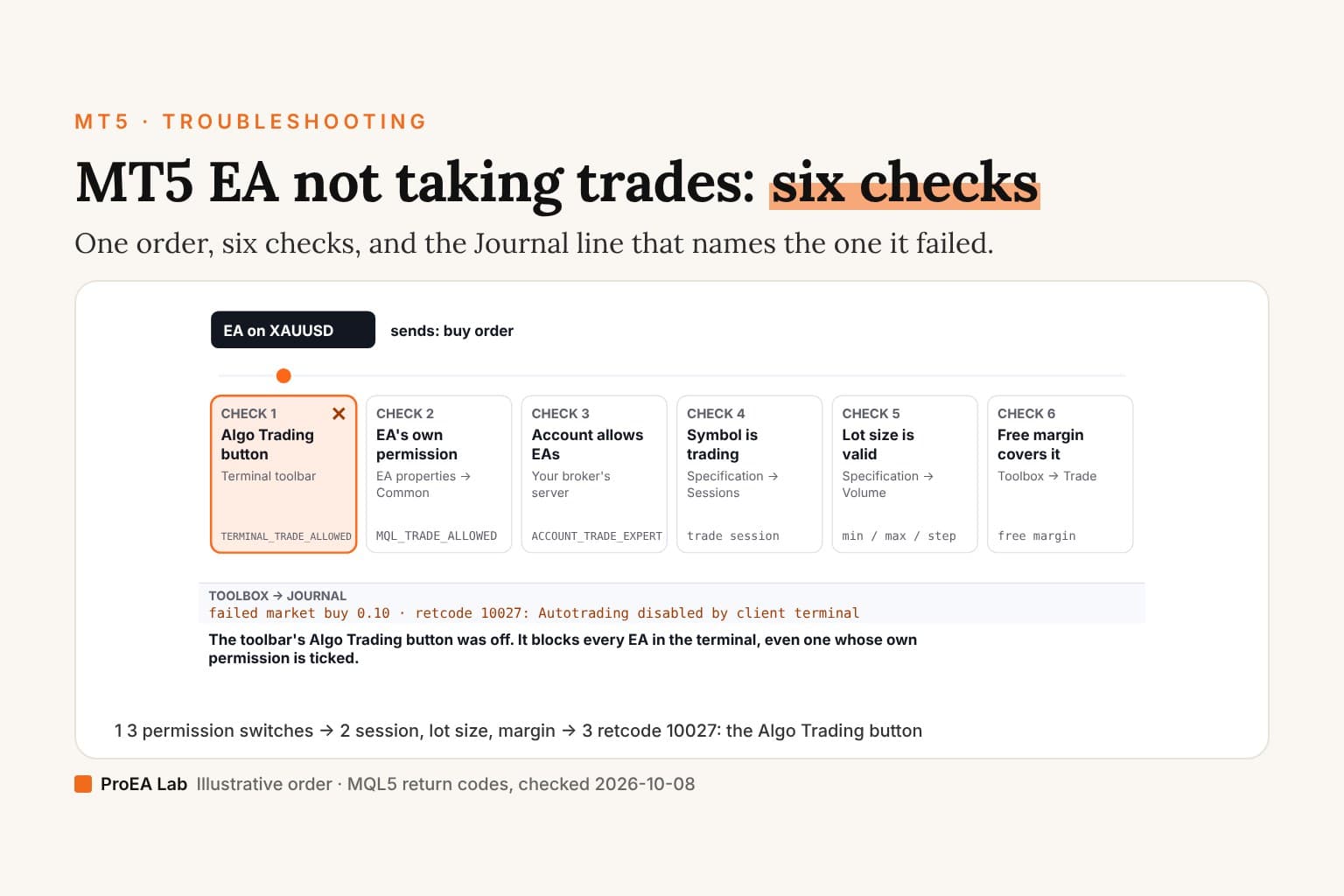
Loading a preset sets inputs; it doesn't switch on trading. The toolbar's Algo Trading button and the EA's own permission still decide that, as the install guide explains.
What's inside a .set file?
One input per line: name=value, with four more fields for anything MT5 can optimise. A line reads InpLots=0.1||0.1||0.01||1.0||N: the value, then the Strategy Tester's start, step and stop, then Y or N for whether that input is optimised. Strings and colors carry the value alone.
From the 187 presets on our machines (read 2026-10-23): 186 were UTF-16 text with a byte-order mark and Windows line ends. A boolean's start and stop are false and true, as in InpTrail=true||false||0||true||N. A timeframe or other enum is stored as its number, so PERIOD_H1 is 16385; a color as one number (clrDodgerBlue is 16748574); and a date as seconds since 1970. Lines starting with ; are comments.
To change a value by hand, edit only the part before the first || and keep the file's encoding. The opener does both for you: it changes the values you edit, writes every other line back as it was, and saves in the encoding the file came in.
Make a .set from an .mq5
The opener's Make a .set from these inputs writes the source's defaults in that same layout, with optimisation switched off. Most defaults resolve: numbers, booleans, strings, colors, dates, #defined values, this file's enums and MT5's common ones (timeframes, moving-average methods, applied prices). Some it won't guess at: a division, a name from another file, an input inside an #if block, or a number too big for its type, which the compiler would change. Those become comment lines naming the input, for you to set in MT5. Check every value before you press OK all the same: it's your account the EA trades.
For EA sellers: an install note your buyers can follow
Paste this into your zip's INSTALL.txt, your product page or your delivery email. It's free to use, needs no sign-up, and the link opens this page, where buyers can check each file you sent without uploading it:
HOW TO INSTALL (MetaTrader 5)
1. In MT5, choose File > Open Data Folder, then open MQL5 > Experts.
2. Copy the .ex5 file there. Got the .mq5 instead? Copy it there,
   press F4 to open MetaEditor, open the file and press F7 to compile.
3. In Navigator, right-click > Refresh, then drag the EA onto a chart.
4. To load the settings: in the EA's window, Inputs > Load > choose
   the .set file > OK. Check the values before you press OK.
5. Turn on Algo Trading in the toolbar, and tick Allow Algo Trading
   in the EA's properties window.

Not sure which file is which, or where it goes? Open it at
https://proea.app/open/mt5 (free; read in your browser, nothing uploaded).
The short link https://proea.app/open/mt5 redirects here and stays the same if this page ever moves. For a product page, one line does: "Not sure where a file goes? Open it in the free MT5 file opener at proea.app/open/mt5."
What's next?
- Install and attach it: how to install an EA on MT5 covers folders, compiling, presets and permissions.
- Trades rejected? Look up the Journal's return code in the MT5 error pages, each with what causes it and a fix.
- After a demo run: export the history and read it in the MT5 report analyzer, in the browser too.
- Want code you can read? MTR FullSystemEA ships as full source: 21 MQL5 files, 16,923 lines, including the 1,763-line
.mq5entry file. Readable source explains what an EA does; it doesn't prove it profits.
Frequently asked questions
What is an .mq5 file?
MQL5 source code: the plain-text program behind an MT5 Expert Advisor, indicator or script. Open it in MetaEditor (press F4 in MT5) or any text editor. MetaEditor compiles it into an .ex5 when you press F7.
How do I open an .ex5 file?
You don't open it; you run it. An .ex5 is compiled, so it can't be read or edited. Put it in MQL5, then Experts (or Indicators, or Scripts) inside MT5's data folder, refresh Navigator and drag it onto a chart.
Can an .ex5 be converted back to .mq5?
Not by MetaTrader. Tools that claim to are decompilers, and decompiling someone else's program can breach its license and copyright, so we don't offer or link to one. If you need to read or change the code, ask the seller for the .mq5.
How do I convert .mq5 to .ex5?
Compile it: open the .mq5 in MetaEditor and press F7. The .ex5 appears next to it. Every file it includes must be where the source expects it, or the compile stops with errors.
Where is the .set file location in MT5?
Presets you save from an EA's Inputs tab go in MQL5, then Presets, inside the data folder (File, then Open Data Folder). The Strategy Tester keeps the last inputs it used for each EA in MQL5, then Profiles, then Tester.
How do I load a .set file in MT5?
Open the EA's properties (attach it to a chart, or double-click it in Navigator), go to the Inputs tab, click Load and choose the .set. Check the values it filled in, then press OK.
Can I open an .ex5 file on Android or iPhone?
Not to run it. MetaQuotes' Android and iPhone help have no section on Expert Advisors or custom indicators. Run the .ex5 in MT5 on a Windows PC, on a Mac through MetaQuotes' installer, or on a server, and watch the account from your phone.