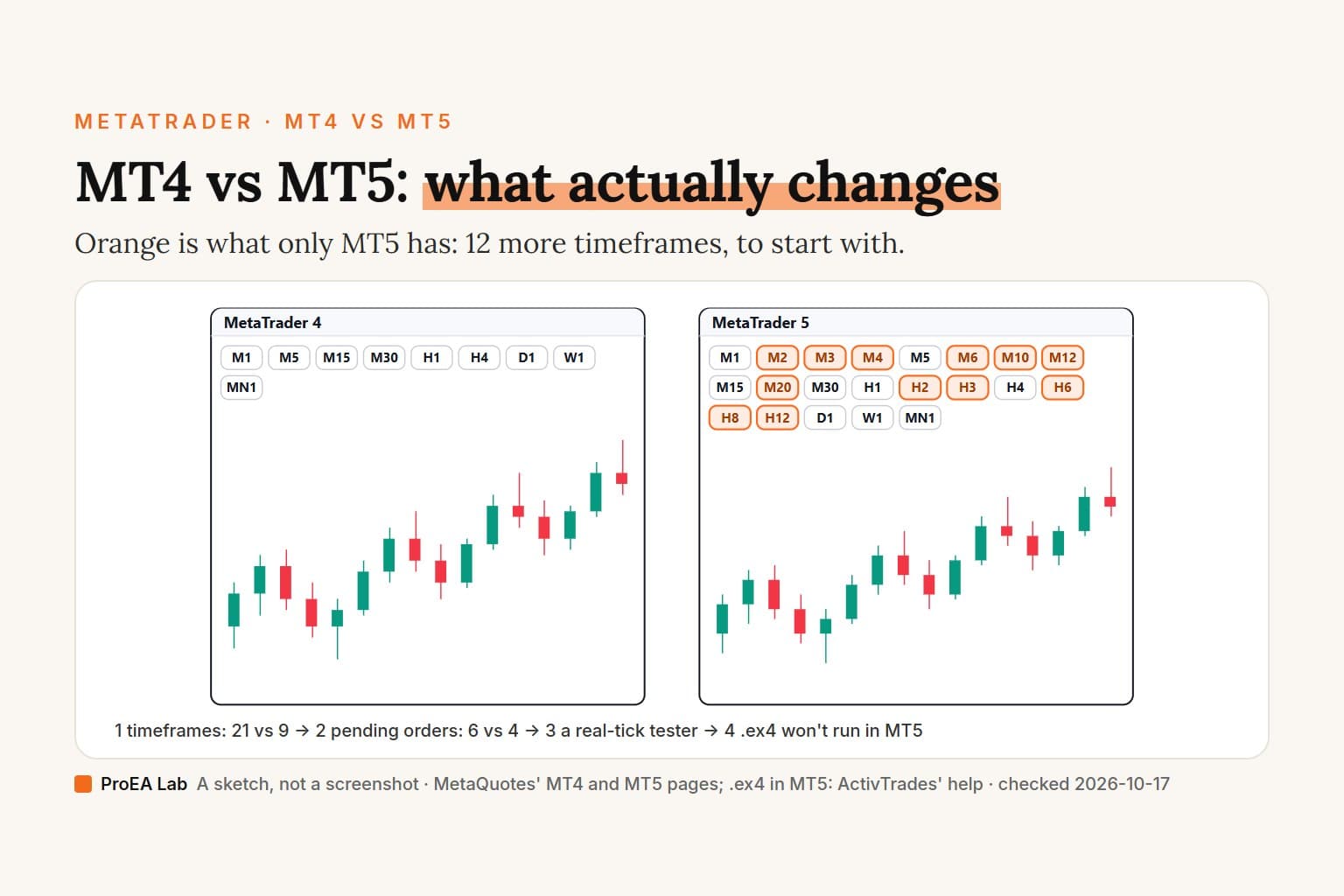
Every count on this page comes from MetaQuotes' own pages, which we read on 2026-10-17. We sell MT5 EAs, so we have a side; that's why the numbers are theirs and the links go to them.
A simulated sketch, not a screenshot: blank bars stand in for data, and only the words this page prints are labeled.
Read as text
- Timeframes: MT4 charts 9, from M1 to MN1. MT5's desktop terminal charts 21; the 12 it adds are in orange.
- Pending orders: MT4 has Buy Limit, Sell Limit, Buy Stop and Sell Stop. MT5 adds Buy Stop Limit and Sell Stop Limit.
- Positions: two Buy deals of 0.5 lots stay two positions in MT4 and on an MT5 hedging account. An MT5 netting account merges them into one position of 1.0 lot. The broker sets which.
- Strategy Tester: MT4 tests the one symbol you pick, on a single thread, in 3 modelling methods. MT5 adds real ticks, tests every symbol the EA trades, splits off a forward period and runs on many agents.
- EA files: MT4 runs .ex4 programs compiled from .mq4 source; MT5 runs .ex5 compiled from .mq5. An MT4 EA moves to MT5 only by porting its source to MQL5.
How this window was chosen: Counts and names from MetaQuotes' own comparison table, the MT4 and MT5 help and the MQL4 and MQL5 references, checked 2026-10-17. The 21 timeframes are the MT5 desktop terminal's; MetaQuotes lists 9 for its iPhone, iPad and Android apps. That .ex4 files don't run in MT5 is ActivTrades' statement in its help centre.
MT4 vs MT5 at a glance
From MetaQuotes' comparison of the two platforms, unless the row says otherwise. Checked 2026-10-17.
| MT4 | MT5 | |
|---|---|---|
| Chart timeframes | 9 | 21 (desktop) |
| Pending order types | 4 | 6 |
| Position accounting | Hedging | Netting or hedging, set by your broker |
| Depth of Market | Price ladder and order controls | Broker- or exchange-provided depth where available; order controls |
| Economic calendar | No | Yes |
| Built-in technical indicators | 30 | 38 |
| Strategy Tester | Single thread | Multi-threaded, multi-currency, real ticks |
| Forward period in the tester | None in its help | 1/2, 1/3, 1/4 or a custom date |
| EA language and files | MQL4: .mq4 compiles to .ex4 | MQL5: .mq5 compiles to .ex5 |
| Symbols | 1,024 | Unlimited |
| Markets, per this table | Forex | Forex, futures, options, stocks, bonds |
| Market, Signals, built-in VPS | Yes | Yes |
| Latest build | 1490, 2 October 2026 | 6230, 24 September 2026 |
The forward-period row is from each platform's tester help, the file row from the MQL4 and MQL5 references, the Market, Signals and VPS row from each platform's own pages, and the build row from the MT4 and MT5 release notes.
Market-depth correction, 2026-10-18: MetaQuotes' comparison page omits MT4's Depth of Market, but MT4's own help documents the window. The row above now distinguishes its price ladder and order controls from MT5's broker- or exchange-provided depth. This correction does not change the other rows' 2026-10-17 check date.
Is MT5 better than MT4?
MT5 has more timeframes, pending order types and testing options. MetaQuotes makes both terminals, but its comparison table still needs checking against the help, as the market-depth correction above shows. Even MT4's own help page on the Strategy Tester closes by pointing readers to "the new platform" and its multi-asset tester (MT4 help).
Two of MetaQuotes' pages disagree, and we'd rather show you than pick one. The comparison table lists MT4's market as Forex alone, while metaquotes.net calls MT4 "designed for Forex and futures trading". What you can trade on either platform is set by your broker's symbol list in the end.
What MT4 has going for it is history. Years of EAs, indicators and scripts were written in MQL4, and none of them run in MT5 as they are. If one of them is the reason you trade, that outweighs any row in the table.
How many timeframes do MT4 and MT5 have?
MT4 has 9; MT5's desktop terminal has 21. MT4's are M1, M5, M15, M30, H1, H4, D1, W1 and MN1. MT5 adds 12 in between: M2, M3, M4, M6, M10, M12, M20, H2, H3, H6, H8 and H12 (MT5 help, MQL5 reference).
The MQL4 reference lists those 12 too, which can look like a contradiction. It explains that "online charts of financial instruments can be plotted only" on the standard nine, and that the extra constants exist for offline charts and so MQL5 code compiles in MQL4 (MQL4 reference).
The 21 is a desktop number. MetaQuotes' download page lists "3 chart types and 9 timeframes" for the MT5 iPhone, iPad and Android apps (MT5 download).
What order types does MT5 have that MT4 doesn't?
Two pending orders: Buy Stop Limit and Sell Stop Limit. Both platforms have Buy Limit, Sell Limit, Buy Stop and Sell Stop (MT4 help). MT5's two extras combine a stop and a limit: when the Ask reaches the stop level, a Buy Limit order is placed at the Stop Limit price you set, in MetaQuotes' description of the Buy Stop Limit. Sell Stop Limit is the mirror image on the Bid.
MT5 also has a fourth execution mode, Exchange execution, next to Instant, Request and Market (MT5, MT4), and more fill policies: Fill or Kill, Immediate or Cancel and Return, where MT4 has Fill or Kill only.
Netting vs hedging: can you hedge on MT5?
Yes, on a hedging account. MetaQuotes added hedging to MT5 in build 1295, released on 1 April 2016, and said it works like the system "used in MetaTrader 4" (release notes). MT5 supports two systems, and "the system used depends on the account and is set by the broker" (MT5 help).
Take two Buy deals of 0.5 lots on the same symbol, the example MetaQuotes uses:
- MT4, or an MT5 hedging account: two separate positions of 0.5 lots each. Each one closes on its own.
- An MT5 netting account: one position of 1.0 lot. A deal in the same direction adds to the position, and an opposite deal shrinks, closes or reverses it.
This matters most for EAs. Code that opens a second Buy expecting a second position gets one bigger position on a netting account, and closing on netting means "an opposite trading operation for the same symbol and the same volume", per the same help page. The account's system shows in the terminal's window header and in the Journal, so check it before you attach anything.
Which has the better Strategy Tester?
MT5's, by a distance. MetaQuotes' table sums it up as "Multi-threaded + Multi-currency + Real ticks" for MT5 against "Single thread" for MT4. In practice:
- Ticks. MT4 models price inside a bar three ways, Every tick, Control points or Open prices only, and its Every tick builds ticks from the bars of the smallest timeframe it has, filling in between them by "interpolation based on predefined templates" (MT4 tester help). MT5 adds Every tick based on real ticks, where "no simulation is performed" and the broker's recorded ticks are replayed, plus 1 minute OHLC and Math calculations (MT5 tester help).
- Spread. MT4's history holds "only Bid prices", and the tester uses the spread at the start of the test, or one you type, for the whole run. In MT5's real-tick mode "a spread may change within a minute bar" (tick generation).
- Symbols. In MT4 you pick a symbol and a period. MT5's tester "automatically processes information of all symbols that are used in the trading strategy", so a basket EA can be tested as one.
- Speed. MT5 runs passes on local agents, remote agents and the paid MQL5 Cloud Network. MT4 has one thread.
- Forward period. MT5 can hold back the last 1/2, 1/3, 1/4 or a custom part of the date range and show its results on a separate Forward tab. We found no forward option in MT4's tester help.
MetaQuotes' tester page calls a strategy that does equally well in both parts "proof" against fitting. We don't. A forward period is one more stretch of the same market's history, and a strategy can pass it by luck. The MT5 backtesting guide covers the settings that make a test harder to fool, and every tick vs real ticks shows why the same EA can return two different results in two modes.
Can I use MT4 EAs and indicators on MT5?
Not as they are. MT5 runs .ex5 programs: you compile .mq5 source in MetaEditor and "the executable file has an extension EX5" (MT5 help). MT4 runs .ex4. We didn't find a MetaQuotes page that says in so many words that MT5 refuses an .ex4. The broker ActivTrades does, in its help centre (updated 22 October 2025): "If you have custom indicators and Expert Advisors (.mq4 and .ex4 files), they will not work on the MT5 platform" (ActivTrades). We didn't try it ourselves.
So the first question is what you have. With the .mq4 source, the EA can be ported to MQL5. With only the .ex4, there's nothing to port; ask the seller whether an MT5 version exists. Products in the MQL5 Market are listed per platform, in separate MT4 and MT5 catalogues.
What does converting MQL4 to MQL5 involve?
Less than it once did, and more than a recompile. Since MT4 build 600, MQL4 "has been completely revised reaching the level of MQL5", with the same event handlers (OnInit, OnTick) and one compiler for both languages (MQL4 reference). What changes is mostly how the EA reads indicators and sends trades:
- Indicators. MQL4's iMA "calculates the Moving Average indicator and returns its value". MQL5's iMA "returns the handle" of the indicator instead (MQL4, MQL5). The reference says the same of every built-in indicator function, with values read by CopyBuffer (MQL5 indicators).
- Trades. MQL4's OrderSend takes the symbol, order type, volume, price, slippage, stop loss and take profit, and returns a ticket. MQL5's takes an MqlTradeRequest structure and fills an MqlTradeResult (MQL4, MQL5). Orders, positions and deals are separate lists in MQL5, so the loops that scan open trades get rewritten.
- Accounting. On a netting account, the EA's logic for multiple positions per symbol has to change, as above.
- Retesting. The port runs in a different tester with different tick modelling, so MT4 and MT5 results won't match bar for bar. Test the MT5 version on demo before you trust it.
Coming from TradingView instead? The Pine Script to MQL5 guide walks through a full conversion. Once you have an .ex5, installing an EA on MT5 takes five steps.
Depth of Market, calendar and asset classes
Both terminals have a Depth of Market window. MT5 adds broker- or exchange-provided depth where available and a built-in economic calendar.
- Depth of Market. MT4 opens it from Market Watch too. Its help describes a ladder derived from the current Bid and Ask, the symbol's stop level and price step, with controls to place orders and manage stops (MT4 DOM). That is different from an exchange order book. In MT5, exchange-traded symbols can show market participants' prices and volumes; over-the-counter depth comes from your broker's quotes, or the window works as a one-click order panel if the broker sends no volumes. Exchange depth also depends on what your broker provides (MT5 DOM).
- Economic calendar. MT5's Toolbox has a Calendar tab covering "over 600 macroeconomic indicators" across the 15 largest economies (MT5 help). MT4 has a news feed and price alerts, but no calendar (MT4 alerts and news).
- Asset classes. MT5 supports exchange trading of stocks, futures, options and bonds as well as Forex, per the table. Which of them you can trade is your broker's list.
One MT4 window has no MT5 twin. History Center (F2) is MT4's window for stored price bars (MT4 help); in MT5 that data lives in the Symbols window, and your account's trades are in the Toolbox, as covered in where MT5 trade history is.
Market, VPS and Signals: does each platform have them?
Yes, both do. MetaQuotes describes the Market for buying and renting EAs and indicators, Signals for copying another account's trades, and a virtual server you rent from inside the terminal, on both metatrader4.com and in the MT5 help. What doesn't cross over is the product: a Market EA is built for one platform, and an MT4 copy won't run in MT5.
Can I run MT4 and MT5 on Mac, Linux, the web and my phone?
On a computer and a phone, yes for both. In a browser, MetaQuotes points you to its MT5 web terminal.
| Where | MT4 | MT5 |
|---|---|---|
| Windows | Installer | Installer |
| macOS | Installer on the download page | Installer that runs the platform inside Wine; macOS Catalina 10.15.7 or later, Apple M1 and newer included |
| Linux | A guide on MQL5.com | Help page with a Wine install script for Ubuntu, Debian, Linux Mint and Fedora |
| Web browser | See below | MetaQuotes' WebTerminal, or your broker's copy |
| iPhone and iPad | App Store | App Store |
| Android | Google Play, Huawei AppGallery, APK | Google Play, Huawei AppGallery, APK |
Sources: the MT4 and MT5 download pages and MT5's help for macOS and Linux, checked 2026-10-17. The Mac install, login and data folder are step by step in MT5 for Mac.
The web row is the odd one. metatrader4.com's web-trading page still describes "the MetaTrader 4 web platform", but its button goes to the same web terminal that MT4's own download page labels "MetaTrader 5 Web Trading". For an MT4 account in a browser, ask your broker whether it hosts a web terminal; we didn't test one.
Is MT4 being discontinued?
Not that MetaQuotes has said, as far as we could find. MT4 still gets builds: build 1490 came out on 2 October 2026 with "several important security enhancements, bug fixes, and changes designed to improve the platform's overall stability", plus a change to how Stop Loss and Take Profit apply to several positions on one symbol in FIFO mode, after 1470 and 1460 in March 2026 (MT4 release notes). MT5's recent builds add features; build 6230 on 24 September 2026 expanded its AI Assistant (MT5 release notes).
We looked for a MetaQuotes statement on MT4 licences for brokers on metatrader4.com, metatrader5.com and metaquotes.net on 2026-10-17 and found none. News sites have reported on that over the years; we're not repeating claims we can't trace to MetaQuotes or a broker's own notice. What reaches you in practice is your broker's choice: whether it still opens MT4 accounts at all.
Which should you use?
Pick by your situation, not by the table: the platform your broker offers and the code you already run decide more than any row.- Your broker offers only one. Use that one. MetaQuotes doesn't document logging an MT4 account into MT5 or the other way round, and we haven't tried, so treat the account and its platform as a pair.
- You run an MT4 EA you can't rewrite. Stay on MT4 for that EA. It's still maintained, and an .ex4 without source can't be ported. Ask the seller about an MT5 version before you plan a move.
- You want to backtest properly. Use MT5: real ticks with a changing spread, every symbol in one test, a forward period and the work spread across agents. Start with the backtesting guide.
- You trade exchange stocks or futures, or want exchange order-book depth. MT5, if your broker lists the symbols and provides that depth. MT4 already has a price ladder for managing orders.
- You're starting from nothing. MT5. There's no MQL4 code to carry, and MetaQuotes' recent MT5 builds add more features than MT4's.
What we checked, and what we didn't
We read MetaQuotes' comparison table, the MT4 and MT5 help pages, download pages and release notes, and the MQL4 and MQL5 references on 2026-10-17; each link above is the page a claim comes from. The one non-MetaQuotes source is ActivTrades' help centre, quoted as that broker's statement.
We didn't install MT4 for this page, load an .ex4 in MT5, log an MT4 account into MT5, or try any broker's MT4 web terminal. Broker setups vary: the symbols, accounting system, Depth of Market and web terminal you get are your broker's call.
Where we stand
We build MT5 EAs and sell them as full .mq5 source, with no MT4 versions, so we'd rather you were on MT5. The comparison above is MetaQuotes' own. If an MT4 EA you trust is what pays your bills, nothing on this page is a reason to drop it.
Use this animation on your site.
Frequently asked questions
What is the difference between MT4 and MT5?
MT5 has 21 chart timeframes to MT4's 9, 6 pending order types to 4, netting as well as hedging accounts, an economic calendar, and a multi-threaded, multi-currency Strategy Tester that can use real ticks. Both have a Depth of Market window; MT4 documents a price ladder and order controls, while MT5 can show broker- or exchange-provided depth. MT4 runs .ex4 files and MT5 runs .ex5.
Is MT5 better than MT4?
MT5 offers more timeframes, pending order types and backtesting options. MT4's advantage is the EAs and indicators already written for it, which don't run in MT5 until someone ports their source code to MQL5. Both terminals have a Depth of Market window, though MT5 can display broker- or exchange-provided depth rather than only the price ladder documented for MT4.
Can I use my MT4 EA on MT5?
Not as it is. MT5 runs .ex5 programs compiled from MQL5 source, and ActivTrades' help centre states that .mq4 and .ex4 files will not work on MT5. With the .mq4 source, a programmer can port it to MQL5. With only the .ex4, ask the seller for an MT5 version.
Can you hedge on MT5?
Yes, on a hedging account. MetaQuotes added hedging to MT5 in build 1295, released on 1 April 2016. Your broker sets each account to netting or hedging, and the terminal shows which in its window header and in the Journal.
Which is better for backtesting, MT4 or MT5?
MT5. Its Strategy Tester can run on real ticks with the spread changing inside each minute, tests every symbol an EA trades, spreads the work over many agents and can hold out a forward period. MT4's tester generates its ticks, keeps only Bid prices and uses one spread for the whole test.
Is MT4 being discontinued?
MetaQuotes hasn't said so on its own sites, as far as we could find on 2026-10-17. MT4 still gets new builds: build 1490 came out on 2 October 2026 with security fixes, stability work and a change to Stop Loss and Take Profit handling in FIFO mode. Whether you can still open an MT4 account is up to your broker.
Does MT5 work on a Mac?
Yes. MetaQuotes' macOS installer sets up Wine and runs the platform inside it, on macOS Catalina 10.15.7 or later, Apple's M1 and newer chips included. MT4's download page offers a macOS installer too.