Short answer: TradingView gives you three ways to take partial profit. From the trading panel, you close part of a live position: turn off "Instant order placement", click the X on the position, tick "partial close" and pick the units, if your broker account supports it. In a Pine strategy, you call strategy.exit() more than once with qty_percent. With an indicator, the script draws the plan (TP1, TP2, TP3) and you close the parts yourself, or a bridge does it from an alert.
Each way is quoted below from TradingView's own help and Pine pages. After them comes a drill: one simulated price path in R, where you mark where TP1, TP2 and the trailing stop take each part. You can then see what halves, thirds and all at TP3 end with, and why the order of the candles decides that, not the scale-out.
What is partial take profit?
Taking partial profit means closing part of an open position at a profit and keeping the rest open. TradingView's help page on it (read 29 October 2026) puts it in one line: "Partial position close allows you to lock in profits or reduce exposure without closing the entire trade. For example, if you're long 3 contracts, you can close 1 or 2 and keep the rest open."
Scaling out is the same thing done in planned steps: half at the first target, say, and the rest later. Traders shorten it to "taking partials". Two things usually come with it, though neither is required:
- A stop moved to the entry once the first part is banked, so the rest can't turn the trade into a full loss (unless a gap jumps the stop).
- A trailing stop on the last part, so it can run past the last target or give back only part of the run.
Can you take partial profit on TradingView?
Yes, three ways. Which one you use depends on what's on your chart: a live position at a connected broker, a strategy in the Strategy Tester, or an indicator.
| Way | Where it works | What it does | The catch |
|---|---|---|---|
| Partial close | The trading panel, with a connected broker | Closes some units of a live position | "Instant order placement" must be off, and "not all broker accounts support partial close" |
strategy.exit() with qty_percent | A Pine strategy | Places partial exit orders in TradingView's simulation | The orders are hypothetical: a strategy tests a plan; on its own it doesn't trade your account |
| An indicator's plan | Any indicator that draws targets | Shows the stop and the targets; you close the parts | It places nothing. Its alerts need a paid TradingView plan |
TradingView close partial position: the trading panel
This is the way for a position you hold at a broker connected to TradingView. TradingView's help page "How to make a partial close?" (read 29 October 2026) gives two steps and a caveat:
- Turn off instant orders. "Partial close can be implemented only when the “Instant order placement” mode is disabled. To turn it off, you need to open Settings on the upper toolbar → Trading:"
- Close part. "After clicking “X” to close a position, check “partial close” in the confirmation pop-up and select the number of units:"
- Check your broker. "Kindly note that not all broker accounts support partial close. If the feature is not available, this option will not appear on the confirmation pop-up."
Neither help page says whether TradingView's own Paper Trading account offers partial close, and we haven't checked it, so we make no claim either way. If you practise there, try a partial close on a small position before you count on it.
How to set partial take profit in TradingView with Pine Script
In a strategy, a partial take profit is two or more exit orders on the same entry. TradingView's Pine Script manual, on its "Strategies" page (read 29 October 2026): "Strategies can use more than one call to the strategy.exit() command to create successive partial exit orders for the same entry ID. … To exit from a position using multiple strategy.exit() calls, include a qty or qty_percent argument in each call to specify the portion of the traded quantity to close. If the sum of the exit order sizes exceeds the open position, the strategy automatically reduces their sizes to match the total size of the position."
So half at TP1 and the rest at TP3 is two calls on the same entry ID, "Long" here:
strategy.exit("TP1", "Long", qty_percent = 50, limit = tp1, stop = sl)
strategy.exit("TP3", "Long", qty_percent = 100, limit = tp3, stop = sl)
The first closes 50% at tp1. The second asks for 100%, more than is left once TP1 has filled, so the strategy shrinks it to whatever is left. Two details from the same page:
qtybeatsqty_percent. "If a strategy.exit() call includes both qty and qty_percent arguments, the command uses the qty value to size the order and ignores the qty_percent value."- A full example. The page's "Multi-level exit demo" enters two shares and places two brackets, one with a
qtyof 1 and one with aqtyof 3. The second shrinks to the one share left. Moving the rest's stop to the entry after TP1 takes more code than the example shows.
Keep in mind what a strategy is. The same manual: "Pine Script® strategies are specialized scripts that simulate trades across historical and realtime bars, allowing users to backtest and forward test their trading systems." It adds that "they provide the ability to place, modify, and cancel hypothetical orders and analyze performance results", and that "TradingView uses a broker emulator to simulate trades while running a strategy script." A qty_percent exit tests your scale-out. It doesn't close anything at your broker.
How to scale out of a trade on TradingView with an indicator's plan
The third way is the one most chart traders use without naming it. An indicator can't place orders, not even hypothetical ones. What it can do is draw the plan the moment a signal fires: the entry, the stop and the targets. You then close the parts at your broker, or from the trading panel (the first way), when the price gets there.
Two things decide whether this works for you:
- The plan has to exist before the entry. An indicator that prints TP1, TP2 and TP3 with the signal gives you levels to act on. One that only marks entries leaves the scale-out to your judgment mid-trade.
- You need to hear about it. To be told when a target fills while you're away from the chart, the indicator has to send an alert, and TradingView's Basic plan has none for indicators. Its pricing page's row "Active technical alerts on indicators, strategies, and drawings" reads ✗ on Basic, 20 on Essential, 100 on Plus, 400 on Premium and 1,000 on Ultimate (read 29 October 2026). Alerts need Essential or above.
Signal Desk, our entry checklist indicator in Pine Pro Library, draws this kind of plan: a stop and three targets at 1R, 2R and 3R. It never splits the exit: the whole trade closes together, at TP3, at the stop or on one of its other exits. Its settings move the stop as the trade goes, "TP1 → stop to breakeven" and "TP2 → stop to TP1, then ATR trail". Signal Desk Premium uses the same entries and adds the scale-outs in the drill below.
Halves, thirds or all at TP3: one simulated path
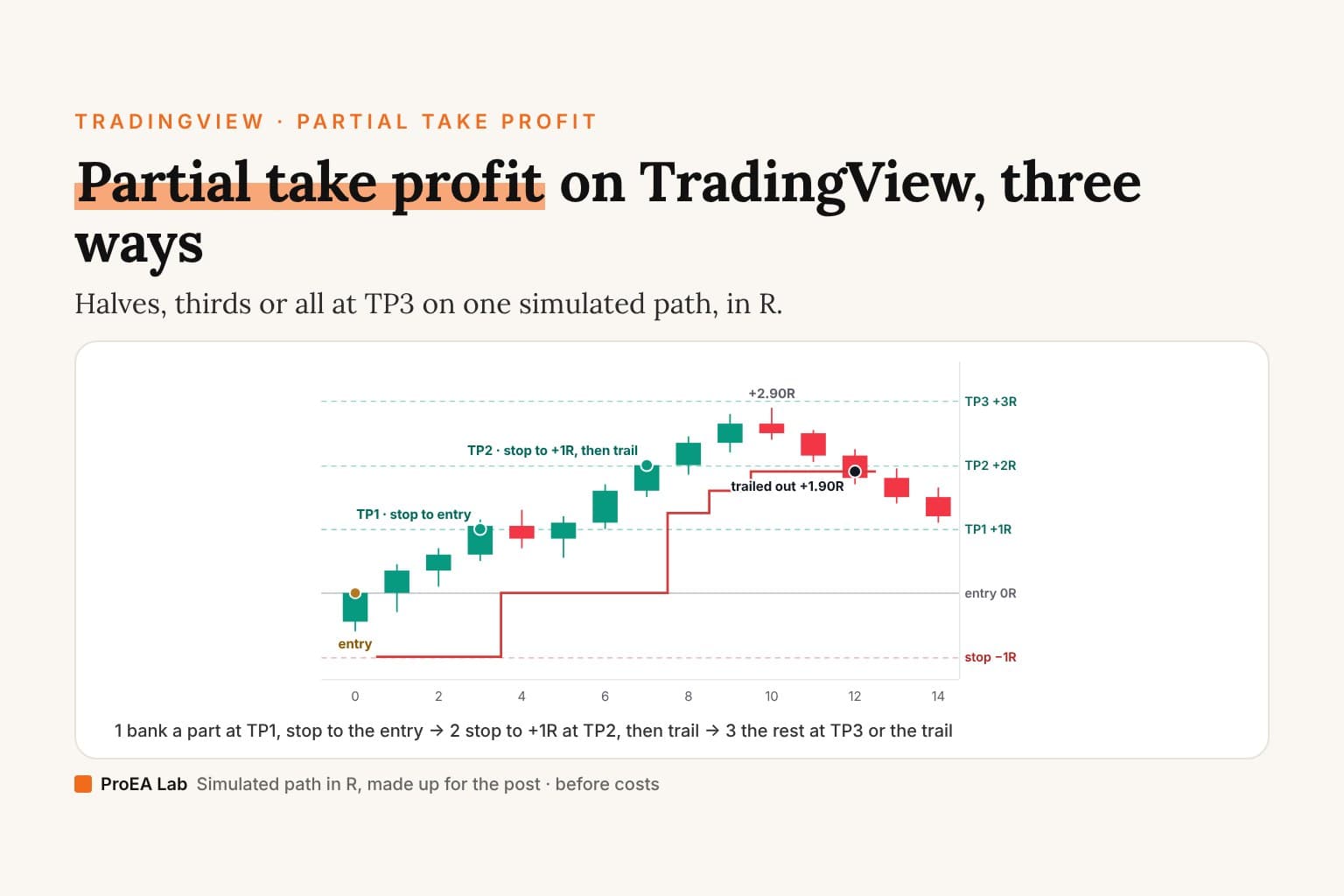
The 15 candles below are made up, measured in R from the entry: 0R is the entry, −1R the stop, and the targets sit at +1R, +2R and +3R. They are simulated and illustrative, not a market and not a result. The three ways to split the exit are Signal Desk Premium's: Halves closes half at TP1 and lets the other half run to TP3 or the trail. Thirds closes a third at TP1, a third at TP2, and the last third rides on. All at TP3 closes nothing early: "the whole size exits together".
The stop rules are the library desk's: the stop is checked first on every closed candle; TP1 moves it to the entry; TP2 moves it to TP1, and from then on it trails 1.5 × ATR under the close and never moves down. To keep the drill readable, ATR is fixed at 0.5R, so the trail sits 0.75R under each close. The desk's other exits are off, partials fill exactly at their target, and there are no costs.
Mark it yourself first.
The entry is candle 0's close; the stop is −1R and the targets are +1R, +2R and +3R. Where does each target fill, where does the stop go after each, and which of the three scale-outs ends with the most R? The candles are in the table under the drill.
Simulated and illustrative: made-up candles in R, not a market and not a result. The rules: the stop is checked first on each closed candle; TP1 moves it to the entry, TP2 to TP1, then it trails 1.5 × ATR under the close (ATR fixed at 0.5R here); partials fill at their target. No costs.
| Candle | Open | High | Low | Close |
|---|---|---|---|---|
| 0 | −0.45 | +0.05 | −0.60 | 0.00 |
| 1 | 0.00 | +0.45 | −0.30 | +0.35 |
| 2 | +0.35 | +0.70 | +0.10 | +0.60 |
| 3 | +0.60 | +1.15 | +0.50 | +1.05 |
| 4 | +1.05 | +1.30 | +0.70 | +0.85 |
| 5 | +0.85 | +1.20 | +0.55 | +1.10 |
| 6 | +1.10 | +1.70 | +1.00 | +1.60 |
| 7 | +1.60 | +2.10 | +1.50 | +2.00 |
| 8 | +2.00 | +2.45 | +1.85 | +2.35 |
| 9 | +2.35 | +2.80 | +2.20 | +2.65 |
| 10 | +2.65 | +2.90 | +2.40 | +2.50 |
| 11 | +2.50 | +2.55 | +2.05 | +2.15 |
| 12 | +2.15 | +2.25 | +1.70 | +1.80 |
| 13 | +1.80 | +1.95 | +1.40 | +1.50 |
| 14 | +1.50 | +1.65 | +1.10 | +1.20 |
All prices are in R. The entry is candle 0's close.
The drill. With the rules above:
- Which candle fills TP1, and where does the stop go?
- Which candle fills TP2, and where is the stop after that candle's close?
- Where has the trail climbed to by the time the run turns, and which candle takes the rest out?
- What does each of halves, thirds and all at TP3 end with, before costs?
The answer, step by step
1. TP1 on candle 3. Candle 3's high of +1.15R is the first above +1R. Halves banks half at +1R, ½ × 1 = +0.50R. Thirds banks a third, ⅓ × 1 = +0.33R. All at TP3 banks nothing. All three move the stop to the entry, 0R. Candle 5 dips to +0.55R, well above it.
2. TP2 on candle 7. Candle 7's high of +2.10R is the first above +2R. Thirds banks another third at +2R, ⅓ × 2 = +0.67R, so +1.00R in all. Every stop moves to TP1, +1R, and then trails 1.5 × 0.5 = 0.75R under the close: 2.00 − 0.75 = +1.25R.
3. The trail. It climbs with each higher close and never moves down:
| Candle | Low | Close | Close − 0.75 | Stop after the close |
|---|---|---|---|---|
| 7 | +1.50 | +2.00 | +1.25 | +1.25 |
| 8 | +1.85 | +2.35 | +1.60 | +1.60 |
| 9 | +2.20 | +2.65 | +1.90 | +1.90 |
| 10 | +2.40 | +2.50 | +1.75 | +1.90 |
| 11 | +2.05 | +2.15 | +1.40 | +1.90 |
| 12 | +1.70 | out at +1.90 |
Candle 10 reaches +2.90R, 0.10R short of TP3, so no part ever fills there. Candle 12's low of +1.70R goes through the +1.90R stop, and what's left exits at +1.90R.
4. The result, before costs.
- Halves: +0.50R banked, plus ½ × 1.90 = 0.95R, makes +1.45R, in 3 orders: the entry, the partial and the exit.
- Thirds: +1.00R banked, plus ⅓ × 1.90 = 0.63R, makes +1.63R (exactly 4.90 ÷ 3), in 4 orders.
- All at TP3: the whole position at +1.90R makes +1.90R, in 2 orders.
On this path, the less you closed early, the more you kept: the run went far and the trail held most of it. That's a property of the path, not of the scale-out. The same rules give these results when a trade ends other ways:
| How the trade ends | Halves | Thirds | All at TP3 |
|---|---|---|---|
| Stopped before TP1 | −1.00R | −1.00R | −1.00R |
| TP1, then back to the entry | +0.50R | +0.33R | 0.00R |
| TP2, then back to the +1R stop | +1.00R | +1.33R | +1.00R |
| This drill's path, trailed out at +1.90R | +1.45R | +1.63R | +1.90R |
| Straight on to TP3 | +2.00R | +2.00R | +3.00R |
No column wins every row. Closing early pays when the trade turns back after the first target. Holding the whole size pays when it runs. Before the entry, you don't know which kind of trade you're in.
Partial take profit in MT5, on desktop and mobile
MetaTrader 5 closes part of a position the way it closes all of it, with a smaller volume. MetaQuotes' help for the desktop platform says: "A position can be closed fully or partially, depending on the volume of a trade executed in the opposite direction." For one position:
- In the "Trade" tab, open the position's context menu. The help: "To partially close a position, click "Close Position" in the context menu of the appropriate position. Next enter the value of the volume to close and click "Close..."."
- Type the part you're closing, not the whole size: "If you want to close a part of the position, enter the volume to close in the "Volume" field."
On the phone apps, the Android and iPhone help pages say the same in one line: "A position can be closed in full or in part, depending on the volume of the opposite operation." On Android: "To close a position, long press the position in the Trade tab, select "Close position", then tap the button at the bottom."
What MT5 doesn't do is hold three targets on one position. The order window has one target, "Take Profit – the Take Profit level in prices.", and a partial close leaves it where it was: "If a position is partially closed, Stop Loss and Take Profit are not changed by the new order." So there are two ways to get TP1, TP2 and TP3 in MT5:
- Three positions. On a hedging account, "Multiple open positions of the same symbol can simultaneously exist on the trading account". Open the size as three positions, each with its own Take Profit, and move each stop yourself.
- One position, closed by hand. Close each part at its level with a smaller volume, as above, then move the stop on what's left.
The "stop to entry after TP1" step isn't automatic in MT5 either way: you move it, or an Expert Advisor does. Signal Desk Premium's scale-outs are drawn on TradingView; it has no MT5 version.
Should you take partial profits?
None of the sources we read for this post says one way earns more than another, and the table above shows why none could: the answer depends on how each trade ends. What a partial does change is easier to pin down:
- The spread of results. Banking part at TP1 lifts the "back to the entry" row (+0.50R instead of 0.00R) and lowers the "runs to TP3" row (+2.00R instead of +3.00R).
- Costs. Every partial is one more order. In the drill, halves fill 3 orders, thirds 4 and all at TP3 2, and each one pays commission and slippage.
- Size. You can only split what can be split. With one contract there is no half; Signal Desk Premium's ticket says it plainly: "1 unit is too small to split: it rides as one piece."
So choose the split before you enter, write it down, and keep it for long enough to see it across many trades, the way you'd test any other rule.
Signal Desk Premium: the scale-out on your chart
Signal Desk Premium puts the drill's three choices on the chart. In its own words: "Half at TP1 by default, then the stop moves to entry. The rest runs to TP3, trailing after TP2." You pick Halves, Thirds or All at TP3, and the trade ticket counts "Your commission and slippage on every order: the entry, each partial, the exit" in R before you place anything. It sizes the trade from the money you risk, and it locks the day after a set loss.
It doesn't place orders: "The scripts never place orders. If you connect a bridge to the alerts, the bridge does, on your account and your responsibility." The alerts need a paid TradingView plan, as above. Premium uses the same entries as the library desk. It does not promise better results; it makes the same signals easier to prepare for, size, manage, filter and act on.
Sources
- TradingView Help Center: How to make a partial close? and Partial position close, read 29 October 2026.
- TradingView Pine Script manual: Strategies (the introduction, the broker emulator, and partial and multi-level exits), read 29 October 2026.
- MetaQuotes' MetaTrader 5 help: Performing Deals, General Concept, and Opening and Closing Positions for Android and iPhone, read 29 October 2026.
- TradingView pricing, the alert rows, read 29 October 2026.
- Signal Desk 1.2.0's Pine source (its "TP1 → stop to breakeven" and "TP2 → stop to TP1, then ATR trail" settings and the 1.5 ATR trail), and Signal Desk Premium's page for the three scale-outs.
- The drill:
src/components/blog/partial-take-profit/scale-out-path.ts, the library desk's stop rules on made-up candles.
Disclosure
We, ProEA Lab, build Signal Desk and Signal Desk Premium and sell them. The code is AI-assisted. The 15 candles are simulated and illustrative, made up in R to show the arithmetic; they are not a market and not a result. Nothing here is a forecast or advice. Trading involves risk.
Frequently asked questions
What is partial take profit?
Closing part of an open position at a profit and keeping the rest open. TradingView's help gives the example of being long 3 contracts and closing 1 or 2. Scaling out is the same thing done in planned steps, such as half at the first target.
Can you take partial profit on TradingView?
Yes, three ways. Close part of a position from the trading panel if your broker account supports it, call strategy.exit() more than once with qty_percent in a Pine strategy, or follow an indicator that draws the targets and close the parts yourself.
How do I close a partial position on TradingView?
Turn off Instant order placement in Settings, under Trading. Then click the X on the position, tick partial close in the confirmation pop-up and choose the number of units. If the option isn't there, your broker account doesn't support partial close.
How do I set partial take profit in Pine Script?
Call strategy.exit() once per target, each with the same entry ID and its own qty_percent, such as 50 for half. If a call has both qty and qty_percent, qty wins, and if the parts add up to more than the position, the strategy shrinks them to fit.
How do I take partial profit in MT5?
Close part of the position. On the desktop platform, choose Close Position in the position's context menu, enter the volume to close and click Close. The phone apps close a position in full or in part depending on the volume of the opposite operation. A position keeps one Take Profit, so three targets mean three positions on a hedging account, or closing each part by hand.
Is it better to take partial profits or let the trade run?
Neither wins on every path. On this post's simulated path, all at TP3 ended at +1.90R, thirds at +1.63R and halves at +1.45R. On a path that turns back to the entry after TP1, halves keep +0.50R and all at TP3 ends at 0.00R. Each partial is also one more order to pay for.
What does scale out mean in trading?
Closing a position in parts at planned levels instead of all at once. A common plan, and Signal Desk Premium's default, closes half at the first target, moves the stop to the entry and lets the rest run to the last target or a trailing stop.