Short answer: an AI trading journal is worth having when the code computes every figure and the model only explains it. Ask any AI journal, paid or free, for the rows behind a number and add them up yourself. If it can't show them, the number may be made up.
You can run one three ways: free on your own computer, with your own Claude, ChatGPT or Gemini account, or inside a paid journal with AI built in. Each sends your trades somewhere different and caps the AI differently. This page covers what each does, what to check, and a drill to train your eye.
| The job | Who should do it | Why |
|---|---|---|
| Store every trade | The journal (a file or a database) | A chat forgets; a table doesn't |
| Compute win rate, R, expectancy, totals by tag | Code | Arithmetic over hundreds of rows has one right answer |
| Explain the figures, find the next question | The model | That is what language models are good at |
| Tell you what to change | You, with the model arguing | One finding, one rule |
| Forecast next month | Nobody | No row in a journal holds the future |
What does an AI trading journal do?
It does two jobs: it keeps and computes your trade history, and a language model explains what the figures say. The first job is an ordinary journal: every trade's entry, exit, size, result and your tags and notes, with statistics computed over them (win rate, average win and loss in R, expectancy, totals by setup, session, day and tag). The second job is the new part. A model reads those statistics and answers in words: "your London trades carry the account", "the trades where you moved your stop cost more than two planned losses".
Done well, it does the part of a weekly review most traders skip: it adds up the rows and asks the uncomfortable question. Our guide to how to journal forex trades covers the columns worth keeping. With them filled, the AI has something to explain.
Why can an AI journal make up a number?
Because a language model writes the most likely next words, and a win rate is just more words to it. Asked "what's my win rate on gold?" over a long table, a model working from its own reading of the rows can answer "60%" when the rows say 33%. The answer reads right, sits in a confident sentence and has nothing behind it. It's the same failure our post on using AI for trading warns about when you paste a journal into a chat: misread columns, gross and net mixed, a partial close counted twice.
There are two fixes, and both put the arithmetic in code:
- The journal computes, the model explains. Every figure on screen comes from a query or a formula; the model is handed the results and told to use only those. Ask it something nothing computed, and it should say so.
- The model writes code and runs it. In a chat, ask it to compute with code, if it can run code on a file you upload, and to print the rows it used. Then you can check the rows.
The second test catches the rest: ask for the rows behind any figure, and add them up. Try it on the drill below.
| # | Day | Pair | Session | Side | Result | Tag |
|---|---|---|---|---|---|---|
| 1 | Mon | EURUSD | London | long | +2.0R | plan |
| 2 | Mon | GBPUSD | New York | short | −1.0R | plan |
| 3 | Tue | XAUUSD | London | long | +1.5R | plan |
| 4 | Tue | EURUSD | New York | long | −1.6R | moved stop |
| 5 | Wed | GBPUSD | London | short | +2.0R | plan |
| 6 | Wed | XAUUSD | New York | short | −1.0R | plan |
| 7 | Wed | XAUUSD | New York | short | −1.0R | revenge |
| 8 | Thu | EURUSD | London | long | −1.0R | plan |
| 9 | Thu | GBPUSD | London | long | +0.6R | early exit |
| 10 | Thu | XAUUSD | Asia | long | −1.0R | plan |
| 11 | Fri | EURUSD | London | short | +2.5R | plan |
| 12 | Fri | XAUUSD | New York | long | −1.8R | moved stop |
| 13 | Fri | GBPUSD | New York | short | −1.0R | revenge |
| 14 | Fri | XAUUSD | London | short | +1.2R | early exit |
| 15 | Fri | EURUSD | London | long | −1.0R | plan |
| 16 | Fri | GBPUSD | Asia | short | −1.0R | plan |
| Week | −1.6R | |||||
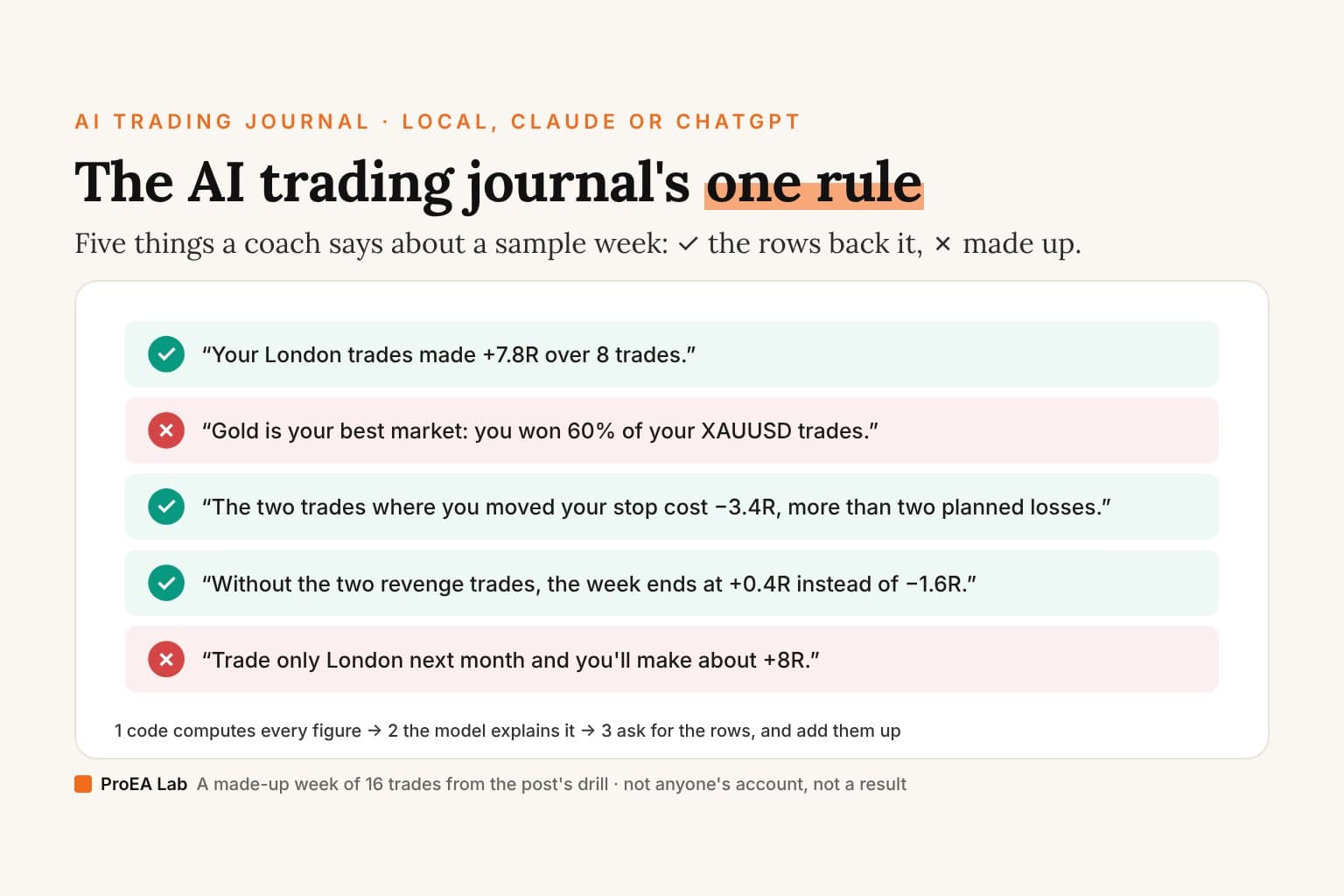
1. “Your London trades made +7.8R over 8 trades.”
2. “Gold is your best market: you won 60% of your XAUUSD trades.”
3. “The two trades where you moved your stop cost −3.4R, more than two planned losses.”
4. “Without the two revenge trades, the week ends at +0.4R instead of −1.6R.”
5. “Trade only London next month and you'll make about +8R.”
0 of 5 marked.
Ask of each one: which rows would I add up to get this?
The 16 trades are invented for this drill; they are no one's account and no result. R is the result in units of the risk taken on the trade: −1.0R is a full planned loss.
The two made-up claims are the two kinds to watch for. The 60% is a plausible number with no rows behind it: gold won 2 of 6, 33%, and lost −2.1R over the week. The +8R next month is a forecast: a journal can count what happened, not what will. The three that check out (+7.8R from London, −3.4R from the moved stops, +0.4R without the revenge trades instead of −1.6R) are sums you can point at.
What are the three ways to run an AI trading journal?
On your own computer with a free local model, with your own Claude, ChatGPT or Gemini account, or inside a paid journal that has AI built in. They differ in where your trades go, what the AI costs and how much of it you get.
1. A free local model, on your computer
Ollama runs open-weight language models on your own machine. It costs nothing per question, works offline, and your trades never leave the computer. The trade-off: a model small enough to run on a laptop is weaker at long reasoning than the large hosted ones. It is good at explaining figures you hand it, so pair it with a journal or spreadsheet that does the computing.
2. Your own Claude, ChatGPT or Gemini
Export your trades as a CSV and give them to the assistant you already use. Ask it to compute with code, never in its head, and to show the rows. This is the cheapest strong option if you already pay for one, and the free tiers work for a weekly review. Two things to know: you are sending your trade history to that provider, and a chat is not a journal. Next month's chat won't remember this month's trades, so keep the file as the record.
A few journals let you plug in your own key, so the journal computes the figures and your chosen model explains them. You pay the provider for what you use.
3. A journal with AI built in
The subscription journals now sell AI as a feature of their plans. What their own pages said when we read them on 29 October 2026 (TraderSync's pages showed a bot check that day, so its row is from our reads of 3 October, and of 9 July for how its page described Cypher):
| Journal | Its AI, in its words | How much you get |
|---|---|---|
| TradeZella | Zella AI: "It tags your trades, writes your notes, checks your rules, builds your playbook, and adds stop losses — automatically." | "500 AI credits / month" on Essential ($35/mo), 1,500 on Pro, 3,000 on Ultra; "Each action spends credits". Its Zella agents are on Pro and Ultra only |
| TraderSync | Cypher, which its page described on 9 July as "the equivalent of a performance analyst, strategist, planner, and coach" | Cypher Assistant "5 Cypher Messages per day" on Pro ($29.95/mo), 15 on Premium, 60 on Elite; Cypher Coach on Elite only |
| Edgewonk | "Automated Edge Finder": "Every Sunday, the edge finder provides an automatic performance and mistake scan." | A weekly scan, not a chat |
| TradesViz | "AI Coach leads seven AI tools: AI Query, AI Chat, AI Summary, AI Notes, AI Daily Brief and AI Widgets." | On Pro (US$19.99/mo) and Platinum, none on the free Basic plan: AI Query "20 unique queries per day for Pro and 30 unique queries for Platinum", AI Chat 25 and 50 messages a day; the AI Coach "Runs as often as you like, with no separate quota" |
| TradeLens (ours) | A coach that explains figures computed in code | A free local model, or your own Claude, OpenAI or Gemini key; $47 once |
The hosted ones are the most convenient: the AI sees your synced trades with no export, and there's nothing to install. You pay monthly, the AI is rationed by credits or messages, and your trades live on their servers. TradesViz says its AI Chat, Summary and Notes send the relevant trade data to OpenAI or Google models. Check what each says about how its figures are computed before you trust a number it writes.
What should you check before paying for an AI trading journal?
Whether every figure traces to rows, where your trades go, and how much AI the price buys. Six questions, in order:
- Show me the rows. Ask for the trades behind one figure and add them up. If it can't list them, its numbers can't be checked.
- Who does the arithmetic? The journal's code, or the model? The answer belongs in its documentation.
- Where do my trades go? Its servers, a model provider, or nowhere. A broker connection should use the read-only investor password, never your master password.
- How much AI do I get? Credits per month, messages per day, or unlimited on your own key.
- Can I choose the model? A journal locked to one model can't use a better one next year.
- Can I export everything? Your trades, tags and notes, as a CSV, so you're never locked in.
Which questions should you ask the AI?
Ones whose answer is a sum over your rows. Each of these has a right answer your journal can compute:
- Which setup lost the most R this month, and on how many trades?
- What did the trades right after two losses make?
- What did moving my stop cost, compared with a planned loss?
- Which session carries the account, and which one gives it back?
- What is the month without my worst tag?
- Are my losers bigger than my plan says they should be?
After each answer, ask: "Show me the rows." Then turn the finding with the largest cost into one rule for next week. Our trading journal examples show what entries look like when they give the AI something to work with.
What the AI can't answer: what the market does next, whether your strategy has a real edge on 30 trades (see how many trades it takes to test one), and whether a pattern it found is luck (see data-mining bias).
The deep version, as a PDF
The Trading Journal Playbook
What to write on every trade and why, filled-in entries across markets, the pre-trade checklist, the weekly and monthly review with the arithmetic shown, and the same columns on paper, in a spreadsheet or an app.
- What to write on every trade, and why each of the template's eighteen columns exists, in the order you fill them
- 13 filled-in entries across forex, gold, an index CFD, a partial close, a prop-firm evaluation day, a skipped trade and a backtest, every Risk, Result and R worked from the prices
- The pre-trade checklist, and how a month of mistake tags turns into checks of your own
Opens soon · USD 19, one payment. See what's inside →
What does TradeLens do?
TradeLens is our journal, and it was built on this page's rule: every figure is arithmetic over your trades, and the AI only names and explains it.
- It runs on your computer: Python 3.11 or later on Windows, macOS or Linux, a browser screen at
127.0.0.1:8742, one local database file, and the download sends nothing to a cloud: no sync, no telemetry. - It imports MT4 HTML statements and CSV files (MT5 history, other brokers, other journals) through a column-mapping wizard, with starter templates for MT4, MT5, cTrader and TradingView. Re-importing updates and never duplicates.
- The coach runs on a free local model (its setup script installs Ollama and pulls a bundled model) or your own Claude, OpenAI or Gemini key. A key you add sees only the computed numbers, never your credentials.
- You get the full source, with 92 tests and a 426-trade demo account, and you can extend it with Claude Code, Cursor or another coding agent.
What it doesn't have: no phone app, no market replay, no backtesting and no free plan. The download imports files; it doesn't sync with your broker while you trade. If you want an app on your phone that syncs as you trade, a hosted journal fits better.
The short version
- An AI journal is two jobs: code keeps and computes the trades; a model explains the figures.
- Every figure should trace to rows. Ask for them, and add them up.
- Three ways to run one: free and local, your own Claude, ChatGPT or Gemini, or a paid journal with AI built in.
- Before paying: who computes, where the trades go, how much AI the price buys, and whether you can export.
- Ask for sums, not forecasts.
Frequently asked questions
What is an AI trading journal?
A trading journal with a language model on top of your trade history. The journal stores each trade (entry, exit, size, result, your tags and notes) and computes the statistics; the AI reads those figures and explains them in words, answers questions about them and suggests what to look at next. The good ones keep the two jobs apart: code does the arithmetic, the model does the words.
Is there a free AI trading journal?
Yes, in two ways. You can keep your trades in a free spreadsheet and paste the export into the free tier of Claude, ChatGPT or Gemini, asking it to compute with code and show the rows behind every figure. Or you can run an open-source model on your own computer with Ollama, which costs nothing per question and keeps the trades offline. The journals with AI built in (TradeZella, TraderSync, TradesViz) put it on their paid plans.
Can I use Claude or ChatGPT as a trading journal?
As the reviewer, yes; as the journal itself, not on its own. A chat keeps no reliable record across months and can miscount a long table. Keep the trades in a file or a journal app, export them, and ask the model to compute with code (or give it figures your journal already computed), then to quote the rows behind each finding. TradeLens takes your own Claude, OpenAI or Gemini key for its coach and sends the model computed numbers, never your broker login.
Can an AI trading journal make up numbers?
It can, if the model is asked to do the arithmetic. A language model writes the most likely next words; asked for a win rate over hundreds of trades it can return a figure that reads right and has no rows behind it. The fix is architectural: the journal computes every figure in code and the model only explains them. Test any AI journal by asking it for the rows behind a number and adding them up yourself.
What should I ask an AI trading journal?
Questions whose answer is a sum over your rows: which setup lost the most R, what the trades after two losses made, what moving your stop cost, which session carries the account, what the total is without your worst tag. Then ask for the rows behind each answer. Don't ask it what the market will do or what you will make next month: no row in a journal holds that.
Is an AI trading journal worth it?
It's worth what its numbers are worth. A coach that explains correctly computed figures saves you the weekly spreadsheet work and asks the next question for you. One that computes in the model can mislead you with confidence. Check three things before paying: that every figure traces to rows, where your trades are sent, and whether the AI is capped by credits or messages per day.
Does TradeLens use AI?
Yes, as a coach on top of figures it computes in code. You choose the model: a free local one (a setup script that ships with TradeLens installs Ollama and pulls a bundled model) or your own Claude, OpenAI or Gemini key. The rest of the app needs no AI at all. TradeLens is ProEA's own product: $47 once for the download edition, which runs on your computer and imports MT4, MT5 and CSV files.