A useful trading journal entry is short and countable: the planned risk written before entry, the net result, R, a yes or no for whether you followed your plan, one mistake tag if you didn't, and one line on what happened. Below are six filled-in examples: a planned win, a planned loss, a rule break, a skipped trade, a backtest trade and the weekly review that reads them. Then a bad entry rewritten, and 25 prompts.
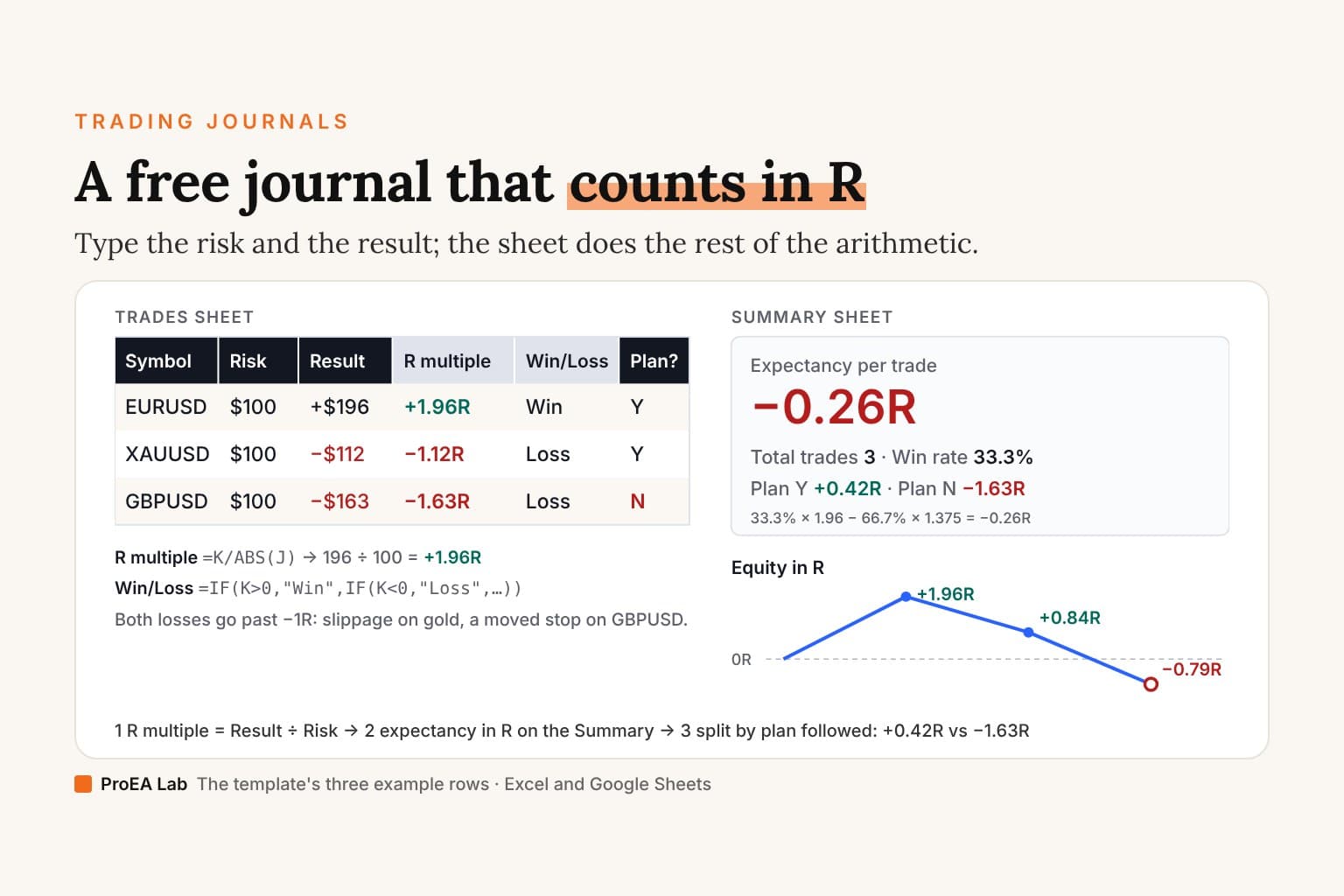
The first three are the example rows of our free Excel and Google Sheets template: the same prices, sizes, results and notes, with a reason line written for this page. The other three are written for this page. All six are examples, not anyone's results.
An entry is for Sunday, not for tonight. Write what the weekly review will need to add up, and one line you'll want to read again.Example 1: a planned win
| Field | Entry |
|---|---|
| Date | 1 October 2026, London open |
| Symbol, direction | EURUSD, long |
| Setup | Pullback - London open |
| Reason, before entry | Pullback to the overnight range high after the open broke it; long while it holds |
| Entry, stop, target | 1.1700, 1.1680, 1.1740 |
| Size, risk | 0.50 lots, $100 (20 pips × $5 a pip) |
| Exit, result | 1.1740, +$196 after $4 of fees |
| R | +1.96R |
| Followed plan? | Y |
| What happened | Target hit as planned. Nothing to change. |
A win needs the least writing, and that's the point: the line says it went to plan. Don't write a paragraph on why you were right. A win that followed the plan and a win that didn't need different flags, not different essays.
Example 2: a planned loss
| Field | Entry |
|---|---|
| Date | 2 October 2026, Asia session |
| Symbol, direction | XAUUSD, short |
| Setup | Range fade - Asia high |
| Reason, before entry | Third test of the Asia high in a quiet session; short below it |
| Entry, stop, target | 3350.00, 3355.00, 3340.00 |
| Size, risk | 0.20 lots, $100 ($5 × 100 oz × 0.20) |
| Exit, result | 3355.50, −$112 after $0.50 an ounce of slippage ($10) and $2 of fees |
| R | −1.12R |
| Followed plan? | Y |
| What happened | Stopped out; $0.50 slippage past the stop. A planned loss. |
This is a good trade with a bad result, and the journal should say so. The loss is bigger than 1R because of slippage and fees, the ordinary cost of trading. If every gold stop slips like this, it will show up in the weekly review as a cost, not as a mistake.
Example 3: a rule break
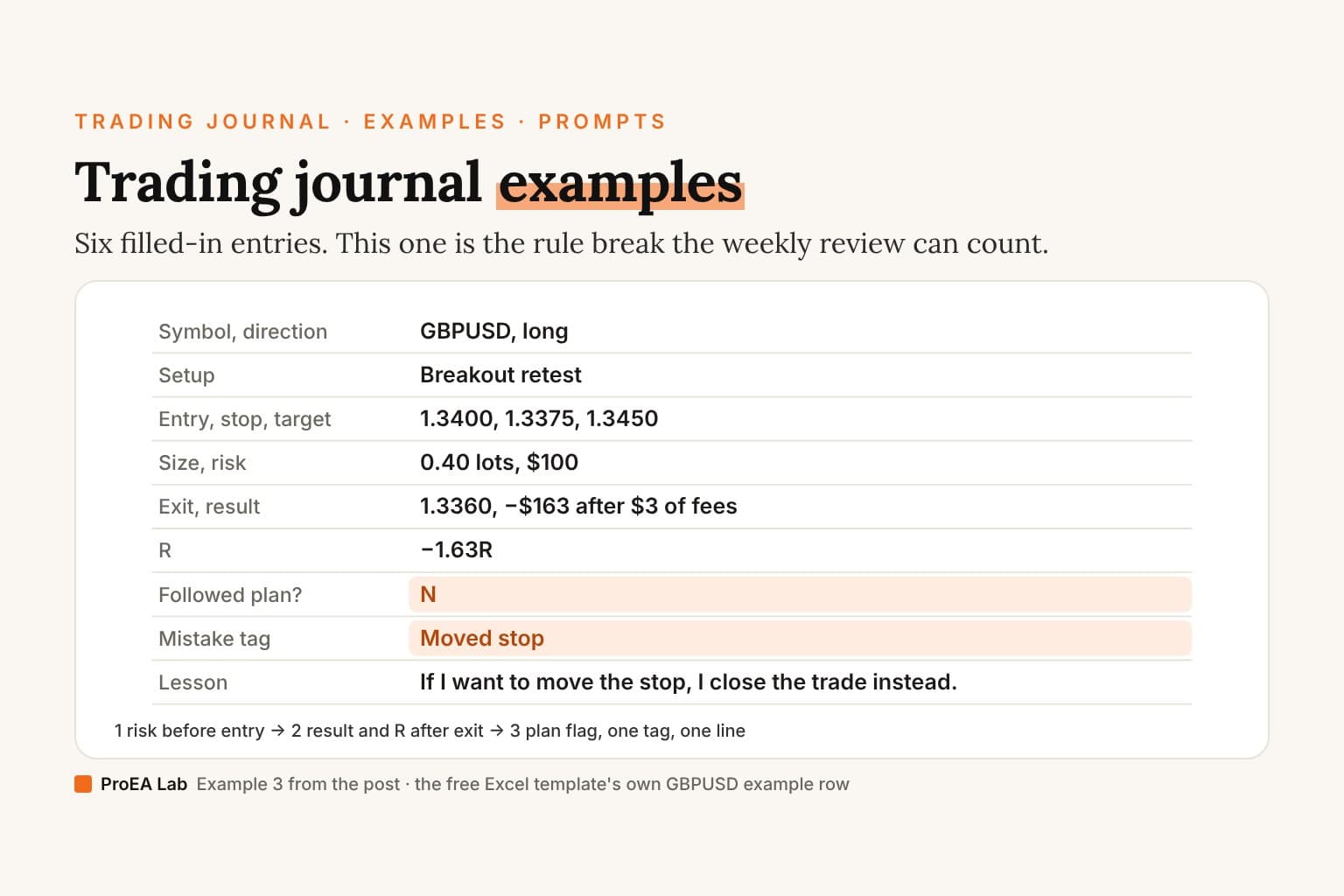
| Field | Entry |
|---|---|
| Date | 5 October 2026, London session |
| Symbol, direction | GBPUSD, long |
| Setup | Breakout retest |
| Reason, before entry | Retest of yesterday's high from above; long while it holds |
| Entry, stop, target | 1.3400, 1.3375, 1.3450 |
| Size, risk | 0.40 lots, $100 (25 pips × $4 a pip) |
| Exit, result | 1.3360, −$163 after $3 of fees |
| R | −1.63R |
| Followed plan? | N |
| Mistake tag | Moved stop |
| What happened | Moved the stop down 15 pips, then closed. |
| Lesson | If I want to move the stop, I close the trade instead. |
The planned loss was −1.00R plus fees; moving the stop 15 pips lower added 0.60R to it (15 pips × $4 = $60), and the fees took the other 0.03R. The plan flag and the tag are what turn this into something the review can count: on Sunday, "Moved stop" gets a total in R, and if it's the costliest tag, its lesson becomes next week's rule.
Example 4: a skipped trade
| Field | Entry |
|---|---|
| Date | Thursday, New York session |
| Symbol, direction | USDJPY, short |
| Setup | Range fade (on the menu) |
| Checklist | No on item 6: US CPI due in 12 minutes, not planned for |
| Result | — (not taken) |
| What happened | Skipped. Wrote it down at the time. |
A skipped trade is a row too. Over a month, the skipped rows tell you whether your checklist is saving you from bad trades or costing you good ones, and you can only know if they were written down when they happened.
Example 5: a backtest trade
| Field | Entry |
|---|---|
| Account | Backtest (separate log) |
| Replayed day | A London open on gold, in bar replay |
| Setup | Pullback - London open |
| Entry, stop, target | Written before pressing play on the next bar |
| R | +2.0R |
| Note | Costs not included; replay, not live |
Backtest entries use the same columns, so a setup's replayed R and its live R can be compared later. Keep them in their own log or account. Mixed with live trades, they make every weekly number wrong, and replayed trades skip both the costs and the nerves.
Example 6: the weekly review
The review reads the week's rows. Here, examples 1 to 3:
| The number | This week |
|---|---|
| Total trades | 3 (plus 1 skipped) |
| Expectancy | −0.26R per trade |
| Plan Y vs plan N | Y: +0.42R average; N: −1.63R |
| Largest loss | −1.63R (Moved stop) |
| Profit factor | 0.71 |
| Costliest tag | Moved stop, −1.63R |
| Next week's one rule | If I want to move the stop, I close the trade instead. |
Three trades say nothing about the method, so the review doesn't judge it. What it can see is that the one rule-broken trade cost more than the two planned ones made together. That's a behaviour leak with a one-line fix. The printable journal has this page ready to fill, and our post on how to journal forex trades walks through the Sunday review in full.
A bad entry, rewritten
Before:
Gold. Lost again, market was crazy today. Got stopped then it went my way. So annoying. Need to be more patient.
Nothing here can be counted. There's no risk, so no R. There's no setup, so it can't be grouped. There's no plan flag, so you can't tell a rule break from a cost. And "be more patient" isn't a rule anyone can follow.
After:
| Field | Entry |
|---|---|
| Symbol, direction | XAUUSD, long |
| Setup | Pullback - London open |
| Risk | $100 |
| Result, R | −$104, −1.04R |
| Followed plan? | Y |
| What happened | Stopped by 30 cents before the move; my stop sat at the obvious low. |
| To check on Sunday | How many gold stops at the obvious low were hit before the move went my way? |
The feeling is still there ("stopped then it went my way"). It's now a question the weekly review can answer with a count.
25 trading journal prompts
Before the trade (write the answers before you click):
- Which setup on my menu is this?
- What would make this idea wrong, and is that where my stop is?
- How much do I lose if the stop is hit, in money?
- Where am I taking profit, or what is my exit rule?
- Is there news in the next 30 minutes?
- Am I under my daily loss limit?
- Am I taking this to win back a loss?
- Would I take this trade at half the size?
After the trade (within the hour): 9. Did I follow my plan: entry, size, stop, exit? 10. If not, at which step did I leave it, and what was I feeling then? 11. Was the result decided by the plan, by costs, or by a change I made? 12. Did I move the stop, close early or add size? 13. What would I do the same next time? 14. What's the one line I'll want to read on Sunday? 15. Is this a trade to study on its own page?
On Sunday (from the rows, not from memory): 16. How many trades, and how many of them followed the plan? 17. What's the expectancy in R, and what's the plan-Y average against the plan-N average? 18. Which mistake tag cost the most R? 19. Which setup made the most, and which lost the most? 20. Which session or hour carries the account, and which gives it back? 21. What did the trades right after a loss make? 22. Was any loss bigger than −1R, and why? 23. What did my skipped trades do? 24. What's the one rule for next week? 25. Did I keep last week's rule?
Prompts 16 to 23 are sums over your rows, which is what an AI coach can answer for you if your journal computes the figures and the model only explains them. What an AI trading journal should and shouldn't do covers that, with a drill.
The same entries for stocks, crypto and futures
Only the size and the risk change. Size is shares, coins or contracts. Risk is the stop distance times the size, times the contract's point value for futures. R, the plan flag, the mistake tags and the review work the same in every market.
The deep version, as a PDF
The Trading Journal Playbook
What to write on every trade and why, filled-in entries across markets, the pre-trade checklist, the weekly and monthly review with the arithmetic shown, and the same columns on paper, in a spreadsheet or an app.
- What to write on every trade, and why each of the template's eighteen columns exists, in the order you fill them
- 13 filled-in entries across forex, gold, an index CFD, a partial close, a prop-firm evaluation day, a skipped trade and a backtest, every Risk, Result and R worked from the prices
- The pre-trade checklist, and how a month of mistake tags turns into checks of your own
Opens soon · USD 19, one payment. See what's inside →
Where the entries live
On paper, the printable trading journal has a daily log for the rows and a one-trade page for entries like example 3. In a spreadsheet, the free Excel and Google Sheets template holds examples 1 to 3 already, with the review computed. If you trade MetaTrader, importing MT5 trades into a journal saves typing the numbers, so the time goes into the flags and the line.
Ours, TradeLens, imports your MT4, MT5 or CSV history on your own computer and computes the weekly numbers for you: what pays and what leaks by session, symbol and setup, your #1 leak priced, and what revenge re-entries and broken-rule trades cost each month. You journal each day with one behaviour tag. It's $47 once. It has no phone app and no free plan.
Frequently asked questions
What is an example of a trading journal entry?
A GBPUSD long from our template: setup Breakout retest, entry 1.3400, stop 1.3375, 0.40 lots, risk $100. The stop was moved down 15 pips to 1.3360 and the trade closed there for −$163, −1.63R. Plan followed: N. Mistake tag: Moved stop. Lesson: if I want to move the stop, I close the trade instead.
What should I write in a trading journal?
Before entry: the setup from a fixed menu, a one-line reason, entry, stop, target, size and the money at risk. After exit: the exit, the net result, R (result ÷ risk), whether you followed your plan, one mistake tag if you broke it, and one line on what happened. Everything else is optional.
What are good trading journal prompts?
Before the trade: what would make this idea wrong, and is that where my stop is? After it: did I follow my plan, and if not, at which step did I leave it? On Sunday: which tag cost the most R this week, and what one rule fixes it? The page lists 25, in three groups.
Should I journal trades I didn't take?
Yes, the ones your setup offered and your checklist stopped. Write them as a row with a dash for the result and the checklist item that failed. Over a month they show what the checklist saved you from or cost you.
Do I journal backtest trades in the same journal?
Keep them in the same format but a separate log or account, tagged as backtest. Mixing them with live trades makes every weekly number wrong, and replayed trades skip the costs and the nerves of real ones.
How long should a trading journal entry be?
About a minute to write: the numbers, two flags and one line. Long diary entries are hard to count; the weekly review needs rows it can add up. Save the long notes for the few trades you study on a separate page.