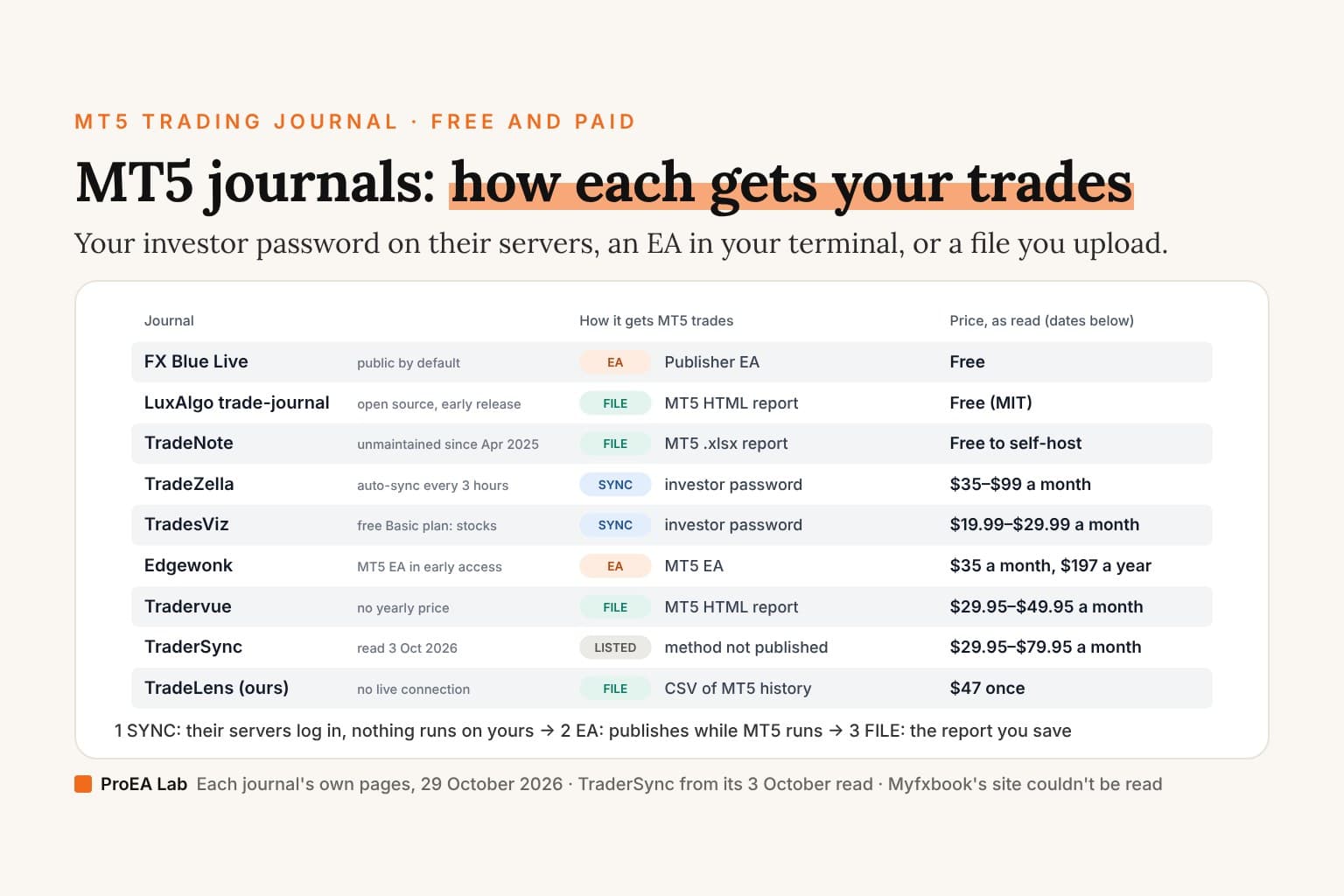
Short answer: on what we read on 29 October 2026, the best free MT5 journal that sends your trades by itself is FX Blue Live. It's free, and its Publisher EA sends every MT5 trade to your FX Blue page, by default every 5 minutes or whenever you open or close a position. It has two catches: your results are public by default until you set a PIN, an access list or a private order list, and we found no notes or screenshots, so it's a statistics page more than a diary. If you'd rather keep your trades on your own machine, LuxAlgo's trade-journal is free, MIT-licensed and reads MT5's HTML report, with its own caveats: an "Early release", an MT5 deals parser not yet checked on a real account's file, and no .xlsx. The paid journals split by how they get MT5 trades. TradeZella and TradesViz sync with your investor password on their own servers. Edgewonk has an MT5 EA in early access. Tradervue takes the HTML report you upload. And TraderSync lists MetaTrader 5 in its broker directory, as we read it on 3 October 2026, without saying how it connects.
A journal is only as useful as the way your trades get into it, so this page sorts MT5 journals by that first, then by price, by who can see your results, and by where your trades are kept.
The three ways an MT5 journal gets your trades
- Your investor password, on their servers. The journal logs in with MT5's read-only investor password and pulls your trades on a schedule; nothing runs on your computer. TradeZella and TradesViz work this way.
- An EA in your terminal. An Expert Advisor on one MT5 chart sends your history out. FX Blue Live works this way, and its FAQ says the EA must be running, so your PC, or a VPS, stays on. Edgewonk's MT5 EA is in early access; whether it needs MT5 open isn't on the pages we could read.
- A file you upload. You save the MT5 report or a CSV and import it; nothing connects to your account, and the journal knows only what you've exported. Tradervue, the open-source journals and TradeLens work this way.
How to import MT5 trades into a journal walks through each route, and the checks to run after your first import.
Nine MT5 journals side by side
Read on 29 October 2026 from each journal's own pages, except TraderSync: its site returned a bot check that day, so its row is our read of 3 October 2026. A dash means the pages we read don't say. Prices are in US dollars.
| Journal | Price (date read) | MT5 route | Terminal must stay running? | Public by default? | Phone app | Where the data lives |
|---|---|---|---|---|---|---|
| FX Blue Live | Free (29 Oct 2026) | Publisher EA on one MT5 chart | Yes, for the EA; or a VPS | Yes, until you set a PIN, an access list or a private order list | None named for FX Blue Live | FX Blue's site, on a page at your username |
| LuxAlgo trade-journal | Free, MIT (29 Oct 2026) | Upload the MT5 HTML report; not .xlsx | No | No: it runs on your machine | — | One SQLite database on your machine |
| TradeNote | Free to self-host; hosted $4.99 a month (29 Oct 2026) | Upload the MT5 .xlsx report, from an English terminal; unmaintained since 2025-04-14 | No | No: it runs on your machine | — | MongoDB on your machine |
| TradeZella | $35, $59 or $99 a month; $315, $531 or $891 a year (29 Oct 2026) | Investor-password sync on its servers; HTML upload as the fallback | No: "no Expert Advisors, no scripts to install" | — | — | TradeZella's servers |
| TradesViz | Pro $19.99, Platinum $29.99 a month, or $14.99 and $22.49 a month billed yearly; free Basic for stocks (29 Oct 2026) | Investor-password sync on its servers; an EA and manual import too | No: "NO need to keep any clients open" | — | iOS and Android | TradesViz's servers |
| Edgewonk | $35 a month or $197 a year (29 Oct 2026) | MT5 EA, in early access from its support team | — (its help pages didn't load) | — | — | Your Edgewonk account, closed to you after you cancel |
| Tradervue | Silver $29.95, Gold $49.95 a month (29 Oct 2026) | Upload the MT5 History report saved as HTML | No | — | — | Your Tradervue account |
| TraderSync | Pro $29.95, Premium $49.95, Elite $79.95 a month (3 Oct 2026) | MT5 listed in its broker directory; the method isn't published | — | — | Store links in its site footer (read 9 Jul 2026) | Your TraderSync account |
| TradeLens (ours) | $47 once (29 Oct 2026) | Import a CSV of your MT5 history; no live connection in the download | No | No: it runs on your machine | No | One SQLite file on your computer |
Myfxbook isn't in the table: its site couldn't be read on 29 October 2026, and the section on it below says what that leaves.
Each journal, and what decides it
FX Blue Live: free, automatic, public by default
FX Blue Live calls itself "a free web-based service for analyzing and publishing your trading history". It takes MT4, MT5, cTrader and a few other platforms. For MT5, its user guide recommends the Publisher EA: run the setup program (the installer needs Microsoft .NET Framework 4.8), turn on "Allow WebRequest" for https://publisher.fxblue.com, enter your FX Blue username and password in the EA's inputs, and add it to one chart. "A single copy of the EA will publish all trades in MT5." It updates every 5 minutes by default, or whenever you open or close a position, and can publish as often as every 60 seconds.
The EA publishes only while it runs. FX Blue's FAQ: "if you don't want to leave your home PC running all the time, to upload your trading results or to copy signals, then you need a VPS instead." A version of the EA without a DLL can run on the MetaQuotes VPS. FX Blue also offers account sync with a read-only investor password, but its FAQ names MT4 and cTrader for that and adds MT5 brokers "when users ask us to", so whether yours is covered is a question for FX Blue.
Three things decide it:
- Public by default. "Trading results which are published to FX Blue are public by default. If someone knows (or can guess) your username, then they can view your results." You can set a PIN, a white list of accounts allowed to see yours, or "Make your order list private", but "You cannot hide both your balance and your equity." Its terms give FX Blue "a royalty-free, non-exclusive license" to publish what you upload.
- Tags, not notes. Its strategy tags match each order's comment, which you set when you place the trade and can't change afterwards. We found no per-trade notes or screenshot upload on the pages we read.
- The breakdown. Stats by symbol, direction, month, day, hour, magic number and strategy, MAE/MFE, and a risk tab with risk of ruin. Its home page also carries sponsored broker and prop-firm offers.
LuxAlgo trade-journal: free and private, an early release
LuxAlgo's trade-journal is MIT-licensed and runs on your own machine, with Node 22+ and pnpm or with docker compose up -d, and keeps your trades in one SQLite database. In our code read on 29 October 2026, its parsers read MT5's "Save as Report" HTML (the Positions table), the Deals table, Strategy Tester reports included, and the MT4 HTML statement. There's no EA and no MT5 sync: MetaTrader isn't on its broker sync list, so MT5 comes in as a file.
Its own docs list the caveats. The README opens with "Early release. APIs and schema may still move before 1.0." Its validation table marks the MT5 deals parser "(fixtures)" with the cross-check box left unticked: not yet checked on a real account's file. And the MT5 .xlsx report is "NOT yet handled", so save the report as HTML. Its AI takes your own Anthropic or OpenAI key, or an OpenAI-compatible server such as Ollama. LuxAlgo also runs a free hosted copy inside its Vela charts.
TradeNote, under GPL-3.0 and with 979 stars on GitHub on 29 October 2026, reads the MT5 .xlsx report from a terminal set to English. It has had no commit since 14 April 2025, and it stores every MT5 trade in USD whatever your account's currency. A hosted copy is $4.99 a month. Our code read of the eight GitHub journals has the rest.
TradeZella: investor-password sync, every 3 hours
TradeZella's MT4 and MT5 guide (last updated 31 March 2026) syncs with your investor password: "This is a read-only password that is separate from your main trading password." It adds "No FTP configuration, no Expert Advisors, no scripts to install." and says you can "try a manual sync (available every 30 minutes) or wait for the next automatic sync (every 3 hours)". An HTML upload is the "manual fallback".
On its pricing page on 29 October 2026: Essential $35, Pro $59 and Ultra $99 a month, or $315, $531 and $891 billed yearly. Essential connects 1 active account and Pro up to 50. No free trial or refund wording appeared there, and its terms say: "TradeZella has a no refund policy after sign-up." It's a web app, and your trades are kept on TradeZella's servers.
TradesViz: sync on its servers, a free plan for stocks
TradesViz describes "100% Automated MT5 sync based on running custom MT5 clients on our own servers using your MT5 investor (read-only) password", with "NO need to keep any clients open"; new MT5 brokers are "added within 24-48 hrs". It also documents a free MT5 Expert Advisor (that page was last updated 17 May 2025) and a manual import.
On its pricing page on 29 October 2026: Pro $19.99 and Platinum $29.99 a month, or $14.99 and $22.49 a month billed yearly, each with a 7-day free trial. Basic is "Free forever", but its assets row reads "Stock", and no page we read says whether its auto-sync covers MetaTrader, so we don't count it as a free MT5 journal. Its home page lists "Mobile App V3 for iOS & Android". On refunds, its FAQ: "No. We do not offer refunds for any subscription purchases."
Edgewonk: an MT5 EA, in early access
Edgewonk's changelog entry of 5 August 2026 added "New MetaTrader 5 EA Auto Import: Automatically synchronize your MT5 trading history with Edgewonk", "Secure and Read-Only: The EA cannot open, modify, or close trades" and "Early Access: Contact Edgewonk Support to receive the EA". It replaces an FTP import that MT5 no longer supports: MetaTrader 5 build 6060, in MetaQuotes' release notes of 23 July 2026, "Removed support for publishing trading reports via FTP." Edgewonk's setup pages are on its help centre, which returned a bot check on 29 October 2026, so we couldn't read the EA's install steps or whether MT5 has to stay open for it.
On its pricing page that day: $197 for 12 months or $35 a month, with every feature on both plans. Its home page shows a "14-day refund period". After you cancel, "you will no longer be able to log into your Edgewonk trading journal."
Tradervue: the HTML report, uploaded
Tradervue imports MT5 "using the file upload method": save the History report "as a HTML file" and upload it. That route connects nothing to your account, so Tradervue knows only what you've exported. On its pricing page on 29 October 2026: Silver $29.95 and Gold $49.95 a month, with no yearly price; trials for both, and a free plan whose limits the page doesn't list. Silver stores 1 GB of images and Gold 5 GB. When a paid subscription ends, the account changes to "the no-charge, reduced-functionality access option".
TraderSync: read on 3 October, not 29
TraderSync's site returned a bot check ("Performing security verification") to every page we tried on 29 October 2026, so these facts are from our read of 3 October 2026. Its broker directory lists "MetaTrader 5 (MT5)" and says only rows with a check in its "Autosync" column "can be imported via a direct connection". Its forex page: "Automatically sync your forex trades from top brokers like OANDA, TradeLocker, and Metatrader 4/5". None of its pages we read says whether that connection uses the investor password, an EA or something else; its sync help offers an Auto-Sync tab, or "File Upload or Add Manually".
Monthly prices on 3 October 2026: Pro $29.95, Premium $49.95 and Elite $79.95, with a 7-day free trial. Its billing policy: "All payments made are non-refundable and we do not offer pro-rated refunds."
Myfxbook: not compared
On 29 October 2026, every myfxbook.com page we tried, its MT5 connection page and its help site included, returned a bot check ("Just a moment...", "Performing security verification"), and we didn't try to get past it. The only Myfxbook text we could read that day was its two app store listings, and they don't say how an MT5 account connects, what it costs or whether results are public. So Myfxbook isn't in the table, and this page compares nothing about it. If you're weighing it, read its own MT5 connection page and privacy settings first.
TradeLens (ours): a local app that imports files
TradeLens is ProEA's own journal, so read this section as ours. It's a $47 one-time download: a local Python app (Python 3.11 or later) with a browser screen at 127.0.0.1:8742, keeping your trades in one SQLite file on your computer.
- It imports MT4 HTML statements and CSV files (MT5 history, other brokers) through a column-mapping wizard, with starter templates for MT4, MT5, cTrader and TradingView.
- The download has no live connection to MT5: you save your history, then import it.
- Its AI coach runs on a free local model through Ollama, or on your own Claude, OpenAI or Gemini key.
- It has no phone app, no replay, no backtesting and no free plan.
More on the TradeLens page.
Free MT5 journal options
- FX Blue Live: free and automatic through its EA, public by default, no notes or screenshots.
- LuxAlgo's trade-journal: free and MIT-licensed, on your own machine; you import the MT5 HTML report. An early release.
- TradeNote: free to self-host and reads the MT5
.xlsxreport, but unmaintained since April 2025. - Our free trading journal template: an Excel and Google Sheets sheet with the formulas built in; you type each trade in from your MT5 history.
- The printable trading journal: a PDF to fill in by hand.
- Our free MT5 report analyzer: it reads an MT5 HTML statement or trade-history CSV in your browser, and the file isn't uploaded. It totals the report after commission and swap, keeps deposits apart from trading and checks the result against your closing balance. It keeps nothing once you close the tab, so it's a check, not a journal.
Two paid journals also have free plans. Tradervue's MT5 import is a file upload ("import your trades from MetaTrader 5 into your trading journal using the file upload method"), so its free plan can take your MT5 report, though its pricing page doesn't list what the free plan includes. TradesViz's Basic plan lists "Stock" as its assets, so its free plan isn't for MT5 forex. To find the report all of these read, where to find your MT5 trade history shows it on desktop, web and phone.
MT4
Most of these take MT4 too, though not always by the same route:
- FX Blue: a Publisher EA for MT4, and account sync with MT4's read-only password.
- TradeZella: the same investor-password sync as for MT5.
- TradesViz: MT4 by FTP; its server-side sync is MT5 only so far ("we do NOT have support for MT4 for this method yet").
- Edgewonk: MT4's own FTP publishing (Tools > Options > FTP), as its blog post of 20 September 2024 describes.
- Tradervue and TraderSync: both list MetaTrader 4 among their platforms (TraderSync as read on 3 October 2026).
- LuxAlgo's trade-journal: the MT4 HTML statement, not yet checked on a real file. TradeNote has no MT4 import.
- TradeLens (ours): the MT4 HTML statement.
Limits
One read of each journal's own pages on 29 October 2026, in a headless browser and without logging in, so we saw no logged-in screen and connected no account. TraderSync's facts are from 3 October 2026; Myfxbook's site and Edgewonk's help centre returned bot checks. The open-source journals were code-read, not run. Prices and sync routes change, so check the journal's own page before you pay. We build and sell TradeLens.
Frequently asked questions
What is the best free MT5 trading journal?
On what we read on 29 October 2026, FX Blue Live. It is free, and its Publisher EA sends every MT5 trade to your FX Blue page, by default every 5 minutes or when you open or close a position. Its results are public by default until you set a PIN, an access list or a private order list, and we found no notes or screenshots. For a private journal on your own machine, LuxAlgo's MIT-licensed trade-journal reads the MT5 HTML report, though its README calls it an early release and its MT5 deals parser has been checked against test files only.
Which trading journals connect to MT5 automatically?
TradeZella and TradesViz log in with your read-only investor password from their own servers, so nothing has to run on your computer; TradeZella's automatic sync runs every 3 hours. FX Blue Live and Edgewonk use an EA on a chart in your MT5 terminal, and Edgewonk's MT5 EA is in early access from its support team. TraderSync's broker directory lists MetaTrader 5, as we read it on 3 October 2026, without saying how it connects. Tradervue imports an MT5 HTML report you upload.
Does MT5 have to stay open for a trading journal to work?
Only for a journal that uses an EA. FX Blue's FAQ says its publisher app must be running, and suggests a VPS if you don't want to leave your home PC on. TradeZella and TradesViz log in with your investor password on their own servers, and TradesViz says there is no need to keep any clients open. A journal that imports a report file needs MT5 open only while you save the report.
Is FX Blue Live private?
Not by default. FX Blue's FAQ says results published to FX Blue are public by default, and anyone who knows or can guess your username can view them. You can set a PIN, a white list of accounts allowed to see yours, or make your order list private, but you cannot hide both your balance and your equity. Its terms also give FX Blue a royalty-free licence to publish what you upload.
Can I use Myfxbook as an MT5 trading journal?
We could not check. On 29 October 2026, every myfxbook.com page we tried, its help site included, returned a bot check, so we could not read how it connects an MT5 account, what it costs or whether results are public. Its two app store listings were readable but do not answer those questions, so this page compares nothing about Myfxbook.
Which MT5 journals also take MT4?
FX Blue (an MT4 Publisher EA and MT4 account sync), TradeZella (the same investor-password sync), TradesViz (FTP for MT4, since its server-side sync is MT5 only so far), Edgewonk (MT4's own FTP publishing), Tradervue and TraderSync (both list MT4) and LuxAlgo's trade-journal (the MT4 HTML statement). TradeNote has no MT4 import. TradeLens, ours, imports the MT4 HTML statement.
Where does TradeLens fit?
TradeLens is ProEA's own journal: a $47 one-time download, a local Python app that keeps your trades in one SQLite file on your computer. It imports MT4 HTML statements and CSV files of MT5 or other broker history, and the download has no live connection to MT5. Its AI coach runs on a free local model or your own Claude, OpenAI or Gemini key. It has no phone app, no replay, no backtesting and no free plan.