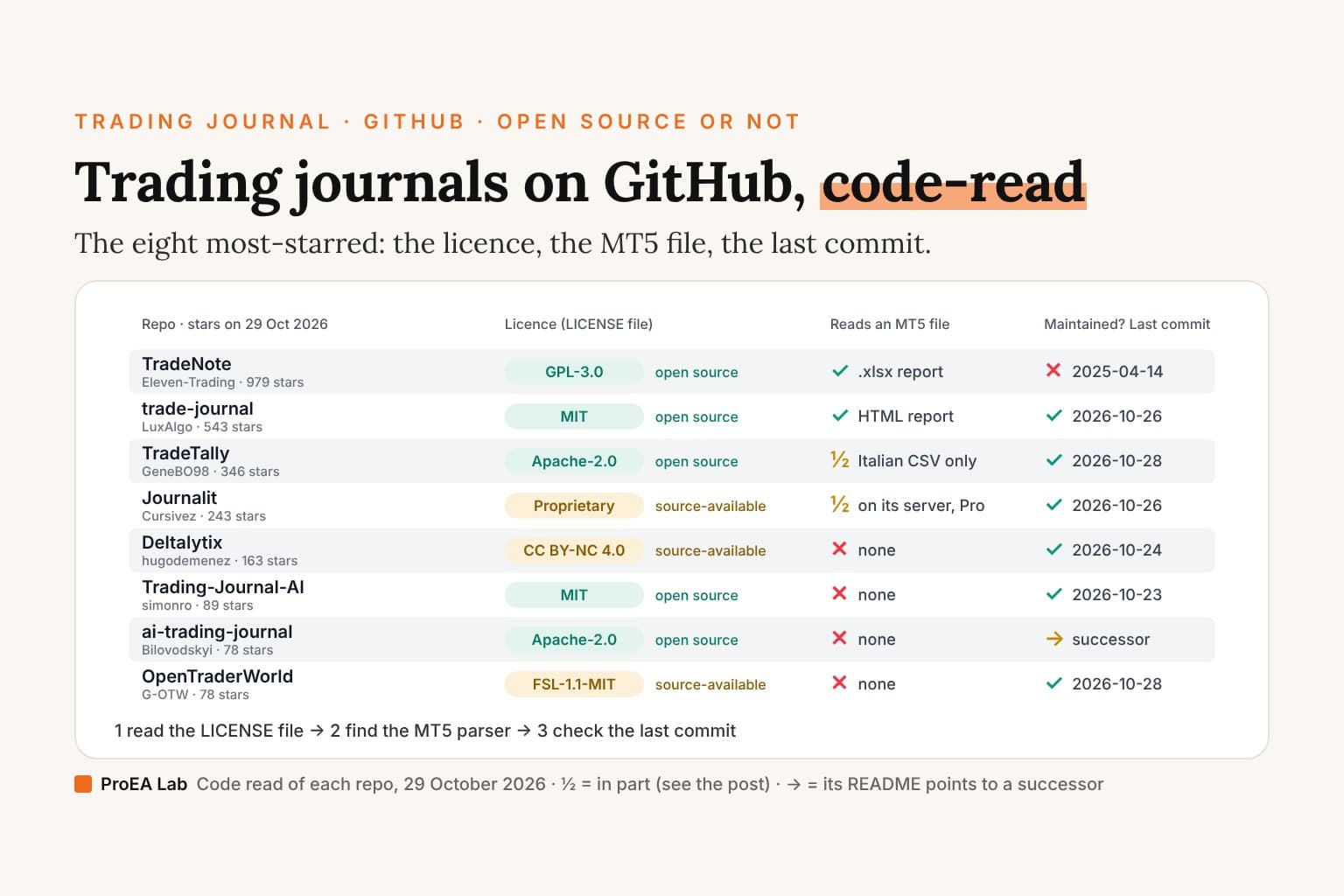
Short answer: for an MT5 forex trader, the free journal on GitHub to start with is LuxAlgo's trade-journal. It's MIT-licensed, it had a commit three days before our read, and its own code reads MetaTrader 5's HTML report. Take its caveats with it: the README calls it an "Early release", its validation table leaves the MT5 deals parser's cross-check at "☐ (fixtures)" and its real-file check unticked, so it hasn't been checked on a real account's file, and the MT5 .xlsx report isn't handled yet. For US stocks, options and futures, TradeTally (Apache-2.0) reads the most broker files. Five of the eight most-starred journals are open source. Journalit, Deltalytix and OpenTraderWorld are not: they're source-available, and Journalit's licence forbids copying, modifying or hosting it.
Most lists of open-source trading journals repeat each project's README.
This one reads the code, and the LICENSE file.
What we checked
We searched GitHub on 29 October 2026 for trading journal, trade journal, the trading-journal, tradingjournal and trade-journal topics, crypto trading journal, mt5 trading journal, tradezella alternative and tradervue alternative, sorted by stars. We took the eight most-starred results that are trading journals a trader can run, from 979 stars down to 78, cloned each one and read it. We didn't install, build or run any of them. Seven questions:
- The licence: what the LICENSE file says, not the README. Is it an open-source licence?
- Upkeep: the date of the last commit. No commit on any branch in over 12 months, so none since 29 October 2025, counts as unmaintained.
- MT5: which MetaTrader 5 file the code reads, if any, and what the project's own notes say about it.
- Other imports: MT4, TradingView, crypto exchanges, other brokers, a generic CSV.
- Running it yourself: what you need installed, and where your trades are stored.
- AI: which models the code calls, and whose key it uses.
- A hosted copy: whether the project also runs one, free or paid.
Stars are the count GitHub's search returned on 29 October 2026; they measure attention, not quality. The repos we searched and left out are listed at the end, with the reason. TradeLens, our own journal, ships its source to buyers but is not open source, so it isn't one of the eight; it's described once, near the end, as ours.
Open source or source-available?
Being on GitHub doesn't make a journal open source. Open source means a licence approved by the Open Source Initiative (OSI): anyone may use, change and share the code, for any purpose, commercial use included. Source-available means you can read the code, and the licence decides what else you may do. The eight carry six licences:
| Licence | Kind | Run it yourself? | Change the code? | Build a business on it? | Here |
|---|---|---|---|---|---|
| MIT | Open source, permissive | Yes | Yes | Yes; keep the copyright notice | LuxAlgo trade-journal, Trading Journal AI |
| Apache-2.0 | Open source, permissive | Yes | Yes | Yes; keep the notices. It adds a patent grant | TradeTally, ai-trading-journal |
| GPL-3.0 | Open source, copyleft | Yes | Yes | Yes; a changed copy you distribute ships its source under GPL-3.0 | TradeNote |
| FSL-1.1-MIT | Source-available | Yes, for your own use | Yes, for your own use | Not a competing product or service. Each release becomes MIT on its second anniversary | OpenTraderWorld |
| CC BY-NC 4.0 | Source-available, non-commercial | For personal and other non-commercial use | Yes, with attribution | No: its README says commercial use needs a separate licence | Deltalytix |
| Proprietary source-available | Not open source | The compiled plugin, in Obsidian, under Journalit's terms; there's no server to host | No | No | Journalit |
For a trader keeping their own journal, every row but the last lets you run the code on your own machine and change it. The difference shows when you'd build on it: a coaching service, a desk's internal tool, a hosted copy for other traders. MIT and Apache-2.0 allow it, GPL-3.0 allows it with its share-alike rule, FSL forbids a competing product until a release turns MIT, and CC BY-NC needs the author's permission. Whether trading for a living counts as commercial use under CC BY-NC is a question for the licensor, not for us.
The table
Stars and last commits as of 29 October 2026. "MT5 import" means a MetaTrader 5 file the repo's own code reads; broker sync is in each section.
| Repo | Stars | Last commit | Licence | Open source (OSI)? | MT5 import | Runs on | AI |
|---|---|---|---|---|---|---|---|
| TradeNote | 979 | 2025-04-14, unmaintained | GPL-3.0 | Yes | Yes: the .xlsx report, from an English terminal | Docker Compose, with MongoDB | None |
| LuxAlgo trade-journal | 543 | 2026-10-26 | MIT | Yes | Yes: the HTML report and the Deals table; not .xlsx | Node 22+ and pnpm, or Docker; SQLite | Your Anthropic or OpenAI key, or Ollama |
| TradeTally | 346 | 2026-10-28 | Apache-2.0 | Yes | Partial: a semicolon CSV with Italian headers | Docker, with PostgreSQL | 12 provider settings, local models included |
| Journalit | 243 | 2026-10-26 | Proprietary source-available | No | Parsed on Journalit's server; Pro to save | An Obsidian plugin; no self-hosted server | An MCP server for your AI app |
| Deltalytix | 163 | 2026-10-24 | CC BY-NC 4.0 | No | No (FTMO's CSV only) | Bun and Docker Postgres, a developer runbook | OpenAI |
| Trading Journal AI | 89 | 2026-10-23 | MIT | Yes | No (stocks, options, futures) | Python 3.11 and Node 18; setup.bat | Claude only, your key |
| ai-trading-journal | 78 | 2026-10-12, a pointer to its successor; last feature 2025-12-22 | Apache-2.0 | Yes | No (trades typed by hand) | No self-host instructions | Claude |
| OpenTraderWorld | 78 | 2026-10-28 | FSL-1.1-MIT | No, until each release converts | No (a generic CSV/JSON mapper) | install.sh, then Docker | Your Anthropic or OpenAI-compatible endpoint, off by default |
Five of the eight carry an OSI licence. Two parse an MT5 report in their own code, LuxAlgo's (the HTML report) and TradeNote's (the .xlsx report), and TradeNote has had no commit since April 2025. Journalit imports MetaTrader files on its own server. None of the eight repos packages its journal as a desktop app: we found no Electron or Tauri build in any of them. Each is a web app, a small server you run and open in a browser, apart from Journalit, a plugin inside the Obsidian app.
What the code says
TradeNote: the most stars, and no commit since April 2025
TradeNote has 979 stars, the most here. The last commit on its main branch is version 19.0.3, on 14 April 2025, and its other branches stop earlier, so by our 12-month line it's unmaintained. The LICENSE file is the GNU GPL version 3 (package.json says GPL-3.0-or-later), and the code is Vue 3, Express, Parse Server and MongoDB. To run it, the README says to download the Docker Compose file and run docker compose up -d, which starts the app and a MongoDB database at http://localhost:8080.
Its broker list has 13 entries: a template CSV (one execution per line), TradeZero, Interactive Brokers (with auto-sync through an IBKR Flex token), TD Ameritrade, TradeStation, Tradovate, MetaTrader 5, Heldentrader, Rithmic, FundTraders, NinjaTrader, TastyTrade and TopstepX. The MetaTrader 5 parser reads an Excel workbook and finds its Deals section. Two things an MT5 trader would notice. The export steps ask you to "set the MT5 language to English before exporting" and to save the report as an "Open XML (MS Office Excel 2007)" file. And the parser sets the currency of every imported MT5 row to "USD" (src/utils/brokers.js, line 110), whatever your account's currency. A symbol of six characters starting with a letter is typed forex; any other symbol is typed a stock.
There's no MT4, TradingView or crypto exchange import, and no AI: a search of its code for OpenAI, Anthropic, Claude, Gemini, Ollama and LLM finds nothing. Self-hosting is free; the hosted copy on tradenote.co is $4.99 a month, with a 7-day free trial.
LuxAlgo trade-journal: the MT5 report, under MIT
LuxAlgo's trade-journal has 543 stars. The repo was created on 24 August 2026, and its last commit, on 26 October 2026, merged Binance futures sync. The LICENSE file is MIT, copyright LuxAlgo Global, LLC, with its trademark terms in a separate file. It's a TypeScript monorepo: a Next.js 15 app that keeps your trades in one SQLite database, with the importers in a package of their own. The README asks for Node 22+ and pnpm 11.0.8, or docker compose up -d, which builds the image on your machine and serves it at http://localhost:3000, with your data kept in ./data.
Its own code reads more MetaTrader files than any other repo here. Its HTML reader notes that "MetaTrader's own 'Save as Report' produces HTML (no CSV button exists in the terminal)", and three parsers take it from there: one for the closed-positions table (Time, Position, Symbol, Type, Volume, Price, S/L, T/P and the rest), one for the MT5 Deals table, Strategy Tester reports included, and one for MT4 and MT5 HTML statements. It works out each trade's R from its stop loss, which, its comment says, "stays correct for FX/CFDs without knowing contract sizes". The other file formats are TradingView paper-trading history and strategy "List of trades", Hyperliquid, IBKR, NinjaTrader, thinkorswim, TradeZella and XTB, plus a generic column mapper.
Its own documentation says what isn't done yet. The README opens with a warning: "Early release. APIs and schema may still move before 1.0." Its validation table in docs/importers.md has two checks: "Cross-checked" ("header set verified against field sources") and "Real file" ("verified against an actual export file from a live account"). The MT5 deals report is marked "☐ (fixtures)" on the first and unchecked on the second; the MT4 HTML statement is unchecked on both. And: "Known variants NOT yet handled (send a sample!): MetaTrader 5 xlsx 'Trade History Report' (the MT4-style .htm statement works)". So save your MT5 report as HTML, not Excel, and check the first import against your statement. Our free MT5 report analyzer reads the same HTML report in your browser and totals it, so you have figures to compare; importing MT5 trades into a journal covers the export.
Broker sync goes through @luxalgo/broker-sdk 0.6.0, an npm package whose code isn't in this repo, so we didn't read it. The README lists 22 brokers and exchanges for it, among them Alpaca, Binance, Bybit, Coinbase, Kraken, OKX, Hyperliquid, IBKR Flex, Charles Schwab, TradeStation and Topstep. MetaTrader isn't on the list: MT5 comes in as a file.
The AI is bring-your-own. The code lists three providers, Anthropic, OpenAI and "compatible", and the README says any OpenAI-compatible server such as Ollama works, for "session recaps, per-trade critiques, 'ask your journal' over your own aggregates". AI statement parsing on the Import page stays on Anthropic and OpenAI. LuxAlgo also runs a hosted copy: its page says the journal "is included on every plan, Free too", inside its Vela charts.
TradeTally: the most broker files, for stocks and futures
TradeTally has 346 stars and a commit on 28 October 2026. Its LICENSE is the Apache License 2.0, and its README says "This project is open source software." It's Vue 3 and Node/Express on PostgreSQL, and it has an iOS app. To run it, you docker run its published image, or use the Compose file, which adds PostgreSQL 16. In the README's words: "Self-Hosted: Free, open-source deployment with all Pro features included."
Its 17 CSV parsers cover stock, options and futures brokers, most of them in North America: Interactive Brokers, Schwab, thinkorswim, Tradovate, Webull, Lightspeed, Questrade, Firstrade, tastytrade, Sierra Chart, TradingView, Tradervue, paperMoney, Delta Exchange, MetaTrader and a generic format. Its auto-detect recognises 24 formats, NinjaTrader, TradeStation, Fidelity, E*TRADE and Wealthsimple among them. Broker sync through APIs covers Alpaca, IBKR, OANDA, Schwab, TradeStation, Trading 212, Tradovate and Webull. For crypto, it reads Delta Exchange order history.
MT5 is where it's thin. The MetaTrader 5 parser finds its header only when it contains simbolo, tipo, volume, prezzo and profitto: the Italian report, as a semicolon CSV. A snake_case MT4 or MT5 CSV goes to the generic parser. MetaTrader isn't in the import dropdown, so only Auto-Detect reaches it, and the upload takes CSV and text files, not HTML or Excel.
AI has the widest choice here: 12 provider settings in aiService.js, among them Gemini, Claude, OpenAI, DeepSeek, Kimi, Perplexity, the Codex and Claude command-line tools, and local models through Ollama or LM Studio. Two things a trader would notice. The README says that "for full feature access (real-time quotes, advanced charts, sector analysis), a Finnhub.io Basic plan is required." And there's a hosted version at tradetally.io, with free trade storage and a paid Pro plan whose price wasn't in the page text we could read.
Journalit: an Obsidian plugin, and not open source
Journalit has 243 stars and a release, 1.10.0, on 26 October 2026. Its code is on GitHub, but Journalit is not open source. Its LICENSE is a "Proprietary Source-Available License": "The source code is made available for transparency and Obsidian Community plugin review only." It goes on: "copying, modifying, redistributing, sublicensing, selling, hosting, or creating derivative works from the Software is prohibited without explicit written permission from Cursivez."
It's a plugin for Obsidian, the notes app, installed from Obsidian's Community Plugins, and its backend is Journalit's server. Imports go there: the plugin posts your file to api.journalit.co to analyse, preview and commit it, and the repo has no MetaTrader parser of its own. The README lists MetaTrader 4/5 among its file imports and MetaTrader 4 among its automatic syncs, and adds: "MetaTrader 5 statements use Trade Import, not FTP-based Trade Sync." Free users can analyse and preview an import. Saving it to the journal, Trade Sync and the economic calendar need Pro, which its pricing page puts at $15 a month billed annually ($180 a year), or $19 billed monthly.
The plugin makes no AI calls of its own. It offers an MCP server you add to Claude, ChatGPT or another AI app, with 100 tool calls a month on the free plan.
Deltalytix: futures and prop firms, under a non-commercial licence
Deltalytix has 163 stars and a commit on 24 October 2026. Its README's headline says "Open-source trading journal and analytics for futures and prop-firm traders", but its LICENSE is Creative Commons Attribution-NonCommercial 4.0, which is not an OSI licence. The README: "Commercial use and commercial distribution require a separate licence."
It's Next.js 16 on a preview channel, React 19.2 and Postgres through Prisma, with Supabase for sign-in. Self-hosting is a script, bash scripts/self-host-quickstart.sh, that needs Bun and Docker, starts Postgres and turns on a local sign-in bypass. The guide behind it opens with "Agent-focused runbook for local dashboard development", and the roadmap lists Docker on-premise deployment as "In development".
Its imports are built for futures: direct sync for Rithmic, Tradovate, Thor and DXfeed, and file imports for ATAS, IBKR (PDFs included), NinjaTrader, Quantower, Topstep, TradeZella and FTMO, plus an AI column mapper for any other CSV. There's no MetaTrader parser: no metatrader, mt5 or mt4 appears in its TypeScript, and the nearest is FTMO's client CSV. Its AI coach runs on OpenAI models. The hosted version has a free plan with "2 weeks of data storage" and "Basic CSV imports only", and a plan at $19.99 a month.
Trading Journal AI: Claude, for stocks, options and futures
Trading Journal AI has 89 stars and a commit on 23 October 2026. It's MIT: "Free and MIT licensed. No paid tier." A Python FastAPI backend and a React screen keep "One SQLite file, no account, no telemetry." It's the nearest thing here to a Windows app: install Python 3.11+ and Node.js 18+, run setup.bat once and launch.bat each time, then open http://localhost:3010. Mac and Linux get manual steps.
It's for "Stocks, options and futures": importers for thinkorswim and Interactive Brokers, and a generic CSV that needs date, time, symbol, side, quantity and price, and turns away any asset type that "is not STOCK, OPTION or FUTURE". There's no MT5, MT4, forex, TradingView or crypto import.
Its AI is Claude only, on an Anthropic key you configure locally, and optional; the code names claude-opus-5. Claude reads diary uploads and pulls out "strategy, stops, R-multiples, emotional state, and mistakes", and "Brain" is a chat over your full trading history. Its README says what goes to Anthropic's API when you use either. The newest feature, Exit Lab, replays your completed stock trades on one-minute prices from Alpaca, with your own Alpaca keys.
ai-trading-journal: typed by hand, and a successor
ai-trading-journal, published as TradeJournal, has 78 stars. Its last commit, on 12 October 2026, tells signed-in users about KovaFlow, "the new version"; the last feature commit was on 22 December 2025. The licence is Apache-2.0. It's Next.js 15 on Neon PostgreSQL, with Clerk for sign-in and Stripe for payments. The README has no self-hosting section; the code expects a database URL and keys for Claude, Clerk and Stripe.
There's no import: no CSV or Excel parser, and the README's instruction is "Click on any date to add a trade". The AI writes reports on time management, risk and instruments with Anthropic's Claude models. The hosted app, tradejournal.one, sells AI tokens at "$5 / 20 Tokens", and the README now sends readers to KovaFlow.
OpenTraderWorld: exchange connectors, source-available
OpenTraderWorld has 78 stars and released v0.1.0 on 28 October 2026, the day before our read. Its LICENSE is the Functional Source License 1.1 with an MIT future licence (FSL-1.1-MIT). You may use, copy and change it for any purpose but a "Competing Use", a commercial product or service that substitutes for it, and each release becomes MIT on "the second anniversary" of its release. The repo calls itself "Free and source-available". It isn't OSI open source until a release converts.
It's a Rust core, a SvelteKit screen and PostgreSQL behind Caddy, set up by one install script that runs Docker; then you open http://localhost:5454. The README: "It runs on your computer or your server with Docker. No account, no cloud, no telemetry." The journal is one module in a workspace of "25+ modules" with charts, backtests, a portfolio and news, and trading from the chart is marked "experimental".
File import is one generic column mapper: "Any broker, any language, any locale, without a per-broker parser". It reads CSV and JSON, not Excel or HTML, so an MT5 report isn't something it opens. Broker sync is its strong side: the repo has fill-fetch code for Binance, Bybit, OKX, Kraken, Coinbase, Deribit, Bitfinex, Bitget, Gate.io and MEXC, and for OANDA, Interactive Brokers, Alpaca, TradeStation and NinjaTrader. Its AI agent takes Anthropic or any OpenAI-compatible endpoint you bring, and an MCP server is built in; "Both are off until you turn them on." There's no paid tier: its hosting page says "OpenTraderWorld has no subscription for personal use."
MT5 import, side by side
| Repo | The MT5 file its code reads | What its own notes or code say |
|---|---|---|
| LuxAlgo trade-journal | The "Save as Report" HTML (Positions), the Deals table (HTML or CSV, Strategy Tester included), the MT4 .htm statement | MT5 deals "☐ (fixtures)", no real-file check; the MT5 .xlsx report "NOT yet handled" |
| TradeNote | The MT5 Report .xlsx, from a terminal set to English | Every MT5 row stored in USD; no commit since 2025-04-14 |
| TradeTally | A semicolon CSV with Italian headers; snake_case MT4/MT5 CSVs through the generic parser | CSV and text uploads only; not in the broker dropdown |
| Journalit | "MetaTrader 4/5", parsed on Journalit's server | Pro needed to save an import |
| Deltalytix | None (FTMO's client CSV only) | — |
| Trading Journal AI, ai-trading-journal | None | — |
| OpenTraderWorld | None (a generic CSV/JSON mapper; OANDA sync) | — |
If you'd rather see what your MT5 report holds before you pick a journal, our MT5 report analyzer reads it in your browser and can write a draft in the column order of our free trading journal template.
How to choose
| If you… | Start with | Because | Watch for |
|---|---|---|---|
| Trade forex or CFDs on MT5 | LuxAlgo trade-journal | MIT, a commit three days before our read, and the only repo here whose own code reads the MT5 HTML report | "Early release"; MT5 parsers not yet checked on a real file; no .xlsx |
| Trade US stocks, options or futures | TradeTally | Apache-2.0, 17 CSV parsers and 8 broker syncs, an iOS app | Docker and PostgreSQL to run it; a Finnhub plan for full features |
| Trade crypto | LuxAlgo trade-journal | MIT, a Hyperliquid parser, exchange sync for Binance, Bybit, OKX and more | The sync is LuxAlgo's broker SDK, a separate package we didn't read |
| Want the crypto exchange code in the repo you run | OpenTraderWorld | Fill-fetch connectors for ten exchanges in its own Rust code | Source-available, not open source; version 0.1.0 |
| Want AI on a free local model | TradeTally | 12 provider settings, Ollama and LM Studio among them | Hosted providers bill your own key; Ollama or LM Studio runs on your machine |
| Want the AI to read your trading diary | Trading Journal AI | MIT, built around Claude | Your own Anthropic key; stocks, options and futures only |
| Want it on Windows without Docker | Trading Journal AI, or LuxAlgo with Node 22 and pnpm | setup.bat and launch.bat; or two pnpm commands | Neither is an installer: you install Python and Node.js, or Node and pnpm, first |
| Trade futures through a prop firm | Deltalytix, if its licence suits you | Direct sync for Rithmic, Tradovate, Thor and DXfeed | CC BY-NC 4.0; self-hosting is a developer runbook |
Self-hosted or hosted?
Self-hosting is free in money, not in time. A hosted journal such as TradeZella or TraderSync syncs your broker account on its own, needs nothing installed, and keeps working when your computer is off; TraderSync and TradesViz have phone apps, as our comparison of TradeZella alternatives found on 8 October 2026. You pay monthly, and your trades live on their servers.
A self-hosted journal asks for your time instead. You install Docker, Node or Python, update it when the repo moves, back up its database file yourself, and when your broker changes its export, you wait for a parser fix or write one. Most of the eight can be hosted for you too: TradeNote ($4.99 a month), LuxAlgo (free inside its charts), TradeTally (free storage, with a paid Pro), Deltalytix ($19.99 a month) and the old TradeJournal app. Journalit's imports run on its servers either way.
If you'd rather install nothing at all, a spreadsheet is a journal too: our free trading journal template, or the printable trading journal if you'd rather write by hand.
Ours: TradeLens
TradeLens is ProEA's own journal, and it isn't open source. It's a $47 one-time download that ships its full source to buyers under ProEA's licence, not an OSI one, which is why it isn't one of the eight.
- It runs on your computer: Python 3.11 or later on Windows, macOS or Linux, a browser screen at
127.0.0.1:8742, one SQLite file, and the download has no cloud sync and no telemetry. - It imports MT4 HTML statements and CSV files (MT5 history, other brokers) through a column-mapping wizard, with starter templates for MT4, MT5, cTrader and TradingView.
- Its AI coach runs on a free local model through Ollama or on your own Claude, OpenAI or Gemini key, and explains figures computed in code; our AI trading journal guide explains why that split matters.
- It ships with 92 tests and a 426-trade demo account.
What it doesn't have: no phone app, no replay, no backtesting and no free plan, and it imports files rather than syncing with your broker as you trade. More on the TradeLens page.
Check a repo yourself
- The licence: open the LICENSE file, not the README. MIT, Apache-2.0 and GPL-3.0 are open source; "source-available", "NonCommercial", "Proprietary" and "Functional Source License" are not. A repo with no LICENSE file grants you no rights to reuse its code.
- Upkeep: the date of the latest commit, on every branch. A journal is a parser for your broker's export; when the export changes, an unmaintained parser stops reading it.
- Your file: search the code for your platform (
metatrader,mt5) and read the parser's list of headers. Then look for the project's notes on what it hasn't checked. - Where the import runs: in the app on your machine, or posted to someone's server.
- The AI: search for
openai,anthropicandollama. Which provider, whose key, and what it's sent. - The first import: check its totals against your broker statement before you read anything into a chart.
Searched and left out
- simonlin1212/vibe-astock (886 stars): a China A-share market-review workbench where a trade log is one feature; tagged
trading-journal, not code-read. - kansoku-trade/kansoku (331): "AI Stock Partner on Your Mac", a market information app.
- rsalianto/tradoor (77): a crypto trading terminal with a journal tab, created on 24 October 2026.
- Simple-Rich-Trading-Journal (51): a Python Dash app under Attribution-NonCommercial-NoDerivatives 4.0, not open source, with no commit since 2 October 2025.
- mransbro/tradingjournal (51): a Flask app with no licence file and no commit since 13 February 2023.
- A list of papers and an unrelated repo also matched the searches.
- Below the star cut, a few repos promise MT5 import, among them janzofx/Trading_Journal (8 stars), described as a Java desktop app with "generic MT5 import". We read its description only, not its code.
Limits
One code read, on 29 October 2026, of each repo's default branch as cloned that day (and every branch of TradeNote's). We didn't install or run any of them, so nothing here says an import works on your file: it says what the code is written to read. Repos change weekly, and stars measure attention, not quality. LuxAlgo's broker SDK and Journalit's server aren't in the repos, so we didn't read them. Hosted prices are quoted from each project's site on the same day. We build and sell TradeLens. Nothing here is legal advice: for a licence question that matters to a business, ask the licensor.
Frequently asked questions
What is the best free trading journal on GitHub?
For an MT5 forex trader, LuxAlgo's trade-journal: MIT-licensed, 543 stars, a commit on 26 October 2026, and its own code reads the MT5 HTML report. It comes with its own caveats: the README calls it an early release, its validation table leaves the MT5 deals parser's cross-check at "☐ (fixtures)" and its real-file check unticked, so it hasn't been checked on a real account's file, and the MT5 .xlsx report is not handled yet. For US stocks, options and futures, TradeTally (Apache-2.0, 346 stars) reads the most broker files.
Which trading journals on GitHub are actually open source?
Five of the eight most-starred carry an OSI open-source licence: TradeNote (GPL-3.0), LuxAlgo's trade-journal (MIT), TradeTally (Apache-2.0), Trading Journal AI (MIT) and ai-trading-journal (Apache-2.0). The other three are source-available. Deltalytix is CC BY-NC 4.0, so commercial use needs a separate licence. OpenTraderWorld is FSL-1.1-MIT, which bars a competing product and turns each release into MIT two years later. Journalit is proprietary: you may read its code, not copy, modify or host it. Journalit is not open source.
Is there a self-hosted trading journal that runs on my own computer?
Yes, most of the eight. LuxAlgo's trade-journal keeps your trades in one SQLite database and runs with Node 22 and pnpm or with Docker. Trading Journal AI keeps one SQLite file, with no account and no telemetry. OpenTraderWorld installs with Docker, and its README says no account, no cloud, no telemetry. TradeNote and TradeTally run in Docker with a database. Self-hosting is free in money, not in time: you install, update and back it up yourself, and broker sync, market data and a hosted AI model still need the internet.
Is there a trading journal desktop app for Windows or Mac on GitHub?
Not as an installer. None of the eight repos packages its journal as a desktop app: each is a web app, a small server you run and open in a browser, and Journalit is a plugin inside the Obsidian app. The closest to a Windows app is Trading Journal AI: install Python 3.11+ and Node.js 18+, run setup.bat once and launch.bat each time, then open localhost:3010. It handles stocks, options and futures only.
Is there a free AI trading journal on GitHub?
Yes, if you run the model yourself or bring a key. TradeTally has 12 AI provider settings, local models through Ollama and LM Studio among them, so a question can cost nothing. LuxAlgo's trade-journal takes your own Anthropic or OpenAI key, or any OpenAI-compatible server such as Ollama. Trading Journal AI is built around Claude and needs your own Anthropic key. Deltalytix uses OpenAI models, under a non-commercial licence.
Is there a crypto trading journal on GitHub?
Yes. LuxAlgo's trade-journal, under MIT, reads Hyperliquid trade history files and lists exchange sync for Binance, Bybit, Coinbase, Kraken, OKX and others through LuxAlgo's broker SDK, a separate package whose code is not in the repo. OpenTraderWorld has exchange connectors in its own code, Binance, Bybit, OKX, Kraken, Coinbase and Deribit among them, but it is source-available under FSL-1.1-MIT and at version 0.1.0. TradeTally reads Delta Exchange order history.
Why is TradeNote marked unmaintained?
Its last commit on any branch was version 19.0.3 on 14 April 2025, more than 12 months before our read on 29 October 2026, which is our line for unmaintained. It is still the most-starred journal here, with 979 stars, under GPL-3.0, and a hosted copy costs $4.99 a month. Its MT5 import reads only the .xlsx report from a terminal set to English, and it stores every MT5 trade in USD.
Where does TradeLens fit, and is its source included?
TradeLens is ProEA's own journal, and it is not open source. It is a $47 one-time download that ships its full source to buyers under ProEA's licence. It runs on your computer (Python 3.11 or later, a browser screen at 127.0.0.1:8742, one SQLite file; the download has no cloud sync and no telemetry), imports MT4 HTML statements and CSV files through a column-mapping wizard, and its AI coach explains figures computed in code. It has no phone app, no replay, no backtesting and no free plan.