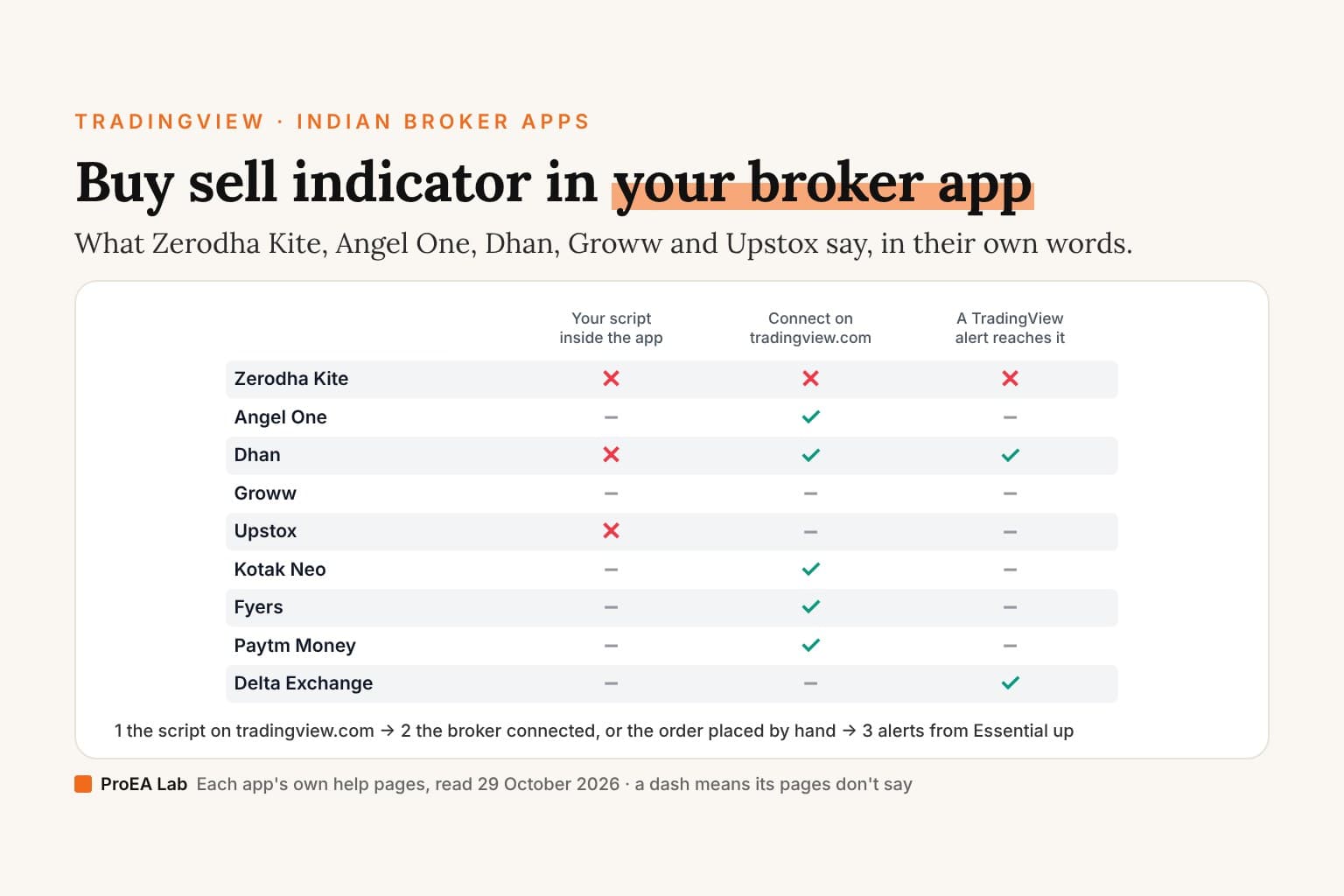
Short answer: none of the nine apps' pages we read says your own TradingView (Pine) script runs inside its app. Zerodha says Kite "uses a built-in library of indicators instead of a public one", and Dhan says "The Pinescript editor is not extended to the hosted library available at tv.dhan.co." The route that works runs the other way: put the script on tradingview.com and connect your broker there, which Angel One, Dhan, Kotak Neo, Fyers and Paytm Money each describe on their own pages. Zerodha says Kite "does not offer a direct feature to connect with" TradingView, so a Kite trader reads the signal on TradingView and places the order in Kite. An alert on the script needs TradingView's Essential plan or above.
Every answer below is the app's own page, quoted and dated, read on 29 October 2026. Where an app's pages don't answer a question, we say "not said" instead of guessing.
Which broker apps run a TradingView script?
Three questions for each app: can your own script run inside the app's charts, can you connect the app on tradingview.com, and can a TradingView alert reach it?
| App | Your own script inside the app | Connect on tradingview.com | A TradingView alert reaches it |
|---|---|---|---|
| Zerodha Kite | No: Kite's own built-in library | No direct connection | No: only through a program of your own on Kite Connect |
| Angel One | Not said | Yes, on TradingView's Trading Panel | Not said |
| Dhan | No, not on tv.dhan.co | Yes, via the Trading Panel | Yes, Dhan's webhooks |
| Groww | Not said: a list of available indicators | Not said | Not said |
| Upstox | No, in a 2023 staff reply about tv.upstox.com | Not said by Upstox; TradingView has a broker page for it | Not said |
| Kotak Neo | Not said | Yes, from TradingView's broker panel | Not said |
| Fyers | Not said | Yes, on the chart's trading panel | Not said |
| Paytm Money | Not said | Yes, on the chart's trading panel (its 2023 post) | Not said |
| Delta Exchange | Not said | Not said: its tutorial uses alerts, not the panel | Yes, by a webhook in a TradingView alert |
Pick your app
Pick the app you trade from. The drill shows its three answers, the lines they rest on in its own words, and the steps that work.
Pick your app.
Each answer is the app's own page, quoted and dated, or "not said" where its pages don't answer.
Each app's own help pages, read 29 October 2026. "Not said" means the pages we read don't answer it. Alerts on an indicator, and webhooks, need TradingView's Essential plan or above.
The sections below quote each app in full.
Buy sell signal indicator in Zerodha Kite
Zerodha's support page "Why are some TradingView indicators unavailable on Kite TradingView charts?" answers: "You cannot access all TradingView indicators on Kite because Kite uses a built-in library of indicators instead of a public one. TradingView's website features a public library where traders can share indicators, while Kite offers a built-in library of indicators. As a result, you cannot access certain indicators found on tradingview.com when using the TradingView chart within Kite."
Its page on connecting other software: "No, Kite does not offer a direct feature to connect with third-party applications like AmiBroker or TradingView. You can only use ChartIQ and TradingView's charting libraries within Kite."
Neither page shows a date. Together they mean Kite's charts offer Kite's built-in indicators, not every indicator on tradingview.com, and Kite does not offer a direct feature to connect with TradingView. The script runs on tradingview.com, on the symbol and timeframe you trade, and you place the order in Kite.
TradingView webhook to Zerodha
The one door Zerodha's pages name for orders from outside Kite is its API. Kite Connect's FAQ: "It provides REST-like HTTP APIs to execute orders in real time across equities and commodities, manage portfolios, and stream live market data over WebSockets." With no TradingView link on Zerodha's side, a webhook needs something in between: a program of your own, or a third party's, that receives the alert and calls Kite Connect. The FAQ adds two conditions: "You must configure a static IP address to place orders via the Kite API from 1 April 2025." And: "Zerodha does not offer a sandbox environment for Kite Connect." So there's no practice account to try a bridge on. Our TradingView webhook guide covers the TradingView side.
Buy sell signal indicator in Angel One
Angel One's TradingView page lists "Pine Script" with the line "Build custom indicators and automated strategies", and gives three steps to connect:
- "Log into your TradingView account."
- "Open a chart and click on Trading Panel at the bottom or the Buy/Sell buttons on the chart."
- "Select Angel One from the list of brokers and click Connect."
Its news post on the integration, published 9 July 2026 and updated 7 August 2026, says: "The feature is available to all clients at no extra cost, while regular brokerage and exchange charges continue as usual."
Both pages describe TradingView with Angel One connected. Neither says a Pine script appears inside the Angel One app's own charts, so we don't say it does. Add the indicator to your chart on tradingview.com and trade from the panel.
Buy sell indicator in Dhan
Dhan keeps its two TradingView products apart. On its hosted charts: "The Pinescript editor is not extended to the hosted library available at tv.dhan.co." On tradingview.com: "However, if you wish to use your own strategy on TradingView, you can seamlessly execute it through webhooks provided by Dhan for free. This allows you to connect your TradingView alerts directly with Dhan to place orders."
Its connect page says "Connect to Dhan via Trading Panel on TradingView.com", lists "Pine Editor" and "Community Scripts" among the features, and adds: "Accessing features depends on your subscription plan on TradingView."
So in Dhan: no script on tv.dhan.co; yes on tradingview.com with Dhan connected; and Dhan's webhook can turn an alert into an order, on a paid TradingView plan (below). Dhan also has a daily limit of its own: "P&L Exit lets you set a maximum profit and maximum loss on all your intraday positions for the day."
Buy sell indicator in Groww app
Groww's pages describe its own charts and a list to pick from. Its post of 26 October 2026: "To add an indicator, tap Indicators on the chart, search or browse the available indicators, and select the one you want to use." Its charts page calls them "customisable charts built to adapt to your strategy supported by TradingView and Groww Charts".
The two Groww pages we read, on 29 October 2026, don't mention Pine, a script of your own, or connecting to tradingview.com, and we didn't search Groww's help beyond them. So we can't tell you Groww runs your script, or that it can't. What works either way: run the script on tradingview.com and place the order in Groww.
Buy sell indicator in Upstox
Upstox's help center adds indicators to its TradingView charts from a list: "in the TradingView chart panel at the top bar, click on the "Indicators" option." Then: "Search for your desired indicator, such as RSI, Supertrend, or Moving Average, etc."
On Upstox's community forum, its Senior Manager - Community answered a request list for tv.upstox.com on 1 November 2023: "Adding custom indicators is sadly not possible since it’s an exclusive trading view feature." On 15 October 2025 an Upstox developer replied to a trader who wanted to place orders from TradingView's charts: "As of now, direct integration from TradingView is not available."
That has since moved on TradingView's side: TradingView's own site has a broker page for Upstox, with a Trade button, on 29 October 2026. Upstox's help pages we read don't describe the connection yet. Check the Trading Panel on your chart: if Upstox is listed, connect it there; if not, place the order in Upstox yourself.
Kotak Neo, Fyers, Paytm Money and Delta Exchange
- Kotak Neo. Its help page, dated 6 March 2026: "Open TradingView and select Kotak Neo from the broker panel." Then: "You will be redirected to the Kotak Neo QR login page". Its next steps are "Go to Home → Profile → Web Login" and "Scan the QR code shown on the screen." Last: "Once authenticated, you will be redirected back to TradingView and can start trading."
- Fyers. Its TradingView page lists Pine Script: "Create and share your own indicators and strategies with fewer lines of code." Its steps: "Create accounts - Sign up with FYERS and create a free TradingView account", "FYERS on TradingView - In the broker profile, click "Trade", or find FYERS on the chart's trading panel", "Connect the accounts - Enter your FYERS account credentials to connect to TradingView".
- Paytm Money. Its blog post of 14 October 2023 describes Pine Script as a "Lightweight and powerful programming language for developing own indicators and strategies." and says: "Visit the Paytm Money broker profile and click the “Trade” button, or find the Paytm Money icon on the chart’s trading panel." TradingView's broker page for Paytm Money was up on 29 October 2026.
- Delta Exchange. Delta Exchange India is a crypto derivatives exchange, not an NSE broker. Its tutorial skips the Trading Panel: "Follow these steps to create a webhook for tradingview". On TradingView: "Click on the add alert button and paste the message in the message box." Then: "Move to the Notifications tab and paste the webhook URL". And: "If you haven’t set up 2FA on your account, you won’t be able to use signal trading."
We didn't read Sahi's pages, so it isn't here.
The route that works
- Put the script on tradingview.com, not in the broker app. Every TradingView plan loads it as an indicator. The free Basic plan allows 2 indicators per chart: the pricing page's "Indicators per chart" row reads 2 / 5 / 10 / 25 / 50 for Basic, Essential, Plus, Premium and Ultimate.
- Use the symbol and timeframe you trade, so the signal is on the same candles as your order.
- Connect your broker on the chart's Trading Panel if it's listed. Angel One, Dhan, Kotak Neo, Fyers and Paytm Money describe this on their own pages, and TradingView has a broker page for Upstox. Orders then go from the panel to your account.
- Or keep the app for orders. Read the signal on TradingView, or let an alert tell you, and place the order yourself. That's the Zerodha Kite and Groww route.
- Automate only through what the broker offers: Dhan's webhooks, Delta's webhook, or for Zerodha a program on Kite Connect. Whatever sends the order, the account and the risk are yours.
Alerts need a paid TradingView plan
TradingView's pricing page, read 29 October 2026, for Basic / Essential / Plus / Premium / Ultimate:
| Row | Basic | Essential | Plus | Premium | Ultimate |
|---|---|---|---|---|---|
| Active technical alerts on indicators, strategies, and drawings | ✗ | 20 | 100 | 400 | 1,000 |
| Webhook notifications | ✗ | ✓ | ✓ | ✓ | ✓ |
| Active price alerts | 3 | 20 | 100 | 400 | 1,000 |
So on Basic you can run a buy sell indicator but not set an alert on it; that starts at Essential. A webhook to Dhan or Delta needs Essential too, and TradingView's webhook page adds: "For your data protection, webhook alerts are only allowed when 2-factor authentication is enabled." Set a script's alert to fire Once Per Bar Close. TradingView's Pine documentation calls that "The simplest way to avoid this type of repainting", the kind where an alert fires on a live candle that later changes. More on choosing a plan in which TradingView plan you need.
Which buy sell indicator to run
The app doesn't pick the indicator; the route above works for any script. Ours, built for NSE intraday, is Signal Desk, the entry checklist desk in Pine Pro Library. It grades five setup checks (trend, momentum, structure, location and candle quality), skips entries that chase a stretched candle, takes at most two entries a day by default, and draws a stop with three targets. Its page: "Default entry times are 09:30 inclusive to 14:45 exclusive, Asia/Kolkata, based on candle opening times."
On an index chart it can label longs BUY CE and shorts BUY PE, and its page is plain about the limits: "Mapping formats a strike and expiry label. It does not read an option chain, premiums, Greeks or available expiries." Its alerts: "Eight named conditions: long/short entries, their A-only variants, long/short exits, TP1 and TP2. Choose Once Per Bar Close." And "Draws on your price chart. The indicator does not place orders." Signal Desk is sold in Pine Pro Library, $49 once for every desk with its Pine source.
Signal Desk Premium, $49 once, adds a heads-up before the signal, a trade ticket sized from your risk, scale-outs, a daily lock, a 20-market Radar with one alert (its ready lists include NSE India) and a relay to Telegram and Discord. Its alerts, like any script's, need Essential or above. In its page's words: "Premium uses the same entries as the library desk. It does not promise better results; it makes the same signals easier to prepare for, size, manage, filter and act on."
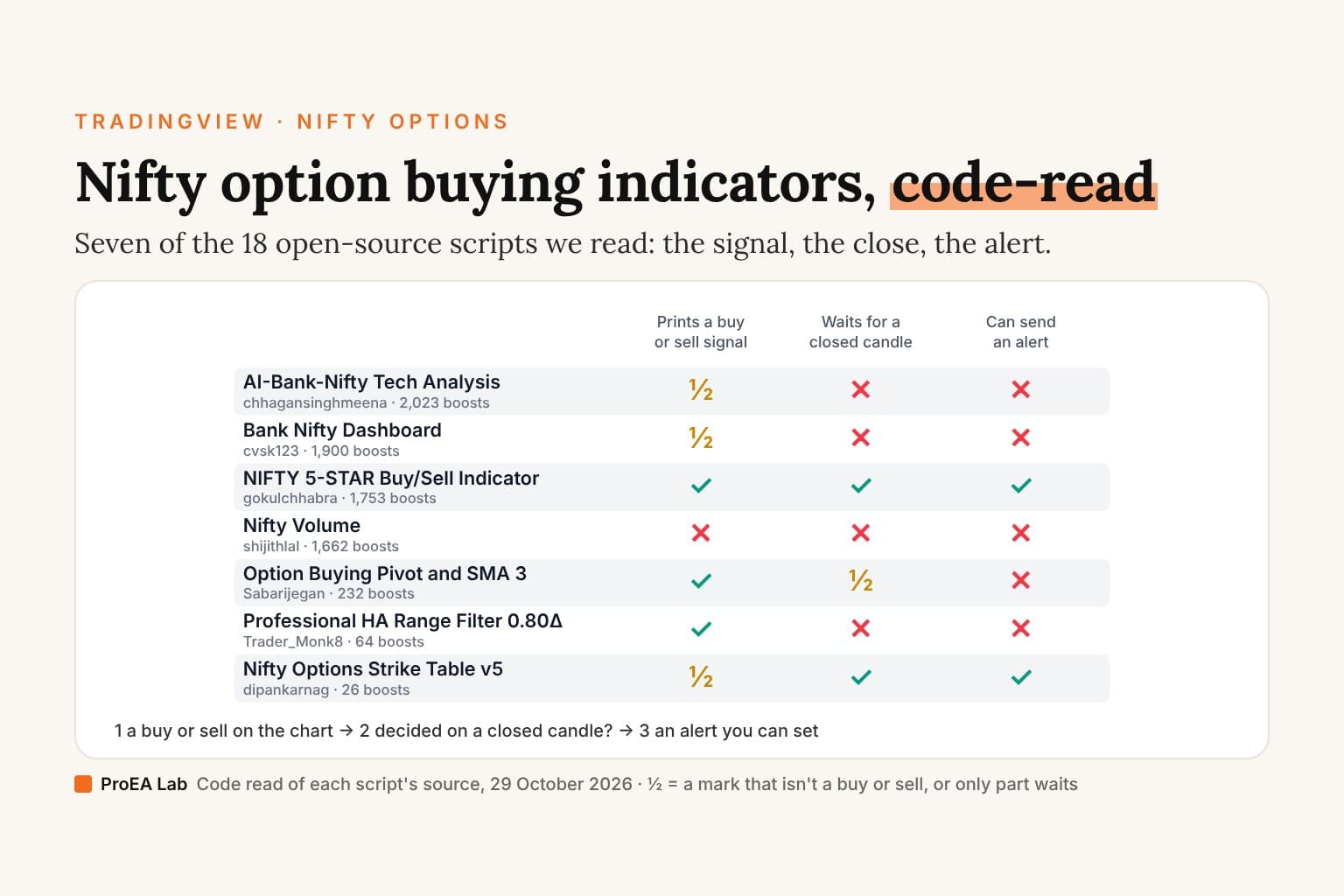
What we measured on NSE:NIFTY 5-minute candles, with costs on, is in Signal Desk: what we measured. The open-source Nifty and option scripts on TradingView, read line by line, are in the best Nifty option buying indicator on TradingView.
Sources
- Zerodha support: third-party charting, TradingView indicators on Kite and Kite Connect API FAQs, read 29 October 2026.
- Angel One: Trade with Angel One on TradingView and its news post, read 29 October 2026.
- Dhan: Pine scripts through Dhan, Connect Dhan to TradingView and Set P&L Exit, read 29 October 2026.
- Groww: Charts and Trade on Charts on Groww, read 29 October 2026.
- Upstox: indicators in the scalper terminal, TradingView chart, and community replies of 1 November 2023 and 15 October 2025; TradingView's Upstox broker page; read 29 October 2026.
- Kotak Neo: connect to TradingView. Fyers: TradingView Charts. Paytm Money: Trade directly on TradingView. Delta Exchange India: TradingView automation tutorial. All read 29 October 2026.
- TradingView: pricing, webhooks and the Pine Script alerts page, read 29 October 2026.
Disclosure
We, ProEA Lab, build Signal Desk and Signal Desk Premium and sell them. We have no relationship with any broker named here, and none of them reviewed this page. Brokers change their apps: check the page linked under each answer before you rely on it. Nothing here is financial advice. Trading involves risk.
Frequently asked questions
Can I add a TradingView indicator in Zerodha Kite?
Only the indicators in Kite's own library. Zerodha's help says you cannot access all TradingView indicators on Kite because Kite uses a built-in library of indicators instead of a public one, so certain indicators found on tradingview.com aren't available on Kite's TradingView charts. It also says Kite does not offer a direct feature to connect with TradingView. Run the script on tradingview.com and place the order in Kite yourself.
How do I get a buy sell signal indicator in Angel One?
Angel One's page connects it on TradingView: log into TradingView, open the Trading Panel on a chart, select Angel One and click Connect. Then add the indicator to that chart on tradingview.com. Angel One's pages don't say a script of your own appears inside the Angel One app.
Can I use Pine Script in Dhan?
Not on tv.dhan.co: Dhan says its Pine editor is not extended to that hosted library. On tradingview.com, with Dhan connected through the Trading Panel, you can, and Dhan says its webhooks can turn your TradingView alerts into orders.
Is there a buy sell indicator in the Groww app?
Groww's charts have a list of available indicators that you search or browse. Its pages we read don't mention adding a script of your own or connecting to tradingview.com, so run the script on TradingView and place the order in Groww.
Can I connect Upstox to TradingView?
TradingView's site has a broker page for Upstox, with a Trade button, as of 29 October 2026. Upstox's own help pages we read don't describe the connection, and an Upstox developer wrote in October 2025 that direct integration wasn't available, so check your chart's Trading Panel.
Do TradingView alerts need a paid plan?
Alerts on an indicator do. TradingView's pricing page shows no technical alerts on Basic and 20 on Essential, and webhooks start at Essential too. Basic can still run the indicator: it allows 2 indicators per chart.
Does a TradingView webhook work with Zerodha?
Not directly. Zerodha says Kite does not offer a direct feature to connect with TradingView, so a webhook needs a program in between that receives the alert and places the order through Kite Connect, Zerodha's API, from a static IP registered with Zerodha.