Download the Notion trading journal CSV and import it into Notion as a database. It holds our free trading journal template's columns and its three example rows, shaped for Notion's import, and below are the two formulas to paste in once it's there. It's a CSV, not a Notion page to duplicate: in Notion's own words, "CSV imports create a new Notion database (rows → items/pages, columns → properties)." No email, no account.
| Step | What you do | Notion's help page, read 29 October 2026 |
|---|---|---|
| 1 | Import the CSV as a new database | Import data into Notion |
| 2 | Set each property's type | Intro to databases; Database properties |
| 3 | Add R multiple and Win/Loss as formula properties | Formula syntax; Formulas |
| 4 | Add a calendar view and a board by Mistake tag | Calendars; Views, filters and sorts; Boards; Tables |
The example rows are EURUSD, XAUUSD and GBPUSD with Size in lots, so it works as a Notion forex journal as it is. Every Notion step quoted here is from Notion's help pages as we read them; where a page didn't say something, we say so.
Notion is good at the story of a trade. Write the risk in the row before the story, or the story has nothing to be measured against.What's in the Notion trading journal CSV?
Sixteen columns and the template's three example rows, cell for cell. The spreadsheet's eighteen columns, minus the two that become formulas, renamed where a formula has to name them:
| Notion property | From the template's column | Set it to |
|---|---|---|
| Symbol | Symbol | Title |
| Date | Date | Date |
| Direction | Direction (Long/Short) | Select: Long, Short |
| Setup / reason | Setup / reason | Text |
| Entry | Entry | Number |
| Stop | Stop | Number |
| Target | Target | Number |
| Exit | Exit | Number |
| Size | Size (lots) | Number |
| Risk | Risk (account currency) | Number |
| Result | Result (account currency) | Number |
| Fees | Fees | Number |
| Followed plan | Followed plan? (Y/N) | Select: Y, N |
| Mistake tag | Mistake tag | Select |
| Notes | Notes | Text |
| Screenshot link | Screenshot link | Text |
| (left out) | R multiple | A formula you add |
| (left out) | Win/Loss | A formula you add |
Three changes from the spreadsheet, each for Notion:
- Symbol comes first. When you import, you "Map each CSV column to the Notion property you want", and one column becomes the Title, the name each page carries ("The Title property doesn't support formatting."). Symbol is the column meant for it, so each trade's page is named by its market and Date stays free to be a real Date property, which the calendar needs.
- Shorter names. Direction (Long/Short) becomes Direction, Risk (account currency) becomes Risk, and so on, so the formulas read
prop("Risk"), notprop("Risk (account currency)"). - No R multiple or Win/Loss columns. Notion's import page: "A new CSV import can't create new rollups or formulas (you'll need to rebuild these in Notion after import)." So they're formula properties you add once, below.
Dates are written year first (2026-10-01), and numbers are plain: no currency signs, no thousands separators. Risk is a positive number, as in the spreadsheet; Result is net of fees, so −112 is a loss.
How do I import the trading journal into Notion?
Notion's steps, verbatim:
- "Go to Settings → Import → CSV". Or: "type /csv in a page."
- "Upload your .csv file."
- "Choose whether to create a new database or import data into an existing one." Choose a new database.
- "Select the import location."
- "Map each CSV column to the Notion property you want." Use the table above.
"Notion imports are available on desktop and web (not on mobile yet)." The file limit is "5 MB per file on the Free plan and 50 MB per file on paid plans"; ours is well under 1 KB. The import also asks that "the first row is your header row", which it is.
Adding trades later. Each trade is a row, and each row is a page ("Rows import as pages."), so the simplest way is a new row when a trade closes. To bring in a batch from another CSV, Notion offers "Merge with CSV" from the •• menu of a full-page database, and warns: "If you're merging into an existing database, make sure your CSV headers match the database's property names exactly." Also: "Imports add rows. They don't update existing rows, so watch for duplicates."
Which property types should each column be?
Number for the prices, Size, Risk, Result and Fees; Select for Direction, Followed plan and Mistake tag; Date for Date. You can set them while mapping the import, or afterwards: "To manage and edit the properties of a database, open the settings menu at the top of the database and select Edit properties". Notion's databases page adds: "Click the ⋮⋮ that appears to the left of each property on hover in order to: drag it up or down, change the Property type, rename it, Duplicate or Delete it."
What each type is for, in Notion's words:
| Type | Notion's description | Our columns |
|---|---|---|
| Number | "Accepts numbers. These can also be formatted as currency or progress bars." | Entry, Stop, Target, Exit, Size, Risk, Result, Fees |
| Select | "Choose one option from a list of tags. Useful for categorization." | Direction, Followed plan, Mistake tag |
| Date | "Accepts a date or a date range (time optional)." | Date |
Then check the three rows. Notion's import page has three warnings that touch this file: "If numbers aren't importing correctly (like $ amounts, %s, or negative values), map that column to Text instead."; "Dates import in MM/DD/YYYY format."; and "If a column has mixed data types, Notion may import it as text to avoid data loss." Our numbers are plain and our dates are YYYY-MM-DD, which has only one reading. Notion's pages don't say what happens to existing values when you change a Text property to Number or Date, so after any change, check that Result reads 196, −112 and −163 and Date reads 1, 2 and 5 October 2026. Retype any value that came through wrong.
How do I calculate R multiple and win/loss in Notion?
Add two formula properties. Notion's steps: "Select the slider icon at the top of a database → Edit properties → New property". "Select Formula". "Give your property a name if you'd like." "Select Edit formula". Name the first R multiple and paste:
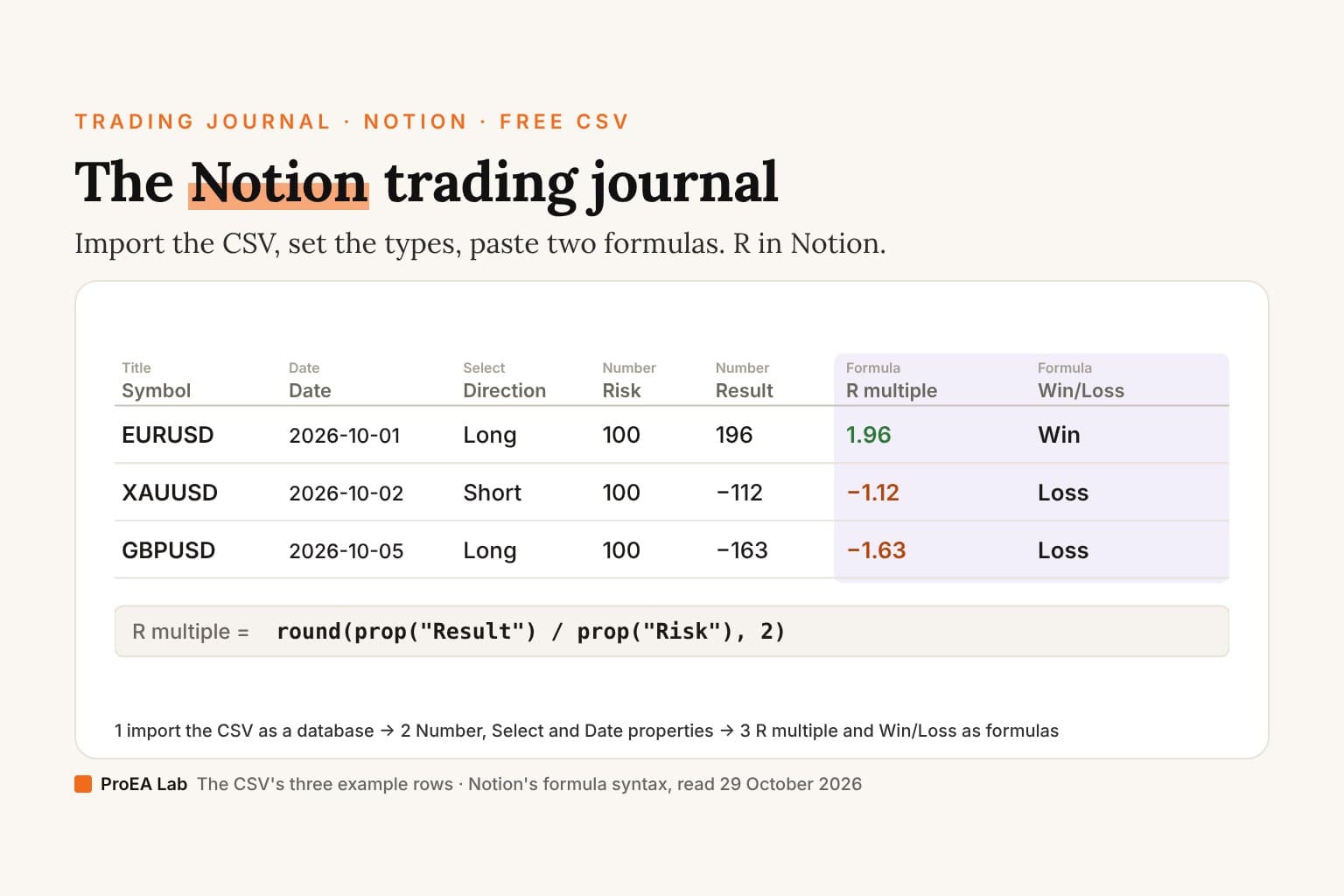
round(prop("Result") / prop("Risk"), 2)
Name the second Win/Loss and paste:
if(prop("Result") > 0, "Win", if(prop("Result") == 0, "Breakeven", "Loss"))
Every piece is from Notion's formula syntax page (Formulas 2.0): a property is prop("Name") (its example: prop("Number") / 2), round "Supports one or two arguments", with round(1.234, 2) = 1.23 as its example, if "Returns the first value if the condition is true; otherwise, returns the second value", and its comparisons include prop("Priority") == "High" and prop("Due Date") > now(). Notion has no worked example of the two put together; the combination is ours. Its formulas page writes references by bare name instead (its example: "Reach * Impact * Confidence / Effort"), so in the editor you may see Result where we wrote prop("Result").
On the three example rows:
| Symbol | Risk | Result | R multiple | Win/Loss |
|---|---|---|---|---|
| EURUSD | 100 | 196 | 1.96 | Win |
| XAUUSD | 100 | −112 | −1.12 | Loss |
| GBPUSD | 100 | −163 | −1.63 | Loss |
That's the same R as the spreadsheet template's R multiple column: +1.96R, −1.12R and −1.63R. Unlike the spreadsheet's formulas, these two don't test for a blank Risk or Result, so log a trade once it has closed, with both filled in.
How do I make a trading journal calendar in Notion?
Keep the table, and add two views of the same database: a calendar by Date and a board by Mistake tag.
The table is the database the import made: one row per trade. Its column footer does the arithmetic Notion documents. "To run a calculation on a property:" "Click on a property in your table." "In the menu that appears, hover over Calculate. Select from one of the calculation options." A Number property unlocks Sum, Average, Median, Min, Max and Range. On the examples, Result's Sum is −79 (196 − 112 − 163) and its Average −26.33 (rounded), and Fees' Sum is 9. The tables page names those options for Number properties; it doesn't say whether a formula column offers them, so open R multiple's Calculate menu and see.
The calendar. Notion's calendar page: "To use one, your database must contain a Date property." Add it with "Click + next to the name of your database or the name of your current database view" and "Select Calendar from the dropdown menu", then "Click Show calendar by and select your date property." Each trade, named by its symbol, sits on the day you traded it, and an empty day is a day with no trades.
The board by Mistake tag. "By default, your board will be grouped by a status property if your database has one. Otherwise, your database items will be grouped by a select, person, multi-select, or relation property that's in your database." With three Select properties, choose the grouping yourself; Notion's grouping steps, written for tables, read: "Open the settings menu at the top of the database." "In the menu that appears, select Group under View settings." "Choose the property you'd like to group by." Each column then shows a count: "To the immediate right of each column heading, you'll see a gray number. The default is for this to show the number of cards in each column". On the examples, Moved stop holds 1 card. Notion's help doesn't confirm a separate total for each group, so read each tag's cost in R on the cards, or in the spreadsheet.
Can Notion show your win rate?
Not as one documented number. Win/Loss is a formula, and Notion's boards page answers "Any way to group by a relation or formula property?" with "Not currently". The Calculate options it documents are for Number properties. So the win rate, wins divided by trades, is a count you make: on the examples, 1 Win in 3 trades, 33.3%.
The rest of the weekly numbers are further out of reach. The spreadsheet template's Summary computes them from the same three rows: expectancy of −0.26R, a profit factor of 0.71, and +0.42R when the plan was followed against −1.63R when it was broken. Notion's documented footer doesn't produce them. The same rows as a CSV, such as the file you imported, go straight into our trading performance tracker: it reads any CSV with a Result and a Risk column in your browser, lets you pick the columns, and works out every one of those numbers, plus R by setup and mistake tag. The trading expectancy calculator works expectancy out from a win rate and average R you've counted.
What should you review each week in Notion?
- The calendar. The week's trades on their days, and the days you didn't trade.
- The worst trades. Clicking into a property opens "a menu where you can edit the property's name, filter or sort by that property, run calculations, and more." Sort by R multiple, open the three lowest pages and read what you wrote before entry.
- The board by Mistake tag. Which tag holds the most cards this week.
- The footer. Result's Sum is the week's net in money; Fees' Sum is what costs took.
- The five numbers. Expectancy, plan followed against plan broken, the largest loss in R and profit factor need the spreadsheet template's Summary, or arithmetic by hand. Then write down one rule for next week.
For whole entries filled in, see six trading journal examples; they start from the same three rows.
The deep version, as a PDF
The Trading Journal Playbook
What to write on every trade and why, filled-in entries across markets, the pre-trade checklist, the weekly and monthly review with the arithmetic shown, and the same columns on paper, in a spreadsheet or an app.
- What to write on every trade, and why each of the template's eighteen columns exists, in the order you fill them
- 13 filled-in entries across forex, gold, an index CFD, a partial close, a prop-firm evaluation day, a skipped trade and a backtest, every Risk, Result and R worked from the prices
- The pre-trade checklist, and how a month of mistake tags turns into checks of your own
Opens soon · USD 19, one payment. See what's inside →
Is Notion good for a trading journal?
For the notes, yes. For the numbers, it's the weakest of the three. Notion against Excel or Google Sheets, and against a journal app: Notion keeps the story of each trade, where a spreadsheet keeps a cell; a spreadsheet computes the weekly review, where Notion's documented footer stops at Sum and Average.
| Notion (this CSV) | Spreadsheet (free template) | Journal app (TradeLens, ours) | |
|---|---|---|---|
| Cost | A Free plan; imports up to 5 MB a file on it | Free | $47 once at launch, $79 regular; runs on your computer |
| Getting trades in | Import a CSV; later rows by hand or Merge with CSV | Type or paste each row | Imports MT4 HTML statements and MT5 history; a broker CSV goes through its column-mapping wizard |
| From MT5 | Its import page covers CSV, not MT5 reports: rows by hand, or a CSV whose headers match | Copy from the MT5 report | MT5 history imported |
| R multiple, Win/Loss | Two formula properties you add once | Built-in formulas | Figures computed in code |
| Win rate, expectancy, profit factor, plan split | Not among the documented footer options | The Summary sheet | Computed; an AI coach on a free local model or your own Claude, OpenAI or Gemini key explains them |
| Notes, screenshots, linked pages | Every trade is a page | A Notes cell and a screenshot link | A daily Journal entry, tagged with one behaviour word |
A Notion journal suits a trader who writes: the reasoning, a screenshot or two, links to the setup's own page. If the weekly numbers are the point, keep them in the spreadsheet, or on paper with the printable trading journal. Options traders have their own options trading journal.
Ours, TradeLens, is built for MT4, MT5 and CSV: it imports MT4 HTML statements and MT5 history and takes a broker CSV through its column-mapping wizard, computes the figures in code, and its AI coach runs on a free local model or your own Claude, OpenAI or Gemini key. It's $47 once at launch, and it isn't a Notion add-on.
The example rows are made up and marked EXAMPLE; their prices are illustrative. Nothing here is a claim about results. We read Notion's help pages on 29 October 2026; Notion changes its product, so if a step on this page no longer matches, email support@pulltrade.app.
Frequently asked questions
Is there a free Notion trading journal template?
Yes, as a CSV you import, not a Notion page to duplicate. It holds the free template's columns, minus the two that become formulas, and three example rows. Notion turns the rows into pages and the columns into properties; then you set the property types and paste two formulas.
How do I journal trades on Notion?
Import the CSV as a new database. Set the prices, Size, Risk, Result and Fees to Number; Direction, Followed plan and Mistake tag to Select; and Date to Date. Add the R multiple and Win/Loss formulas, then log one row per closed trade and keep the notes and screenshots inside each trade's page.
What is the R multiple formula in Notion?
round(prop("Result") / prop("Risk"), 2), in Notion's formula syntax: the result divided by the risk, rounded to 2 decimals. On the three example rows it gives 1.96, −1.12 and −1.63, the same R as the spreadsheet template. Type Risk as a positive number.
Can Notion calculate your win rate?
Not as one documented number. The calculations Notion's tables page adds for a Number column are Sum, Average, Median, Min, Max and Range, and its boards can't group by a formula, so Win/Loss can't be a board column. Count the week's Win rows yourself, or let the spreadsheet template's Summary compute it.
Can you make a trading journal calendar in Notion?
Yes. Add a calendar view and show it by the Date property, and each trade, named by its symbol, sits on the day you traded it. Notion's calendar page says a database needs a Date property for one, which is why the CSV keeps Symbol, not Date, as the title column.
Why did my numbers or dates import as text?
Notion's import page says to map a column to Text if numbers such as dollar amounts, percentages or negative values don't import correctly, and notes that dates import in MM/DD/YYYY format. Our file writes plain numbers and YYYY-MM-DD dates. If a column still lands as text, change its property type and check the three example rows.
Is Notion good for a trading journal?
Good for the story of each trade: every row is a page for your reasoning, screenshots and links to other pages. Weaker on the numbers: its import page covers CSV, not MT5 reports, and its documented column footer gives sums, averages and the like, not a win rate, expectancy, profit factor or plan-followed split. A spreadsheet's Summary does those.