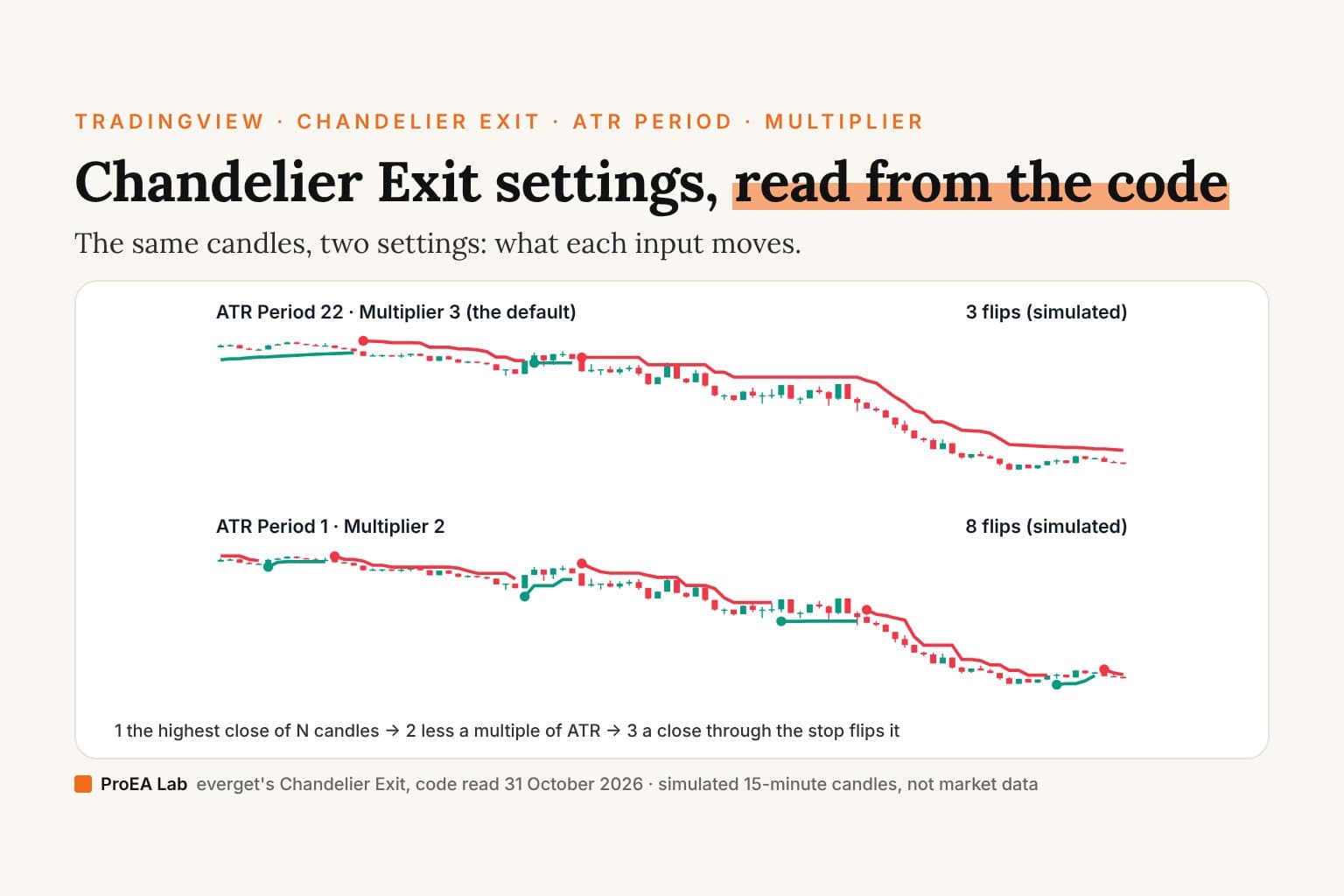
Short answer: no Chandelier Exit setting is best on every chart, and the script's code doesn't claim one. everget's Chandelier Exit, the most boosted on TradingView (29,892 boosts on 31 October 2026), ships ATR Period 22, ATR Multiplier 3 and the highest close, and each of the three trades one thing for another: a longer period hangs the stop from an older extreme over a smoother ATR, a bigger multiplier puts it further from price so it flips less often, and the highest high instead of the highest close moves both stops closer to price. The ZLSMA scripts' default, 1 and 2, turns it into a trail two candle ranges from each close: on the same 96 simulated candles it flipped 8 times where 22 and 3 flipped 3. Move all three yourself in the drill below.
Most settings pages hand you numbers.
This one reads the lines they change.
What we read
We searched TradingView's scripts for "chandelier exit" and "chandelier" on 31 October 2026: 53 scripts, 38 open source, 11 protected and 4 invite-only. The most boosted by far is Chandelier Exit [everget], with 29,892 boosts, written in Pine v6 and shared under GPL-3.0. Its whole calculation is lines 20 to 44 of its source, and we read every line. Then we read the eleven next most-boosted open-source scripts, down to 1,077 boosts, and four below them whose defaults travel as settings advice: QuantAlgo's presets, SwiftEdge's ZLSMA script and simwai's two. A line number below is the line in the script's source as TradingView served it that day.
Our ATR trailing stop roundup already sets everget's script beside seven other trailing stops, and this page doesn't repeat that table. It reads the inputs.
The inputs, one by one
everget's script has six inputs in three groups. Three move the stop; three change what you see and when an alert fires.
| Input | Default | Line | What it changes |
|---|---|---|---|
| ATR Period | 22 | 7 | The ATR's length, and the number of candles the highest and lowest are taken over |
| ATR Multiplier | 3.0, in steps of 0.1 | 8 | How many ATRs the stop hangs from the extreme |
| Use Close Price for Extremums | On | 9 | On: the highest close and lowest close. Off: the highest high and lowest low |
| Show Buy/Sell Labels | On | 12 | The Buy and Sell words at each flip; the dot at the new stop prints either way |
| Highlight State | On | 13 | The green or red fill between the stop and the candle's average price |
| Await Bar Confirmation | On | 16 | Whether the three alerts wait for the candle to close |
ATR Period: one number, two jobs
length = input.int(22, title = 'ATR Period', group = calcGroup). The script uses it twice: in ta.atr(length) (line 20), Wilder's average of the true range, and in ta.highest(close, length) and ta.lowest(close, length) (lines 22 and 26), the window the stops hang from. In this script you can't set the two apart. pipCharlie's Chandelier Stop and both of KivancOzbilgic's scripts give the window its own input, and Willybob's pairs a 22-candle window with a 14-period ATR.
A longer period does two things at once. The window reaches further back, so the long stop hangs from an older close, often a higher one, and a new high counts until it is 22 candles old. And the ATR is smoother: in Wilder's average each new candle's true range gets 1/22 of the weight. The window is counted in candles, so its length in time is your timeframe's: 22 candles are five and a half hours on a 15-minute chart and 110 minutes on a 5-minute one.
At the other end, ATR Period 1 makes the window one candle and the ATR that candle's own true range. The long stop becomes the close less Multiplier times this candle's range: a trail of each close, not a stop hung from the trend's high.
ATR Multiplier: the distance
mult = input.float(3.0, step = 0.1, title = 'ATR Multiplier', group = calcGroup), used once: atr = mult * ta.atr(length) (line 20). The long stop is the extreme less this distance and the short stop the extreme plus it. A bigger multiplier puts both stops further from price, so a pullback has more room before a close crosses the stop, and a turn has to travel further before the script flips. A smaller one does the reverse. Nothing in the code picks a value for you: 3.0 is where the input starts.
Use Close Price for Extremums: the close or the wick
useClose = input.bool(true, title = 'Use Close Price for Extremums', group = calcGroup). On, the stops hang from ta.highest(close, length) and ta.lowest(close, length). Off, from ta.highest(length) and ta.lowest(length), which in Pine take the high and the low. A candle's high is never below its close, so switching it off lifts the long stop and lowers the short stop before the ratchet: both move toward price by the wicks at the extremes. QuantAlgo's script says the same in its tooltip: with the high and low, "it reacts to intrabar spikes and sits closer to price."
On the drill's simulated candles, 22 and 3 flip three times either way, but with the high and low the first two flips come one candle earlier, at 03:30 and 08:00 instead of 03:45 and 08:15. At 14 and 2 the high and low flip 11 times to the close's 7.
The other three inputs
Show Buy/Sell Labels draws the words; a small dot at the new stop marks each flip whether it's on or off (lines 41 and 46). Highlight State fills between the stop and ohlc4, the average of the candle's open, high, low and close (lines 49 to 52). Await Bar Confirmation belongs to the alerts, below.
The formula: the ratchet and the flip
The stop isn't just the highest close less 3 ATRs. Three more lines decide where it's drawn and when it turns:
longStop := close[1] > longStopPrev ? math.max(longStop, longStopPrev) : longStop
shortStop := close[1] < shortStopPrev ? math.min(shortStop, shortStopPrev) : shortStop
dir := close > shortStopPrev ? 1 : close < longStopPrev ? -1 : dir
- The ratchet (lines 23 and 24, 27 and 28).
longStopPrevis the last candle's long stop. While the last close is above it, the long stop takes the higher of this candle's value and the last one, so it only rises. Once a close is below it, the long stop resets to this candle's value and can drop. The short stop mirrors it. Both stops are worked out on every candle, long or short, and the chart draws one: the long stop while long, the short stop while short (lines 40 and 45). - The flip (lines 30 and 31). The script starts long (
var int dir = 1). It turns long when a close is above the last candle's short stop, and short when a close is below the last candle's long stop. The long test comes first: if the two stops have crossed, which a small multiplier or the high and low make possible, a close between them stays or turns long. On the drill's candles at 22 and 3 with the high and low, the 08:00 Buy starts its long stop above that candle's close for this reason. - Buy and Sell (lines 39 and 44) mark the candle where the direction turns. The label sits at the new stop: a Buy at the long stop that starts on that candle, a Sell at the new short stop.
So a flip is a close through the stop the chart is drawing, at its last candle's value. The drill also draws the other stop, dashed: it is the one the chart switches to after a flip, and when the two have crossed, a Sell needs the close below it too.
When it decides, and its alerts
Nothing in lines 20 to 52 waits for the candle to close. On the candle that is still forming, close is the latest price, so the stops, the direction and the label follow every price update: a Buy can print mid-candle and be gone when the candle closes back under the stop. On history each candle is worked out once, at its close, so the chart you scroll back through shows only the flips that held. Read a label after its candle has closed.
The alerts are where the script waits. Line 54 sets await = awaitBarConfirmation ? barstate.isconfirmed : true, and each of the three alerts carries it:
- CE Direction Change:
Chandelier Exit has changed direction, {{exchange}}:{{ticker}}(line 55) - CE Buy:
Chandelier Exit Buy, {{exchange}}:{{ticker}}(line 56) - CE Sell:
Chandelier Exit Sell, {{exchange}}:{{ticker}}(line 57)
With Await Bar Confirmation on, the default, each can fire only on the candle's closing update. Turn it off and an alert can fire on the forming candle for a flip its close then undoes. An alert on any indicator needs a paid TradingView plan: TradingView's pricing page, read on 29 October 2026, shows no technical alerts on Basic and 20 on Essential (which plan you need).
Move the settings
22 × 3 is everget's default, and the default of most of the variants we read.
ATR Period 22, Multiplier 3, the highest close: 3 flips on these simulated candles (1 Buy, 2 Sell).
The long stop hangs 3 × ATR(22) below the highest close of the last 22 candles (5 hours 30 minutes of 15-minute candles), the short stop the same above the lowest close. The drawn stop sat 0.49 from the close on average. The flips: Sell at 03:45, Buy at 08:15, Sell at 09:30 UTC; the shortest stretch between two was 5 candles. With the highest high instead: 3 flips.
Simulated 15-minute candles, not market data: a window of the seeded market our structure films use. The first window of the simulated market's 15-minute candles (64 to warm the ATR up, 96 drawn; tried every 8 candles) in which, with the highest close, ATR Period 22 and Multiplier 3 flip 3 to 6 times on the drawn candles, 30 and 4 flip at least once but fewer times, 14 and 2 more times, and 1 and 2 more times than 14 and 2; and the highest high and lowest low at 22 and 3 flip on at least one different candle. Every line is everget's own calculation (lines 20 to 44 of his script, read 31 October 2026), decided on closed candles; on a live chart the script also tests the candle that is still forming. Flip counts describe these simulated candles only. No outcomes are shown.
Read as text: the flips at this setting, and the count at others
ATR Period 22, Multiplier 3, the highest close: Sell at 03:45 UTC, the close 105.08 through the last long stop 105.18, the new short stop 105.57; Buy at 08:15 UTC, the close 105.10 through the last short stop 104.93, the new long stop 104.86; Sell at 09:30 UTC, the close 104.58 through the last long stop 104.86, the new short stop 105.03.
| Period | × 1 | × 1.5 | × 2 | × 2.5 | × 3 | × 4 | × 5 |
|---|---|---|---|---|---|---|---|
| 1 | 18 | 10 | 8 | 8 | 7 | 3 | 1 |
| 5 | 18 | 10 | 7 | 3 | 3 | 3 | 1 |
| 10 | 18 | 12 | 6 | 3 | 3 | 3 | 3 |
| 14 | 25 | 12 | 7 | 5 | 3 | 3 | 3 |
| 22 | 23 | 15 | 7 | 5 | 3 | 3 | 1 |
| 30 | 21 | 15 | 7 | 5 | 5 | 1 | 1 |
| 50 | 19 | 11 | 7 | 7 | 3 | 3 | 1 |
Three things to try. At period 22, drag the multiplier from 3 down to 1 and watch the flips go from 3 to 23. Back at 22 and 3, switch to the high and low: the same three flips, the first two a candle earlier. Then click 1 × 2: 8 flips, and a stop that steps with every candle instead of hanging from the 22-candle high.
What the popular settings advice changes
The numbers that travel as best settings are mostly scripts' defaults. Here are the twelve most-boosted open-source Chandelier scripts in our search as their code ships them, with boosts as the search showed them on 31 October 2026. ATR · window · multiplier: 22 · 22 · 3 means a 22-period ATR, a 22-candle window and 3 ATRs.
| Script | ATR · window · multiplier | Extremes from | What else it changes | Licence line |
|---|---|---|---|---|
| Chandelier Exit [everget] (29,892) | 22 · 22 · 3, one input for both 22s | The close; the high and low as an option | The script this page reads | GPL-3.0 |
| Chandelier Stop (pipCharlie, 5,989) | 22 · 22 · 3, whole numbers only | The high and low | One line coloured by direction; no alerts | None |
| Chandelier Exit - Heikin Ashi (mpeick, 2,532) | 1 · 1 · 1.85 | The high and low of Heikin Ashi candles, on by default | Buy and Sell marks only, no stop line; alerts that don't wait for the close | None |
| Chandelier Exit Oscillator [LuxAlgo] (2,372) | 22 · 22 · 3 | The average of the highest close and the highest high | No ratchet; an oscillator in its own pane, with the stop on the chart; no alerts | CC BY-NC-SA 4.0 |
| Chandelier Exit (Willybob, 2,068) | 14 · 22 · 3, whole numbers only | The high | The long stop only, worked out afresh each candle; no flip, no alerts | None |
| Chandelier Exit V2 by fr3762 KIVANÇ (1,749) | 22 · 22 · 3, whole numbers only | The high and low | Both stops, worked out afresh each candle; no flip, no alerts | None |
| Chandelier Exit Trend Navigator [MarkitTick] (1,347) | 22 · 22 · 3 | The close; the high and low as an option | No stop line: it colours the candles and lists the stop in a table; a 1-ATR stop with 1R, 2R and 3R targets; its Buy and Sell signals and their alerts wait for the close | CC BY-NC-SA 4.0 |
| Chandelier Exit - Strategy (melihtuna, 1,336) | 22 · 22 · 3 | The close; the high and low as an option | everget's calculation as a strategy, with percentage stops and targets | MPL 2.0 |
| Chandelier Exit Strategy with 200 EMA Filter (PakunFX, 1,191) | 22 · 22 · 3 | The close; the high and low as an option | everget's calculation as a strategy that trades only on the side of a 200-period EMA | MPL 2.0, and everget's GPL-3.0 lines |
| Advanced Chandelier Exit with S/R [Alpha Extract] (1,114) | 22 · 22 · 3, times a Sensitivity Factor of 1.0 | The close; the high and low as an option | Support and resistance zones; alerts that don't wait for the close | None |
| Ultra Scalper Pro / ZLSMA + Chandelier Exit (GODSTARY, 1,088) | 22 · 22 · 3 | The high and low | Its Long and Short need the Chandelier direction plus ZLSMA, EMA, RSI and volume checks, on by default | MPL 2.0 |
| Chandelier Exit by fr3762 KIVANÇ (1,077) | 22 · 22 · 3, whole numbers only | The high and low | The same ratchet and flip as everget's; one line; no alerts | None |
Ten of the twelve ship a 22-period ATR, a 22-candle window and 3 ATRs, and none of their code shows how that default was chosen. Three headers credit the Chandelier Exit to Charles Le Beau, both of KivancOzbilgic's and mpeick's, and mpeick's adds that Alexander Elder popularized it in his 2002 book Come Into My Trading Room. What the other choices trade:
- 1 and 2. The ZLSMA scripts by SwiftEdge (437 boosts) and simwai (773 and 713 for its strategy and indicator) default to ATR Period 1 and Multiplier 2, and mpeick's to 1 and 1.85. At period 1 the stop is no longer hung from the trend's extreme: it sits two of this candle's ranges from its close, and on the drill's candles it flips 8 times to the default's 3. In those scripts a Chandelier Buy isn't the signal on its own: SwiftEdge's Buy also needs the close to cross a 50-period ZLSMA on the same candle (line 39), and simwai's takes its extremes from the candle's average price,
(open + high + low + close) / 4, whichever way its close switch is set, because both branches of that line read the same thing (line 33); that's its strategy, and its indicator uses the previous candle's average and ATR. mpeick's runs on Heikin Ashi candles by default (line 15), not the candles you trade. - 14 and 2, 30 and 4. Chandelier Exit Trend [QuantAlgo] (689 boosts) has two presets: Fast Response (14, 2.0), which its tooltip calls "Suited to intraday trading on 5min to 1H charts", and Smooth Trend (30, 4.0), "Suited to position trading on daily and weekly charts". Its own engine differs from everget's: the window starts at the trend's first candle, and it decides on closed candles. In everget's engine on the drill's candles, 14 and 2 flip 7 times and 30 and 4 once.
- The high and low. Seven of the twelve have no close switch. Six hang from the high and low: pipCharlie's, mpeick's (Heikin Ashi ones), Willybob's (the high alone), GODSTARY's and both of KivancOzbilgic's; LuxAlgo's hangs from the average of the highest close and the highest high. The same numbers on the high and low draw a tighter stop.
- A separate window. pipCharlie's, Willybob's and both of KivancOzbilgic's set the window apart from the ATR. In everget's, one input sets both.
- No ratchet. LuxAlgo's, Willybob's and KivancOzbilgic's V2 work the stop out afresh on every candle, so it can step back when an old extreme leaves the window or the ATR widens. The same 22 and 3 draws a different line there.
Best Chandelier Exit settings for intraday
No setting is best for intraday either, but three things change on a short chart:
- The window counts candles. 22 on a 5-minute chart is the last 110 minutes; on a 15-minute chart, five and a half hours. If you want the stop hung from the session's high, the period has to cover the session at your timeframe.
- Opening gaps enter the ATR. The true range is the largest of the candle's high less its low and the distances of its high and low from the last close, so on a market that closes overnight the first candle's true range includes the gap. At period 22 that candle gets 1/22 of the average and fades over the candles after it; at period 1 the stop sits Multiplier times that whole range, gap included, from the close.
- The forming candle moves faster. A label can print and vanish within a 5-minute candle. Use the alerts with Await Bar Confirmation on, or read the label after the close.
The scripts' own intraday suggestions are QuantAlgo's Fast Response, 14 and 2, and the ZLSMA scripts' 1 and 2. They are their authors' suggestions, not results we measured. Pick a few settings in advance and check them as below.
Chandelier Exit strategy
everget's script is an indicator: it draws stops and labels, places no orders and has no Strategy Tester. The open-source strategies in our search wrap the flips in orders:
- melihtuna's Chandelier Exit - Strategy (1,336 boosts, Pine v4, MPL 2.0) runs everget's calculation, buys on Buy and sells short on Sell, closes a long when a close is 5% below the entry, when a high is 20% above it or on a percentage trailing exit, and takes new trades only between 1 January 2019 and 1 January 2025 by default. Its
strategy()call sets a 0.03% commission. - PakunFX's Chandelier Exit Strategy with 200 EMA Filter (1,191, Pine v5) runs everget's calculation, takes a confirmed Buy only above a 200-period EMA and a confirmed Sell only below it, and closes on the opposite flip. Its
strategy()call sets no commission. - simwai's Chandelier Exit ZLSMA Strategy (773, Pine v5, MPL 2.0) runs ATR Period 1 and Multiplier 2 on the candle's average price and enters when a Buy and a cross of that average over its 50-period ZLSMA fall on the same candle. Its
strategy()call sets a commission of 0.075,calc_on_every_tick = falseandprocess_orders_on_close = true, so it decides and fills at the candle's close.
melihtuna's and PakunFX's set no calc_on_every_tick, so they decide at a candle's close, and their orders can fill no earlier than the next candle. Before you read any of their Strategy Tester figures, check the commission and slippage, the date window, and what the strategy does besides the flip. We don't report their results.
Is the Chandelier Exit accurate?
We don't publish an accuracy figure for the Chandelier Exit, and here is why:
- It makes no forecast to score. It draws a stop and marks when a close crosses it. An accuracy figure needs a rule for a right flip (how far must price go after a Buy, and by when?), and every rule gives a different number.
- Any figure belongs to one market, one timeframe, one setting and one set of costs. On the drill's 96 simulated candles, the flip count alone runs from 1 to 25 across its table of settings with the close, and from 1 to 29 with the high and low.
- We read its code; we didn't test it on a market. We don't print a number we haven't measured, and one market's number wouldn't carry to yours.
- A percentage on a label isn't an accuracy. SwiftEdge's Buy label prints a percentage that is a strength score from the close's distance to its ZLSMA and the candle's size, capped at 100 (lines 43 to 46), not a probability.
To find out what a setting does on your market, test it yourself, the fair way, below.
Chandelier Exit on TradingView, MT5 and Angel One
TradingView. Every script here is a community script on TradingView. To add everget's, open Indicators on a chart, search for Chandelier Exit and pick Chandelier Exit [everget]; its Settings are the six inputs above.
MT5. Every Chandelier Exit we read is Pine Script, which runs only on TradingView, not on MT5, MT4 or NinjaTrader 8. An MT5 version would be a new program written in MQL5; what changes in a port is in Pine Script to MQL5.
Angel One. Our broker apps explainer read Angel One's pages on 29 October 2026. Its TradingView page gives three steps to connect: "Log into your TradingView account.", "Open a chart and click on Trading Panel at the bottom or the Buy/Sell buttons on the chart." and "Select Angel One from the list of brokers and click Connect." Neither of the two Angel One pages it read, the TradingView page and a news post, says a Pine script appears inside the Angel One app's own charts. So add the Chandelier Exit to your chart on tradingview.com and trade from the connected panel. An alert on it needs TradingView's Essential plan or above.
Check one yourself
- The extreme: find
ta.highest(. Withcloseinside, the stop hangs from the highest close; with only a length, from the high. One script in our read passes the same series down both branches, so check that the switch changes anything. - The window and the ATR: see whether
ta.atr(andta.highest(read the same length input. If they do, the period sets both. - The ratchet: look for
math.max(with the last stop in it, and the condition before it. Without one, the stop is worked out afresh each candle and can step back. - The flip:
close > shortStopPrevflips on a close through the last stop. Note which test comes first. - The forming candle: look for
barstate.isconfirmed. In everget's script it guards the alerts, not the labels. More in how to tell if an indicator repaints. - Choosing settings: fix three or four versions in advance, pick one on an early stretch of your market and check it on a later stretch it never saw, after costs. Count the flips on each: every flip you trade pays the spread and commission.
Ours
Neither of our desks is a Chandelier Exit. One draws a chandelier-style trail; the other a SuperTrend-style one. From their Pine:
| Chandelier Exit [everget] | Stochastic Pop Desk's trend trail | Drift Desk's trail | |
|---|---|---|---|
| Hangs from | The highest close of the last 22 candles | The highest high since the trail last flipped | The candle's average of high, low and close, shifted by a pressure read |
| Distance | 3 × ATR(22) | 3 × ATR(10) | 2 × ATR(14) |
| Only tightens | While the last close stays beyond it | Always, until it flips | While the last close stays beyond it |
| Flips on | A close through the last stop it draws, the forming candle included | A closed candle's close through the last trail | A closed candle's close through the last band |
| Alerts | Direction change, Buy, Sell | Trend flipped, among eight | Trail flip, plans, 1R, resolved |
| Licence line | GPL-3.0 | MIT | MIT |
| Where | TradingView's public library | Pine Pro Library, $49 once | Pine Pro Library, $49 once |
Stochastic Pop Desk has the chandelier-style line. Its tooltip calls it "A chandelier-style line updated on confirmed closes. It flips when close crosses the previous trail." It measures from the trend's own start, as QuantAlgo's does, though QuantAlgo's looks back no further than its period and the desk's has no such cap: on a flip it starts from that candle's high (or low), then hangs 3 × ATR(10) below the highest high since, and only rises until a closed candle's close goes through it. Its first side comes from the close against the EMA 200. The whole trail runs inside barstate.isconfirmed, so on the forming candle it keeps its last closed value, and its "Trend flipped" alert fires on a confirmed close. The trail is drawn by default and is context for the desk's job, the Stochastic Pop entry; a "Stop follows the trend trail" switch, off by default, can use it as a trade's stop.
Drift Desk is a SuperTrend-style trail, not a chandelier. Its centre is the candle's hlc3 shifted by a candle-pressure score times ATR times 0.5, its bands sit 2 × ATR(14) either side, the lower band only rises while the last close holds at or above it, and the trail flips when a closed candle's close crosses the last band. A flip becomes a paper plan only when its checks pass, with a stop set once 0.25 ATR beyond the lowest low (or highest high) of the 10 candles before it, and a target at 2R. Both desks come with their full Pine v6 source in Pine Pro Library, $49 once for every desk.
Drift Desk Premium, $49 once, does the work around each flip on the chart: it reads the bigger trend, waits for the pullback, sizes the plan to your lot step with fees in R, manages the stop (half off and the stop to entry at 1R, then the Drift trail) and scans 20 symbols with one alert. You place the orders. Premium is a toolset: its signals are not proven to earn more. Test them on your own market.
Limits
One code read, on 31 October 2026, of the versions TradingView served that day. Scripts change, and boosts measure popularity, not quality. The drill runs everget's calculation on simulated candles, decided on closes: it isn't market data, and its flip counts aren't results. We didn't test any setting on a market. We build and sell Stochastic Pop Desk, Drift Desk and Drift Desk Premium, and we have no relationship with any author named here. Nothing here is financial advice.
Frequently asked questions
What are the best settings for the Chandelier Exit indicator?
No setting is best on every chart, and the script doesn't claim one. everget's Chandelier Exit ships ATR Period 22, ATR Multiplier 3 and the highest close. A bigger multiplier puts the stop further from price and flips it less often; a longer period hangs it from an older extreme over a smoother ATR; the highest high instead of the highest close moves both stops closer to price. On the same simulated candles, 22 and 3 flipped 3 times, 14 and 2 flipped 7 times and 1 and 2 flipped 8 times. Fix a few settings in advance and test them on your own market, after costs.
What are the best Chandelier Exit settings for intraday?
There isn't one. On an intraday chart, ATR Period counts candles, so 22 on a 5-minute chart is the last 110 minutes; the true range includes any opening gap; and the label can print and vanish on the candle that is still forming. QuantAlgo's script suggests its Fast Response preset, 14 and 2, for 5-minute to 1-hour charts, and the ZLSMA scripts by SwiftEdge and simwai default to 1 and 2. Those are their authors' suggestions, not results we measured.
What does the Chandelier Exit by everget do?
It hangs a long stop 3 ATRs below the highest close of the last 22 candles and a short stop 3 ATRs above the lowest close, on a 22-period ATR. The long stop only rises while the last close stays above it. The script turns long when a close crosses above the last short stop and short when one crosses below the last long stop, and labels the turn Buy or Sell. It is written in Pine v6, shared under GPL-3.0, and had 29,892 boosts on TradingView on 31 October 2026.
Is there a Chandelier Exit strategy on TradingView?
everget's script is an indicator, so it places no orders. Open-source strategy versions exist: melihtuna's Chandelier Exit - Strategy runs the same calculation with a 5% stop and a 20% target and takes new trades only up to 1 January 2025 by default; PakunFX's trades only on the side of a 200-period EMA; simwai's pairs ATR Period 1 and Multiplier 2 with a 50-period ZLSMA. Check each one's commission, slippage and date window before you read its Strategy Tester.
How accurate is the Chandelier Exit indicator?
We don't publish an accuracy figure for it. The script makes no forecast to score: it draws a stop and marks when a close crosses it, so any accuracy number depends on what you count as a right flip, and on the market, the timeframe, the settings and the costs. On the same 96 simulated candles, the flip count alone ran from 1 to 25 across the drill's table of settings with the close. Test a few settings on your own market instead, fixed in advance and after costs.
Is the Chandelier Exit indicator available for MT5?
Not these scripts. Every Chandelier Exit we read is Pine Script, which runs only on TradingView, not on MT5 or MT4. An MT5 version would be a new program written in MQL5.
Can I use the Chandelier Exit indicator in Angel One?
Angel One's pages describe connecting your Angel One account on TradingView: log into TradingView, open the Trading Panel on a chart, select Angel One and click Connect. They don't say a TradingView script runs inside the Angel One app. So add the Chandelier Exit to your chart on tradingview.com and trade from the connected panel. An alert on it needs TradingView's Essential plan or above.