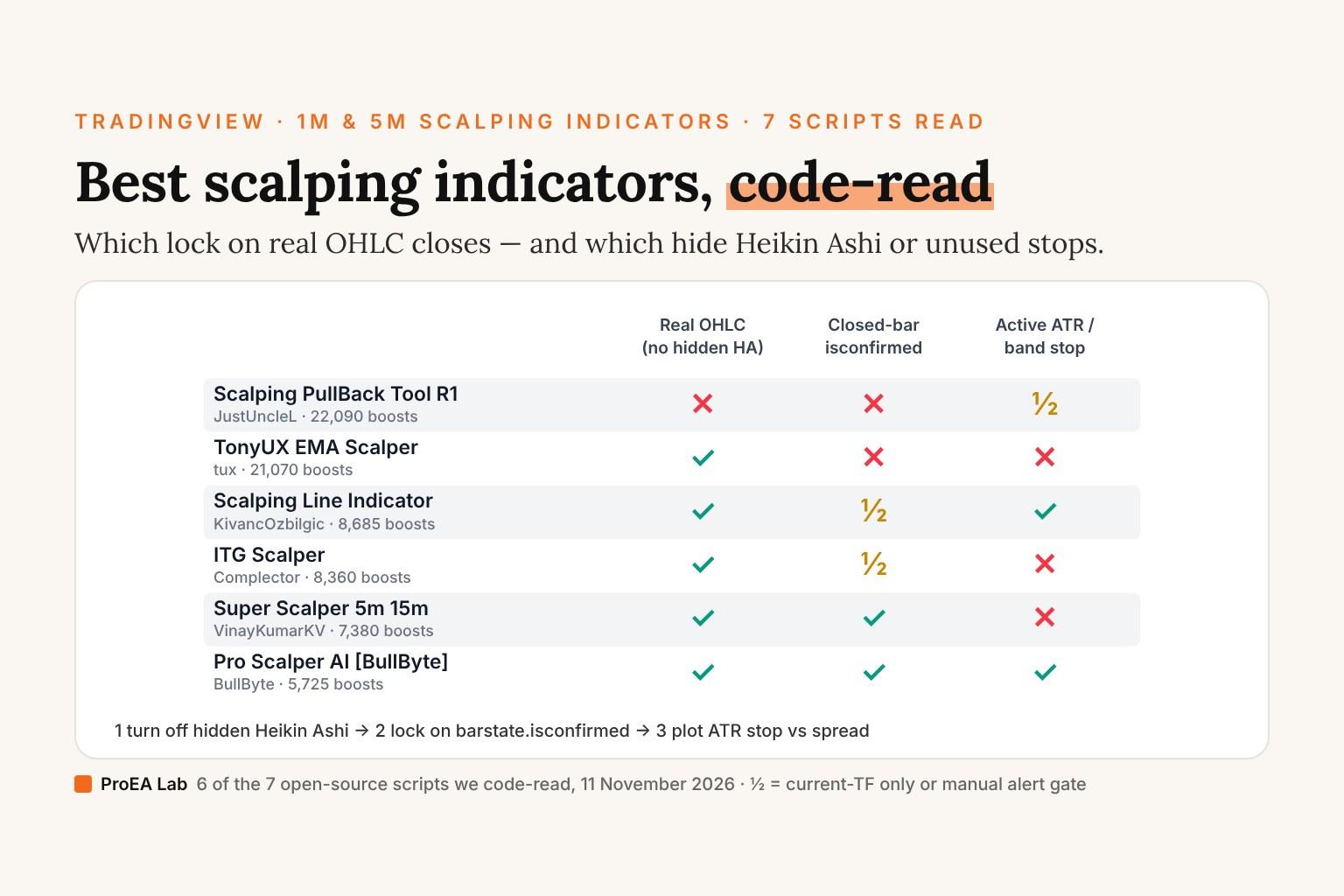
Of the seven open-source TradingView scalping scripts in our scorecard, read on 11 November 2026, only two gate their signals on barstate.isconfirmed: ITG Scalper on its own timeframe, and BullByte's Pro Scalper AI. The rest fire on the live candle, evaluate synthetic Heikin Ashi closes in the background (DelayArrow = false, UseHAcandles = true), or compute a stop they never pass to strategy.exit(). Filter for real OHLC prices, barstate.isconfirmed locking and a stop drawn in code, and one script in the table has all three: BullByte's.
Here is what our line-by-line source read found across eight high-boost scalping scripts on TradingView (seven open source, one invite-only), followed by a standalone //@version=6 closed-bar pullback scalper you can paste directly into Pine Editor. (If you trade full cash-session setups, opening ranges, or Indian NSE option lots, see our companion audit of the best intraday indicators on TradingView.)
Scorecard: eight TradingView scalping scripts, seven read from source
| Script & Author | Boosts (11 Nov 2026) | Pine Version & Length | Real OHLC Math (No Hidden HA) | Confirmed Bar Lock (isconfirmed) | Stop / Risk Math in Code | Key Source Finding |
|---|---|---|---|---|---|---|
Pro Scalper (profitprotrading, BEhT6Syv) | 27,564 | Closed source (invite-only) | Unverifiable | Unverifiable | Unverifiable | Source locked; impossible to audit lookahead or Heikin Ashi smoothing before paying |
Scalping PullBack Tool R1 (JustUncleL, n1co3drh) | 22,090 | v4 · 239 lines | No by default (UseHAcandles = true, L102) | No by default (DelayArrow = false, L99) | Visual swing fractals only | Pulls heikinashi() prices via security() even on standard candle charts |
TonyUX EMA Scalper (tux, egfSfN1y) | 21,070 | v1 · 18 lines | Yes (close) | No (cross(close, ema(20))) | None | Single 20-bar EMA cross; nothing in the code filters a flat session |
Scalping Line Indicator (KivancOzbilgic, irb0NAkB) | 8,685 | v4 · 22 lines | Yes (close) | Causal line; intrabar cross alert | 1.0% band around triangular MA | sma(sma(close, 50), 51) vs sma(close, 7); clean math when alerts use Once Per Bar Close |
ITG Scalper (Complector, AcrZjl6Q) | 8,360 | v4 · 115 lines | Yes | Yes on current TF (L79–80); No on custom HTF (L70–71) | None | TEMA(14) + MACD(12,26,9); keep useCurrentRes = true to avoid unshifted HTF security() |
Super Scalper - 5 Min 15 Min (VinayKumarKV, 4ORGCiTh) | 7,380 | v5 · 73 lines | Yes | Strategy fills next open | Dead code (L53–55) | stopLoss and takeProfit are calculated on lines 53–55 and never passed to strategy.exit() |
Pro Scalper AI [BullByte] (BullByte, HmXeAuPG) | 5,725 | v6 · 410 lines | Yes | Yes (f_nr helper on L13) | ATR(14) stop & target lines | Cleanest open-source build; "AI Forecast" (L214–217) is plain 20-bar ta.linreg |
Scalping EMA ADX RSI (serkany88, PBZoZxX0) | 5,000 | v5 · 96 lines | Yes | Intrabar unless alert gated | Prior bar high/low breakout | Sensible 3-factor pullback (EMA 50 + RSI(3) <= 20 + ADX(5) > 30 + close > high[1]) |
Four code traps we caught inside the top scalping scripts
1. Background Heikin Ashi smoothing (Scalping PullBack Tool R1, 22,090 boosts)
On line 99 and line 102 of n1co3drh, two boolean defaults quietly reshape every signal:
DelayArrow   = input(false, title="Show Arrow Only After Candle Closed")
UseHAcandles = input(true,  title="Use Heikin Ashi Candles in Algo Calculations")
Lines 108–111 then call security(heikinashi(tickerid), Period, close) even when your TradingView chart displays real Japanese candlesticks. Because Heikin Ashi haClose = (O + H + L + C) / 4 and haOpen = (prevHaOpen + prevHaClose) / 2 smooth away intrabar wicks, pullback arrows print neatly on historical trends at synthetic prices you cannot actually fill. If you use n1co3drh, toggle DelayArrow = ON and UseHAcandles = OFF immediately.
2. Dead-code stop losses (Super Scalper - 5 Min 15 Min, 7,380 boosts)
VinayKumarKV's 4ORGCiTh (73 lines) looks like a complete ATR-managed strategy at first glance because lines 53–55 compute ATR stop and target distances from atr(14):
stopLoss   = close - atr_slen * 2
takeProfit = close + atr_slen * 3
Read lines 56–73, however, and neither stopLoss nor takeProfit is referenced anywhere again. There is no strategy.exit() call in the file — trades stay open through arbitrarily deep drawdowns until ema(21) crosses ema(65) in the opposite direction! Worse, line 42 requires open < close - atr_slen * 1 (close - open > 1.0 * ATR(14)), forcing you to buy after a full-ATR expansion bar has already stretched away from value.
3. Conditional HTF lookahead (ITG Scalper, 8,360 boosts)
Complector's AcrZjl6Q does the right thing on lines 79–80 (longCond and barstate.isconfirmed), making it non-repainting out of the box when useCurrentRes = true. The moment a user unchecks useCurrentRes to pull a 15-minute MACD onto a 1-minute chart, lines 70–71 run Pine v4 security(syminfo.tickerid, resCustom, Fmacd) without [1], leaking the unclosed 15-minute MACD across all fifteen 1-minute historical bars inside it (the classic trap covered in how to tell if an indicator repaints).
4. "AI" marketing over linear regression (Pro Scalper AI [BullByte], 5,725 boosts)
BullByte's 410-line //@version=6 script (HmXeAuPG) is genuinely well-engineered on bar confirmation: line 13 defines f_nr(src) => barstate.isconfirmed ? src : nz(src[1]), locking every EMA (9, 21, 55), RSI(14), MACD and ATR(14) calculation to closed bars. Just know what its optional "AI Forecast" checkbox (useAI = false on line 42) actually computes on lines 214–217:
float lrNow  = ta.linreg(cClose, 20, 0)
float lrPrev = ta.linreg(cClose, 20, 1)
float slope  = lrNow - lrPrev
There is no neural network or k-NN classifier inside — if you want actual multi-feature distance classification on TradingView, read our line-by-line audit of Lorentzian Classification indicator settings.
Why spread and stop width decide 1-minute and 5-minute scalping
On a 5-pip EURUSD stop, a 1.2-pip spread alone is 24% of 1R on every round turn, before commission and before price moves a single tick (check exact pip value and lot sizing in our pip value calculator and forex position size calculator). That arithmetic is why we'd start scalping code from two rules. We haven't tested either as a strategy; they keep the cost visible, nothing more:
- Prefer an entry near session value to one after a
1.0 × ATRexpansion candle. After a full-ATR bar, the entry sits further from any structural stop, so the stop has to be wider. Our script below anchors direction to session VWAP andEMA(50)and waits for a 3-period RSI pullback; a WaveTrend oscillator cross or a flat-zero Impulse MACD filter is another trigger you could test. Neither is tested here. - Plot the ATR stop and
2Rtarget directly on the chart. If an indicator draws"BUY"without showing where1Rsits relative to spread, it is a decoration, not a trading plan. (For wider session-level scalps, see also best intraday indicators on TradingView, SuperTrend indicator settings, and SuperTrend formula & starting pairs, which are untested starting points too.)
Clean Pine Script v6 Pullback Scalper (VWAP + EMA 50 + RSI 3 + ATR Stop)
This complete //@version=6 indicator combines serkany88's EMA(50) + RSI(3) pullback structure with session ta.vwap(hlc3), Wilder ta.atr(14) stop/target lines, a minimum cooldown between signals, and strict barstate.isconfirmed gating on real OHLC candles:
//@version=6
// Rule idea (EMA 50 trend, RSI 3 pullback, a close past the last candle) from serkany88's "Scalping EMA ADX RSI":
// https://www.tradingview.com/script/PBZoZxX0/
indicator("ProEA Clean Pullback Scalper v6 (VWAP + EMA + ATR Plan)", shorttitle = "CleanScalp v6", overlay = true)

int   emaLen     = input.int(50, "Trend EMA Length", minval = 5)
int   rsiLen     = input.int(3, "Pullback RSI Length", minval = 2)
float rsiOs      = input.float(20.0, "Bull Pullback RSI Level (<=)")
float rsiOb      = input.float(80.0, "Bear Pullback RSI Level (>=)")
int   atrLen     = input.int(14, "ATR Stop Length", minval = 5)
float slMult     = input.float(1.5, "Stop Loss (x ATR)", minval = 0.5, step = 0.1)
float rrTarget   = input.float(2.0, "Reward : Risk Target (R)", minval = 1.0, step = 0.25)
int   cooldown   = input.int(6, "Minimum Bars Between Signals", minval = 1)
bool  useVwap    = input.bool(true, "Require Price on Trend Side of Session VWAP")

float emaTrend = ta.ema(close, emaLen)
float sessVwap = ta.vwap(hlc3)
float rsiFast  = ta.rsi(close, rsiLen)
float atrVal   = ta.atr(atrLen)

bool dippedOs  = rsiFast[1] <= rsiOs or rsiFast[2] <= rsiOs
bool spikedOb  = rsiFast[1] >= rsiOb or rsiFast[2] >= rsiOb
bool vwapBull  = not useVwap or na(sessVwap) or close > sessVwap
bool vwapBear  = not useVwap or na(sessVwap) or close < sessVwap

var int lastSigBar = -999
bool coolOk = (bar_index - lastSigBar) >= cooldown

bool rawLong  = barstate.isconfirmed and coolOk and close > emaTrend and vwapBull and dippedOs and close > high[1] and close > open
bool rawShort = barstate.isconfirmed and coolOk and close < emaTrend and vwapBear and spikedOb and close < low[1]  and close < open

var float activeEntry = na
var float activeStop  = na
var float activeTp    = na
var int   activeDir   = 0

if activeDir == 1 and (low <= activeStop or high >= activeTp)
    activeEntry := na
    activeStop  := na
    activeTp    := na
    activeDir   := 0
else if activeDir == -1 and (high >= activeStop or low <= activeTp)
    activeEntry := na
    activeStop  := na
    activeTp    := na
    activeDir   := 0

if rawLong
    lastSigBar  := bar_index
    activeEntry := close
    activeStop  := close - slMult * atrVal
    activeTp    := close + slMult * atrVal * rrTarget
    activeDir   := 1
else if rawShort
    lastSigBar  := bar_index
    activeEntry := close
    activeStop  := close + slMult * atrVal
    activeTp    := close - slMult * atrVal * rrTarget
    activeDir   := -1

plot(emaTrend, "Trend EMA", color = #2962ff, linewidth = 2)
plot(useVwap ? sessVwap : na, "Session VWAP", color = #eab308, linewidth = 1)
plot(activeStop, "Active Signal Stop", color = color.new(#f23645, 25), style = plot.style_steplinebr)
plot(activeTp, "Active Signal 2R Target", color = color.new(#089981, 25), style = plot.style_steplinebr)

plotshape(rawLong,  "Confirmed Long Scalp",  shape.labelup,   location.belowbar, #089981, text = "LONG",  textcolor = color.white, size = size.tiny)
plotshape(rawShort, "Confirmed Short Scalp", shape.labeldown, location.abovebar, #f23645, text = "SHORT", textcolor = color.white, size = size.tiny)

alertcondition(rawLong,  "CleanScalp Confirmed Long",  "Confirmed closed-bar pullback LONG scalp")
alertcondition(rawShort, "CleanScalp Confirmed Short", "Confirmed closed-bar pullback SHORT scalp")
Ours: Signal Desk & Signal Desk Premium
We build Signal Desk (in Pine Pro Library) and Signal Desk Premium for intraday traders who want every signal audited as a complete ticket on closed candles rather than a bare arrow: five independent confluence checks, position size rounded to your lot step from risk, round-trip commission and slippage deducted in R, partial scale-outs, and a daily trade cap + daily loss lock that shuts new entries off after a rough morning. Both ship as readable Pine Script v6 source; neither claims a guaranteed win rate.
heikinashi() inputs, confirm signals lock on barstate.isconfirmed, and measure the stop distance against your broker's spread.Frequently asked questions
Which scalping indicator on TradingView does not repaint?
Among the most-boosted open-source scripts we read on 11 November 2026, BullByte's Pro Scalper AI (5,725 boosts) freezes confirmed values via barstate.isconfirmed ? src : nz(src[1]) on line 13, and Complector's ITG Scalper (8,360 boosts) gates signals with barstate.isconfirmed on lines 79 to 80 as long as useCurrentRes stays enabled. By contrast, JustUncleL's Scalping PullBack Tool R1 (22,090 boosts) defaults DelayArrow to false on line 99 and computes signals on Heikin Ashi averages.
Why do Heikin Ashi scalping indicators look better on history than in live fills?
Heikin Ashi open and close prices are smoothed synthetic averages rather than real tradable market quotes. Scripts like Scalping PullBack Tool R1 enable UseHAcandles = true by default on line 102 and fetch heikinashi() prices in the background even on a standard candlestick chart, so visual entry arrows sit at synthetic prices the order book never traded at that timestamp.
What timeframe do scalping indicators on TradingView run on?
The scripts in our scorecard are built for 1-minute to 15-minute charts; Super Scalper names 5 and 15 minutes in its title. The shorter the chart, the bigger a fixed spread is against the stop: on a 5-pip EURUSD stop, a 1.2-pip spread alone is 24% of 1R before commission. We haven't tested which timeframe works better.
Does Pro Scalper AI on TradingView use machine learning?
Despite the name, reading lines 214 to 217 of BullByte's 410-line Pine v6 source shows the optional AI Forecast module (disabled by default via useAI = false) is standard 20-bar linear regression slope extrapolation using ta.linreg(cClose, 20, 0), while its core signals come from EMA ribbons, RSI, MACD and Bollinger squeeze confirmation.
Why does Super Scalper 5 Min 15 Min hold losing trades without a stop?
In VinayKumarKV's 73-line Super Scalper strategy (7,380 boosts), lines 53 to 55 calculate stopLoss and takeProfit variables from ATR(14), but neither variable is ever passed to a strategy.exit() call—meaning backtest positions only flip when an opposite EMA 21 / EMA 65 cross occurs.
What does the Pine v6 scalper in this post combine?
Session VWAP, a 50-period EMA trend filter, a 3-period RSI pullback (at or below 20 for longs, at or above 80 for shorts) and a Wilder ATR(14) stop at 1.5 ATR with a 2R target, all on closed bars, so position size and spread cost in R are known before you click. It is a starting point we haven't backtested, not a tested strategy.