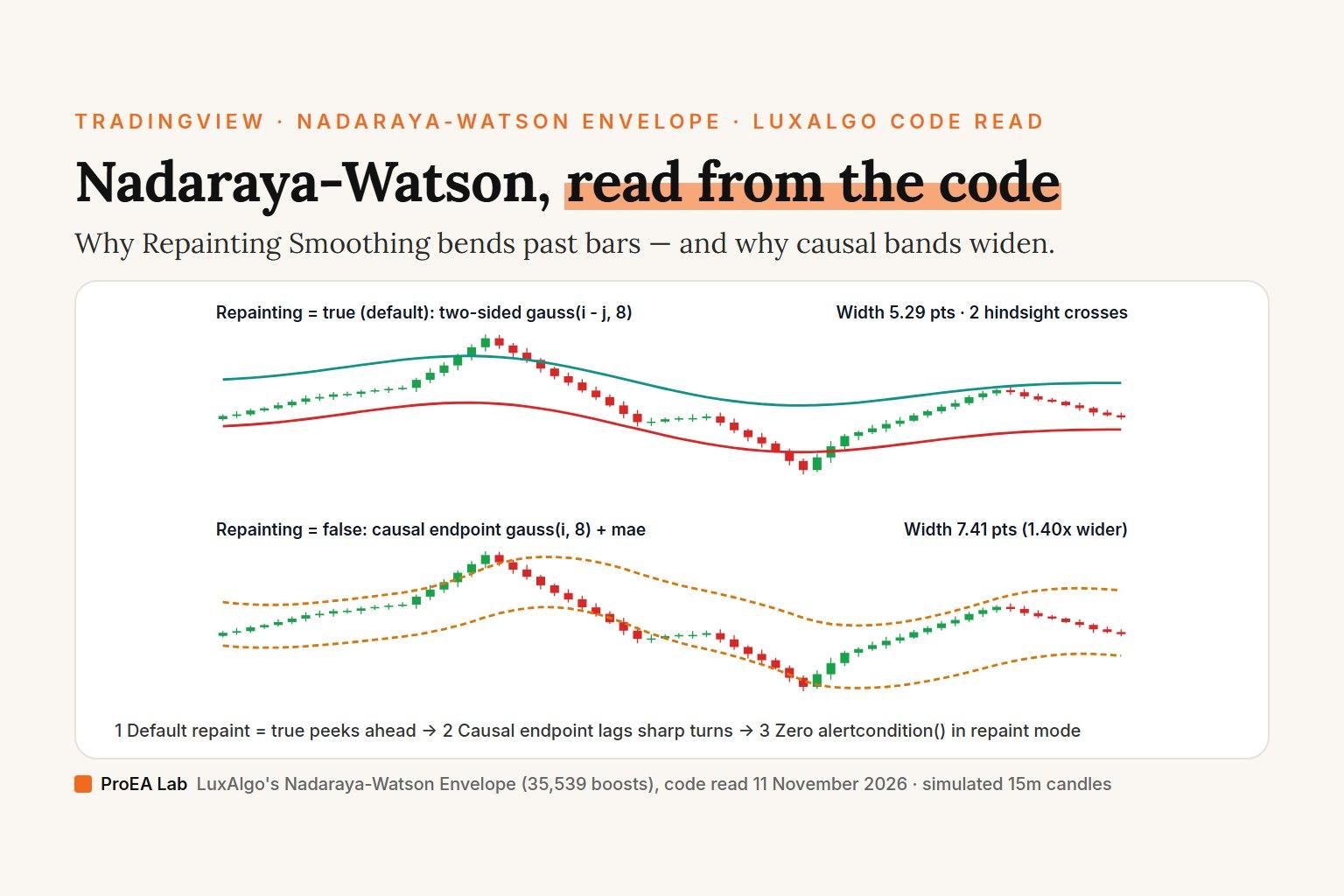
No single Nadaraya-Watson setting removes the trade-off between smoothness and lag, and reading the 119-line source of Nadaraya-Watson Envelope [LuxAlgo] (35,539 boosts) shows why screenshots of its default settings look impossibly clean: Repainting Smoothing defaults to true on line 14, running a nested 500-bar loop (gauss(i - j, h)) on lines 70–83 that smooths every historical bar using candles from its future. Overlay both modes and drag the Replay Bar Cutoff slider on the simulated candles below to watch past bands bend and reversal triangles shift as future bars arrive.
h=8.0 · mult=3.0 @ Bar 66/66: Causal envelope is 1.41× wider (7.41 vs 5.26 pts) · 2 hindsight vs 3 causal crosses.
At identical settings (h=8.0, mult=3.0), the causal one-sided band is 1.41× wider than the two-sided hindsight band because endpoint weights cannot peek ahead into upcoming reversals. Drag Replay Bar Cutoff left (try Bar 21 or Bar 43) to watch hindsight smoothing rewrite past bars.
Simulated 15-minute candles, not market data: generated deterministically (110 warmup + 66 drawn bars). The method (Gaussian kernel regression, two-sided and one-sided, with a band at mult × the mean absolute error) is computed by our own code, not by LuxAlgo's script, and isn't claimed to match the script's numbers. Counts describe these simulated bars only; no trade outcomes are claimed.
Read preset comparison as table
| Nadaraya-Watson Preset | Hindsight Width | Causal Width | Width Ratio | Hindsight vs Causal Crosses |
|---|---|---|---|---|
| h=8 · mult=3 (Overlay Both) | 5.26 pts | 7.41 pts | 1.41× | 2 vs 3 |
| Replay @ Bar 21 Peak (Watch Hindsight) | 4.24 pts | 5.68 pts | 1.34× | 1 vs 1 |
| Replay @ Bar 43 Flush (Watch Hindsight) | 5.08 pts | 7.10 pts | 1.40× | 2 vs 3 |
| Causal Only · h=6 · mult=2.2 | 2.81 pts | 4.55 pts | 1.62× | 4 vs 4 |
What we read
On 11 November 2026 we searched TradingView's scripts for "nadaraya watson", "nadaraya-watson" and "nadaraya", and read the open-source scripts named below.
One script stands out: LuxAlgo's July 2023 Nadaraya-Watson Envelope [LuxAlgo], with 35,539 boosts, more than the six other scripts named here combined: LuxAlgo's Nadaraya-Watson Smoothers (9,544 boosts), AlgoAlpha's Liquidity Sweeps (5,909 boosts), Flux Charts' Nadaraya Smoothed Bollinger Bands (5,341 boosts), jdehorty's Rational Quadratic Kernel (Non-Repainting) (4,404 boosts) and Envelope (Non-Repainting) (2,957 boosts), and Lupown's Nadaraya-Watson non repainting [LPWN] (3,126 boosts). We pulled and read the complete Pine source of each open-source leader; every line number below refers to TradingView's raw code as served on 11 November 2026.
LuxAlgo's four inputs—and two separate engines in one file
LuxAlgo declares four calculation inputs on lines 10–14 of Iko0E2kL:
| Input in Settings | Default | Line | What LuxAlgo's code actually does with it |
|---|---|---|---|
Bandwidth (h) | 8. | 10 | Controls the Gaussian kernel width in gauss(x, h) => math.exp(-(math.pow(x, 2)/(h * h * 2))) (line 24). Lower h hugs price tightly; higher h flattens the regression line. |
mult | 3. | 11 | Multiplies the 500-bar mean absolute residual (sae on line 83 when repaint = true; mae on line 55 when repaint = false) to set the upper and lower envelope distance. |
Source (src) | close | 12 | Input series smoothed by the kernel (close by default). Note that lines 116–117 hardcode close in ta.crossunder(close, out - mae) even if you change Source to hlc3! |
Repainting Smoothing (repaint) | true | 14 | Switches between two completely separate implementations: a two-sided hindsight line.new() loop (lines 67–95) when true, and a one-sided causal plot() endpoint series (lines 43–58 & 112–117) when false. |
Here are the five lines the two engines turn on, quoted from LuxAlgo's script (the two comment lines are ours). The full 119-line source is on its TradingView page, Nadaraya-Watson Envelope [LuxAlgo]:
// Repainting Smoothing off: one-sided weights and the error band (lines 43–55)
        w = gauss(i, h)
mae = ta.sma(math.abs(src - out), 499) * mult
// Repainting Smoothing on: two-sided weights and the error band (lines 70–83)
            w = gauss(i - j, h)
        sae += math.abs(src[i] - y2)
    sae := sae / math.min(499,n - 1) * mult
Those lines, read with the rest of the script, show four details that almost never appear in YouTube indicator videos:
- Why historical signals look psychic when
Repainting Smoothing = true: In thebarstate.islastblock, bari(n - ion the chart) averagessrc[j]across both older bars (j > i) and newer bars that had not happened yet (j < i):When a V-bottom or blow-off top happens five bars later,yhat_repaint(t) = sum(src_u * exp(-(t - u)^2 / (2 * h^2))) / sum(exp(-(t - u)^2 / (2 * h^2))) for u in [max(0, n - 499) .. n]gauss(i - j, 8)bends the envelope backward in time to meet the turn, andsaeaverages future residuals across the entire 500-bar window. Click Replay @ Bar 21 Peak or Replay @ Bar 43 Flush in the drill above, then drag Replay Bar Cutoff to66to watch closed bars rewrite themselves. (Our indicator repainting audit covers this exactbarstate.islastdrawing pattern.) - Why unchecking
Repainting Smoothingwidens the bands at the samemult = 3.0: In causal endpoint mode (repaint = false), bartcan only seei = 0..499(t - i <= t). Because a one-sided weighted average lags every trend and sharp turn,math.abs(src - out)on line 55 is larger than the two-sided hindsight residual on line 80, somaecomes out wider thansaeat identical(h = 8, mult = 3)settings; the drill prints the ratio for its simulated candles, and we haven't measured it on real ones. Whether to lowermultor switch to an ATR band after turning repainting off is something to test on your own market: we haven't. - The line-54
0. / 0.natrick (and whySourceis ignored on causal arrows): Look at lines 116–117 at the very bottom ofIko0E2kL:Unlike lines 112–113 (plotshape(ta.crossunder(close, out - mae) ? low : na, "Crossunder", ...) plotshape(ta.crossover(close, out + mae) ? high : na, "Crossover", ...)plot(repaint ? na : out + mae)), lines 116–117 omitrepaint ? na. The only reason they do not plot extra arrows in repainting mode is thatdenstays0.on line 41 whenrepaint == true, soout /= denon line 54 divides0. / 0.(na), silently poisoningmaetona! Notice too that lines 116–117 testcloserather thansrc, whereas lines 89–92 testsrc[i]. - Zero
alertcondition()calls, a top-right warning badge, and 500 unusedline.newobjects: On lines 99–107 (var tb = table.new(position.top_right, 1, 1)), LuxAlgo prints'Repainting Mode Enabled'wheneverrepaintstays on. Meanwhile on lines 33–35 (if barstate.isfirst and repaint), the script allocates 500 empty lines intovar ln = array.new_line(0), then never referenceslnagain—lines 86–87 allocate brand-newline.new()segments on every tick ofbarstate.islast(relying onmax_lines_count = 500garbage collection) and skip odd bars viaif i % 2. Neither mode registers anyalertcondition().
How the top open-source Nadaraya-Watson scripts compare
| Script & author | Boosts (2026-11-11) | Kernel & defaults | Band formula | Repainting & alerts |
|---|---|---|---|---|
Nadaraya-Watson Envelope (LuxAlgo, Iko0E2kL) | 35,539 | Gaussian, h = 8, mult = 3, close | 499-bar mean abs(src - yhat) * mult | Repaints by default (repaint = true); causal endpoint when unchecked; zero alertcondition(). |
Rational Quadratic Kernel (jdehorty, AWNvbPRM) | 4,404 | Rational Quadratic, h = 8, r = 8, x_0 = 25 | Single trend line (lag = 2 color option) | Non-repainting one-sided loop (i = 0 to size + x_0); 2 alertcondition() calls. |
non repainting [LPWN] (Lupown, YyeIcFNh) | 3,126 | Rational Quadratic, h = 8, r = 8, x_0 = 25 | yhat1 ± 2.7 * ta.atr(32) (lines 19–20, 67–68) | Non-repainting causal kernel + ATR envelope; 4 alertcondition() calls. |
Envelope (Non-Repainting) (jdehorty, WeLssFxl) | 2,957 | Rational Quadratic (KernelFunctions/2), h = 8, alpha = 8 | Near 1.5 & Far 8.0 × 60-bar kernel RMA True Range | Non-repainting causal library call; plots Near/Avg/Far zones without hindsight. |
Notice an insightful implementation quirk inside both jdehorty's AWNvbPRM (line 17: size = array.size(array.from(src))) and Lupown's YyeIcFNh (lines 23–25: srcArray = array.new<float>(0), array.push(srcArray, src), size = array.size(srcArray)): because array.from(src) holds a single float on each bar, size is always 1—so their loop for i = 0 to _size + x_0 actually runs 0 to 26 (27 bars) rather than across the entire chart! With default h = 8, bars beyond 26 carry tiny tail weights anyway, which accidentally makes both scripts fast while keeping closed bars strictly non-repainting. Compare ATR-based trailing and band logic in our UT Bot Alerts settings code read, Chandelier Exit settings code read, and SuperTrend indicator guide.
Clean Pine Script v6: Non-repainting Nadaraya-Watson Envelope with alerts
If you want a lightweight, strictly causal //@version=6 Nadaraya-Watson Envelope with zero hindsight line.new() redraws, configurable MAE vs ATR band mode, Source wired consistently into every crossover check, and barstate.isconfirmed alerts, paste this compact script into TradingView's Pine Editor:
//@version=6
indicator("ProEA Causal Nadaraya-Watson Envelope (v6)", shorttitle = "NWE Causal v6", overlay = true)

src       = input.source(close, "Source")
h         = input.float(8.0, "Bandwidth (h)", minval = 1.0, step = 0.5)
windowLen = input.int(100, "Causal Lookback Bars", minval = 20, maxval = 500)
bandMode  = input.string("Rolling MAE", "Band Width Mode", options = ["Rolling MAE", "ATR"])
bandLen   = input.int(100, "MAE / ATR Length", minval = 5, maxval = 500)
mult      = input.float(2.5, "Envelope Multiplier", minval = 0.5, step = 0.1)

var array<float> weights = array.new<float>(0)
if barstate.isfirst
    for i = 0 to windowLen - 1
        weights.push(math.exp(-(i * i) / (2.0 * h * h)))

int maxBack = math.min(windowLen - 1, bar_index)
float wSum  = 0.0
float pSum  = 0.0
for i = 0 to maxBack
    float w = weights.get(i)
    pSum += src[i] * w
    wSum += w

float yhat   = wSum > 0.0 ? pSum / wSum : src
float spread = bandMode == "Rolling MAE" ? ta.sma(math.abs(src - yhat), bandLen) * mult : ta.atr(bandLen) * mult
float upper  = yhat + spread
float lower  = yhat - spread

bool bullSlope = yhat >= nz(yhat[1], yhat)
plot(yhat, "Causal Kernel Mid", color = bullSlope ? #14b8a6 : #ef4444, linewidth = 2)
pU = plot(upper, "Upper Envelope", color = #0d9488)
pL = plot(lower, "Lower Envelope", color = #dc2626)
fill(pU, pL, color = color.new(#0f172a, 92), title = "Envelope Fill")

bool rawUpperCross = ta.crossover(src, upper)
bool rawLowerCross = ta.crossunder(src, lower)
bool upperBreak    = barstate.isconfirmed and rawUpperCross
bool lowerBreak    = barstate.isconfirmed and rawLowerCross
plotshape(upperBreak ? high : na, "Confirmed Upper Cross", shape.triangledown, location.abovebar, #ef4444, size = size.tiny)
plotshape(lowerBreak ? low : na, "Confirmed Lower Cross", shape.triangleup, location.belowbar, #14b8a6, size = size.tiny)

alertcondition(upperBreak, "Confirmed Close Above Upper NWE", "Confirmed close above Upper Nadaraya-Watson Envelope on {{ticker}} ({{interval}})")
alertcondition(lowerBreak, "Confirmed Close Below Lower NWE", "Confirmed close below Lower Nadaraya-Watson Envelope on {{ticker}} ({{interval}})")
Notice why windowLen defaults to 100 rather than 500: for h = 8.0, a Gaussian weight at i = 48 (6h) is already exp(-18) (roughly 0.000000015), so summing 500 bars burns 5× the loop iterations for zero visible price change while maxBack = math.min(windowLen - 1, bar_index) starts plotting cleanly from bar 1 instead of returning na for the first 499 bars. Before risking capital on any mean-reversion envelope, pair closed-candle rules with a volatility, session, or k-NN regime filter (see our Lorentzian Classification indicator settings code read, Squeeze Momentum code read, and VWAP indicator settings code read), port existing MT5/MT4/NinjaTrader filters with our MQL5 to Pine Script v6 converter, and verify trade count and spread drag in our TradingView backtesting guide.
Use this animation on your site.
Frequently asked questions
What are the default Nadaraya-Watson Envelope [LuxAlgo] settings on TradingView?
LuxAlgo's 119-line Pine v5 script (Iko0E2kL) declares four calculation inputs on lines 10–14: Bandwidth (h) = 8.0, mult = 3.0, Source = close, and Repainting Smoothing = true. Out of the box, Repainting Smoothing is enabled and prints a top-right warning badge ('Repainting Mode Enabled') on lines 99–107.
Does the Nadaraya-Watson Envelope indicator repaint?
With default settings (Repainting Smoothing = true), yes—heavily. Inside if barstate.islast and repaint (lines 67–95), the script recomputes the last 500 bars using gauss(i - j, h) across both past and future bars in the window, redraws line.new() segments, and places ▼ and ▲ label.new() reversal triangles retroactively. Unchecking Repainting Smoothing switches to the one-sided endpoint loop on lines 43–58, which never changes closed historical bars.
Why does turning off Repainting Smoothing make Nadaraya-Watson Envelope wider and lag?
In repainting mode, two-sided Gaussian weights see upcoming price reversals before they happen, pulling the smoothed curve toward the turn and keeping mean absolute residual sae small. When Repainting Smoothing is unchecked, the endpoint estimator weights only current and past bars (i = 0 to 499), so the curve lags sharp directional moves; that lag enlarges math.abs(src - out) in mae = ta.sma(math.abs(src - out), 499) * mult (line 55), making the non-repainting bands noticeably wider at the same mult = 3.0.
What is the difference between LuxAlgo's Gaussian kernel and jdehorty's Rational Quadratic kernel?
LuxAlgo's script uses a Gaussian kernel exp(-x^2 / (2 * h^2)), whose weights decay exponentially fast outside roughly 2 * Bandwidth bars. jdehorty's open-source non-repainting scripts (4,404 and 2,957 boosts) use a Rational Quadratic kernel (1 + x^2 / (2 * r * h^2))^(-r), a scale mixture of Gaussian kernels controlled by Relative Weighting (r / alpha = 8.0), and build envelope bounds from kernel-smoothed ATR rather than a 499-bar mean absolute error.
Does Nadaraya-Watson Envelope [LuxAlgo] have built-in alerts in repainting mode?
LuxAlgo's published 119-line script contains zero alertcondition() calls in either mode. In repainting mode, the ▼ and ▲ markers are drawn as retrospective label.new() objects inside barstate.islast (lines 89–92), while the plotshape() crossovers on lines 116–117 are silently disabled in repainting mode because den stays 0.0 on line 41, making out = 0.0 / 0.0 = na on line 54.
What Bandwidth and Mult settings work best on Nadaraya-Watson Envelope?
No fixed Bandwidth or Mult is universally optimal across symbols or timeframes, and tuning parameters on a two-sided repainting curve measures hindsight rather than live tradeable fills. Switch Repainting Smoothing off first, then test Bandwidth (starting from h = 8) and Mult (2.0 to 3.0 controls envelope width) on closed bars with realistic spread and commission.