Download the prop firm trading journal as an Excel workbook (.xlsx), which you can import into Google Sheets, or a CSV with the values but no formulas. It is our free trading journal template with six columns added for a funded or evaluation account: the account, its daily loss limit, the day's closed P/L before each trade, the room left before the limit, whether the trade's risk fits in that room, and the day's P/L after it. No email, no account.
Type a trade's risk before you click and the sheet answers OK or OVER. Everything else on the free template is still there: R multiples, win/loss, the Summary with expectancy, profit factor and the plan-followed split.
Before a prop trade, one number matters more than the setup: how much of the day's loss limit is left. The journal works it out on every row.What's in the prop firm trading journal?
The Trades sheet keeps the free template's eighteen columns, A to R, in the same places, so its Summary is the template's own. Risk and Result are typed: Risk is your planned loss at the stop, Result is the closed P/L net of fees. Six columns follow from S:
| Column | Typed or formula | What it holds |
|---|---|---|
Account | Typed | The account's name, the same on every row: "50K evaluation" and "50K eval" are two accounts |
Daily loss limit ($) | Typed | The limit in dollars, from your firm's current rules |
Day P/L before this trade | Formula | The closed results of the earlier rows with the same date and account |
Room before this trade | Formula | Daily loss limit + Day P/L before this trade |
Risk within room? | Formula | OK when the trade's risk is less than the room; OVER when a full stop-out could reach the limit. A tie counts as OVER |
Day P/L after this trade | Formula | Day P/L before this trade + Result |
Day P/L before this trade is a SUMIFS over the rows above it. On row 6, the example's fifth trade:
=IF(OR($A6="",$S6=""),"",SUMIFS($K$1:$K5,$A$1:$A5,$A6,$S$1:$S5,$S6))
It adds the Result column for every earlier row whose Date and Account match this row's, so each account starts every date at $0, and one sheet can hold several accounts. Rows must be in time order within each day. The Summary adds one line to the template's: Trades whose risk could break the daily limit, the count of OVER rows.
Two days on a 50K evaluation, worked
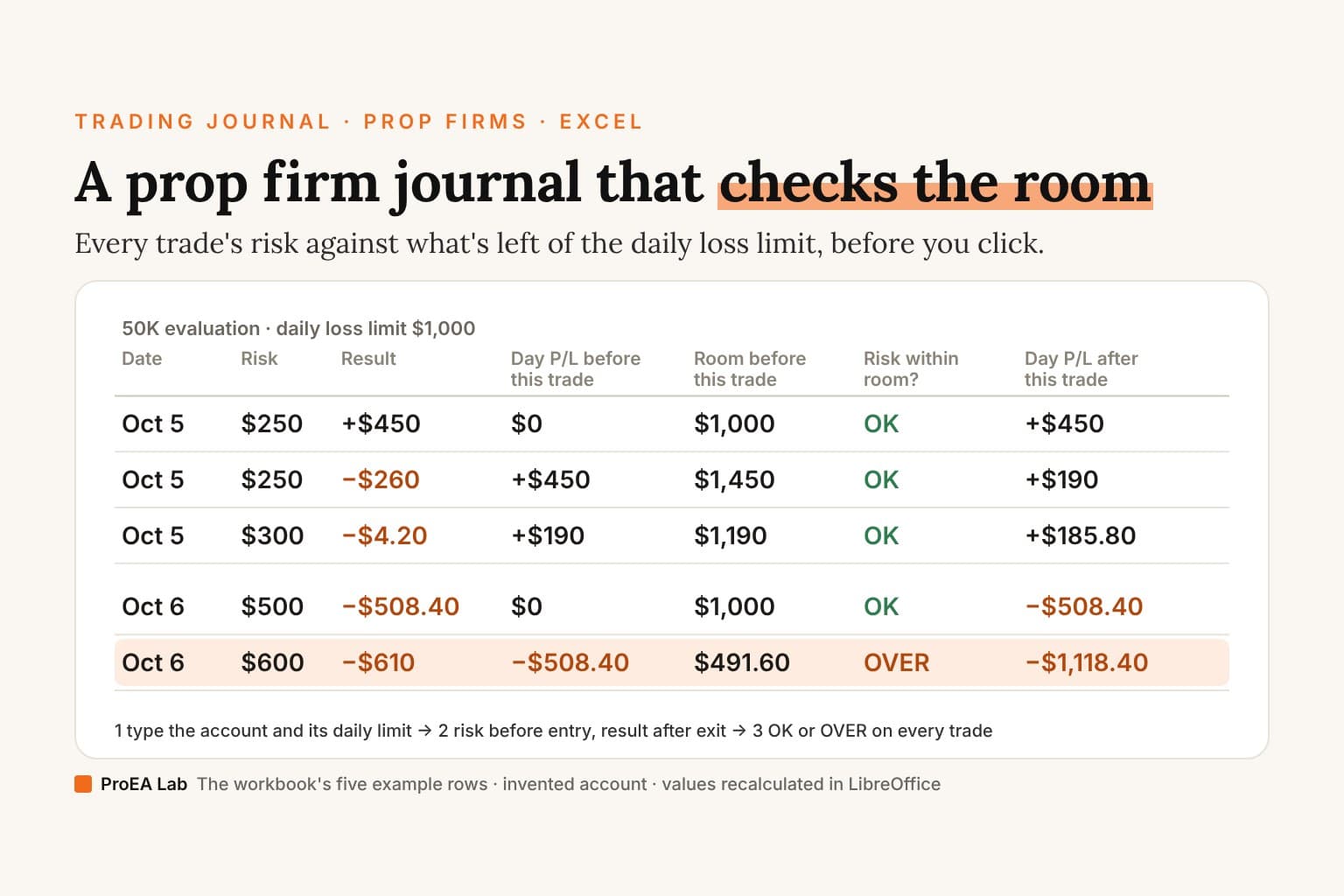
The workbook ships with five invented NQ trades on an account called 50K evaluation, with a $1,000 daily loss limit. The prices are left blank; the risk and the result are typed, as you would type them from your platform. The account is made up. Its $1,000 limit on 50K happens to be the size of Topstep's optional Daily Loss Limit on a 50K Trading Combine when we read Topstep's help center on 2026-10-22 (Topstep's daily loss limit), but the example follows no firm's rulebook.
| Date | Risk | Result | Day P/L before this trade | Room before this trade | Risk within room? | Day P/L after this trade |
|---|---|---|---|---|---|---|
| 2026-10-05 | $250 | +$450 | $0 | $1,000 | OK | +$450 |
| 2026-10-05 | $250 | −$260 | +$450 | $1,450 | OK | +$190 |
| 2026-10-05 | $300 | −$4.20 | +$190 | $1,190 | OK | +$185.80 |
| 2026-10-06 | $500 | −$508.40 | $0 | $1,000 | OK | −$508.40 |
| 2026-10-06 | $600 | −$610 | −$508.40 | $491.60 | OVER | −$1,118.40 |
Day 1 is +$450, then −$260, then a −$4.20 scratch: closed at entry, so the $4.20 of fees is the whole loss. The morning's win adds to the room: $1,450 before the second trade, because the sheet measures the room to a floor fixed at the day's start, and a winning trade moves the balance away from it. The day closes at +$185.80, and on 6 October the account starts from $0 again.
Day 2 opens with a stop-out of −$508.40: its $500 of risk plus $8.40 of fees. That leaves $491.60 of room. The next row is the revenge trade: setup "No setup", Followed plan? N, Mistake tag Revenge trade, and the row's note, "Re-entered to win it back: $600 of risk with $491.60 of room left." The sheet marks it OVER as soon as its date, account, limit and risk are typed, before there is any result: a full stop-out could take the day past the limit. It stopped out for −$610, and the day ends at −$1,118.40, $118.40 past the $1,000 limit.
In R, the two days are +1.80R, −1.04R and −0.01R, then −1.02R and −1.02R. The revenge trade lost about what a planned trade loses. What made it the costly one was the room it was taken in, and only the room columns show that.
The Summary on the five rows: 5 trades, 1 win, a total of −$932.60 after $29.40 of fees, −0.26R expectancy, and 1 trade whose risk could break the daily limit. The four trades marked Y average −0.07R; the one marked N, −1.02R.
Why does the prop firm journal count closed P/L only?
A spreadsheet knows only what you type, and you type a result when the trade has closed. So Day P/L before this trade is the closed P/L of the day's earlier rows, and the room is measured from that. Your firm may count the day in ways the sheet can't see:
- Open trades count. When we read FTMO's rules on 2026-10-08, the 2-Step's Maximum Daily Loss was a floor for equity ("Balance + Open Positions P/L ± Swaps – Commissions"), recalculated at 00:00 CE(S)T as that balance minus 5% of initial capital (FTMO rules). Topstep's Daily Loss Limit, read on 2026-10-22, is reached by your net P&L for the day, open trades included. Hold two trades at once and an open loss on the first shrinks the second one's real room, which the sheet can't see.
- The higher of balance and equity. FundingPips and Goat Funded Trader, read on 2026-10-19, set each day's daily loss from the higher of the opening balance and equity (FundingPips rules, Goat Funded Trader rules). A trade held across the reset with an open profit lifts that day's floor, and the sheet, which starts every date at $0, shows more room than there is.
- A winning morning. The sheet gives the day's closed gains back as room, as in the example's $1,450. That is how a floor fixed at the day's starting balance behaves, the way FTMO's 2-Step and Topstep's net P&L limit read in the dates above. Our daily loss limit calculator counts the other way: a profitable day adds no allowance, and open P/L is an input. If your rule reads like that, never count on more room than the limit itself.
- Fees and slippage. Risk within room? compares the planned loss at the stop. On day 2 a $500 risk cost $508.40, so a trade whose risk is a few dollars under the room can still break the limit.
The Date column must be your firm's trading day, not the calendar day. Topstep's trading day, in our 2026-10-22 read, runs from 5 PM to 3:10 PM CT, so a trade at 6 PM CT takes the same date as the next morning's trades; FTMO's day resets at 00:00 CE(S)T. The firm's dashboard is the source of truth. What a breach costs is the firm's call too: Topstep's optional limit ends the day without failing the account, and Goat Funded Trader closes the account when equity falls under its daily floor, both in the reads above.
How do I set up a trading journal for prop firms?
- Delete the five rows marked EXAMPLE, on the Trades sheet only.
- Name each account once and keep the name exact. The SUMIFS matches the Account text, so one sheet holds an evaluation and two funded accounts side by side, each with its own day.
- Type the Daily loss limit ($) from your firm's current rulebook, on every row. Where the firm states a percentage, convert it: at FTMO, read on 2026-10-08, 5% of initial capital is $2,500 on a $50,000 account. Rules change; check the dashboard when you start a new account.
- Before you click, type the row without a Result: date, symbol, direction, setup, size, Risk, Account and limit. Risk within room? answers OK or OVER. For a futures contract, the futures tick value calculator and the futures position size calculator give the dollars at the stop; for gold, the XAUUSD lot size calculator.
- After the trade closes, type the Result net of fees from your platform's trade history. For MetaTrader 5, the free template's guide maps the report's columns one by one: how to fill it from MT5. Then fill Followed plan?, the mistake tag and a line of notes.
In Google Sheets, upload the .xlsx with File → Import → Upload so the formulas and dropdowns come with it. The CSV holds the example rows' values but no formulas, so from R multiple to Day P/L after this trade, nothing calculates on a row you add.
What should a prop trader review each week?
The free template's five numbers still apply: total trades, expectancy in R, plan Y against plan N, the largest loss in R and the profit factor. On the example they read 5 trades, −0.26R, Y −0.07R against N −1.02R, a largest loss of −1.04R and a profit factor of 0.33. A prop account adds four checks:
- The OVER count. The Summary's last line. Every OVER row is a trade that could have ended the day on its own; read its mistake tag. On the example it is the one revenge trade.
- The closest day. For each day, the lowest Day P/L after this trade against the limit. Day 2 reached −$1,118.40 on a $1,000 limit; a day that ended at −$900 broke nothing and still deserves a line in the review.
- Trades after the day's first loss. Filter the rows that follow a loss on the same day and compare their R, and count the Revenge trade tags.
- The best day's share. The last Day P/L after this trade of each day is that day's closed P/L. If your firm has a consistency rule, put the days into the prop firm consistency calculator.
Then check the week's closed P/L against the firm's dashboard. A difference means a missing row, a fee left out or a trade typed on the wrong day.
The deep version, as a PDF
The Trading Journal Playbook
What to write on every trade and why, filled-in entries across markets, the pre-trade checklist, the weekly and monthly review with the arithmetic shown, and the same columns on paper, in a spreadsheet or an app.
- What to write on every trade, and why each of the template's eighteen columns exists, in the order you fill them
- 13 filled-in entries across forex, gold, an index CFD, a partial close, a prop-firm evaluation day, a skipped trade and a backtest, every Risk, Result and R worked from the prices
- The pre-trade checklist, and how a month of mistake tags turns into checks of your own
Opens soon · USD 19, one payment. See what's inside →
Prop firm journal or prop firm tracker?
They answer different questions, and they work side by side. This journal is per trade: it checks each trade against the room left in the day. Our prop firm tracker spreadsheet is per day: one row per account per trading day, with the day's start and close balance, and the daily loss floor and the account's drawdown floor worked out.
| Prop firm trading journal | Prop firm tracker | |
|---|---|---|
| One row per | Closed trade | Account per trading day |
| What you type | The trade, its risk and result, the account and its daily limit | Start and close balance, the day's high and low equity |
| What it checks | Whether the next trade's risk fits the room left today | The daily loss floor and the static, end-of-day or intraday trailing drawdown floor |
| What it can't see | Open P/L and the drawdown floor | The trades inside the day |
| When you fill it | Before and after each trade | Once a day, after the close |
The drawdown floor can end the account, and this journal doesn't track it. For the floor itself, the trailing drawdown calculator compares a static and a trailing floor, and the EOD vs intraday drawdown simulator plays the end-of-day and intraday trails day by day; EOD vs intraday trailing drawdown explains the difference.
If you want the day's room on your chart while you trade, the Prop Firm Challenge Toolkit (ours, $29 at launch) shows your configured daily loss limit, drawdown and profit target as dollar buffers on TradingView, from the balance you type.
What is the best trading journal for prop firms?
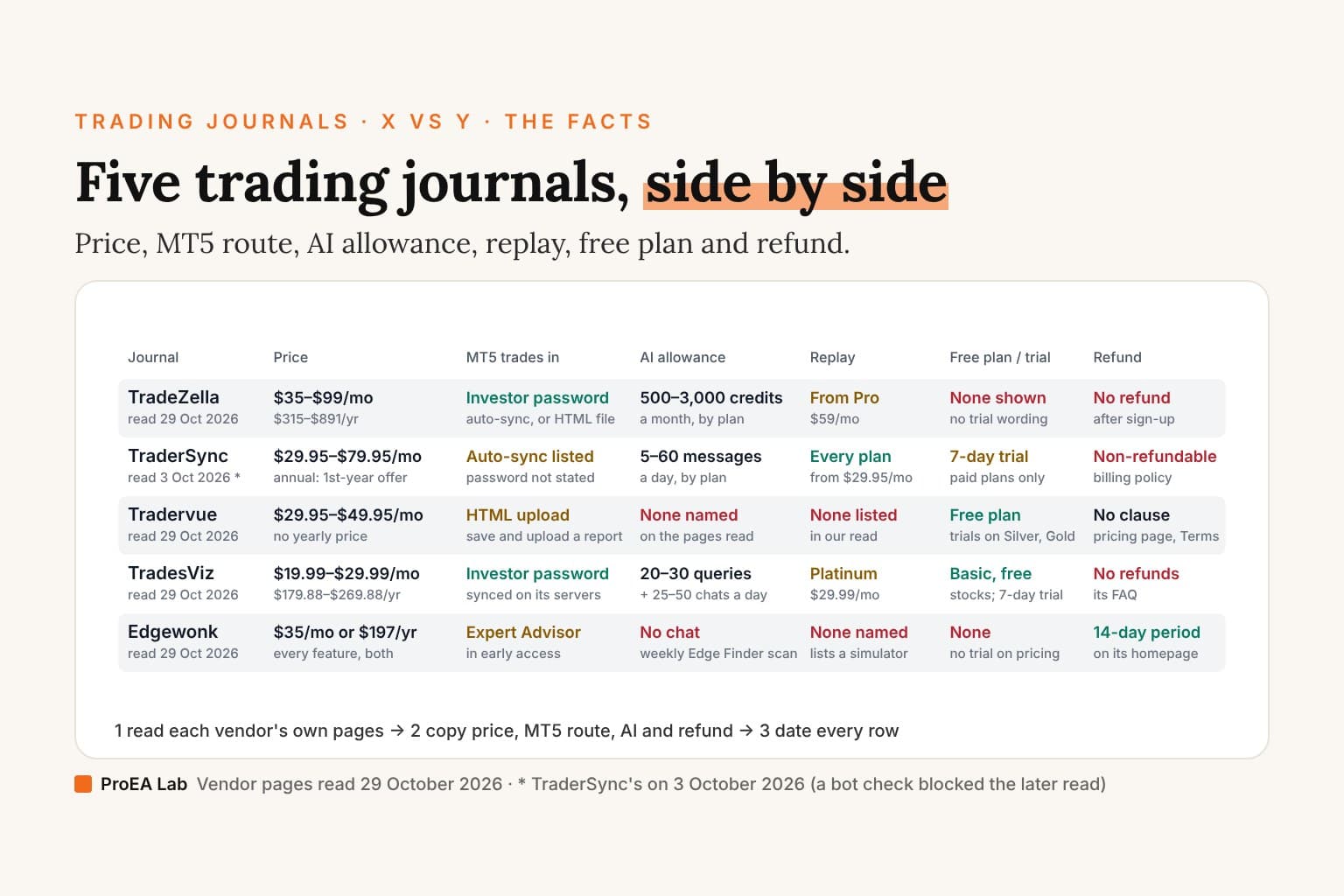
The one with the columns a prop trader needs: each account kept apart, risk and result in R, the daily limit beside every trade, and the firm's own day. A spreadsheet does all four. What a subscription journal adds is import or sync, so no trade goes missing, and charts. Here is what five subscription journals' own pages say about prop accounts:
| Journal | What its pages say about prop firms | Accounts | Read |
|---|---|---|---|
| Edgewonk | Import page: "Auto-sync for all other MetaTrader 4 and MetaTrader 5 brokers and prop firms available." | Both plans: "Track unlimited broker accounts" | 29 October 2026 |
| TradesViz | Pricing table, Platinum plan only: "Advanced Trading Simulator: any symbol, any date, multi-chart, prop challenge" | 1, 10 or 20 trading accounts on Basic, Pro and Platinum | 29 October 2026 |
| TraderSync | Its supported-broker directory lists FTMO | Not counted | 9 July 2026 |
| TradeZella | Nothing on prop firms in the pages we read | 1, up to 50, or unlimited active accounts on Essential, Pro and Ultra | 29 October 2026 |
| Tradervue | Nothing on prop firms in the pages we read | "Unlimited Trading Accounts" on both paid plans | 29 October 2026 |
None of the pages we read describes a check of a trade's risk against the daily limit. If that check is why you're looking, look for it in a journal's own documentation, or keep it in this sheet. Prices, MT5 sync and refund terms for the same five are in five subscription journals side by side.
Ours, TradeLens, imports MT4 statements and MT5 history, and takes broker CSVs through a column-mapping wizard, with starter templates for MT4, MT5, cTrader and TradingView. Its page says it works with prop-firm accounts if your prop dashboard or platform exports CSV, or you take the challenge on MT4 or MT5, and it takes as many accounts as you like, each reviewed on its own or together. It prices the habits that push an account toward a daily-loss breach, such as after-loss re-entries, oversized revenge trades and your worst session, in money. It runs on your own computer, $47 at launch ($79 regular), one payment, and its AI coach explains figures computed in code. It doesn't know your firm's rules; the per-trade room check stays this sheet's job.
Frequently asked questions
What is a prop firm trading journal?
A trading journal that keeps your prop account's daily loss limit beside every trade. Ours adds six columns to the free template: Account, Daily loss limit ($), Day P/L before this trade, Room before this trade, Risk within room? and Day P/L after this trade. Each trade's risk is checked against the room left before it and marked OK or OVER.
Is there a free prop firm trading journal?
Yes. Download it as an Excel workbook or a CSV: no email, no account. Upload the .xlsx to Google Sheets to keep its formulas; the CSV carries the five example rows with their worked-out values but no formulas, so rows you add to it won't calculate.
How does the journal work out the room before a trade?
It adds up the closed results of the earlier rows with the same date and account, then adds that to the daily loss limit. On the example's second day, a $508.40 loss leaves $491.60 of room under a $1,000 limit, so the next trade's $600 of risk is marked OVER before it is taken.
Why does the journal count closed P/L only?
Because a spreadsheet only knows the trades you type, and you type a result once the trade is closed. Floating losses on open trades, and firms that set the day's baseline from equity or from the higher of balance and equity, can breach the limit sooner than the sheet shows. The firm's dashboard is the source of truth.
Can I use the journal for an FTMO account?
Yes, if you type the limit and the day the way FTMO counts them. When we read FTMO's rules on 2026-10-08, the 2-Step's Maximum Daily Loss was 5% of initial capital under the balance at 00:00 CE(S)T, and it counted open positions, so while a trade is open your real room is smaller than the sheet's.
What is the difference between a prop firm journal and a prop firm tracker?
The journal is per trade: one row per closed trade, with the daily limit checked before each one. The tracker is per day: one row per account per trading day, with the daily loss floor and the static, end-of-day or intraday trailing drawdown floor. The journal catches the trade that could break the day; the tracker watches the floors that end the account.
What is the best trading journal for prop firms?
One that keeps each account apart, counts trades in R and lets you check a trade's risk against the room left in the day. Of the subscription journals we read on 29 October 2026, Edgewonk's import page mentions auto-sync for prop firms and TradesViz sells a prop challenge simulator on its top plan; none of the pages we read describes a per-trade daily limit check.